12-step guide to persistent memory for Claude agents
A practical 12-step walkthrough for giving Claude agents persistent memory across sessions. Covers four layers: built-in Chat Memory, Project instructions, a lean memory file (CLAUDE.md), and Dreaming – a scheduled background process that consolidates and reorganized memory. Includes setup steps, API calls, and advice on filtering what to remember. Harvey reported ~6x task-completion rate improvement with Dreaming. Ideal for engineers building long-running agents.
I have combined everything that actually works about Claude memory -official docs, the Dreaming research preview, real production setups - into one walkthrough.
Follow my Substack to get fresh AI alpha: movez.substack.com
Bookmark this. Save it. By the end you will have an agent that remembers permanently - not "within a chat," but across weeks.
That is not hyperbole. Until March 2026 this was impossible for normal users. Now it takes 12 steps.

我将所有真正有效的Claude记忆方法——官方文档、Dreaming研究预览、实际生产环境配置——整合成了一份完整的操作指南。
关注我的Substack获取最新AI前沿信息:movez.substack.com
收藏本文,保存好。学完之后,你将拥有一个能够永久记忆的Agent——不是“在对话内”记住,而是跨周都能记住。
这并非夸张。在2026年3月之前,普通用户根本无法做到这一点。而现在,只需12步。
Why every agent you have built is a goldfish.
Every time you open a new Claude chat, it starts from zero.
It does not know your name. It does not remember the three corrections you made yesterday, the workaround it discovered last week, or the fact that you hate bullet-point summaries.
Each session it rediscovers the same things, makes the same mistakes, and asks the same questions you already answered.
This is not a flaw in how Claude is marketed. It is a fundamental property of how language models work: each session starts fresh unless you explicitly feed context back in.
For a chatbot, that is fine. For an agent running real, repeating work, it is the single biggest reason your setup plateaus. An agent with no memory is exactly as useful on run 100 as it was on run 1.

Layer 1 is a sticky note. Layer 4 is an employee who reflects on the week every Friday and comes back sharper. These 12 steps build all four, in three parts.
为什么你构建的每个Agent都像金鱼。
每次你打开一个新的Claude对话,它都是从零开始。
它不知道你的名字,不记得你昨天做的三次修正、上周发现的工作区变通方案,也不知道你讨厌项目符号总结。
每个会话,它都会重新发现相同的东西,犯相同的错误,问你已经回答过的问题。
这并不是Claude营销方面的缺陷,而是语言模型工作的基本属性:每个会话都是全新的,除非你显式地将上下文喂回去。
对于聊天机器人来说,这没问题。但对于一个运行真实、重复性工作的Agent来说,这是你的设置停滞不前的最大原因。一个没有记忆的Agent在第100次运行时和在第1次运行时一样有用。
第1层是一张便利贴。第4层是每周五复盘、归来时更加敏锐的员工。这12步将构建全部四个层次,分为三个部分。
- Turn on Claude's built-in memory
Start with the thing most people do not realize already exists. In March 2026, Anthropic rolled out persistent memory, called "Chat Memory" - to every Claude account, free and Pro alike.
Claude now remembers your preferences, ongoing projects, and working style across every conversation, automatically, until you tell it to forget.
Click your profile icon → Settings → Capabilities → scroll to the Memory section, and confirm "Generate memory from chat history" is on.

Under the hood it runs Memory Synthesis - Claude distills your conversations into a profile roughly every 24 hours. This is the baseline everything else builds on.
- Seed your memory deliberately instead of waiting
The counterintuitive part the docs are explicit about: do not wait for Claude to infer your preferences from history - that synthesis only runs once about every 24 hours.
Tell it directly in a fresh conversation. Explicit beats inferred every time, and it lands immediately instead of a day later.
Remember the following about me for future conversations:

- I work in [field] and my main projects are [X, Y]
- I prefer [direct prose / no bullet points / short replies]
- My writing style is [describe it]
- Never [the thing you always have to correct]
Claude writes these into memory. The next conversation starts already knowing them. One message eliminates an entire category of repeated explanation.
- 开启Claude的内置记忆
从大多数人不知道已经存在的功能开始。2026年3月,Anthropic向每个Claude账户(免费和Pro版都包含)推出了持久记忆功能,称为“Chat Memory”。
现在,Claude会自动记住你的偏好、正在进行的项目以及工作风格,跨所有对话,直到你告诉它忘记。
点击你的个人资料图标 → 设置 → 能力 → 滚动到“记忆”部分,确认“从聊天历史生成记忆”已开启。
底层运行的是记忆合成(Memory Synthesis)——Claude大约每24小时将你的对话提炼成一个简介。这是其他所有功能建立的基础。
- 主动植入记忆,而不是等待
文档明确指出一个反直觉的点:不要等待Claude从历史记录中推断你的偏好——那段合成每24小时才运行一次。
在一个新对话中直接告诉它。显式总是优于推断,而且立即生效,而不是等到一天后。
请在以后的对话中记住关于我的以下信息:

- 我工作在[领域],我的主要项目是[项目X, 项目Y]
- 我偏好[直接了当的表述 / 不要项目符号 / 简短回复]
- 我的写作风格是[描述]
- 永远不要[你总是需要纠正的事情]
Claude会将这些写入记忆。下一个对话开始时就已经知道它们。一条消息就消除了整个一类重复解释。
- Create a Project as your agent's home
A Project is a persistent workspace where the instructions stay loaded across every conversation inside it. This is Layer 1 in its strongest form.

Go to Projects → New Project. Name it after the job, not the topic. Then fill the custom instructions box with the agent's role, standards, and constraints. Every chat inside that Project inherits them.
- Understand what Projects do NOT remember
This is where most people get burned. Projects persist instructions. They do not persist conversation memory by default.

You set up a Project, give it detailed context, work for a few conversations - then start a new chat in the same Project, and everything you discussed before is gone.
The architecture decisions, the half-finished task, the debugging session -vanished. The Project remembers its instructions, not your history.
- 创建一个Project作为Agent的家
Project是一个持久工作区,其中的指令在内部每个对话中都保持加载。这是第1层的最强形式。
进入Projects → New Project。根据工作(而非主题)命名。然后在自定义指令框中填入Agent的角色、标准和约束。该Project内的每个对话都继承这些设置。
- 理解Project不记住什么
这是大多数人栽跟头的地方。Project持久保存指令,但默认不持久保存对话记忆。
你设置了一个Project,给了它详细的上下文,工作了几个对话——然后在同一个Project中开始新的聊天,之前讨论的一切都消失了。
架构决策、半完成的任务、调试会话——都消失了。Project记住的是它的指令,而不是你的历史记录。
- Add a living memory file
The simplest persistent memory that actually works is a single file the agent reads at the start and appends to at the end.

In Claude Code this is CLAUDE.md; for any agent it can be a memory.md in Project Knowledge.
The rule the docs hammer on: keep it lean. A fresh session can spend roughly 20,000 tokens loading instructions before you type anything.
Do not treat this file like a wiki dump. If you use Claude Code's /init to generate a starter file, the counterintuitive next step is to delete most of what it generates - it states obvious things the model already sees.
- Turn on auto memory
Claude Code has an auto-memory mechanism: it writes notes to itself based on your corrections and preferences, and loads them at the start of every session.
Toggle it with /memory in a session, or set autoMemoryEnabled in project settings.
Now the agent does light self-documentation. When you correct it, the correction can survive into the next session instead of evaporating.
- 添加一个活动记忆文件
最简单且真正有效的持久记忆是一个文件,Agent在开始时读取,在结束时追加。
在Claude Code中,这就是CLAUDE.md;对于任何Agent,它可以是Project Knowledge中的memory.md。
文档反复强调的规则:保持精简。一个新的会话在输入任何内容之前,大约可以花费20,000个token来加载指令。
不要把这个文件当成维基百科转储。如果你使用Claude Code的/init生成起始文件,反直觉的下一步是删除它生成的大部分内容——它陈述了模型已经看到的显而易见的东西。
- 开启自动记忆
Claude Code有一个自动记忆机制:它根据你的修正和偏好为自己写笔记,并在每个会话开始时加载。
在会话中使用 /memory 切换该功能,或在项目设置中设置 autoMemoryEnabled。
现在Agent会进行轻量级的自我记录。当你修正它时,修正可以延续到下一个会话,而不是消失。
- Structure the memory file so it stays useful
A memory file that grows without structure becomes noise. Give it sections:
## Preferences
- Bullet summaries over prose for status updates
- Always cite the source file for any claim

## Decisions
- 2026-04-18 - chose Postgres over Mongo (relational reporting)

## Known workarounds
- Export tool chokes on files >50MB; split first

## Recurring mistakes to avoid
- Do not auto-approve PRs touching the auth module
Each entry earns its place. This is the file the agent consults to stop repeating yesterday's mistakes.
- Decide what is worth remembering
Not everything should be saved. The discipline here is the whole game. After each significant session, the agent reviews what happened and extracts only what is worth keeping: a decision, a workaround, a preference, a failure mode. Everything else is forgotten on purpose.
A good filter: would this change how the agent acts next time? If yes, store it. If no, let it go. Memory that stores everything is as useless as memory that stores nothing.
- 结构化记忆文件,使其保持有用
一个无结构增长的记忆文件会变成噪音。给它分节:
## 偏好
- 状态更新使用项目符号总结而非散文
- 任何声明都必须引用源文件

## 决策
- 2026-04-18 - 选择Postgres而非Mongo(关系型报告需求)

## 已知变通方案
- 导出工具在处理超过50MB文件时卡死;先分割文件

## 需避免的重复错误
- 不要自动批准涉及auth模块的PR
每个条目都有其位置。这个文件是Agent用来停止重复昨天错误的参考。
- 决定什么值得记住
并非所有内容都应该保存。这里的纪律是关键。每次重要会话后,Agent回顾发生了什么,只提取值得保留的内容:一个决策、一个变通方案、一个偏好、一个失败模式。其他一切都被有意遗忘。
一个好的过滤器:这会改变Agent下次的行为吗?如果是,就存储;如果不是,就放掉。什么都存的记忆和什么都不存的记忆一样无用。
- Understand what Dreaming actually is
On May 6, 2026, at Code with Claude, Anthropic shipped Dreaming as a research preview for Managed Agents. The name is borrowed from neuroscience on purpose: when humans sleep, the brain consolidates the day's experiences into long-term memory. Dreaming does the same for an agent.
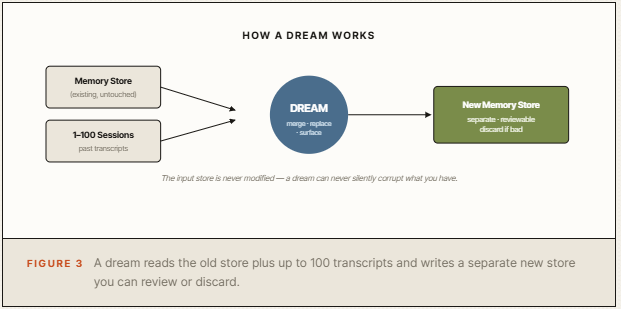
It is a scheduled background process. It reads the agent's existing memory store plus past session transcripts, then produces a new, reorganized memory store: duplicates merged, stale entries replaced with the latest value, and genuinely new insights surfaced.
One condition matters before you bother: Dreaming only helps agents that run the same kind of task repeatedly. It consolidates patterns across many sessions, so a one-off agent has nothing to consolidate. Run it on a workhorse, not a tourist.
- 理解Dreaming到底是什么
2026年5月6日,在Code with Claude活动中,Anthropic以研究预览形式推出了Dreaming功能,面向Managed Agents。这个名字刻意借用了神经科学的概念:人类睡眠时,大脑会将白天的经历整合到长期记忆中。Dreaming对Agent做同样的事。
它是一个定时的后台进程。它读取Agent现有的记忆存储加上过去的会话记录,然后生成一个新的、重新组织的记忆存储:合并重复项、用最新值替换过时条目、浮现真正的新洞察。
在你行动之前有一个条件很重要:Dreaming只帮助那些反复运行相同任务的Agent。它整合多个会话中的模式,所以一次性的Agent没有可整合的内容。请将其用于主力Agent,而不是临时使用的Agent。
- Run a dream - the exact API procedure
Dreaming is a research preview, so there are three prerequisites before you write any code: a Managed Agents API key, access to Dreaming requested through Anthropic's form (it ships gated), and a Python or TypeScript environment with the latest Anthropic SDK.
Every dream call needs two beta headers stacked together - the SDK sets both automatically if you are on the dreaming-aware version:
anthropic-beta: managed-agents-2026-04-01,dreaming-2026-04-21
The call itself takes two kinds of input: the existing memory store you want to consolidate, and up to 100 session IDs - recent agent runs Claude will mine for patterns.
You can also pass instructions to steer what the dream focuses on:
dream = client.beta.dreams.create(
    inputs=[
        {"type": "memory_store", "memory_store_id": store_id},
        {"type": "sessions", "session_ids": [session_a, session_b]},
    ],
    model="claude-opus-4-7",
    instructions="Focus on coding-style preferences; "
                 "ignore one-off debugging notes.",
)
print(dream.id)  # drm_01...
Supported models during the preview are claude-opus-4-7 and claude-sonnet-4-6. Dreams are billed at standard API token rates for the model you pick, and cost scales roughly linearly with the number and length of input sessions.
The docs are explicit: start with a small batch of sessions, scale up once you are happy with the curation quality.
- Inspect the output store before you commit
The input memory store stays read-only the entire time. The dream produces a separate output store, and its ID appears in the dream's outputs[] array once the run starts:
# After the dream ends, the output holds the rebuilt store
output_store_id = next(
    output.memory_store_id
    for output in dream.outputs
    if output.type == "memory_store"
)
Now read it. Check that merged entries are correct, that replaced entries actually were stale, that the surfaced insights are real and not noise.
This review step is the difference between an agent that gets smarter and one that quietly drifts. Because the output is a brand-new store you opt in to, a dream can never silently corrupt what you already have.
- 运行一次Dream——精确的API流程
Dreaming是一个研究预览,因此在编写代码之前有三个前提条件:Managed Agents API密钥、通过Anthropic表单申请Dreaming访问权限(该功能是受控发布的)、以及安装了最新Anthropic SDK的Python或TypeScript环境。
每次Dream调用需要同时包含两个beta头——如果你使用的是支持Dreaming的SDK版本,它会自动设置:
anthropic-beta: managed-agents-2026-04-01,dreaming-2026-04-21
该调用接受两种输入:你要整合的现有记忆存储,以及最多100个会话ID——Claude将从最近的Agent运行中挖掘模式。
你还可以传递指令来引导Dream的焦点:
dream = client.beta.dreams.create(
    inputs=[
        {"type": "memory_store", "memory_store_id": store_id},
        {"type": "sessions", "session_ids": [session_a, session_b]},
    ],
    model="claude-opus-4-7",
    instructions="Focus on coding-style preferences; "
                 "ignore one-off debugging notes.",
)
print(dream.id)  # drm_01...
预览期间支持的模型是claude-opus-4-7和claude-sonnet-4-6。Dream按所选模型的标准API token费率计费,成本大致随输入会话的数量和长度线性增长。
文档明确说明:从小批量会话开始,当你对整理质量满意后再扩大规模。
- 在提交前检查输出存储
输入的记忆存储始终保持只读状态。Dream会生成一个单独的输出存储,其ID在运行开始后出现在dream的outputs[]数组中:
# After the dream ends, the output holds the rebuilt store
output_store_id = next(
    output.memory_store_id
    for output in dream.outputs
    if output.type == "memory_store"
)
现在读取它。检查合并的条目是否正确、替换的条目是否确实过时、浮现的洞察是否真实而非噪音。
这个复查步骤决定了Agent是变得更聪明还是悄然漂移。因为输出是一个你主动选择的新存储,Dream永远不会默默破坏你已有的内容。
- Swap it in, schedule it, let it compound
Once you trust the output, the switch to production is a one-line change - point your agent at the new store ID instead of the old one.
Then put dreaming on a schedule: nightly or weekly, depending on how much the agent runs.
Now the loop is closed. The agent works during the day, dreams between runs, and comes back sharper each cycle, with no retraining and no manual reconfiguration.
Archiving an old dream never touches its output store -you manage those separately through the Memory Stores API.
The proof it works at scale: legal-AI company Harvey reported roughly a 6x increase in agent task-completion rates after enabling Dreaming for legal-drafting workflows.
The same jobs that used to fail because Claude kept forgetting filetype quirks and tool workarounds between sessions suddenly started finishing reliably.
- 切换、调度、让效果累积
一旦你信任输出,切换到生产环境只需一行更改——将你的Agent指向新的存储ID而不是旧的。
然后安排Dream的计划:根据Agent运行频率,设为每晚或每周。
现在循环闭环了。Agent白天工作,在运行之间“做梦”,每个周期都变得更加敏锐,无需重新训练或手动重新配置。
归档旧的Dream永远不会影响其输出存储——你需要通过Memory Stores API单独管理。
规模化运行的证明:法律AI公司Harvey报告称,在法律起草工作流中启用Dreaming后,Agent任务完成率提高了约6倍。
之前因为Claude不断忘记文件类型怪癖和工具变通方案而失败的任务,现在开始可靠地完成。
The mistakes that break agent memory.
- Treating Projects as memory. Projects persist instructions, not conversation history. Assume otherwise and you will lose context without understanding why.
- Dumping everything into CLAUDE.md. A bloated memory file wastes tokens and buries the signal. Lean and structured beats long and complete.
- Storing memory with no filter. If everything is worth remembering, nothing is. Save only what would change future behavior.
- Auto-deploying dream output. The whole point of the separate output store is review. Skip it and you lose the safety net.
- Running Dreaming on a low-frequency agent. Dreaming consolidates patterns across many sessions. An agent that runs twice a month never accumulates enough.
破坏Agent记忆的常见错误。
- 将Project当作记忆。Project持久保存指令,而不是对话历史。如果你不这么认为,你会丢失上下文而不明白原因。
- 把所有内容都倒进CLAUDE.md。臃肿的记忆文件浪费token并掩埋信号。精简且有结构优于冗长而完整。
- 不加过滤地存储记忆。如果什么都值得记住,那什么都不值得。只保存那些会改变未来行为的内容。
- 自动部署Dream输出。单独输出存储的全部意义在于复查。跳过复查就失去了安全网。
- 在低频Agent上运行Dreaming。Dreaming整合多个会话的模式。每月只运行两次的Agent永远积累不够。
Conclusion:
Most people will keep opening Claude the way they always have - a fresh, forgetful chat every time, re-explaining themselves on every run, wondering why their agent never gets better.
The ones who build the four layers will have something different: an agent that knows them, accumulates what it learns, and rewrites its own memory to get sharper every week.
Pick the first four steps. Set them up tonight. That alone will change how your next session feels.
总结:
大多数人会继续像以前一样打开Claude——每次都是一个全新的、健忘的对话,每次运行都重新解释自己,想知道为什么他们的Agent从未变得更好。
那些构建了四个层次的人将拥有不同的东西:一个了解他们、积累所学、每周重写自己的记忆以变得更敏锐的Agent。
选择前四个步骤。今晚就设置好。仅此一项就会改变你下次会话的感受。