Claude API adds auto-caching: single cache_control param cuts input cost to 10%
Anthropic introduced prompt auto-caching in the Claude Messages API. Instead of manually moving breakpoints across conversation turns, a single top-level `cache_control: {type: 'ephemeral'}` auto-places the cache at the last cacheable block. Cached tokens cost 10% of base input price and reduce prefill latency. Ideal for agents and coding assistants where most context remains identical turn-over-turn. The post cites Manus founder @peakji on cache hit rate being the most critical metric for production agents, and links to Claude Code's cache-friendly prompt design insights.
Prompt auto-caching with Claude
By @RLanceMartin · 2026-02-19T19:54:49.000Z

TL;DR: Prompt caching is a great way to save cost + latency when using Claude. Input tokens that use the prompt cache are 10% the cost of non-cached tokens. Auto-caching was just added to the API, which makes it easier to cache your prompt with a single cache_control parameter in the API request (docs here). Also, check out @trq212's deep dive on Claude Code's use of prompt caching and useful tips for cache-friendly prompt design.
{
"cache_control":  {"type": "ephemeral"}
"messages": [
  { "role": "user", "content": "A" },
  { "role": "assistant", "content": "B" },
  {  "role": "user", "content": "C", }
]
}
在 Claude 中使用自动缓存
作者:@RLanceMartin · 2026-02-19T19:54:49.000Z
太长不看:对于 Claude,提示缓存(prompt caching)是降低成本和延时的好方法。使用缓存后的输入 token 成本仅为未缓存 token 的 10%。API 新加入了自动缓存功能,只需在请求中添加一个 cache_control 参数就能轻松启用提示缓存(文档见此处)。另外,推荐阅读 @trq212 对 Claude Code 如何使用提示缓存以及缓存友好型提示设计技巧的深入分析。
{
"cache_control":  {"type": "ephemeral"}
"messages": [
  { "role": "user", "content": "A" },
  { "role": "assistant", "content": "B" },
  {  "role": "user", "content": "C", }
]
}
The case for caching
Many AI applications ingest the same context across turns. For example, agents perform actions in a loop. Each action produces new context. Claude’s messages API is stateless, which means it doesn’t remember past actions. The agent harness needs to package new context with past actions, tool descriptions, and general instructions at each turn.
This means most of the context is the same across turns. But, without caching, you pay for the entire context window every turn. Why not just re-use the shared context? That’s what prompt caching does. You can see on the pricing page that cached tokens are 10% the cost of base input tokens. With caching, you only pay in full for each new context block once.
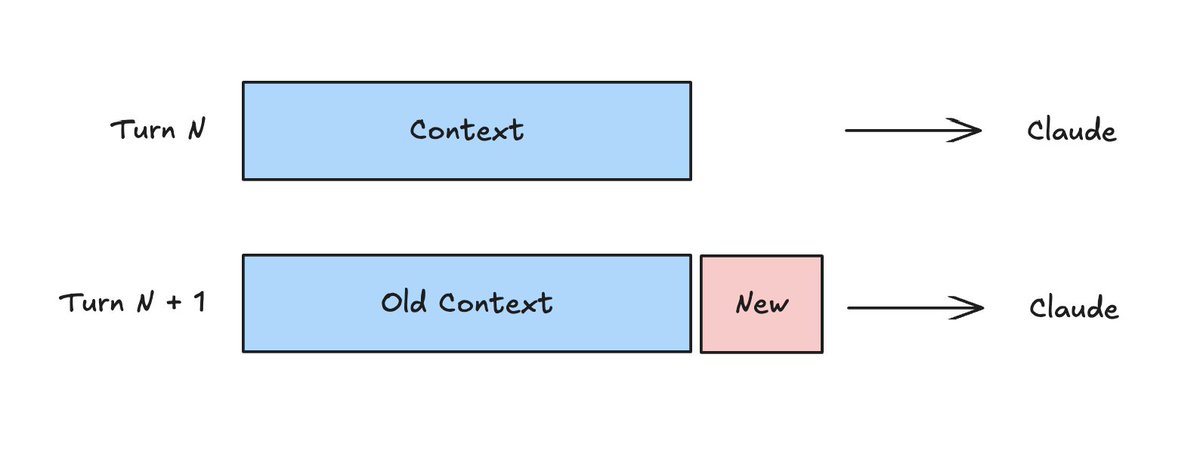
@peakji from Manus called out the cache hit rate as the single most important metric for a production AI agent. @trq212 has noted that prompt caching is critical for long running / token-heavy agents like Claude Code.
缓存的必要性
许多 AI 应用在不同轮次之间会重复摄入相同的上下文。以智能体为例:它会循环执行动作,每个动作都会产生新的上下文。Claude 的 messages API 是无状态的,也就是说它不会记住过去执行的动作。智能体框架在每一轮都需要将新产生的上下文与历史动作、工具描述以及通用指令打包在一起。
这意味着绝大多数上下文在不同轮次之间是相同的。但如果不用缓存,每一轮你都要为整个上下文窗口付费。为什么不复用共享的上下文呢?这就是提示缓存做的事。从定价页面可以看到,缓存 token 的价格仅为普通输入 token 的 10%。启用缓存后,每个新的上下文块你只需付一次全价。
Manus 公司的 @peakji 指出,缓存命中率是生产级 AI 智能体中最重要的指标。@trq212 也提到,对于 Claude Code 这类长运行时、高 token 消耗的智能体来说,提示缓存至关重要。
How it works
There are some great resources (e.g., here from @dejavucoder or here from @kipply) on the details of LLM inference and caching. In general, LLM inference pipelines typically use a prefill phase that processes the prompt and a decode phase that generates output tokens.
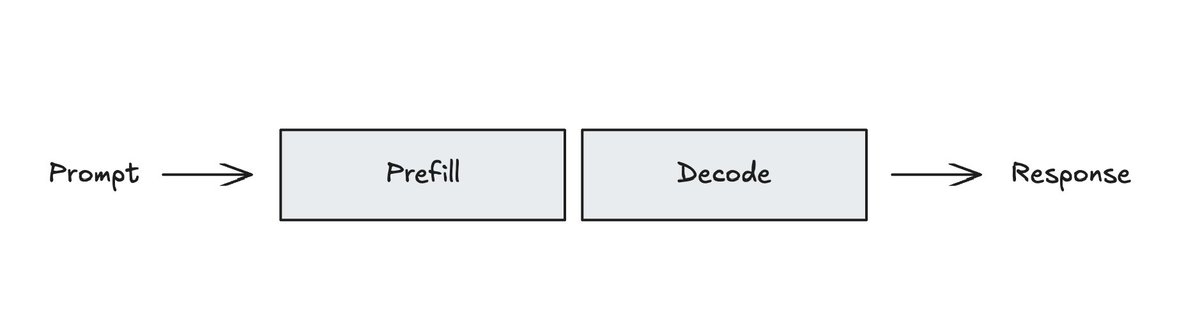
The intuition behind caching is that the prefill computation can be performed once, saved (e.g., cached), and then re-used if (part of) a future prompt is identical. Inference libraries / frameworks like vLLM and SGLang use different approaches to achieve this central idea.
工作原理
关于 LLM 推理与缓存的细节,已经有很不错的资源了(比如 @dejavucoder 的这篇,或 @kipply 的这篇)。一般来说,LLM 推理管线包含两个阶段:负责处理提示的预填充(prefill)阶段,以及负责生成输出 token 的解码(decode)阶段。
缓存背后的直觉是:预填充计算可以只执行一次,将结果保存(即缓存),然后在未来遇到(部分)完全相同的提示时直接复用。vLLM 和 SGLang 等推理库/框架采用了不同的手段来实现这一核心思想。
Usage with Claude
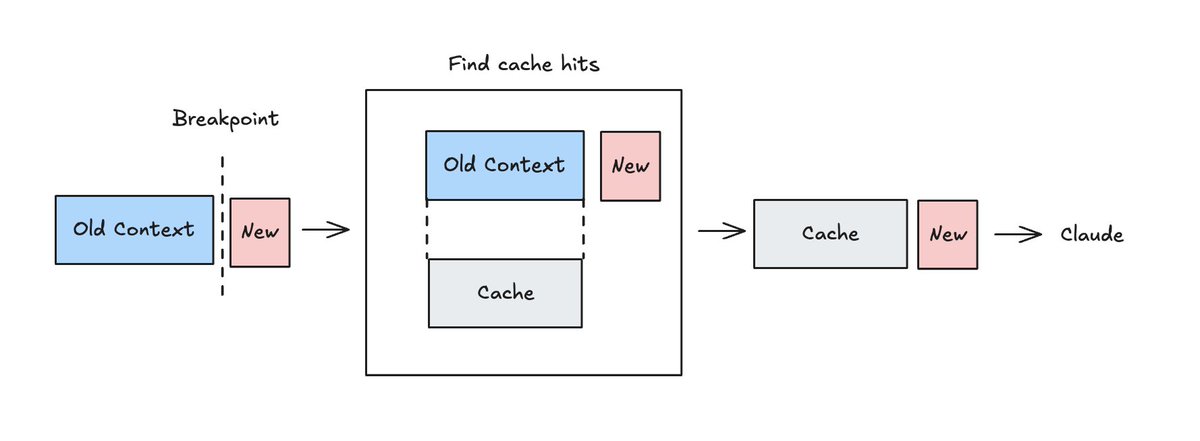
Caching with the Claude messages API uses a cache_control breakpoint, which can be placed at any block in your prompt. This tells Claude two things.
First, it is a “write point” telling Claude to cache all blocks up to and including this one. This creates a cryptographic hash of all the content blocks up to that breakpoint. This is scoped to your workspace.
"messages": [
  { "role": "user", "content": "A" },
  { "role": "assistant", "content": "B" },
  {
    "role": "user",
    "content": "C",
    "cache_control":  {"type": "ephemeral"}
  }
]
Second, it tells Claude to search backward at most 20 blocks from the breakpoint to find any prior cache write matches (“hits”). The hash requires identical content. One character difference will produce a different hash and a cache miss. If there's a match, the cache is used in prefill.
在 Claude 中的使用方法
在 Claude messages API 中使用缓存,需要在提示中放置一个 cache_control 断点(breakpoint)。这个断点可以向 Claude 传达两层意思。
首先,它是一个
Still, there are challenges with caching. For turn-based apps (e.g., agents), you have to move the breakpoint to the latest block as the conversation progresses. The API now addresses this with auto-caching. You can place a single cache_control parameter in your request to the Claude messages API.
{
"cache_control":  {"type": "ephemeral"}
"messages": [
  { "role": "user", "content": "A" },
  { "role": "assistant", "content": "B" },
  {  "role": "user", "content": "C", }
]
}
With auto-caching, the cache breakpoint moves to the last cacheable block in your request. As your conversation grows, the breakpoint moves with it automatically. This still works with block-level caching if you want to set breakpoints (e.g., on your system prompt or other context blocks).
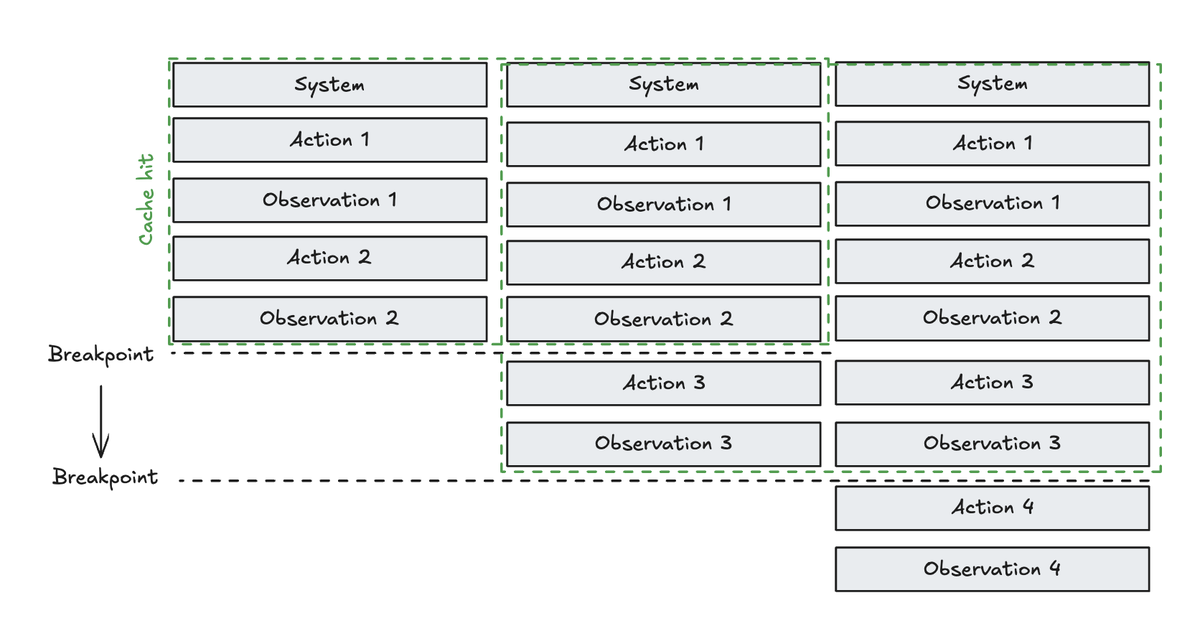
Another challenge is designing your prompt to maximize cache hits. For example, if you edit the history (see below) you risk breaking the cache.
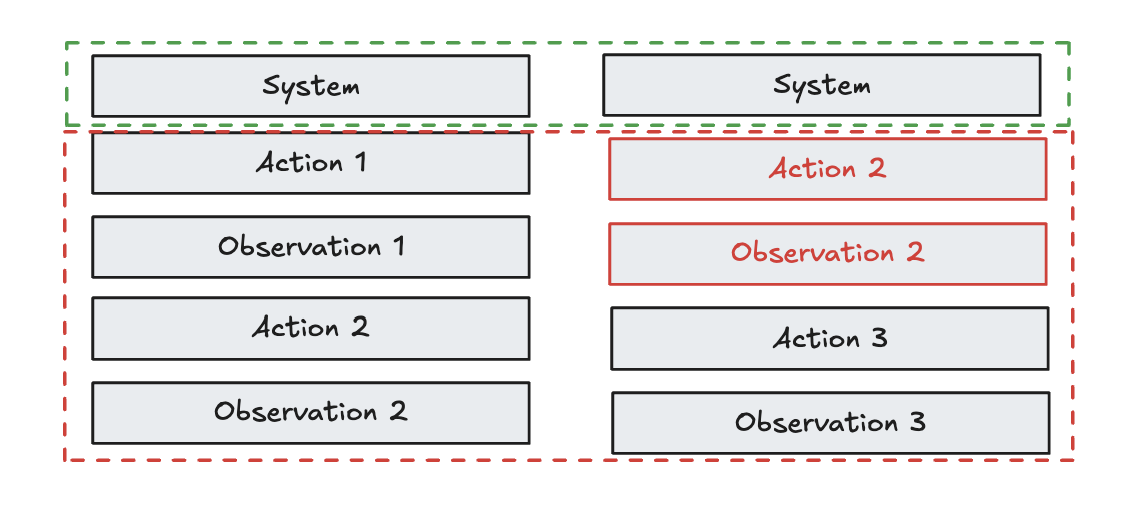
This is a problem that we've tackled with Claude Code! @trq212 just shared a number of useful insights on prompt design with caching in mind.
不过,缓存仍然面临一些挑战。对于基于轮次的应用(比如智能体),你必须随着对话进展不断将断点移动到最新的块上。API 现在通过自动缓存解决了这个问题。你只需要在请求中放置一个 cache_control 参数即可。
{
"cache_control":  {"type": "ephemeral"}
"messages": [
  { "role": "user", "content": "A" },
  { "role": "assistant", "content": "B" },
  {  "role": "user", "content": "C", }
]
}
启用自动缓存后,缓存断点会自动移动到请求中最后一个可缓存块的位置。随着对话增长,断点也随之自动移动。如果你仍然希望手动设置断点(例如在系统提示或其他上下文块上),块级缓存仍然可以配合使用。
另一个挑战是设计提示以最大化缓存命中率。例如,如果你修改历史(见下图),就有可能破坏缓存。
我们已经在 Claude Code 中解决了这个问题!@trq212 刚刚分享了许多关于缓存友好型提示设计的实用见解。