Claude Can Do All of This. Most People Have No Idea.
This guide covers 17 hidden Claude features: persistent memory via Projects, interactive app building with Artifacts, step-by-step reasoning in Adaptive Thinking, long-term user profiling with Memory, role-based prompts, a browser agent (Claude in Chrome), desktop file-system access (Cowork), scheduled tasks, installable skills, CLAUDE.md project rules, terminal coding with Claude Code, visual design with Claude Design, and 90% cost reduction through Prompt Caching. Each includes where to find it and a ready-to-use prompt.

Claude can do a lot more than most people think.
This guide covers all of it - where to find each feature, how to turn it on, and a prompt you can use immediately.
Go through it, pick what fits your workflow, and set it up today. Each one takes minutes to set up and pays off every single day after that.
Claude 能做很多大多数人以为它做不了的事。
这份指南把全部都整理了进来——每个功能在哪里找到、如何开启,以及一个马上就能用的提示词。
从头到尾读一遍,挑出适合你工作流的那些,今天就设置好。每个功能只需几分钟就能搞定,之后每一天都会带来回报。
- Projects - Claude that actually remembers you
Every time you open a new Claude chat, it starts from zero. It doesn't know your name, your work, your preferences - nothing. Most people accept this and re-explain themselves every single conversation.
Projects fix this. You create a project, upload your documents, write standing instructions - and Claude holds all of it permanently. Open it next week and it picks up exactly where you left off.
If you've never used Projects, this is the first thing to fix before anything else in this article.

Example project instructions - paste into the Project Instructions field
- Projects——一个真正记得你的 Claude
你每次打开一个新的 Claude 聊天窗口,它都是从零开始。它不知道你的名字、你的工作、你的偏好——什么都不知道。大多数人接受了这一点,每次对话都要重新解释自己。
Projects 解决了这个问题。你创建一个项目,上传你的文档,写下固定指令——Claude 就会永久保存所有这些信息。下周再打开,它会从你上次中断的地方无缝衔接。
如果你从未用过 Projects,这是你在继续阅读本文之前第一件要做的事。
示例项目指令——粘贴到「项目指令」字段
- Artifacts - working apps inside your chat
Many people think Claude can only produce text. It can't build anything real. That's wrong.
Artifacts are when Claude builds something that actually works inside the chat. Not a block of code you have to copy somewhere - a live product in a side panel. A calculator, a habit tracker, a game, a dashboard with charts. You open it, click it, use it. Without leaving the conversation.
SVG graphics, interactive charts, Mermaid diagrams - all supported. Available on the free plan. Most people have never tried it.
Try this
- Artifacts——聊天窗口里的真实应用
很多人以为 Claude 只能生成文字。以为它没法做出真正的东西。这是错的。
Artifacts 指的是 Claude 在聊天里构建出来的、真的能用的东西。不是你还要复制粘贴到别处的代码块——而是侧边栏里一个鲜活的产品。计算器、习惯追踪器、小游戏、带图表的仪表盘。你打开它、点击它、使用它,全都不用离开对话。
SVG 图形、交互式图表、Mermaid 示意图——全都支持。免费计划就有。大多数人从未尝试过。
试试这个
- Adaptive Thinking - a different level of reasoning
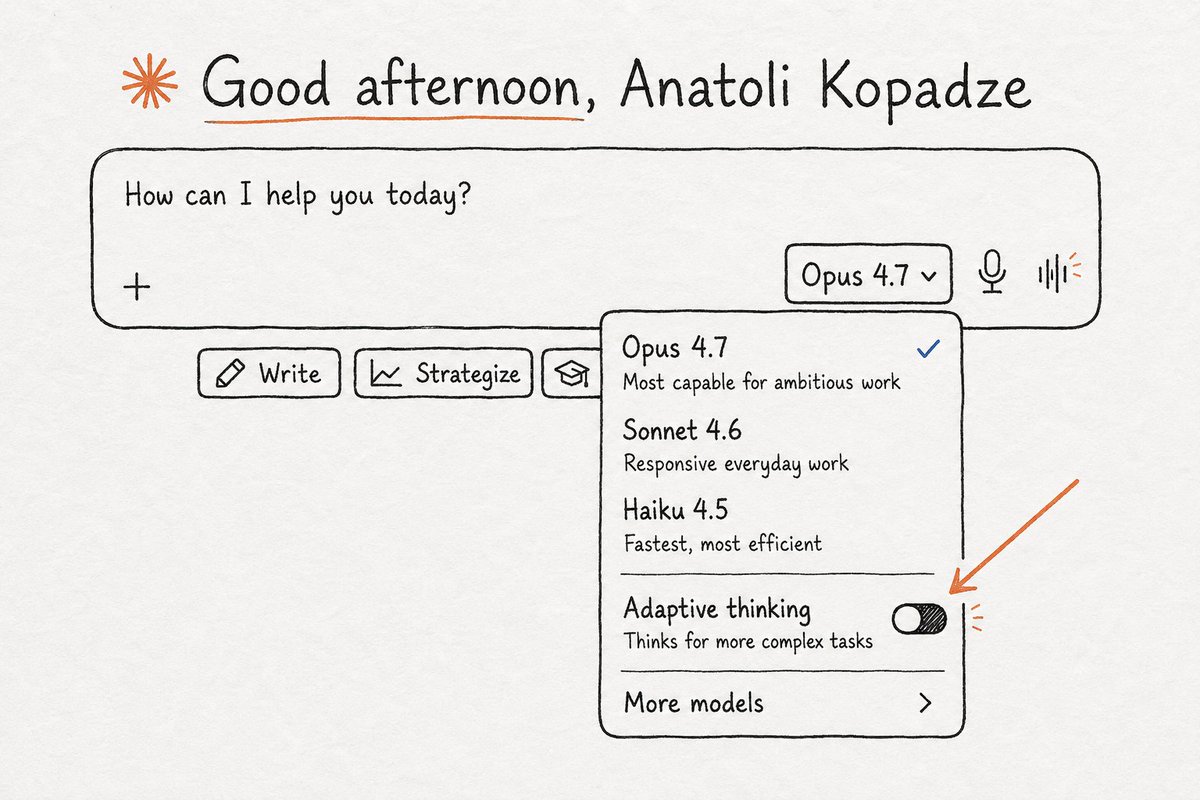
Most Claude users have never turned this on. Extended Thinking is a mode where Claude reasons through a problem step by step before giving you an answer - and you can watch the entire process.
For simple questions, you don't need it. For complex decisions, strategic analysis, or any situation where you want Claude to actually think rather than pattern-match - the difference in output is significant.
Turn it on. Ask the same question you've been asking. Compare the answers.
Use this when facing a real decision
- Adaptive Thinking——另一种层次的推理
大多数 Claude 用户从未开启过这个功能。扩展思考是一个让 Claude 在给你答案之前一步一步推理整个问题过程的模式——而且你能看到全过程。
对于简单问题,你不需要它。但对于复杂决策、战略分析,或者任何你希望 Claude 真正思考而非模式匹配的场景——输出质量的差异是巨大的。
把它打开。问一个你一直在问的问题,对比一下回答。
面对真正决策时就用它
- Memory - Claude that knows who you are
With Memory on, Claude builds a profile of you over time. Your job, your projects, how you like to communicate, what you're currently working on.
Start a completely new chat and it already knows the context. You never introduce yourself again.
It's off by default. Most people don't know it exists

- Memory——认识你的 Claude
开启记忆后,Claude 会随时间推移建立你的个人档案。你的职业、你的项目、你喜欢怎样的沟通方式、你最近在忙什么。
开启一个全新聊天,它已经知道这些背景。你再也不用做自我介绍了。
默认是关闭的。大多数人都不知道它存在。
Give Claude a role - one prompt changes everything
Claude doesn't have to be "an AI assistant." Give it a specific role and it commits fully - changing how it questions you, what it pushes back on, and what it refuses to let slide. Copy any prompt below and paste it at the start of a new chat.
给 Claude 一个角色——一个提示词改变一切
Claude 不必只是一个「AI 助手」。给它一个具体的角色,它就会全力投入——改掉它提问的方式、反驳你的方式、以及绝不放过你的方式。把下面任意一个提示词复制下来,粘贴到新聊天的开头。
- Personal psychologist
Most people use Claude as a validation machine. They describe a problem. Claude says that sounds hard and offers five bullet points of advice.
That's not how good therapy works. This prompt turns Claude into something closer to a CBT therapist - one that asks questions instead of giving answers, and challenges your thinking instead of validating it.
Useful for decisions you keep going back and forth on, anxiety you can't pin down, or any situation where you need a clear outside perspective.
- 个人心理咨询师
大多数人把 Claude 当作一个认同机器。他们描述一个问题,Claude 会说听起来很难,然后给出五点建议。
好的心理咨询不是这么做的。这个提示词将 Claude 变成接近认知行为疗法心理师的样子——它提问而不是给答案,它挑战你的想法而不是赞同它。
适合那些你反复纠结的决定、难以名状的焦虑,或者任何你需要一个清晰的第三方视角的情况。
- The hard mentor
By default Claude agrees with you. It adds to your ideas, supports your reasoning, finds the positives. This is almost always the wrong thing.
This prompt disables that. Claude stops validating and starts stress-testing. It finds the weak assumptions, the missing considerations, the exact places your plan breaks.
It's uncomfortable. That's why it works.
- 严厉的导师
默认情况下,Claude 赞同你。它补充你的想法、支持你的推理、找出积极面。这几乎总是错误的做法。
这个提示词停用了那种模式。Claude 不再确认,而是开始压力测试。它会找出薄弱的假设、忽略的考量、你的计划会在哪些精确的点上破裂。
这让人不适。正因如此,它才有效。
- Personal trainer
Generic fitness advice is everywhere. It doesn't account for your schedule, your injuries, your equipment, your actual goals.
Give Claude your real numbers and it builds a real plan. Not a template. Not something you could find on any fitness website. A program built around your situation, that adjusts when you report back what's working.
- 私人健身教练
泛泛的健身建议到处都是。它们不会考虑你的时间表、你的伤病、你得设备、你真正的目标。
把真实数据给 Claude,它会制定一个真正的计划。不是模板,不是任何健身网站上能找到的东西。一个围绕你个人情况构建的计划,并会根据你汇报的进展情况做出调整。
- Practice a difficult conversation
Most people walk into hard conversations unprepared. They know what they want to say but not what the other person will actually say back.
Claude plays the other person. Realistically. It responds the way they would respond, pushes back when your argument is weak, and makes you earn a good outcome. After you practice a few times, the real conversation is easier.
- 练习困难对话
大多数人走进困难对话时毫无准备。他们知道自己想说什么,但不知道对方实际上会回应什么。
Claude 来扮演对方,非常逼真。它会像对方那样回应,在你的论点薄弱时反驳你,让你必须自己争取一个好结果。练习几次之后,真正的对话就会容易很多。
- Devil's advocate
You've made up your mind. You've already thought through the objections. You're convinced.
That's exactly the moment to have Claude attack the decision. Not polite concerns. The full case against it. The three most realistic ways it fails. The things you're not seeing because you want it to work.
Five minutes now. Before you commit. Not after.
- 唱反调的人
你已经下定决心。你已经思考过各种反对意见。你确信无疑。
这正是让 Claude 攻击这个决定的最佳时刻。不是礼貌的关切,而是完整的反对论据、最现实的三种失败方式、你因为希望它成功而没看到的那些事物。
现在花五分钟。在你承诺之前,而不是之后。
- Claude in Chrome - Claude that sees what you see
Most people use Claude in a separate tab and manually copy-paste what they need. That's the hard way.
Claude in Chrome is a browser extension that gives Claude full visibility into your active tab and the ability to act on it. It reads the page, clicks links, fills forms, navigates to new URLs. You describe the task in plain English and step away.
Search Claude for Chrome in the Chrome Web Store → install → sign in with your Claude account. Click the extension icon to open the sidebar. Claude can now see and interact with any page you have open.
Example task to give it
- Claude in Chrome——能看到你所见的 Claude
大多数人把 Claude 放在一个单独的标签页里,手动复制粘贴自己需要的东西。那是复杂的方式。
Claude in Chrome 是一个浏览器扩展,它让 Claude 能够完全看到你当前活动标签页的内容,并能操作它。它会阅读页面、点击链接、填写表单、导航到新的网址。你用平实的英语描述任务,然后走开。
在 Chrome 网上应用店搜索「Claude for Chrome」→ 安装 → 用你的 Claude 账号登录。点击扩展图标打开侧边栏。现在 Claude 就能看到并与你打开的任意页面交互了。
给它一个示例任务
- Claude Cowork - Claude that lives on your desktop
Claude on the web has no access to your computer. It can't see your files. You have to paste everything manually.
Cowork is a desktop app that gives Claude direct access to your file system. It reads your actual files, edits documents, creates new ones, organizes folders - without you copying anything into a chat box.

- Claude Cowork——住在你桌面上的 Claude
网页版的 Claude 无法访问你的电脑。它看不到你的文件。你不得不手动粘贴一切。
Cowork 是一个桌面应用,让 Claude 直接访问你的文件系统。它会读取你真正的文件、编辑文档、创建新文件、整理文件夹——不用你把任何东西复制到聊天框里。
- Scheduled Tasks - Claude that works while you sleep
Most people treat Claude as something they have to activate. Open a chat, type a request, wait for output, close the tab.
Scheduled Tasks change that. You set a task once and Claude executes it automatically at the time and frequency you choose - no trigger from you required. Every morning. Every Monday. Every hour. Claude runs it and saves the output to your folder.

Example scheduled task description
- 定时任务——在你睡觉时工作的 Claude
大多数人把 Claude 当成必须由自己激活的东西。打开一个聊天,输入请求,等待输出,关闭标签页。
定时任务改变了这一点。你设置一次任务,Claude 就会在选定时间和频率自动执行——无需你再触发。每天早晨、每周一、每小时。Claude 运行任务并把输出保存到你的文件夹。
示例定时任务描述
- Skills in Cowork - install new capabilities like plugins
Skills are pre-built instruction sets that give Claude specific capabilities inside Cowork. Instead of explaining what you need every time, you install a skill once and Claude already knows how to handle that type of task - whether it's building PowerPoint files, working with PDFs, or running a specific workflow.
Think of it like apps on a phone. The base phone works without them. But with the right apps installed, it does a lot more.
How to find and install: Cowork → Customize → Skills to see what's installed. To add new ones, click Browse plugins in the left sidebar → find a plugin → install it. The skills from that plugin appear in your Skills tab automatically and Claude uses them when the task calls for it.

- Cowork 中的技能——像插件一样安装新能力
技能是预先构建的指令集,能赋予 Claude 在 Cowork 中某项特定能力。你不用每次解释自己要什么,安装一个技能一次,Claude 就已经知道如何处理这类任务——无论是制作 PowerPoint 文件、处理 PDF,还是运行某个工作流。
可以把这想象成手机上的应用。手机没有应用也能用,但装了好应用之后能干的事多了很多。
如何查找和安装:Cowork → 自定义 → 技能,就能看到已安装的技能。要添加新的,点左侧边栏的「浏览插件」→ 找到一个插件 → 安装。该插件的技能会自动出现在你的技能标签页,Claude 在任务需要时就会用上。
- CLAUDE.md - rules Claude reads automatically every session
In Cowork and Claude Code, you can create a CLAUDE.md file in your project folder. Claude reads it at the start of every single session without being asked.
Your coding conventions. Your writing style rules. Terminology that means something specific in your company. Brand voice guidelines. Write it once. Claude follows it across every session in that project forever.
- Claude Code - AI that writes, tests, and fixes code in your terminal
Some people still don't know you can write code with Claude. Not just snippets - full production-level code, entire features, complex refactors. You describe what you need in plain English and Claude writes it.
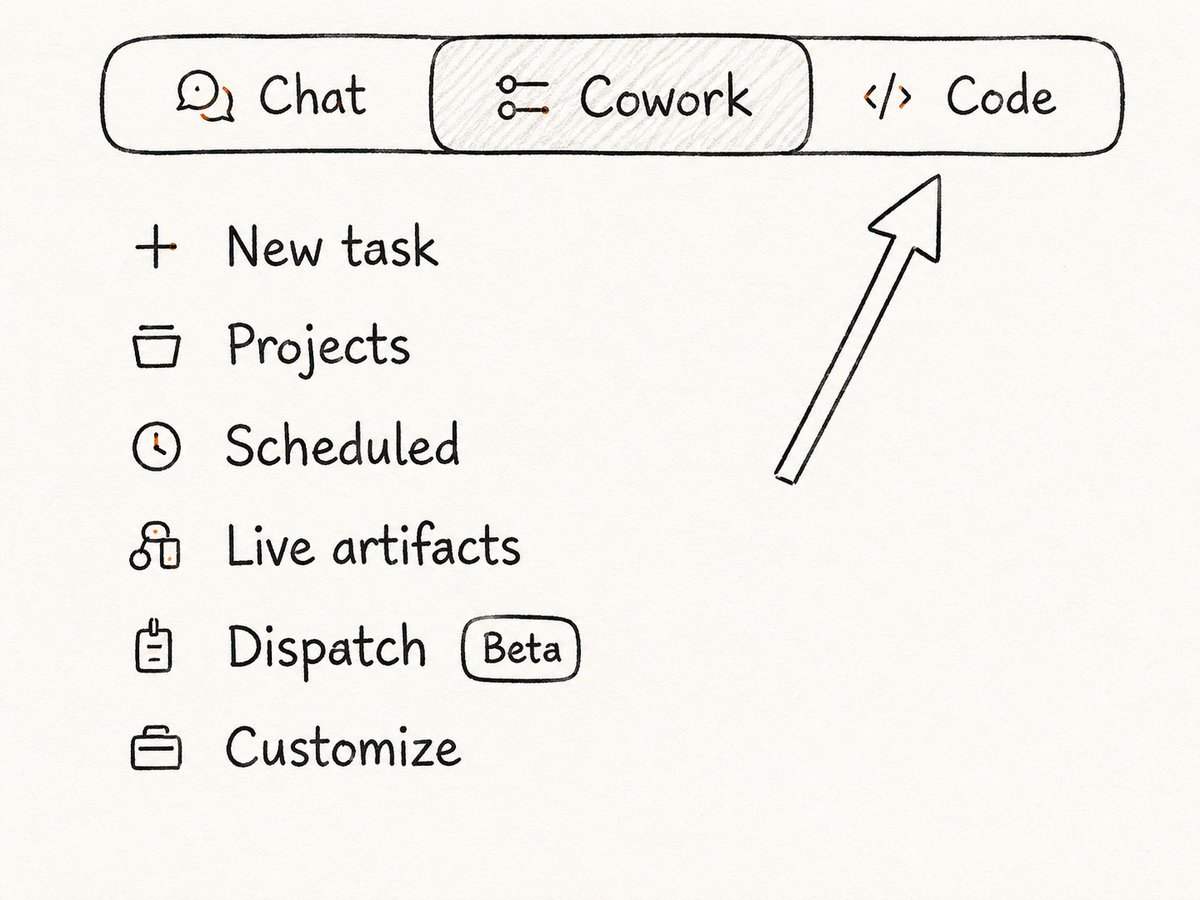
Claude Code takes that one step further. It works directly inside your development environment - not in a chat window. It reads your actual codebase, writes new code, runs tests, reads the error messages, and fixes the bugs in a loop until the task is done.
It integrates with VS Code and JetBrains. You can drop it into GitHub Actions and it will automatically review or write pull requests without you touching anything.
- Claude Code——在你终端中编写、测试并修复代码的 AI
还有人不知道可以用 Claude 写代码。不只是代码片段——而是完整生产级代码、整个功能、复杂的重构。你用平实的英语描述需求,Claude 帮你写出来。
Claude Code 更进了一步。它直接在你的开发环境里工作——而不是聊天窗口里。它会读取你真正的代码仓库,编写新代码,运行测试,读取报错信息,然后循环修复 bug,直到任务完成。
它集成 VS Code 和 JetBrains。你可以把它放进 GitHub Actions,它会自动审查或编写 Pull Request,完全不用你动手。
- Claude Design - AI for visual work
Most people don't know this product exists. Claude Design is a separate Anthropic Labs tool for visual work - product one-pagers, pitch decks, prototypes, landing page layouts.
You describe what you need. Claude builds it. Exports to PPTX, Canva, PDF, or HTML. For people who aren't designers, it replaces a 3-hour Figma session with a 10-minute conversation
To get access, just head to claude.ai/design - that's the direct link to Claude Design, no extra steps needed.

- Claude Design——面向视觉工作的 AI
大多数人不知道有这个产品。Claude Design 是 Anthropic 实验室的一个独立工具,用于视觉类工作——产品单页、融资演示稿、原型、着陆页布局。
你描述需求,Claude 把它做出来。导出为 PPTX、Canva、PDF 或 HTML。对于非设计师来说,它把一场三小时的 Figma 功夫变成了一次十分钟的对话。
要获取权限,直接去 claude.ai/design——那就是 Claude Design 的直接链接,不需要额外步骤。
17 Prompt Caching - 90% cost reduction on API calls (DEV)
For developers building on the Claude API. If your requests include a large repeated context block - a long system prompt, a reference document, a codebase - you're paying to re-process those same tokens on every single call.
Prompt Caching stores that content server-side. Subsequent calls reuse the cache instead of re-processing it. Up to 90% cost reduction on cached tokens. Noticeably faster responses. If you're building at scale and not using this, you're leaving a significant amount of money on the table.
Add "cache_control": {"type": "ephemeral"} to the content block you want cached. Cache persists for 5 minutes and resets the timer on each use. Works for system prompts, large documents, and tool definitions.
17 提示缓存——API 调用成本降低 90%(面向开发者)
对基于 Claude API 构建服务的开发者。如果你的请求中包含大量重复的上下文块——一个很长的系统提示、一份参考文档、一个代码仓库——你每次调用都在为重新处理这些相同的令牌付费。
提示缓存把这些内容存储在服务端。后续调用会复用缓存,而不是重新处理。缓存令牌最高可降低 90% 成本。响应速度也显著变快。如果你规模构建服务却没用这个,你就是在白白浪费一大笔钱。
在你想缓存的内容块中添加 "cache_control": {"type": "ephemeral"}。缓存持续 5 分钟,每次使用都会重置计时器。适用于系统提示、大型文档和工具定义。
You now know more about Claude than most people who use it every day.
Pick one feature from this list. Just one. Set it up today. You don't need to implement everything at once - knowing what exists is already half the battle.
Come back to this article when you're ready for the next one.
你现在对 Claude 的了解已经超过了大多数每天使用它的人。
从这个清单里挑一个功能,就一个。今天就设置好。你不需要一次性把所有功能都用上——知道这些功能的存在,已经赢了一半。
准备好了下一个功能,再回来翻翻这篇文章。