Cloudflare Computer: How to Cut AI Agent Sandboxing Costs by 80%
The default way to sandbox AI agents is to keep a full Linux container alive for every agent. Cloudflare Computer proposes a split: the Workspace Durable Object (with a SQLite VFS) owns authoritative project state; ordinary reads, searches and edits run in a Worker isolate via workspace.fs and just-bash; real Linux operations like npm install and build start a container on demand, and a post-command pull synchronizes changes back. Using a small Vite site as the test case, the author shows code for switching backend between worker-shell and container, and warns that exitCode 0 alone is not durability — sync.status must be 'complete'. A cost model projects that dropping container duty cycle from 100% to 10% reduces monthly cost from ~$36.83 to ~$7.53 (79.6%), while node_modules is deliberately kept disposable. A strong read for engineers building coding agents, sandboxes, or durable workspaces.
Cloudflare Computer: How to Cut AI Agent Sandboxing Costs by 80%
By @yifanxu_ephai · 2026-08-07T23:51:23.000Z
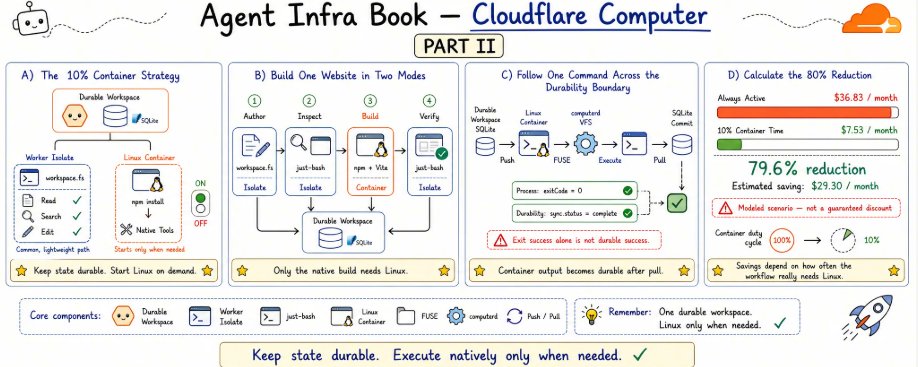
An agent needs a workspace that persists. It does not need a Linux machine that runs continuously.
Cloudflare Computer:如何将 AI Agent 沙箱成本降低 80%
By @yifanxu_ephai · 2026-08-07T23:51:23.000Z
Agent 需要的是一个持久化的工作区,而不是一台持续运行的 Linux 机器。
TL;DR
- One durable workspace: a Workspace Durable Object and its SQLite VFS own the project state.
- Keep the common path light: workspace.fs and just-bash handle reads, searches, writes, and small edits in an isolate.
- Start Linux only when needed: native operations such as npm install and npm run build run in an on-demand container.
- Process success is not durability: container output becomes authoritative only after the post-command pull completes.
- Modeled result, not a guaranteed discount: reducing container-active time to 10% lowers this scenario from $36.83 to $7.53 per month—a 79.6% reduction.
TL;DR
- 一个持久工作区:由 Workspace Durable Object 及其 SQLite VFS 持有项目状态。
- 让常规路径保持轻量:workspace.fs 和 just-bash 在 isolate 中完成读取、搜索、写入和小改动。
- 只在需要时启动 Linux:npm install、npm run build 等原生操作在按需容器中运行。
- 进程成功不等于持久化:容器输出必须等命令执行后的 pull 完成后才能成为权威数据。
- 这是模型测算结果,不是保证折扣:容器活跃时间降到 10%,该场景每月费用从 $36.83 降到 $7.53,降幅 79.6%。
AI agents regularly read files, search code, edit configuration, and sometimes run commands such as npm install or a production build.
The conventional approach gives every agent a complete container. That model is easy to understand, but it also means:
We may still be paying for Linux while the agent is only reading, thinking, or waiting for a model response.
Cloudflare Computer proposes a different division of labor:
- Keep ordinary file operations in an isolate
- Store project state in a Durable Object
- Start a container only when a native tool actually needs Linux
The central idea fits in one sentence:
Keep state available; make the complete operating system appear on demand.
AI agent 经常读取文件、搜索代码、修改配置,偶尔也会运行 npm install 或生产构建等命令。
传统做法是给每个 agent 一个完整容器。这个模型容易理解,但也意味着:
agent 只是在读取、思考或等待模型响应时,我们可能仍在为 Linux 付费。
Cloudflare Computer 提出了不同的分工:
- 普通文件操作留在 isolate 中
- 项目状态存放在 Durable Object 中
- 只有原生工具真正需要 Linux 时才启动容器
核心思想可以用一句话概括:
让状态保持可用;让完整的操作系统按需出现。
One workspace, two execution modes
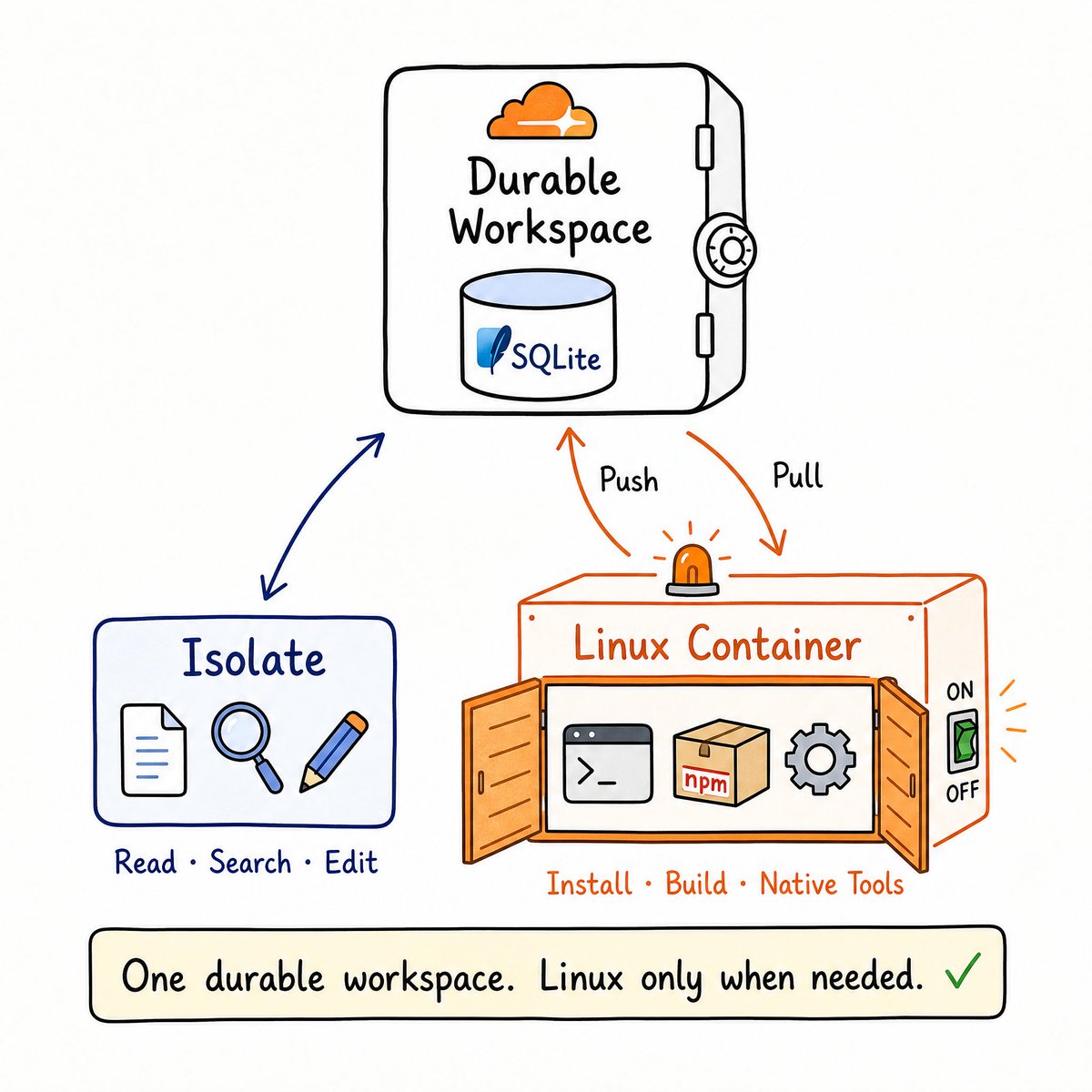
The source of truth for the project is the SQLite VFS inside a Workspace Durable Object.
Ordinary operations can run directly in an isolate:
- Read and write files with workspace.fs
- Search text and traverse directories with just-bash
- Transform data with JavaScript
- Wait for an LLM response without keeping a container alive
The workflow switches to a container only when it needs real Linux capabilities:
- npm install
- npm run build
- Native binaries
- System dependencies
- Long-lived processes that require a real operating system
These are not two unrelated workspaces. The physical model is:
One authoritative durable copy plus an execution-side materialization created only when needed.
When the container starts, Computer pushes the required files into the computerd VFS. Linux programs see an ordinary /workspace directory through FUSE.
After the command finishes, Computer pulls the changes back into the Workspace Durable Object.
Durable state → push → Linux execution → pull → durable state.
一个工作区,两种执行模式
项目的唯一事实来源是 Workspace Durable Object 内部的 SQLite VFS。
普通操作可以直接在 isolate 中运行:
- 用 workspace.fs 读写文件
- 用 just-bash 搜索文本、遍历目录
- 用 JavaScript 转换数据
- 等待 LLM 响应时无需保持容器存活
只有当工作流真正需要 Linux 能力时,才切换到容器:
- npm install
- npm run build
- 原生二进制
- 系统依赖
- 需要真实操作系统的长驻进程
这并不是两个互不相干的工作区。物理模型是:
一份权威的持久副本,外加只在需要时在执行端生成的物化数据。
容器启动时,Computer 会把所需文件推入 computerd VFS。Linux 程序通过 FUSE 看到一个普通的 /workspace 目录。
命令结束后,Computer 再把改动拉回 Workspace Durable Object。
持久状态 → 推送 → Linux 执行 → 拉取 → 持久状态。
Build one website in two modes
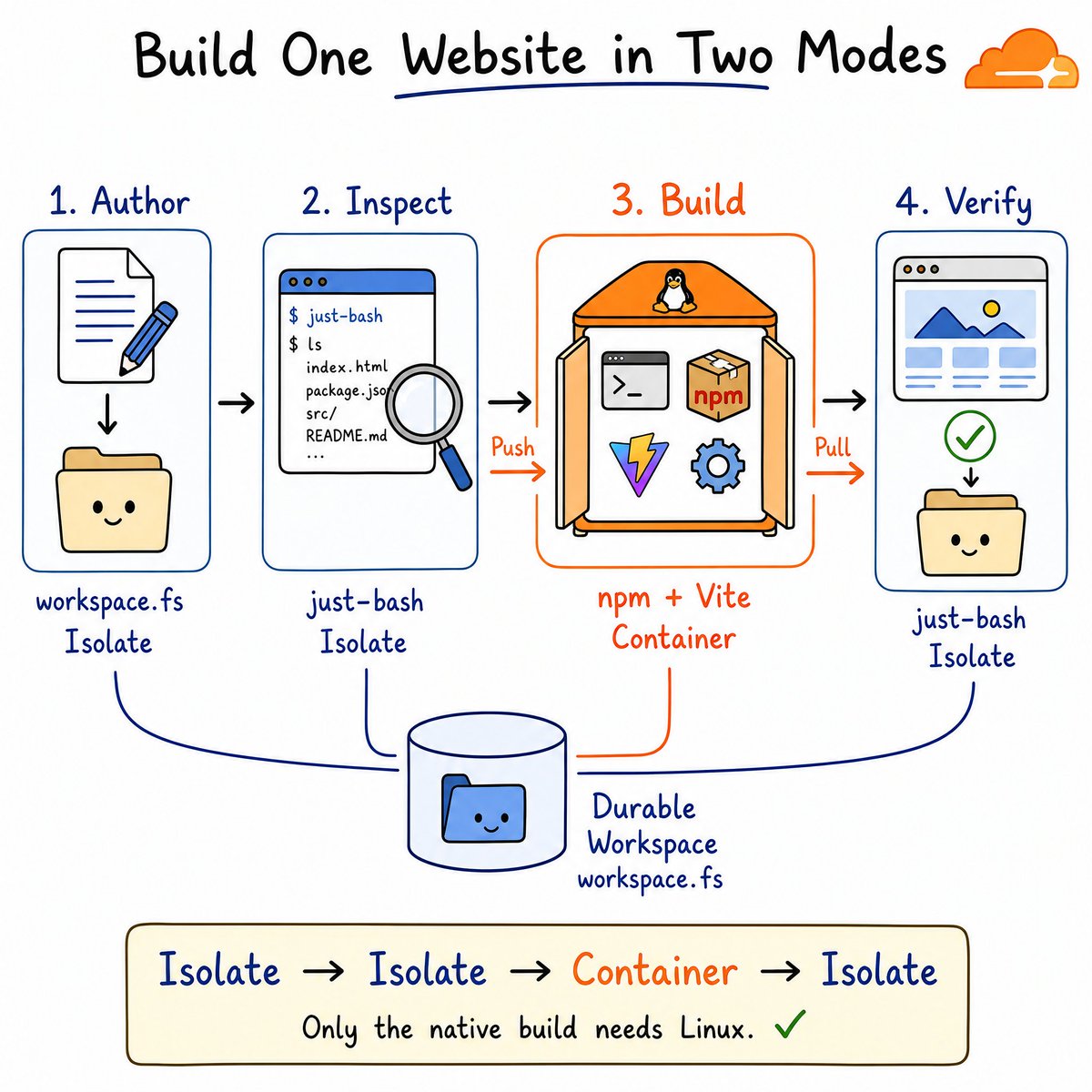
To test the model, we built a small Vite website with Cloudflare Computer
The workflow contains only four steps:
- Author source files in the isolate
- Inspect the project in the isolate
- Install dependencies and build in a Linux container
- Return to the isolate and verify the durable output
The complete path is:
isolate authoring → isolate inspection → container build → isolate verification
Only the native build phase requires Linux.
用两种模式构建一个网站
为了验证这个模型,我们用 Cloudflare Computer 构建了一个小型 Vite 网站。
整个工作流只有四步:
- 在 isolate 中编写源文件
- 在 isolate 中检查项目
- 在 Linux 容器中安装依赖并构建
- 回到 isolate,验证持久化输出
完整路径是:
isolate 编写 → isolate 检查 → 容器构建 → isolate 验证
只有原生构建阶段需要 Linux。
Keep ordinary operations in the isolate
The first command explicitly selects worker-shell:
using inspection = await workspace.runtime.exec(
  "find . -type f | sort",
  {
    backend: "worker-shell",
    cwd: "/workspace/site",
  },
);
This looks like shell syntax, but it is not a native Bash process.
WorkerShellBackend runs just-bash in a Worker isolate and reaches the Workspace filesystem directly through RPC. There is no second filesystem, so there is nothing to push or pull.
File reads, code searches, and small edits can all remain on this lightweight path.
Escalate only native operations to the container
Dependency installation and the Vite build require real Node.js, npm, and Linux, so the application explicitly changes the execution backend:
using build = await workspace.runtime.exec(
  "npm install && npm run build",
  {
    backend: "container",
    cwd: "/workspace/site",
  },
);
The important question is not what the command is called. It is which capabilities the operation requires.
Computer does not automatically send every shell expression into a container. The application chooses a backend according to its tool, lifecycle, and security requirements.
The complete registration code includes Workspace, WorkspaceServiceProxy, WorkspaceProxy, and the container WebSocket route. To keep this article easy to read on a phone, the larger implementation lives in an immutable Git snapshot:
Open the complete Workspace and dual-backend wiring
日常操作留在 isolate
第一条命令显式选择了 worker-shell:
using inspection = await workspace.runtime.exec(
  "find . -type f | sort",
  {
    backend: "worker-shell",
    cwd: "/workspace/site",
  },
);
这看起来像 shell 语法,但它并不是原生 Bash 进程。
WorkerShellBackend 在 Worker isolate 中运行 just-bash,并通过 RPC 直接访问 Workspace 文件系统。这里没有第二套文件系统,所以不存在推送或拉取。
文件读取、代码搜索和小改动都可以留在这条轻量路径上。
只有原生操作才升级到容器
依赖安装和 Vite 构建需要真正的 Node.js、npm 和 Linux,因此应用显式切换执行后端:
using build = await workspace.runtime.exec(
  "npm install && npm run build",
  {
    backend: "container",
    cwd: "/workspace/site",
  },
);
关键问题不是命令叫什么,而是该操作需要哪些能力。
Computer 不会自动把每个 shell 表达式都送进容器。应用会根据工具、生命周期和安全需求来选择后端。
完整的注册代码包含 Workspace、WorkspaceServiceProxy、WorkspaceProxy 以及容器 WebSocket 路由。为了在手机上便于阅读,更大的实现在一个不可变的 Git 快照中:
查看完整的 Workspace 与双后端接线
A successful command is not necessarily durable
This is the easiest Cloudflare Computer boundary to miss.
A command in the container may return exitCode = 0. That proves the process succeeded, but it does not necessarily prove that its output reached the Durable Object.
The application must also inspect the synchronization result:
const result = await build.result();

if (result.exitCode !== 0 || result.sync.status !== "complete") {
  throw new Error("Build or synchronization failed");
}
The build output crosses the durability boundary only after the post-command pull commits successfully to the Workspace SQLite database.
Computer therefore has two success conditions:
- The process completed successfully
- Workspace synchronization completed successfully
If the command succeeds while synchronization remains pending, the correct response is to retry or reconcile synchronization—not to rerun a potentially non-idempotent command blindly.
命令成功不代表已持久化
这是 Cloudflare Computer 最容易忽略的边界。
容器中的命令可能返回 exitCode = 0。这只能证明进程成功了,并不一定证明输出已经到达 Durable Object。
应用还必须检查同步结果:
const result = await build.result();

if (result.exitCode !== 0 || result.sync.status !== "complete") {
  throw new Error("Build or synchronization failed");
}
构建输出只有在命令执行后的 pull 成功提交到 Workspace SQLite 数据库之后,才真正跨过持久化边界。
因此 Computer 有两个成功条件:
- 进程成功执行
- Workspace 同步成功完成
如果命令成功但同步仍处于 pending,正确的做法是重试或协调同步,而不是盲目重跑一个可能非幂等的命令。
Why not persist all of node_modules?
Computer ignores container-side node_modules by default.
One npm install can create tens of thousands of small files. They are useful to the current build, but synchronizing them would increase both latency and durable storage consumption.
More importantly, node_modules is normally reconstructible from package-lock.json.
That creates a clear boundary:
- Source, configuration, lockfiles, and build output are durable
- Execution caches such as node_modules remain disposable
This is not data loss. It is a deliberate separation between project stateand rebuildable cache.
The complete container configuration is also preserved as a Git snapshot:
Open the pinned Dockerfile
为什么不持久化整个 node_modules?
Computer 默认忽略容器侧的 node_modules。
一次 npm install 可能产生数万个小文件。它们对当前构建有用,但同步它们会增加延迟和持久存储消耗。
更重要的是,node_modules 通常可以从 package-lock.json 重建。
这就形成了一条清晰的边界:
- 源码、配置、锁文件和构建输出是持久的
- node_modules 这类执行缓存是可以丢弃的
这不是数据丢失,而是对项目状态与可重建缓存之间的一种刻意分离。
完整的容器配置也保存在 Git 快照中:
查看固定的 Dockerfile
Where does the 80% reduction come from?
The 80% figure is not a guaranteed Cloudflare discount. It is the result of an explicit cost model.
We compare two scenarios:
- One standard-1 Cloudflare Container remains active for 720 hours per month
- The same container is active for only 72 hours, or 10% of the month Workers, isolates, and one Workspace Durable Object handle the ordinary work.
Under the CPU, memory, disk, and plan-allowance assumptions in the model:
- Always active: approximately $36.83/month
- Active 10% of the time: approximately $7.53/month
- Estimated monthly saving: $29.30
- Estimated reduction: 79.6%
The complete bill does not fall to exactly 10% because the $5 Workers Paid monthly minimum remains.
The most important variable is the container duty cycle:
- Active 5%: approximately $6.09/month
- Active 10%: approximately $7.53/month
- Active 25%: approximately $12.41/month
- Active 50%: approximately $20.55/month
- Active 100%: approximately $36.83/month
The right question is therefore not:
“Will Cloudflare Computer always save 80%?”
It is:
“How much of my workflow actually needs Linux?”
The complete cost model and calculationare preserved in the full chapter for line-by-line verification.
80% 的降幅从哪来?
80% 这个数字并非 Cloudflare 的保证折扣,而是一个明确成本模型的测算结果。
我们比较两种场景:
- 一台 standard-1 Cloudflare Container 每月活跃 720 小时
- 同一台容器每月只活跃 72 小时,即 10% 的时间 普通工作由 Workers、isolates 和一个 Workspace Durable Object 处理。
在模型假设的 CPU、内存、磁盘和套餐额度下:
- 始终活跃:约 $36.83/月
- 10% 活跃时间:约 $7.53/月
- 每月节省估算:$29.30
- 降幅估算:79.6%
总账单不会恰好降到 10%,因为还有 $5 Workers Paid 月度最低消费。
最重要的变量是容器的占空比(duty cycle):
- 活跃 5%:约 $6.09/月
- 活跃 10%:约 $7.53/月
- 活跃 25%:约 $12.41/月
- 活跃 50%:约 $20.55/月
- 活跃 100%:约 $36.83/月
因此,正确的问题不是:
“Cloudflare Computer 总是能节省 80% 吗?”
而是:
“我的工作流到底有多大比例真正需要 Linux?”
完整的成本模型和计算过程保留在完整章节中,可逐行核对。
Which agents fit this architecture?
Dual mode is a strong fit for workloads with:
- Many reads, searches, and small edits
- Long waits between tool calls
- Occasional dependency installation or builds
- Reconstructible caches such as node_modules
- Source and final artifacts that must remain durable
- Bursty agent sessions
It is a weaker fit when:
- Every operation requires a native binary
- A development server must run continuously
- The container can rarely sleep
- A large workspace changes constantly
- Multiple writers mutate the same Workspace concurrently
As the container duty cycle approaches 100%, the economic advantage of dual mode approaches zero.
哪些 Agent 适合这种架构?
双模式非常适合以下工作负载:
- 大量读取、搜索和小改动
- 工具调用之间等待时间较长
- 偶尔安装依赖或执行构建
- 缓存可重建,如 node_modules
- 源码和最终产物必须持久化
- 会话呈突发性
以下情况则不太适合:
- 每一步都需要原生二进制
- 开发服务器必须持续运行
- 容器很少能休眠
- 大型工作区不断变化
- 多个写入方并发修改同一个 Workspace
当容器占空比接近 100% 时,双模式的经济优势就趋近于零。
What does Cloudflare Computer actually change?
Cloudflare Computer does not eliminate the container.
It changes the container's role in the system:
The container is no longer the agent's permanent home. It is a tool that appears when the workflow needs Linux compatibility.
The Durable Object owns long-lived state.
The isolate handles the low-cost common path.
The container handles operations that really require an operating system.
Computer coordinates push, execution, and pull between them.
The resulting design principle is simple:
Pay for a complete operating system when the operation requires one—not merely because the agent has a workspace.**
Cloudflare Computer 到底改变了什么?
Cloudflare Computer 并没有消灭容器。
它改变的是容器在系统中的角色:
容器不再是 Agent 的常驻家园,而是当工作流需要 Linux 兼容性时才出现的工具。
Durable Object 持有长期状态。
isolate 处理低成本的常规路径。
容器处理真正需要操作系统的操作。
Computer 在它们之间协调 push、执行和 pull。
最终的设计原则很简单:
只有当操作真正需要完整的操作系统时才为之付费,而不是因为 Agent 有一个工作区就付费。
Code and reproduction
- Complete runnable project
- Complete Worker implementation
- Container Dockerfile
- Local development instructions
- Complete English tutorial and cost calculation
Continue with Agent Infra Book
This article is part of the open-source Agent Infra Book, a systems book about the infrastructure behind coding agents, including sandboxes, durable workspaces, and execution architecture. The repository connects architecture analysis with runnable implementations and measured evidence.
- Star and follow Agent Infra Book
- Read the complete Cloudflare Computer section
- Run the dual-mode website builder
If you are building coding agents, sandboxes, or durable workspaces, the repository is designed to be read, reproduced, and improved in public.
Cloudflare Computer is still preview software. APIs, limits, runtime behavior, and pricing may change. Recheck Cloudflare's current documentation and prices before using this model for a production budget.
代码与复现
- 完整可运行项目
- 完整 Worker 实现
- 容器 Dockerfile
- 本地开发说明
- 完整英文教程与成本计算
继续阅读 Agent Infra Book
本文是开源 Agent Infra Book 的一部分。这是一本关于编码 Agent 基础设施的系统之书,涵盖沙箱、持久工作区和执行架构。该仓库将架构分析与可运行实现、实测证据连接在一起。
- Star 并关注 Agent Infra Book
- 阅读完整的 Cloudflare Computer 章节
- 运行双模式网站构建器
如果你正在构建编码 Agent、沙箱或持久工作区,这个仓库的设计初衷就是公开地阅读、复现并改进。
Cloudflare Computer 仍是预览软件。API、限额、运行时行为和价格都可能变化。在将此模型用于生产预算之前,请重新核对 Cloudflare 的最新文档和定价。