Getting started with loops
This article is an official engineering guide from Claude Code that systematically lays out four agentic loop patterns and their use cases. Turn-based loops are for short exploratory tasks; users encode manual verification steps into SKILL.md — e.g., asking Claude to start a dev server, take screenshots, and check the browser console. Goal-based loops, triggered by /goal, define deterministic termination criteria such as 'get the Lighthouse score to 90 or above' and force iteration until the target is met. Time-based loops come in two flavors: /loop for local polling on an interval and /schedule for cloud-triggered routines, ideal for recurring work like PR review or CI fixups. Proactive loops combine /schedule, /goal, dynamic workflows, and auto mode into a pipeline for long-running, well-defined streams of work. The article also covers code quality maintenance and token usage management: encoding conventions, using scripts instead of re-reasoning, routing routine work to cheaper models, and monitoring cost with /usage. Suitable for engineers embedding Claude Code into daily dev workflows.
Turn-based loops
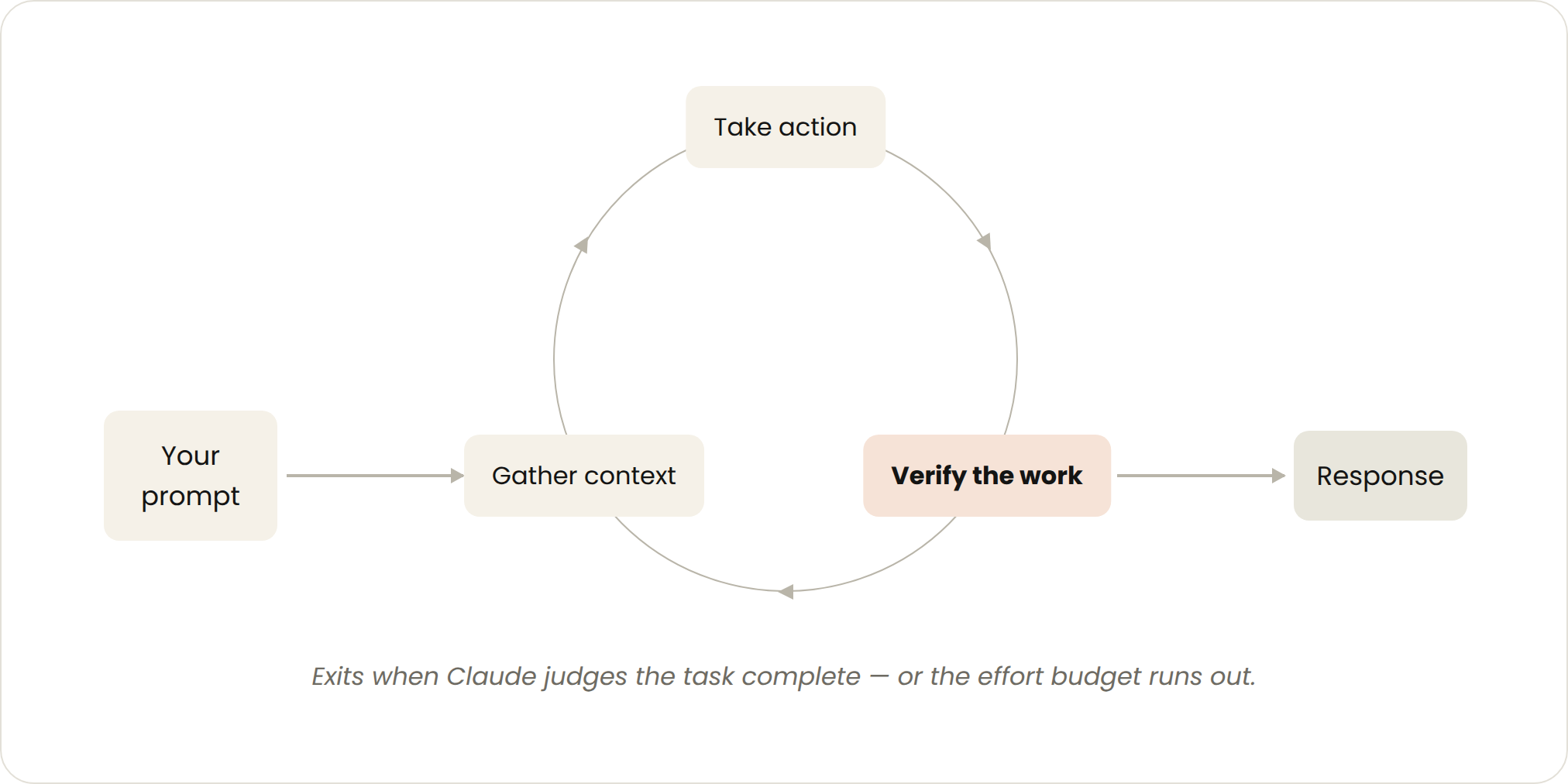
Triggered by: A user prompt.
Stop criteria: Claude judges it has completed the task or needs additional context.
Best used for: Shorter tasks that are not part of a regular process or schedule.
Managed usage by: Write specific prompts and improve verification using skills to reduce the number of turns.
回合制循环
触发方式:用户输入提示词。 停止条件:Claude 判断任务已完成,或需要额外上下文。 适用场景:较短的、不属于固定流程或周期的任务。 使用管理:编写精准提示词,通过技能改进验证,减少交互轮次。
Every prompt you send starts a manual loop with you directing each turn. Claude gathers context, takes action, checks its work, repeats if needed, and responds. We call this the agentic loop.
For example, ask Claude to create a like button. It reads your code, makes the edit, runs the tests, and hands back something it believes works. You then manually check the work, and write the next prompt.
每次发送提示词都会启动一个手动循环,由你来引导每一轮交互。Claude 会收集上下文、执行操作、检查结果,必要时重复,最后给出回应。我们称之为智能体循环。
举个例子:让 Claude 创建一个点赞按钮。它会读取你的代码、进行修改、运行测试,然后交回一个它认为能用的结果。接着你手动检查,再写下一条提示词。
You can improve the verification step by encoding your manual steps as a SKILL.md so Claude can check more of its own work, end-to-end. This should include tools or connectors to allow Claude to see, measure or interact with the result. The more quantitative the checks are, the easier it is for Claude to self-verify.
For example, in your SKILL.md file you may specify:
name: verify-frontend-change description: Verify any UI change end-to-end before declaring it done.
Verifying frontend changes
Never report a UI change as complete based on a successful edit alone. Verify it the way a human reviewer would:
-
Start the dev server and open the edited page in the browser.
-
Interact with the change directly. For a new control (button, input, toggle): click it, confirm the expected state change, and screenshot before/after.
-
Check the browser console: zero new errors or warnings.
-
Use the Chrome Devtools MCP, run a performance trace and audit Core Web Vitals.
If any step fails, fix the issue and rerun from step 1 — do not hand back partially verified work.
你可以将手动验证步骤编码为 SKILL.md,让 Claude 能端到端地自行检查更多工作,从而改进验证环节。这应包括工具或连接器,让 Claude 能查看、度量或交互式检查结果。检查越定量化,Claude 越容易自我验证。
例如,在 SKILL.md 中可以这样设定:
name: verify-frontend-change description: 在声明完成之前端到端验证任何 UI 变更。
验证前端变更
绝不要仅凭修改成功就报告 UI 变更已完成。要像人类审核者一样验证:
-
启动开发服务器,在浏览器中打开编辑后的页面。
-
直接与变更交互。对于新控件(按钮、输入框、开关):点击它,确认预期的状态变化,并截取前后对比图。
-
检查浏览器控制台:零新增错误或警告。
-
使用 Chrome Devtools MCP,运行性能跟踪并审计核心网页指标。
如果任何步骤失败,修复问题并从步骤 1 重新开始——不要交回部分验证的工作。
Goal-based loop (/goal)
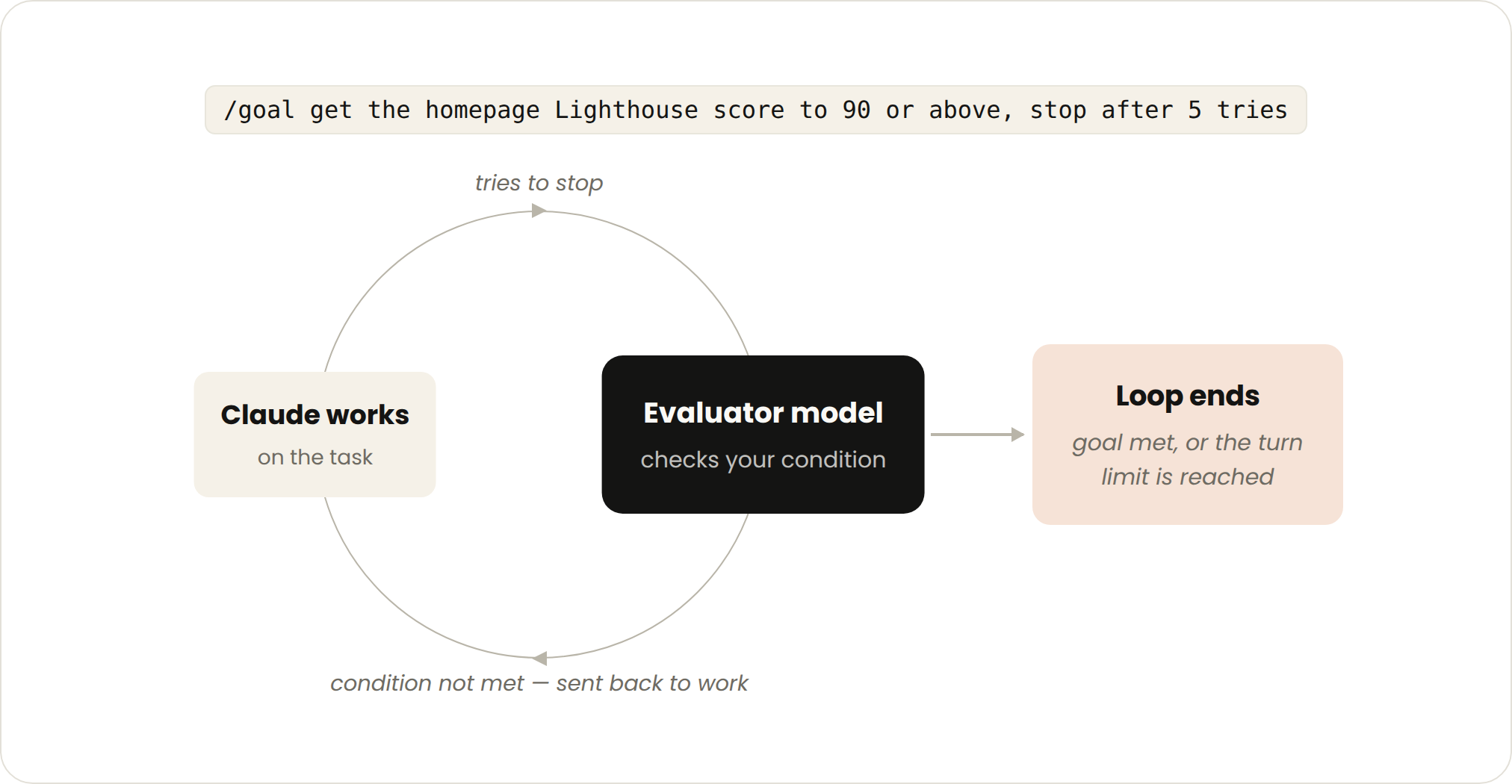
Triggered by: A manual prompt in real-time.
Stop criteria: Goal achieved OR maximum number of turns reached.
Best used for: Tasks that have verifiable exit criteria.
Managed usage by: Setting a specific completion criteria and explicit turn caps, “stop after 5 tries.”
Sometimes, a single turn is not enough, especially for more complex tasks. Agents do better when they can iterate. You can extend how long Claude keeps iterating by defining what done looks like with /goal.
目标驱动循环 (/goal)
触发方式:实时手动提示词。 停止条件:目标达成 或 达到最大轮次。 适用场景:有可验证退出标准的任务。 使用管理:设定具体的完成标准和明确的轮次上限,例如“尝试 5 次后停止”。
有时候,单个轮次不够用,尤其是对于更复杂的任务。智能体在迭代中表现更好。你可以通过 /goal 定义“完成”的标准,从而延长 Claude 的迭代空间。
When you define the success criteria, Claude doesn’t have to make a determination on what is “good enough” and end the loop early. Each time Claude tries to stop, an evaluator model checks your condition and sends it back to work until the goal is met or a number of turns you define is reached.
This is why deterministic criteria, such as number of tests passed or clearing a certain score threshold, are so effective.
For example:
/goal get the homepage Lighthouse score to 90 or above, stop after 5 tries.
当你定义了成功标准后,Claude 不必自行判断什么是“足够好”而提前结束循环。每次 Claude 试图停止时,一个评估模型会检查你的条件,并将其送回继续工作,直到目标达成或达到你设定的最大轮次。
这就是为什么确定性标准——比如通过的测试数量或达到某个分数阈值——如此有效。
例如:
/goal 将首页 Lighthouse 得分提升到 90 分以上,尝试 5 次后停止。
Time-based loop (/loop and /schedule)
Triggered by: A specified time interval.
Stop criteria: You cancel it, or the work completes (the PR merges, the queue is empty).
Best used for: For recurring work, or interfacing with external environments / systems.
Managed usage by: Set longer intervals or react based on events rather than time.
Some agentic work is recurring: the task stays the same and only the inputs change. For example, summarizing Slack messages every morning. Other work depends on external systems, and a simple way to interface with one is to check it on an interval and react to what changed. For example, a PR which may receive code reviews or fail CI.
For these, you can trigger when Claude runs with /loop which re-runs a prompt on an interval. For example:
/loop 5m check my PR, address review comments, and fix failing CI
/loop runs on your computer, so if you turn it off, it stops. You can move the loop to the cloud by creating a routine with /schedule.
时间驱动循环 (/loop 和 /schedule)
触发方式:指定时间间隔。 停止条件:你取消它,或工作完成(PR 合并、队列清空)。 适用场景:重复性工作,或与外部环境/系统交互。 使用管理:设置更长间隔,或基于事件而非时间来响应。
某些智能体工作是重复的:任务本身不变,只有输入在改变。例如每天早晨总结 Slack 消息。另一些工作依赖外部系统,与之交互的一种简单方式是按间隔检查并响应变化。例如,一个 PR 可能收到代码审查或 CI 失败。
对于这些情况,你可以通过 /loop 触发 Claude 运行,它会按间隔重复执行提示词。例如:
/loop 5m 检查我的 PR,处理审查意见,修复失败的 CI
/loop 在你的电脑上运行,所以如果你关机,它就会停止。你可以通过 /schedule 创建一个例行任务,将循环移至云端。
Proactive loops
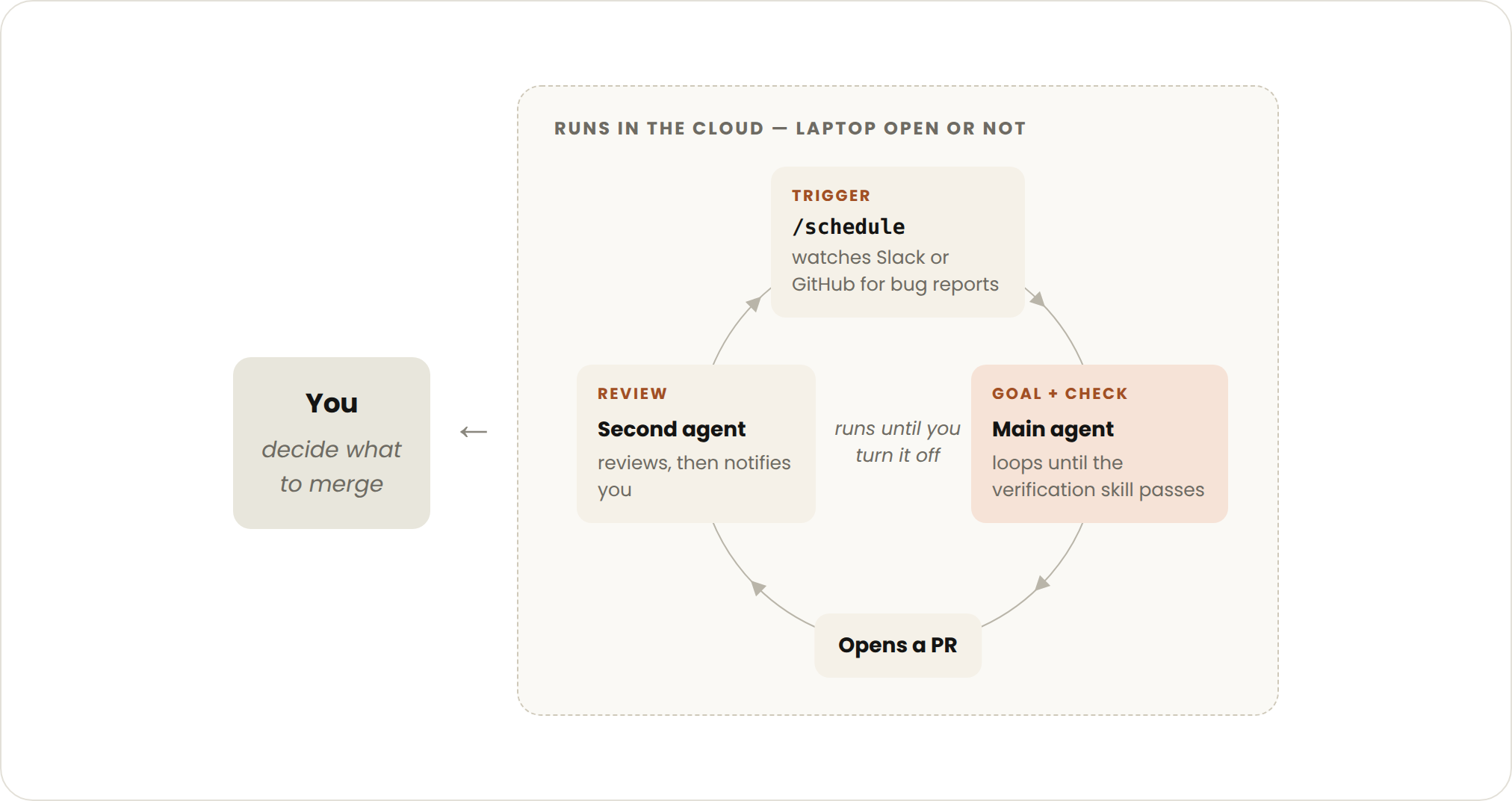
Triggered by: An event or schedule, with no human in real time.
Stop criteria: Each task exits when its goal is met. The routine itself runs until you turn it off.
Best used for: Recurring streams of well-defined work: bug reports, issue triage, migrations, dependency upgrades, etc.
Managed usage by: Routing routines to smaller, faster models and using the most capable model for judgment calls.
主动循环
触发方式:事件或调度,无需实时人工参与。 停止条件:每个任务在目标达成后退出。例行任务本身持续运行,直到你关闭它。 适用场景:定义明确的重复性工作流:Bug 报告、Issue 分类、迁移、依赖升级等。 使用管理:将例行任务路由给更小更快的模型,把判断性任务留给最强大的模型。
The primitives above, along with other Claude Code features like auto mode and dynamic workflows (research preview) can be composed into a loop for long-running work.
For example, to handle incoming feedback, you can use:
/schedule (research preview) to run a routine that checks for new reports
/goal to define what done looks and skills to document how to verify it
Dynamic workflows to orchestrate agents that triage each report, fix it, and review the fix
Auto mode so the routine runs without stopping to ask for permission
Putting it together, a prompt could look like this:
/schedule every hour: check #project-feedback for bug reports. /goal: don't stop until every report found this run is triaged, actioned, and responded to. When fixing a bug, use a workflow to explore three solutions in parallel worktrees and have a judge adversarially review them.
以上这些原语,加上 Claude Code 的其他功能如自动模式(auto mode)和动态工作流(research preview),可以组合成用于长时间运行任务的循环。
例如,处理传入的反馈,你可以这样用:
/schedule(research preview)运行一个例行任务,检查新的报告
/goal 定义完成的标准,skills 文档记录验证方法
动态工作流编排智能体,对每条报告进行分类、修复并审查修复结果
自动模式让例行任务无需请求许可即可持续运行
组合起来,一个提示词可能像这样:
/schedule every hour: check #project-feedback for bug reports. /goal: don't stop until every report found this run is triaged, actioned, and responded to. When fixing a bug, use a workflow to explore three solutions in parallel worktrees and have a judge adversarially review them.
Maintaining code quality
The quality of a loop’s output depends on the system around it. When designing the system:
Keep the codebase itself clean: Claude follows patterns and conventions that already exist in your codebase.
Give Claude a way to verify its own work: Encode what good looks like for you and your team with skills.
Make docs easy to reach: Frameworks and libraries docs have up-to-date best practices.
Use a second agent for code reviews: A reviewer with fresh context is less biased and not influenced by the main agent’s reasoning. You can use the built-in /code-review skill or Code Review for Github.
When an individual result doesn’t meet the standard, don’t stop at fixing the individual issue, try to encode it to improve the system for all future iterations.
维护代码质量
循环输出的质量取决于周围系统。设计系统时:
保持代码库本身整洁:Claude 会遵循代码库中已有的模式和约定。
为 Claude 提供验证自身工作的方法:用 skills 把“好的标准”编码下来,为你和团队服务。
让文档易于访问:框架和库的文档应包含最新的最佳实践。
使用另一个智能体进行代码审查:拥有全新上下文的审查者更少偏见,不受主智能体推理过程的影响。你可以使用内置的 /code-review skill 或 Code Review for Github。
当单个结果未达标时,不要只修复单个问题,尝试将其编码,以改进整个系统,惠及未来所有迭代。
Managing token usage
To manage token usage, loops should have clear boundaries:
Choose the right primitive and model for the job: Smaller tasks don’t need multiple agents or loops. Some tasks can use cheaper and faster models.
Define clear success and stop criteria: Be specific about what done looks like so Claude can arrive at the solution sooner (but not too soon).
Pilot before a large run: Dynamic workflows can spawn hundreds of agents. Gauge usage on a smaller slice of the work first.
Use scripts for deterministic work: Running a script is cheaper than reasoning through the steps. For example, a PDF skill can ship a form-filling script that Claude runs each time, instead of re-deriving the code.
Don’t run routines more often that you need to: Match the interval to how often the thing you’re watching changes
Review usage: The /usage command breaks down recent usage by skills, subagents, and MCPs, /goal with no arguments shows number of turns and token usage so far, /workflows shows each agent’s token usage and you can stop an agent at any time.
管理令牌使用量
为了管理令牌使用量,循环应有明确的边界:
为任务选择正确的原语和模型:小型任务不需要多个智能体或循环。某些任务可以使用更便宜、更快的模型。
定义清晰的成功与停止标准:明确“完成”的样貌,让 Claude 能更早(但不要太早)到达解决方案。
大规模运行前先试点:动态工作流可能产生数百个智能体。先在较小的工作样本上评估用量。
对确定性工作使用脚本:运行脚本比通过思考步骤更节省资源。例如,PDF skill 可以附带一个表单填充脚本,让 Claude 每次运行它,而不是重新推导代码。
不要比必要更频繁地运行例行任务:将间隔与你正在观察的事物的变化频率匹配。
审查使用情况:/usage 命令按 skills、子智能体和 MCP 分解近期用量;不带参数的 /goal 显示到目前为止的轮次和令牌使用量;/workflows 显示每个智能体的令牌使用量,你可以随时停止某个智能体。
To summarize:
Loop You hand off Use it when Reach for
Turn-based The check You're exploring or deciding Custom verification skills
Goal-based The stop condition You know what done looks like /goal
Time-based The trigger The work happens outside your project on a schedule /loop, /schedule
Proactive The prompt The work is recurring and well-defined All of the above, and dynamic workflows
To get started with loops, look at the work you already do. Pick one task where you’re the bottleneck and ask which piece you could hand off: can you write the verification check? Is the goal clear enough? Does the work arrive on a schedule?
Once you have an idea, run the loop, observe the results like where it stalls or over-reaches, and don’t be afraid to iterate on it.
For more information, read the Claude Code docs on running agents in parallel, as well as the loop, schedule, goal, and dynamic workflows pages.
This article was written by Delba de Oliveira and Michael Segner
总结如下:
循环类型 你交出的部分 使用时机 推荐的命令
回合制 检查 你在探索或决策 自定义验证 skills
目标驱动 停止条件 你知道完成的标准 /goal
时间驱动 触发源 工作按计划发生在项目外部 /loop, /schedule
主动循环 提示词 工作是重复且定义清晰的 上述所有,以及动态工作流
开始使用循环时,先审视你已有的工作。挑选一个你成为瓶颈的任务,想想你可以交出哪部分:你能写出验证检查吗?目标足够清晰吗?工作是否按计划到来?
一旦有了想法,运行循环,观察结果——比如它在何处停滞或过度伸张——不要害怕迭代。
更多信息,请阅读 Claude Code 关于并行运行智能体的文档,以及 loop、schedule、goal 和动态工作流的页面。
本文由 Delba de Oliveira 和 Michael Segner 撰写。