Getting started with loops in Claude Code
The Claude Code team defines four loop patterns (turn-based, goal-based, time-based, proactive) with trigger, stop criteria, use cases, and token management tips. Concrete commands like /goal, /loop, /schedule and a SKILL.md example show how to make agents iterate, self-verify, and compose primitives into automated workflows. A practical guide for developers exploring agent engineering.
There’s a lot of talk right now about "designing loops" instead of prompting your coding agent. If you spend some time on X trying to pin down what a loop actually is, you'll come across multiple different answers.
On the Claude Code team, we define loops as agents repeating cycles of work until a stop condition is met. We categorize a few different types of loops based on:
- How they are triggered
- How they are stopped
- What Claude Code primitive is used
- What type of task is most appropriate for each. We’ll cover the main loop types, when to use each, and how to maintain code quality while managing token usage. Not all tasks require complex loops; start with the simplest solution and use these patterns selectively.
现在有很多关于“设计循环/design loops”而非提示编码代理的讨论。如果你在X上花些时间试图搞清楚循环到底是什么,你会遇到多种不同的答案。
在Claude Code团队,我们将循环定义为代理重复工作周期直到满足停止条件。我们根据以下维度对几种不同类型的循环进行分类:
- 如何触发
- 如何停止
- 使用了哪种Claude Code原语
- 每种类型最适合什么任务。 我们将介绍主要的循环类型、何时使用每种类型,以及如何在管理Token用量的同时保持代码质量。并非所有任务都需要复杂的循环;从最简单的方案开始,有选择地使用这些模式。

Turn-based loops
- Triggered by: A user prompt.
- Stop criteria: Claude judges it has completed the task or needs additional context.
- Best used for: Shorter tasks that are not part of a regular process or schedule.
- Managed usage by: Write specific prompts and improve verification using skills to reduce the number of turns. Every prompt you send starts a manual loop with you directing each turn. Claude gathers context, takes action, checks its work, repeats if needed, and responds. We call this the agentic loop.
For example, ask Claude to create a like button. It reads your code, makes the edit, runs the tests, and hands back something it believes works. You then manually check the work, and write the next prompt.
You can improve the verification step by encoding your manual steps as a SKILL.md so Claude can check more of its own work, end-to-end. This should include tools or connectors to allow Claude to see, measure or interact with the result. The more quantitative the checks are, the easier it is for Claude to self-verify.
For example, in your SKILL.md file you may specify:
---
name: verify-frontend-change
description: Verify any UI change end-to-end before declaring it done.
---

# Verifying frontend changes
Never report a UI change as complete based on a successful edit alone. Verify it the way a human reviewer would:

1. Start the dev server and open the edited page in the browser.
2. Interact with the change directly. For a new control (button, input, toggle): click it, confirm the expected state change, and screenshot before/after.
3. Check the browser console: zero new errors or warnings.
4. Use the Chrome Devtools MCP, run a performance trace and audit Core Web Vitals.

If any step fails, fix the issue and rerun from step 1 — do not hand back partially verified work.
基于回合的循环
- 触发方式:用户提示。
- 停止标准:Claude判断任务已完成或需要额外上下文。
- 最佳用途:不属于常规流程或计划的较短任务。
- 用量管理:编写具体提示,并通过技能改进验证以减少回合数。 你发送的每个提示都会启动一个手动循环,由你来指导每一回合。Claude收集上下文、采取行动、检查工作、必要时重复,然后响应。我们称之为智能体循环。
例如,让Claude创建一个点赞按钮。它会读取你的代码、进行编辑、运行测试,然后交出一个它认为可用的结果。然后你手动检查工作,并写下下一个提示。
你可以通过将手动步骤编码为SKILL.md来改进验证步骤,让Claude端到端地检查更多自己的工作。这应该包括允许Claude查看、测量或与结果交互的工具或连接器。检查越定量化,Claude就越容易自我验证。
例如,在你的SKILL.md文件中可以指定:
---
name: verify-frontend-change
description: 在声明完成前端用户界面变更前,对其进行端到端验证。
---

# 验证前端变更
绝不要仅凭成功编辑就报告用户界面变更为完成。要以人工审核员的方式验证:

1. 启动开发服务器,在浏览器中打开修改后的页面。
2. 直接与变更交互。对于新控件(按钮、输入框、切换开关):点击它,确认预期的状态变化,并截图前后对比。
3. 检查浏览器控制台:零个新错误或警告。
4. 使用Chrome Devtools MCP,运行性能跟踪并审计核心网页指标。

如果任何步骤失败,修复问题并从步骤1重新开始——不要交出部分验证的工作。
Goal-based loop (/goal)
- Triggered by: A manual prompt in real-time.
- Stop criteria: Goal achieved OR maximum number of turns reached.
- Best used for: Tasks that have verifiable exit criteria.
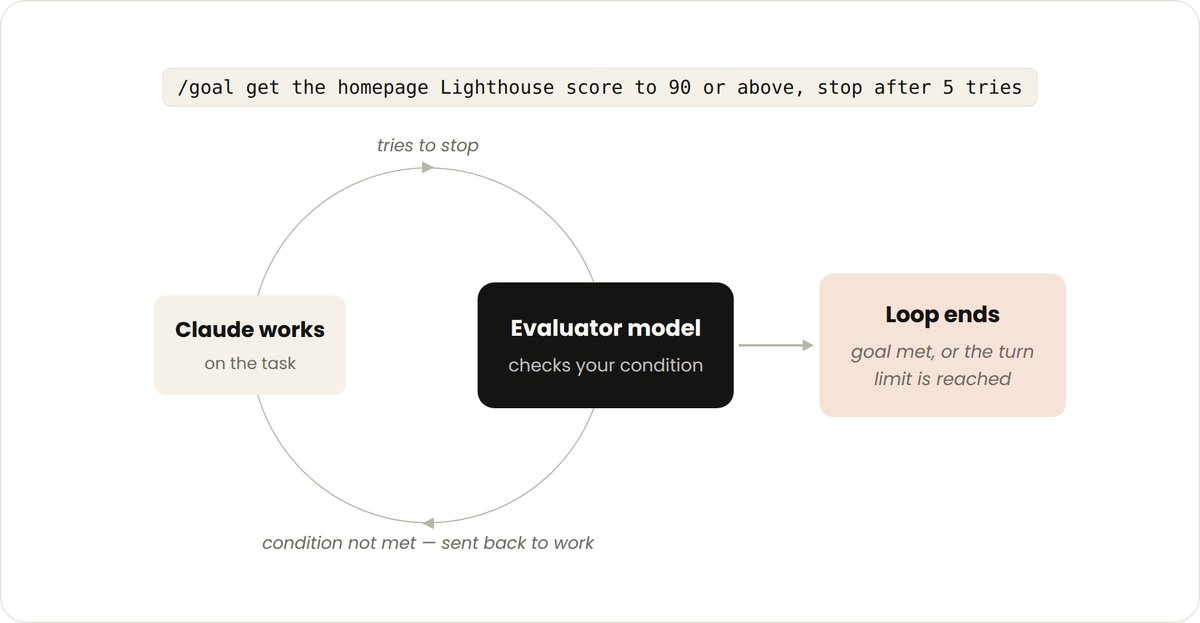
- Managed usage by: Setting a specific completion criteria and explicit turn caps, "stop after 5 tries." Sometimes, a single turn is not enough, especially for more complex tasks. Agents do better when they can iterate. You can extend how long Claude keeps iterating by defining what done looks like with /goal.
When you define the success criteria, Claude doesn’t have to make a determination on what is “good enough” and end the loop early. Each time Claude tries to stop, an evaluator model checks your condition and sends it back to work until the goal is met or a number of turns you define is reached.
This is why deterministic criteria, such as number of tests passed or clearing a certain score threshold, are so effective.
For example:
/goal get the homepage Lighthouse score to 90 or above, stop after 5 tries.
基于目标的循环 (/goal)
- 触发方式:实时手动提示。
- 停止标准:目标达成或达到最大回合数。
- 最佳用途:具有可验证退出标准的任务。
- 用量管理:设置具体的完成标准和明确的回合上限,例如“尝试5次后停止”。 有时单个回合不够,尤其是对于更复杂的任务。智能体在能够迭代时表现更好。你可以通过用/goal定义“完成”的样子来扩展Claude持续迭代的时间。
当你定义成功标准后,Claude无需判断什么是“足够好”并提前结束循环。每次Claude尝试停止时,评估器模型会检查你的条件,并将其送回工作,直到目标达成或达到你定义的回合数。
这就是为什么确定性标准(如通过的测试数量或达到某个分数阈值)如此有效。
例如:
/goal get the homepage Lighthouse score to 90 or above, stop after 5 tries.
Time-based loop (/loop and /schedule)
- Triggered by: A specified time interval.
- Stop criteria: You cancel it, or the work completes (the PR merges, the queue is empty).
- Best used for: For recurring work, or interfacing with external environments / systems.
- Managed usage by: Set longer intervals or react based on events rather than time. Some agentic work is recurring: the task stays the same and only the inputs change. For example, summarizing Slack messages every morning. Other work depends on external systems, and a simple way to interface with one is to check it on an interval and react to what changed. For example, a PR which may receive code reviews or fail CI.
For these, you can trigger when Claude runs with /loop which re-runs a prompt on an interval. For example:
/loop 5m check my PR, address review comments, and fix failing CI
/loop runs on your computer, so if you turn it off, it stops. You can move the loop to the cloud by creating a routine with /schedule.
基于时间的循环 (/loop 和 /schedule)
- 触发方式:指定的时间间隔。
- 停止标准:你取消它,或者工作完成(PR合并、队列为空)。
- 最佳用途:重复性工作,或与外部环境/系统交互。
- 用量管理:设置更长的间隔,或基于事件而非时间做出反应。 有些智能体工作是重复性的:任务不变,只有输入变化。例如,每天早上总结Slack消息。其他工作依赖外部系统,与系统交互的一种简单方式是按间隔检查并响应变化。例如,可能会收到代码审查或CI失败的PR。
对于这些情况,你可以通过/loop让Claude按间隔重复运行一个提示。例如:
/loop 5m check my PR, address review comments, and fix failing CI
/loop在你的计算机上运行,所以如果你关闭它,它就停止了。你可以通过/schedule创建例行任务,将循环移至云端。

Proactive loops
- Triggered by: An event or schedule, with no human in real time.
- Stop criteria: Each task exits when its goal is met. The routine itself runs until you turn it off.
- Best used for: Recurring streams of well-defined work: bug reports, issue triage, migrations, dependency upgrades, etc.
- Managed usage by: Routing routines to smaller, faster models and using the most capable model for judgment calls. The primitives above, along with other Claude Code features like auto mode and dynamic workflows (research preview) can be composed into a loop for long-running work.
For example, to handle incoming feedback, you can use:
/schedule(research preview) to run a routine that checks for new reports/goalto define what done looks and skills to document how to verify it- Dynamic workflows to orchestrate agents that triage each report, fix it, and review the fix
- Auto mode so the routine runs without stopping to ask for permission Putting it together, a prompt could look like this:
/schedule every hour: check the project-feedback channel for bug reports. /goal: don't stop until every report found this run is triaged, actioned, and responded to. When fixing a bug, use a workflow to explore three solutions in parallel worktrees and have a judge adversarially review them.
主动循环
- 触发方式:事件或计划,无需实时人工干预。
- 停止标准:每个任务在目标达成时退出。例行任务本身会一直运行,直到你关闭它。
- 最佳用途:定义明确的重复性工作流:bug报告、问题分类、迁移、依赖升级等。
- 用量管理:将例行任务路由到更小、更快的模型,并将最具能力的模型用于判断调用。 上述原语,连同Claude Code的其他功能(如自动模式和动态工作流,研究预览版),可以组合成一个用于长期工作的循环。
例如,要处理传入的反馈,你可以使用:
/schedule(研究预览版)运行检查新报告的例行任务/goal定义完成的样子,并用技能记录如何验证- 动态工作流编排智能体,对每个报告进行分类、修复并审查修复
- 自动模式使例行任务不间断运行,无需请求许可 综合起来,提示可能如下所示:
/schedule every hour: check the project-feedback channel for bug reports. /goal: don't stop until every report found this run is triaged, actioned, and responded to. When fixing a bug, use a workflow to explore three solutions in parallel worktrees and have a judge adversarially review them.
Maintaining code quality
The quality of a loop’s output depends on the system around it. When designing the system:
- Keep the codebase itself clean: Claude follows patterns and conventions that already exist in your codebase.
- Give Claude a way to verify its own work: Encode what good looks like for you and your team with skills.
- Make docs easy to reach: Frameworks and libraries docs have up-to-date best practices.
- Use a second agent for code reviews: A reviewer with fresh context is less biased and not influenced by the main agent’s reasoning. You can use the built-in
/code-reviewskill or Code Review for Github. When an individual result doesn’t meet the standard, don’t stop at fixing the individual issue, try to encode it to improve the system for all future iterations.
维护代码质量
循环输出的质量取决于其周围的系统。设计系统时:
- 保持代码库本身干净:Claude遵循代码库中已有的模式和约定。
- 让Claude能够验证自己的工作:用技能编码你和团队认为“好”的标准。
- 让文档易于获取:框架和库的文档提供最新的最佳实践。
- 使用第二个智能体进行代码审查:具有新鲜上下文的审查者偏见更少,不受主智能体推理的影响。你可以使用内置的
/code-review技能或Code Review for Github。 当单个结果未达到标准时,不要止步于修复单个问题,尝试将其编码以改进系统,惠及未来所有迭代。
Managing token usage
To manage token usage, loops should have clear boundaries:
- Choose the right primitive and model for the job: Smaller tasks don’t need multiple agents or loops. Some tasks can use cheaper and faster models.
- Define clear success and stop criteria: Be specific about what done looks like so Claude can arrive at the solution sooner (but not too soon).
- Pilot before a large run: Dynamic workflows can spawn hundreds of agents. Gauge usage on a smaller slice of the work first.
- Use scripts for deterministic work: Running a script is cheaper than reasoning through the steps. For example, a PDF skill can ship a form-filling script that Claude runs each time, instead of re-deriving the code.
- Don’t run routines more often that you need to: Match the interval to how often the thing you’re watching changes
- Review usage: The
/usagecommand breaks down recent usage by skills, subagents, and MCPs,/goalwith no arguments shows number of turns and token usage so far,/workflowsshows each agent’s token usage and you can stop an agent at any time.
管理Token用量
为管理Token用量,循环应有清晰的边界:
- 为任务选择正确的原语和模型:较小的任务不需要多个智能体或循环。有些任务可以使用更便宜、更快的模型。
- 定义清晰的成功和停止标准:具体说明完成的样子,这样Claude可以更快(但不过快)得出解决方案。
- 在大规模运行前先试运行:动态工作流可能生成数百个智能体。先在一小部分工作上评估用量。
- 对确定性工作使用脚本:运行脚本比逐步推理更便宜。例如,一个PDF技能可以附带一个表单填写脚本,让Claude每次运行该脚本,而不是重新推导代码。
- 不要比需要的更频繁地运行例行任务:间隔要与监控对象的变化频率匹配。
- 审查用量:
/usage命令按技能、子智能体和MCP分解近期用量;不带参数的/goal显示到目前为止的回合数和Token用量;/workflows显示每个智能体的Token用量,你可以随时停止智能体。
Getting started
To summarize:
| Loop | You hand off | Use it when | Reach for |
|---|---|---|---|
| Turn-based | The check | You're exploring or deciding | Custom verification skills |
| Goal-based | The stop condition | You know what done looks like | /goal |
| Time-based | The trigger | The work happens outside your project on a schedule | /loop, /schedule |
| Proactive | The prompt | The work is recurring and well-defined | All of the above, and dynamic workflows |
To get started with loops, look at the work you already do. Pick one task where you’re the bottleneck and ask which piece you could hand off: can you write the verification check? Is the goal clear enough? Does the work arrive on a schedule?
Once you have an idea, run the loop, observe the results like where it stalls or over-reaches, and don’t be afraid to iterate on it.
For more information, read the Claude Code docs on running agents in parallel, as well as the loop, schedule, goal, and dynamic workflows pages.
This article was written by @delba_oliveira
总结与入门
总结如下:
| 循环类型 | 你让渡的内容 | 何时使用 | 可用的工具 |
|---|---|---|---|
| 基于回合 | 检查工作 | 你正在探索或决策 | 自定义验证技能 |
| 基于目标 | 停止条件 | 你知道完成的样子 | /goal |
| 基于时间 | 触发条件 | 工作在你的项目之外按计划进行 | /loop, /schedule |
| 主动 | 提示本身 | 工作是重复且定义明确的 | 以上所有,以及动态工作流 |
要开始使用循环,审视你已经在做的工作。选择一个你成为瓶颈的任务,思考哪些环节可以交给智能体:你能写出验证检查吗?目标是否足够清晰?工作是否按计划到来?
一旦有了想法,运行循环,观察结果(例如卡住或过度扩展的地方),并且不要害怕迭代。
更多信息,请阅读Claude Code关于并行运行智能体的文档,以及关于loop、schedule、goal和动态工作流的页面。
本文由@delba_oliveira撰写