Stop Installing Plugins on Claude Code: Everything You Need Is Built In
The author installed 23 Claude Code plugins, found baseline overhead of 62,000 tokens before the first prompt. After removing almost all, session length tripled, output quality improved, and token spend halved. This post walks through built-in commands that replaced each plugin: /context for token diagnostics, /compact for conversation compression, /resume for session recovery, Esc Esc for checkpoint restore, /cost for real-time spending, /model for switching models mid-session, /init for project setup, /review for code audits, and custom /.claude/commands/ for zero-overhead workflows. Only three extensions survived the purge, reducing baseline overhead to ~6k tokens. Actionable for any Claude Code user slowed by plugins.

i had 23 plugins installed on claude code. 8 skills. 5 MCP servers. 3 custom agent frameworks. some context management tool i found on twitter at 2am
my sessions were slow. my context window was filling up before i typed my first real prompt. i was hitting limits faster than people on the free tier
then i ran /context for the first time and saw the breakdown:
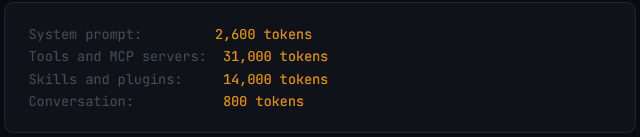
62,000 tokens consumed before i even said hello
that's 31% of my entire context window - gone. eaten by plugins that were supposed to make claude code better. and i hadn't written a single prompt yet

i spent that weekend deleting everything. every plugin. every skill. every MCP server i wasn't using daily. stripped it all back to built-in features only
my sessions got 3x longer. my outputs got sharper. my token spend dropped by half
turns out claude code already ships with everything i was paying plugins to do. i just never learned what was already there
我的 Claude Code 装了 23 个插件。8 个 skills。5 个 MCP 服务器。3 个自定义 agent 框架。还有一个我凌晨两点在 Twitter 上找到的上下文管理工具。
会话慢如牛。上下文窗口还没等我输入第一个真正的 prompt 就快被占满。我触达上限的速度比免费版用户还快。
然后我第一次运行了 /context,看到了这个分析:
62,000 个 token 还没打招呼就被消耗掉了
这占了我整个上下文窗口的 31% —— 就这么没了。被那些本来应该让 Claude Code 变得更好的插件吞掉了。而我还没来得及写一个 prompt。
那个周末我删掉了所有东西。所有插件、所有 skills、所有我不常用的 MCP 服务器。统统只保留内置功能。
我的会话时长变成了原来的 3 倍。输出更清晰了。token 花费减半。
原来 Claude Code 早就自带了那些我用插件才能实现的功能,只是我从没了解过而已。
here's every built-in feature that replaced a plugin i was using
1 // context management
this alone replaces 5 plugins
context is the single most important resource in claude code. you have a 200k token window. everything competes for it - your conversation, system prompts, tools, files claude reads, command outputs. when it fills up, claude starts forgetting things, hallucinating, and producing garbage
most people install plugins to "manage context." i had two. both were unnecessary because claude code has three built-in commands that do it better
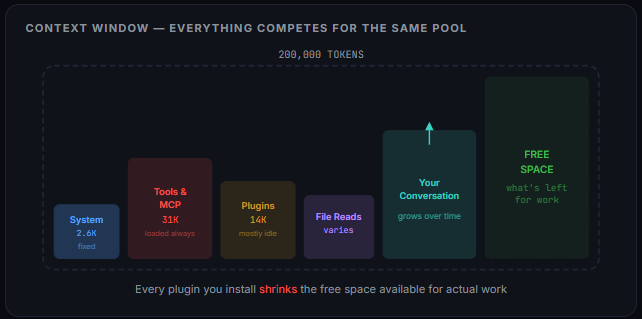
/context - see exactly where your tokens are going
this is the command i wish i'd known about on day one. type /context and you get a full breakdown: how many tokens the system prompt uses, how much your tools take, how much conversation history is eating, how much space you have left
/context
Context Usage claude-opus-4-6
51k/200k tokens (26%)

System prompt:     2.6k tokens (1.3%)
Skills/plugins:    0 tokens (0%)
MCP servers:       3.2k tokens (1.6%)
Conversation:      45k tokens (22.5%)
Available:         149k tokens (74%)
that's what my context looks like now - after the cleanup. before, the skills and plugins line alone was 14k tokens. that's 7% of my total context consumed by extensions sitting idle, waiting to be called, most of which i used maybe once a week
practical rule: run /context at the start of every serious session. if your baseline is above 30k before you type anything, you have a structural problem. fix that before doing any work
这里列出了所有替代了我之前所用插件的内置功能。
1 // 上下文管理
仅此一项就替代了 5 个插件。
上下文是 Claude Code 中最重要的资源。你有 200k token 的窗口。所有东西都在争抢——你的对话、系统提示、工具、Claude 读取的文件、命令输出。当窗口被占满,Claude 就会开始遗忘、产生幻觉、输出垃圾。
大多数人安装插件来“管理上下文”。我装过两个。都没必要,因为 Claude Code 有三个内置命令做得更好。
/context —— 精确查看你的 token 用在哪
我真希望第一天就知道这个命令。输入 /context,你会得到一个详细分解:系统提示用了多少 token、工具占了多少、对话历史消耗了多少、还剩多少空间。
/context
Context Usage claude-opus-4-6
51k/200k tokens (26%)

System prompt:     2.6k tokens (1.3%)
Skills/plugins:    0 tokens (0%)
MCP servers:       3.2k tokens (1.6%)
Conversation:      45k tokens (22.5%)
Available:         149k tokens (74%)
这就是清理后我现在的上下文状况。之前,仅 skills 和 plugins 一行就占了 14k token。也就是总上下文的 7% 被闲置等待调用的扩展消耗掉,而它们中的大多数我一周可能只用到一次。
实用规则:每次重要会话开始时运行 /context。如果你在输入任何内容之前的基线就超过 30k,那就存在结构性问题。干活之前先修好。
/compact - compress your conversation without losing context
this is the most underused command in all of claude code. experienced users run it every 20-30 minutes during active work. most people have never typed it once
when your conversation gets long, every new message costs more tokens because claude re-reads the entire history. by message 30, a single exchange burns 31x more tokens than your first one. /compact compresses all that history into a dense summary, freeing up space while keeping the important context
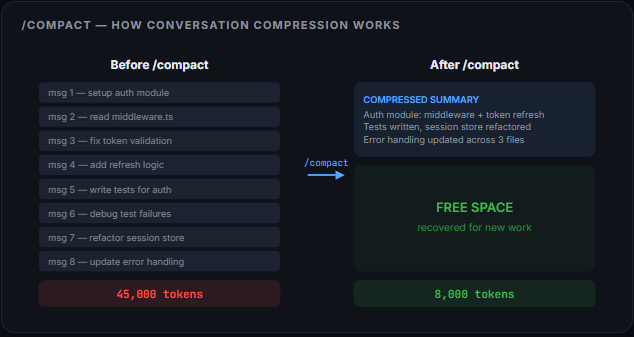
/compact focus on the auth module and current test failures
you can even tell it what to prioritize in the summary. "keep the database schema decisions, compress everything else." it's surgical
the difference between running /compact regularly and not running it: 30-minute sessions vs 3+ hour sessions on the same token budget
/compact —— 压缩对话但不丢失上下文
这是 Claude Code 中最被低估的命令。有经验的用户在工作中每 20–30 分钟就会运行一次。大多数人甚至一次都没敲过。
当对话变长,每条新消息都会消耗更多 token,因为 Claude 要重新读取整个历史。到第 30 条消息时,一次交换消耗的 token 是你的第一条消息的 31 倍。/compact 会把所有历史压缩成一份密集摘要,腾出空间并保留重要上下文。
/compact focus on the auth module and current test failures
你甚至能告诉它摘要中优先关注什么。“保留数据库 schema 决策,压缩其他内容。”简直是外科手术般精准。
定期使用 /compact 与不用的区别:同样的 token 预算下,是 30 分钟的会话,还是超过 3 小时的会话。
/clear - nuclear reset when you need it
/clear wipes everything. conversation history gone. fresh start. file edits stay on disk but the context is completely empty
the distinction matters:
- /compact keeps claude oriented on what happened.
- /clear starts from absolute zero.
- use /clear when you're switching to something completely unrelated.
- use /compact when you're continuing but need more room before i learned these three commands, i was installing plugins that did worse versions of the same thing while eating thousands of tokens in overhead. now i just type a slash command and it's done
/clear —— 一旦需要就来一次彻底重置
/clear 会清空一切。对话历史直接没了。重新开始。文件编辑保留在磁盘上,但上下文完全是空的。
要分清两者的区别:
- /compact 让 Claude 保持对之前发生事情的记忆。
- /clear 从绝对零开始。
- 切换到完全不相关的任务时,用 /clear。
- 继续当前工作但需要更多空间时,用 /compact。 在搞清楚这三个命令之前,我一直装插件来做同样的事,而且做得更烂,还额外吃掉几千 token 的开销。现在我只敲一个斜杠命令就完事了。
2 // session control
stop losing your work
i used to have a plugin that saved my session state so i could resume later. turns out claude code has had this built in the whole time
/resume - pick up exactly where you left off
your terminal crashed. your laptop died. you closed the window by accident. doesn't matter. type /resume and you get a list of every recent session. pick one and you're back exactly where you were
/resume
/resume "auth-refactor"
without arguments it opens a session picker. with a name it jumps straight there. you can even name sessions with /name so they're easy to find later
/rewind - undo anything, anytime
claude rewrote your auth module and made it worse. /rewind rolls everything back - code and conversation - to an earlier checkpoint
Esc Esc - the hidden superpower
single Esc stops generation. everyone knows that. but double Esc opens something most people have never seen - a scrollable list of every checkpoint claude code created during your session. every file state. every conversation state. fully restorable

four options: restore code and conversation, conversation only, code only, or summarize from checkpoint forward
this changes how aggressively you can experiment. zero risk. full undo. let claude try wild approaches - if they fail, rewind costs nothing. i had a plugin that did a worse version of this. deleted it the same day i discovered Esc Esc
2 // 会话控制
别再弄丢你的工作。
我以前有一个插件可以保存会话状态以便稍后恢复。结果发现 Claude Code 一直内置了这个功能。
/resume —— 精确回到上次离开的地方
终端崩溃了。笔记本没电了。你不小心关了窗口。都没关系。输入 /resume,你会看到所有最近会话的列表。选一个,你就回到原来的位置。
/resume
/resume "auth-refactor"
不带参数会打开会话选择器。指定名称会直接跳到那个会话。你甚至可以用 /name 给会话命名,方便以后查找。
/rewind —— 随时撤销任何操作
Claude 重写了你的认证模块,反而改得更糟。/rewind 会把一切——代码和对话——回退到更早的检查点。
Esc Esc —— 隐藏的超能力
按一次 Esc 停止生成。这谁都知道。但双击 Esc 会打开大多数人从未见过的东西——一个可滚动的列表,列出了 Claude Code 在本次会话中创建的每个检查点。每个文件状态、每个对话状态,都可以完全恢复。
四个选项:恢复代码和对话、仅对话、仅代码,或者从检查点向前进行总结。
这完全改变了你尝试的积极性。零风险。完整撤销。让 Claude 大胆去尝试——失败了也无所谓,回退几乎没成本。我以前有一个插件做的是这个的劣化版。发现 Esc Esc 当天我就把它删了。
3 // cost and model control
stop overpaying for simple tasks
/cost - know what you're spending in real time
if you're on the API, /cost shows your running spend for the current session. no plugin needed. no external dashboard. just type the command
/cost
Session costs:
Input tokens: 45,230
Output tokens: 12,450
Total cost: $0.47
Context window: 67% used
for Pro and Max subscribers, /stats shows your progress against your usage limits - both the 5-hour session limit and weekly cap
/model - switch models mid-session
this one saved me more money than any optimization trick i've ever tried
opus is powerful but expensive. it consumes roughly 2x the tokens of sonnet. and here's the thing: sonnet is the right choice for 80% of coding work. it's fast, capable, and cost-efficient. opus only matters for complex architectural decisions and deep debugging

/model lets you switch mid-session:
/model sonnet    # cheap and fast for routine work
/model opus      # deep reasoning for the hard stuff
/model           # see what's available
i used to run opus for everything - formatting files, writing tests, renaming variables. now i switch to sonnet for simple tasks and flip back to opus only when i need it. same work, half the cost
/effort - control how hard claude thinks
/effort low      # simple tasks, quick responses
/effort medium   # default
/effort high     # complex reasoning
renaming a variable doesn't need the same cognitive effort as designing a database schema. /effort lets you tell claude how much thinking to invest. low effort on simple tasks = fewer tokens = longer sessions
Option+T - toggle extended thinking per message
extended thinking is powerful but expensive. adds significant tokens to every response. Option+T toggles it on and off per message instead of leaving it always-on
quick formatting question? leave it off. complex architecture decision? flip it on. back to a simple rename? off again. the toggle takes 0.2 seconds. the menu path takes 4
3 // 成本和模型控制
别为简单任务多花冤枉钱。
/cost —— 实时掌握支出
如果你在用 API,/cost 会显示当前会话的实时花费。不需要插件,不用外部面板,直接敲命令就行。
/cost
Session costs:
Input tokens: 45,230
Output tokens: 12,450
Total cost: $0.47
Context window: 67% used
对于 Pro 和 Max 订阅用户,/stats 会展示你的使用进度——包括 5 小时会话上限和每周上限。
/model —— 会话中途切换模型
这个比我试过的任何优化技巧都省钱。
opus 强大但昂贵。它消耗的 token 大约是 sonnet 的 2 倍。关键是:80% 的编程工作用 sonnet 就对了。它快速、好用、成本低。opus 只适用于复杂的架构决策和深度调试。
/model 让你在会话中途切换:
/model sonnet    # 日常工作用,便宜又快
/model opus      # 复杂问题用,深度推理
/model           # 查看可用模型
我以前不管什么都用 opus——格式化文件、写测试、重命名变量。现在简单任务切 sonnet,需要时再切回 opus。同样的活,成本减半。
/effort —— 控制 Claude 的思考深度
/effort low      # 简单任务,快速响应
/effort medium   # 默认
/effort high     # 复杂推理
重命名变量和设计数据库 schema 所需的认知努力完全不同。/effort 让你告诉 Claude 该花多少心思去思考。简单任务用低努力 = token 更少 = 会话更长。
Option+T —— 逐消息切换扩展思考
扩展思考很强大但很贵,会给每条回复增加大量 token。Option+T 可以逐消息开关,而不是一直开着。
只是快速问个格式化?关掉。复杂架构决策?打开。又回到简单重命名?再关掉。开关只需 0.2 秒,菜单路径要 4 秒。
4 // project setup
10 minutes that save you hours
/init - let claude code set itself up
run /init in any project root and claude code generates a starter CLAUDE.md by scanning your codebase. it detects your stack, your file structure, your conventions, and writes a config file that every future session will read automatically
then customize it. add your conventions, your architecture decisions, your rules. the generated version is a starting point - you make it yours
/init           # generate CLAUDE.md from your codebase
/doctor         # verify everything is configured correctly
/doctor checks that your MCP servers are connected, your skills are loaded, your permissions are set right. run it after any config change
.claudeignore - keep junk out of context
just like .gitignore keeps files out of git, .claudeignore keeps files out of claude code's context window
# .claudeignore
node_modules/
.next/
.git/
*.log
dist/
coverage/
public/images/
every file claude reads eats tokens. every directory it scans costs context. .claudeignore is the simplest way to keep your sessions lean. i had a plugin that "optimized file reading." turns out .claudeignore does the same thing in 5 lines
4 // 项目设置
花 10 分钟,省下数小时。
/init —— 让 Claude Code 自己完成设置
在任何项目根目录运行 /init,Claude Code 会扫描你的代码库,生成一份初始的 CLAUDE.md。它能检测你的技术栈、文件结构、代码规范,并写出一份配置文件,后续每次会话都会自动读取。
然后定制它。加上你的规范、架构决策、规则。生成版只是一个起点——把它变成你自己的。
/init           # 根据代码库生成 CLAUDE.md
/doctor         # 验证所有配置是否正确
/doctor 会检查 MCP 服务器是否连接、skills 是否加载、权限是否正确。任何配置变更后运行一次。
.claudeignore —— 让垃圾远离上下文
就像 .gitignore 让文件远离 git,.claudeignore 让文件远离 Claude Code 的上下文窗口。
# .claudeignore
node_modules/
.next/
.git/
*.log
dist/
coverage/
public/images/
Claude 读取的每个文件都会消耗 token。它扫描的每个目录都会占用上下文。.claudeignore 是保持会话精简的最简单方式。我以前有一个“优化文件读取”的插件,结果发现 .claudeignore 用 5 行代码就能做到同样的事。
5 // code quality
better than most review plugins
/review - built-in code review
type /review and claude analyzes your recent changes. it checks for bugs, style issues, potential problems, and suggests improvements. more targeted and context-aware than asking "review my changes" in a freeform prompt
/review              # review all recent changes
/diff                # see exactly what changed
/security-review     # security-focused audit
/diff shows every change in your working directory. /security-review scans specifically for vulnerabilities. i was using a separate security plugin for this - deleted it after discovering /security-review does the same thing with zero overhead
/plan - think before coding
before claude starts writing code, reading files, and running commands, /plan makes it produce a structured breakdown of what it intends to do - without actually doing any of it
this saves tokens because you catch misunderstandings early. if claude plans to read six files when you only need two, you correct that before it burns context reading files it doesn't need
switch to plan mode before any complex task. review the plan. adjust. then execute. it's the difference between precise work and expensive guesswork
5 // 代码质量
比大部分审查插件都好。
/review —— 内置代码审查
敲 /review,Claude 会分析你最近的改动。它检查 bug、风格问题、潜在问题,并提出改进建议。比在自由形式的 prompt 里说“review my changes”更有针对性、更理解上下文。
/review              # 审查所有最近的改动
/diff                # 准确查看改了什么
/security-review     # 安全专项审计
/diff 展示工作目录中的每个改动。/security-review 专门扫描漏洞。我以前专门用了一个安全插件来做这个,发现 /security-review 零额外开销就能做同样的事后,马上删了。
/plan —— 先想清楚再写代码
在 Claude 开始写代码、读文件、运行命令之前,/plan 会生成一份结构化的意图分解——但并不真的执行任何操作。
这能节省 token,因为你可以在早期就发现理解偏差。如果 Claude 打算读六个文件而你只需要两个,你就可以在它浪费上下文去读不需要的文件之前纠正。
在任何复杂任务前切换到 plan 模式。审查计划。调整。然后再执行。这就是精确工作和昂贵的瞎猜之间的区别。
6 // keyboard shortcuts
the fastest way to do everything
these aren't commands, they're muscle memory. once you learn them, you'll never go back

Shift+Tab - cycle permission modes
claude code asks permission for every file edit and every command. safe but slow. Shift+Tab cycles through three modes:
- normal: asks permission for everything (safe, slow)
- auto-accept: executes without asking (fast, trust required)
- plan: shows what it will do but doesn't execute (review first) switch to auto-accept when you're iterating fast on code you understand. switch to plan when claude is doing something risky. back to normal for sensitive code. one keypress changes the entire interaction speed
Ctrl+R - search your prompt history
claude code keeps your full prompt history across sessions. Ctrl+R lets you fuzzy-search through all of it
you ran a complex prompt three days ago that worked perfectly. instead of retyping it or scrolling through terminal history: Ctrl+R, type two keywords, it's back. after a month of use your prompt history is a personal library of everything that worked
Ctrl+G - write prompts in a real editor
the terminal input is one line. writing a multi-paragraph prompt with specific instructions in a single terminal line is painful. Ctrl+G opens your default text editor - vim, VS Code, whatever you have set. write your prompt properly. save and close. it sends
mandatory for anyone writing detailed prompts. the terminal input wasn't built for paragraphs. your editor was
/btw - ask a side question without interrupting
claude is mid-task, three files deep in a refactor. you suddenly need to know something - "what file has the auth middleware?"
before /btw: cancel the whole task, ask your question, then re-prompt the original task. all context from the interrupted work - gone
/btw lets you ask a side question while claude keeps working. the answer comes without touching the main task's conversation history
6 // 键盘快捷键
最高效的操作方式。
这些不是命令,而是肌肉记忆。一旦学会,就再也回不去了。
Shift+Tab —— 循环切换权限模式
Claude Code 每次编辑文件、执行命令都会请求许可。安全但慢。Shift+Tab 循环切换三种模式:
- normal:每项操作都请求许可(安全、慢)
- auto-accept:直接执行不询问(快,但需要信任)
- plan:展示将会做什么但不执行(先审查) 在快速迭代你熟悉的代码时切到 auto-accept。Claude 要做有风险的操作时切到 plan。处理敏感代码切回 normal。一个按键就改变整个交互速度。
Ctrl+R —— 搜索 prompt 历史
Claude Code 跨会话保留你完整的 prompt 历史。Ctrl+R 让你能模糊搜索全部内容。
三天前你运行过一个复杂 prompt,效果很好。不用重新输入或在终端历史里翻找:Ctrl+R,输入两个关键词,它就回来了。使用一个月后,你的 prompt 历史就成了一个私有库,记录着所有成功过的操作。
Ctrl+G —— 在真正的编辑器中写 prompt
终端输入只有一行。在单行里写一个包含多段落、详细指令的 prompt 太痛苦了。Ctrl+G 会打开你的默认文本编辑器——vim、VS Code,随便你设的是什么。好好写你的 prompt。保存并关闭,就发送出去了。
对于写详细 prompt 的人来说这是必备功能。终端输入不适合写段落。你的编辑器才适合。
/btw —— 不打断就问个附带问题
Claude 正在做任务,重构了三个文件。你突然想知道——“哪个文件里有 auth 中间件?”
以前的做法:取消整个任务,问问题,再重新把原来的任务发一遍。被打断的工作上下文全没了。
/btw 让你在 Claude 继续干活的同时问一个附带问题。答案不会触碰主任务的对话历史。
7 // custom commands
build your own plugins in 30 seconds
here's the thing most people don't realize: the majority of plugins are just markdown files with instructions. you can build the same thing yourself in .claude/commands/
create a markdown file. put instructions in it. it becomes a slash command

# .claude/commands/fix-issue.md
Read GitHub issue #$ARGUMENTS
Create a branch named fix/issue-$ARGUMENTS
Write a fix with tests
Open a PR with a description referencing the issue
now /fix-issue 456 does exactly what a plugin would do - but with zero overhead, zero dependencies, and zero extra tokens consumed in your context window
# .claude/commands/review-pr.md
Review the current PR diff
Check for: security issues, missing tests, style violations
Provide a summary of changes and a pass/fail verdict
/review-pr. custom workflow. zero tokens in baseline overhead. you wrote it in 30 seconds
for teams: commit these to your repo in .claude/commands/. everyone gets the same workflows. treat them like code - review them in PRs, iterate on them, version them
this is literally what most plugin marketplaces sell you. except it's free, weighs nothing in context, and you control every word of it
7 // 自定义命令
30 秒打造你自己的插件。
大多数人没有意识到:大部分插件不过是带着指令的 markdown 文件。你完全可以在 .claude/commands/ 里自己构建。
创建一个 markdown 文件,把指令放进去,它就变成了斜杠命令。
# .claude/commands/fix-issue.md
Read GitHub issue #$ARGUMENTS
Create a branch named fix/issue-$ARGUMENTS
Write a fix with tests
Open a PR with a description referencing the issue
现在 /fix-issue 456 完全做到了插件能做的事——但零额外开销、零依赖、零额外 token 占用上下文窗口。
# .claude/commands/review-pr.md
Review the current PR diff
Check for: security issues, missing tests, style violations
Provide a summary of changes and a pass/fail verdict
/review-pr。自定义工作流。基线里不占半点 token。你 30 秒就写好了。
如果在团队里用:把这些文件提交到仓库的 .claude/commands/ 目录下,每个人都能用同样的工作流。把它们当成代码对待——在 PR 里审查、迭代、版本控制。
这不就是大多数插件市场卖给你的东西吗。关键它是免费的,在上下文里毫无负担,而且每个字都归你掌控。
the configuration paradox
here's what nobody in the claude code ecosystem talks about: every plugin, every skill, every MCP server you install adds baseline overhead to your context window. they're loaded at the start of every session whether you use them or not
claude code caps individual rule files at 6,000 characters and total combined rules at 12,000. those limits exist for a reason. anthropic's own docs say it plainly: "for each line, ask: would removing this cause Claude to make mistakes? if not, cut it"

i had 62,000 tokens of overhead before typing my first prompt. that's nearly a third of my entire context window - consumed by tools sitting idle
after the cleanup: 6,000 tokens of baseline overhead. 156,000 tokens available for actual work. sessions that used to die at 30 minutes now run for 3+ hours
the math is simple: fewer plugins = more context = longer sessions = better output
配置悖论
整个 Claude Code 生态里没人讨论这个:你装的每一个插件、每一个 skill、每一个 MCP 服务器,都会给你的上下文窗口增加基线开销。它们在每次会话开始时就被加载,不管你用不用。
Claude Code 把单个规则文件限制在 6,000 字符内,所有规则加起来限制在 12,000 字符。这些限制是有原因的。Anthropic 自己的文档说得很明白:“对于每一行,问自己:去掉这行会导致 Claude 犯错吗?如果不会,就删掉。”
之前我还没输入第一个 prompt 就有 62,000 token 的开销,那是将近我整个上下文窗口的三分之一——全被闲置的工具消耗了。
清理之后:基线开销只有 6,000 token。156,000 token 可以用来做实际工作。原来 30 分钟就结束的会话现在能持续 3 个多小时。
简单的数学:插件越少 = 上下文越多 = 会话越长 = 输出越好。
the exceptions (what's actually worth installing)
i'm not saying never install anything. i'm saying install with intention. here's what survived my cleanup:
superpowers - the only skills framework worth the overhead. structured dev methodology that actually changes how claude approaches work. 170k+ stars for a reason
karpathy's 4 lines - 4 behavioral rules that prevent claude from assuming, overcomplicating, touching code you didn't ask about, and shipping without verification. 60k+ stars
context-mode MCP - if you do use MCP servers, this one sandboxes their output so they don't dump 10,000 tokens of raw JSON into your conversation. routes tool outputs into a separate knowledge base. your context stays clean
three extensions. total overhead: ~4,000 tokens. everything else? built-in commands that cost zero
例外(真正值得安装的)
我不是说永远别装东西。而是说要有目的地安装。以下是我清理后幸存下来的:
superpowers —— 唯一值得开销的 skills 框架。结构化的开发方法论,确实改变了 Claude 处理工作的方式。170k+ 星,肯定有原因。
karpathy's 4 lines —— 4 条行为规则,防止 Claude 假设、过度复杂化、碰你没要求的代码、不经验证就交付。60k+ 星。
context-mode MCP —— 如果你确实要用 MCP 服务器,这个可以沙箱化它们的输出,避免把 10,000 token 的原始 JSON 直接倾倒进你的对话。将工具输出路由到独立的知识库。你的上下文保持干净。
三个扩展。总开销大约 4,000 token。其他一切?免费的内置命令。
the full list

every single one is built in. every single one costs $0. every single one is available right now in your terminal
stop installing plugins. start using what's already there
follow me @regent0x_to study and research only pure alpha thx for reading. don't forget to bookmark this
完整清单
每一项都是内置的。每一项都不花钱。每一项现在就能在你的终端里使用。
别再装插件了。开始用已经有的东西。
关注我 @regent0x_to,只研究纯 alpha。谢谢阅读,别忘了收藏。