The harness is all you need (mostly)
GitHub developer advocate Burke Holland argues that with AI coding, your biggest productivity lever is mastering the harness—the shared agent interaction/execution framework behind GitHub Copilot CLI, the Copilot app, and IDEs—not chasing new models, MCPs, or clever prompts. The post walks through a repeatable 8-step workflow: start with the Copilot CLI/App and enable YOLO mode (allow-all) inside a Codespaces sandbox; prototype aggressively with one prompt that generated 20 date-picker mockups in a single HTML file or Mermaid diagrams for API options; refine requirements in /plan mode (optionally with the 'grill-me' skill); implement in Autopilot, which automatically dispatches subagents like Explore on small models and General Purpose on larger ones; then iterate via human reviews and finish with a Rubber Duck review from a different model family (e.g., GPT-5.6 Terra asks Sonnet), optionally looping with /autopilot until diminishing returns. The article also advises keeping one model and reasoning level fixed to benefit from prompt caching, running YOLO mode only in sandboxes, and never settling for 'good enough' output.
A practical GitHub Copilot workflow for prototyping, planning, implementing, and reviewing software without chasing every new AI tool.
If you’re feeling overwhelmed by AI right now, you’re not alone.
Every day it seems there is a new tool, new MCP, new model, new skill, new workflow, new feature, new social post that is some form of “Hey look! I have completely figured out AI with this one weird prompt.”
I…don’t believe you.
I work with AI every single day, and what I’m finding is that less is way more. It’s not about what I install or configure or trick the agent into doing that makes any real difference. That stuff is interesting, but at the end of the day it feels like gimmicks.
I see the biggest gains in my productivity from how I use the harness and how well I understand it.
So in this post, I’m sharing you a simple workflow that you can use to drastically improve your effectiveness with AI just by using existing features of GitHub Copilot. No weird prompts. No skill everyone else seems to know about. Just the harness. The harness is all you need—mostly.
一个务实的 GitHub Copilot 工作流:用原型、规划、实现与审查完成软件开发,而不是追逐每一个新的 AI 工具。
如果你现在被 AI 搞得不知所措,你不是一个人。
每天似乎都有新工具、新 MCP、新模型、新技能、新工作流、新功能、新帖子,都是某种“快看!我用一个奇怪提示词彻底搞定了 AI。”
我……不信。
我每天都在用 AI,我发现少即是多。真正起作用的不是安装了什么、配置了什么,或想了什么办法让 agent 干活。这些东西有意思,但归根结底像是噱头。
我效率上最大的提升,来自我如何使用 harness,以及我对它理解有多深。
所以在这篇文章里,我想分享一个简单的工作流,只靠 GitHub Copilot 的现有功能就能大幅提升你使用 AI 的效果。不需要奇怪的提示词,不需要别人似乎都知道的技能。只需要 harness。Harness 就是你需要的全部——基本上。
This is an obvious one, right? Pick a tool! It’s so easy!
But even within the GitHub Copilot family, there are a lot of options. These include the CLI, the new GitHub Copilot app, VS Code, Visual Studio, and JetBrains, just to name a few.
The good news is that these experiences are increasingly being centralized on the same harness. The details can differ by tool, but the core workflow is consistent. Learn the harness once, use it everywhere.
That said, I do believe that learning the harness is key, and the best way to learn it is to be as close to it as possible. So if you are just starting out, I’d recommend beginning with the GitHub Copilot CLI. It’s a terminal interface, which means it’s just text. There isn’t much UI to learn. You enter a prompt. The agent does things. But the interaction is more direct, immediate, and, frankly, very satisfying.
For this demonstration, I’ll be using the new GitHub Copilot app. But the harness that app uses is the exact same thing you’ll be using if you are using the GitHub Copilot CLI, Visual Studio Code and many other places you can find GitHub Copilot.
这是个显而易见的问题,对吧?选一个工具!多简单!
但即便只在 GitHub Copilot 家族里,选项也很多。比如 CLI、新的 GitHub Copilot 应用、VS Code、Visual Studio、JetBrains,等等。
好消息是,这些体验越来越集中到同一个 harness 上。不同工具的细节可能不同,但核心工作流是一致的。学一次 harness,到处都能用。
话虽如此,我确实认为学会 harness 是关键,而学习它的最好方式就是尽可能贴近它。所以如果你刚起步,我建议从 GitHub Copilot CLI 开始。它是终端界面,意味着只有文本。UI 要学的不多。你输入提示词,agent 干活。但那种交互更直接、更即时,而且说实话,非常爽。
本文的演示我会用新的 GitHub Copilot 应用。但这个应用使用的 harness,和你用 GitHub Copilot CLI、Visual Studio Code 以及其他许多能找到 GitHub Copilot 的地方,是完全一样的。
- Turn on YOLO mode
YOLO mode is also known as “Allow All.” This lets the agent execute any command without asking permission. This can vary depending on the tool you are using, but for most it is simply an /allow-all command in the chat. Otherwise, the agent is going to stop and wait for your approval every single time it needs to do some work.
Agents need autonomy for you to see an increase in productivity. If you have to approve everything the agent does, you might as well just do it yourself. Besides, that’s a miserable user experience. Nobody wants to be relegated to sitting at a desk pressing the “Approve” button all day. And pressing “Approve” over and over just trains you not to read what you are being asked to approve, which defeats the purpose.
You want to be safe with agents, though. Bad things happen to good people. When using YOLO mode, you don’t want to run the agent on your local machine. This is especially true when you are using them at work—data is private on your organization’s systems, and mistakes can be costly.
Fortunately there are a bunch of options for running agents in sandboxes. An easy one to get started with is GitHub Codespaces or development containers.
- 开启 YOLO 模式
YOLO 模式也叫“全部允许/Allow All”。它让 agent 无需询问就能执行任何命令。具体取决于你用的工具,但在大多数工具里,就是在聊天中发一个 /allow-all 命令。否则,agent 每做一步都要停下来等你批准。
想看到生产力提升,agent 需要自主权。如果每一步都要你批准,那还不如自己干。而且那是一种很糟糕的体验:没人想整天坐在桌前按“批准/Approve”按钮。一遍遍按“Approve”只会让你不再去读要批准的内容,这反而违背了初衷。
不过和 agent 打交道还是要注意安全。好人也会遇到坏事。使用 YOLO 模式时,不要在本机直接跑 agent,尤其是在公司使用时——组织系统里的数据是私密的,犯错代价可能很高。
好在有很多沙箱选项可以运行 agent。一个容易上手的是 GitHub Codespaces 或开发容器。
- Start with a prototype
One of the most magical things about AI is that you can easily prototype anything and everything up front. Historically, this was not the case. Prototyping was a full phase of a project, and were often a luxury. Now, you can make one with a prompt.
Let’s look at a few examples.
Let’s say we want to build a date picker web component. That seems straightforward, but it’s actually quite complex. Think of all the different things you might want to do with it.
How do you navigate within the component?
What does the selected date look like?
What does a selected range look like?
How does the user navigate between days, months, and years?
Start with a simple prototype and get several variations. I usually start with something like this:
Give me 20 mocks for a date picker web component. Put them all in an HTML file so I can compare.
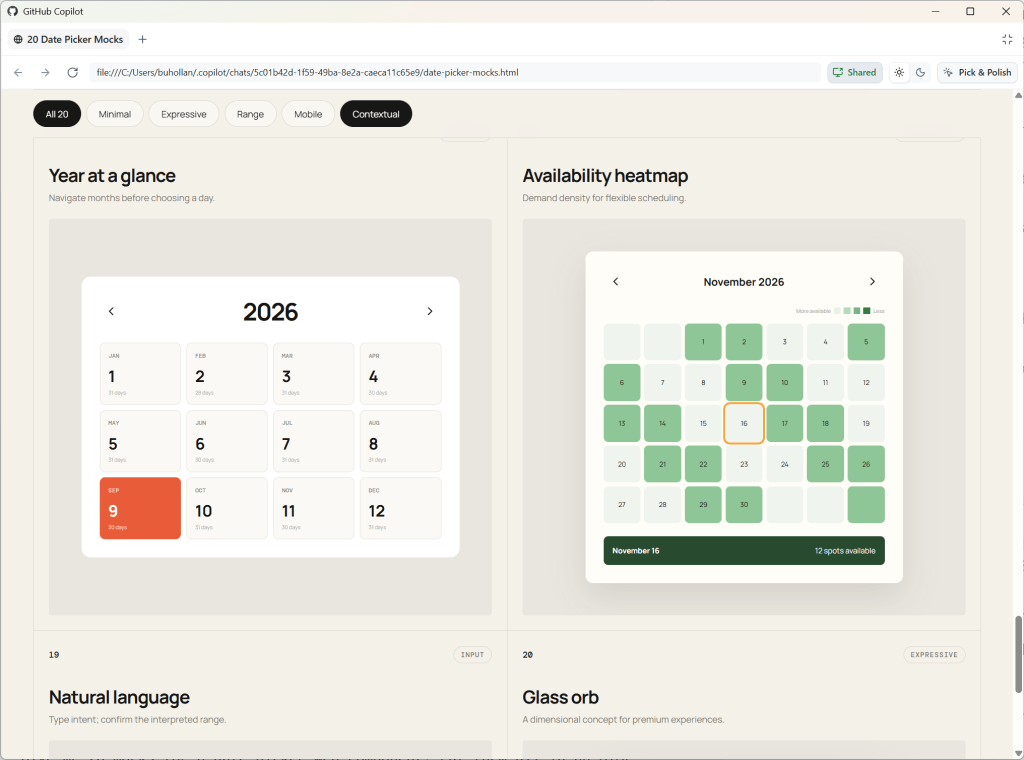
In this case, the AI generated a bunch of different layouts, but one of them is a mock where it starts with the year view. That’s interesting. I would like my date picker to enable the user to zoom out to the year, then into the month, and finally to the day. These are the kinds of things you don’t consider until you see them.
As humans, we process sensory-rich models like images, shapes, and tangible layouts much faster than dense text. Creating low-effort prototypes early on helps make complex concepts immediately intuitive.
- 从原型开始
AI 最神奇的一点是,你可以轻松地预先为任何东西做出原型。过去不是这样。原型制作曾是项目的一个完整阶段,而且常常是奢侈的。现在,一条提示词就能生成。
我们看几个例子。
假设我们要构建一个日期选择器 web 组件。这看起来很简单,实际上相当复杂。想想你可能想用它做的所有事情。
如何在组件内导航?
选中的日期长什么样?
选中的范围长什么样?
用户如何在日、月、年之间导航?
从一个简单原型开始,做出几个变体。我通常会从这样的提示开始:
给我 20 个日期选择器 web 组件的 mock,全部放进一个 HTML 文件里,方便我对比。
这种情况下,AI 生成了许多不同布局,其中一个是先从年份视图开始的 mock。这很有意思。我希望我的日期选择器能让用户先缩放到年份,再进入月份,最后到日。这类东西你不看到是不会想到的。
作为人类,我们处理图像、形状、可触摸布局这类高感官信息的模型,比处理密集文本快得多。早期做出低成本原型,能让复杂概念立刻变得直观。
And this applies to non-visual tasks as well.
For instance, if I want to add a new API endpoint, I’ll still create a visual prototype to understand the requirements and constraints before diving into the implementation.
Create a visual mockup of the API for this project. Add five options for how we could handle a new API endpoint that allows the user to download their analytics data.
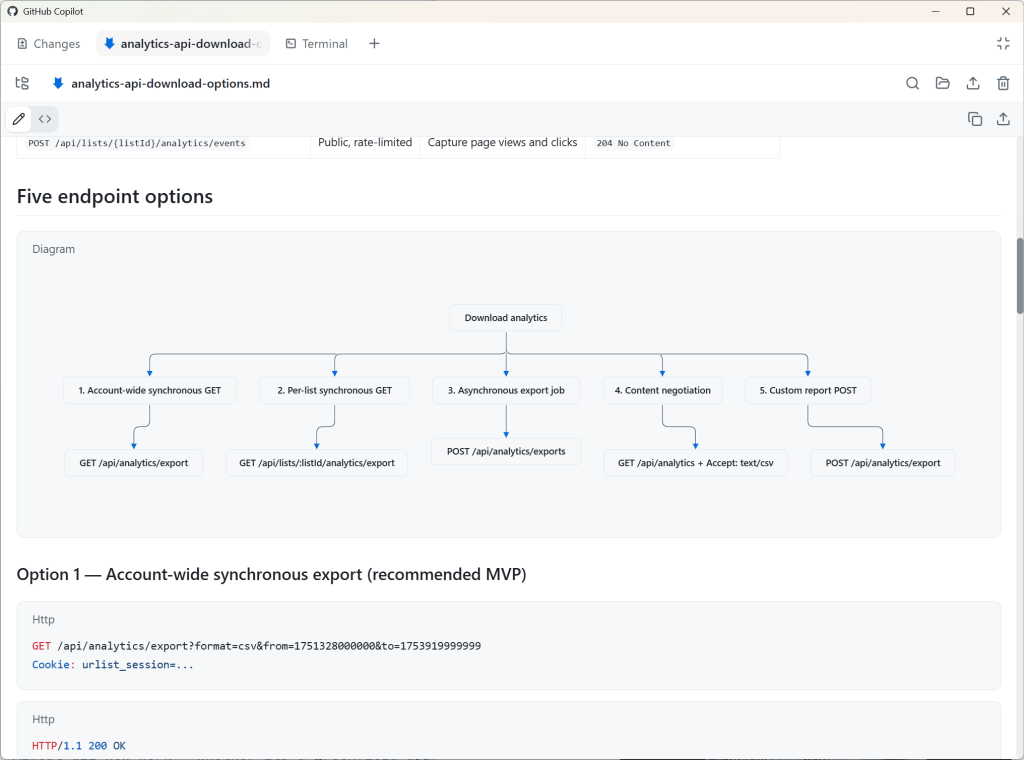
Since the GitHub Copilot app supports Mermaid diagrams, the agent renders this as Markdown, mapping out five different ways we could implement this API endpoint.
When working with agents, it’s easy to forget that everything is nuanced. Prototyping helps uncover the nuances up front, so you avoid spending valuable time and tokens on rework.
这一点也适用于非视觉任务。
例如,如果我想新增一个 API endpoint,我也会先做一个可视化原型,理解需求和约束,再动手实现。
为这个项目创建一个 API 可视化 mockup。给出五种方案,说明我们可以怎么处理一个允许用户下载分析数据的新 API endpoint。
由于 GitHub Copilot 应用支持 Mermaid 图,agent 会把它渲染为 Markdown,画出实现这个 API endpoint 的五种不同方式。
和 agent 一起工作时,很容易忘记一切都有细微差别。原型能提前把这些细微差别暴露出来,这样你就不会把宝贵的时间和 token 浪费在返工上。
I recommend using a medium-sized model, such as GPT 5.6 Terra or Claude Sonnet, on medium reasoning for most work. I also recommend you stick with whatever model you choose here for the duration of this particular feature, bug, or enhancement. Prompt caching will save you tokens. As long as you don’t switch to a different model or reasoning level, your previous chats remain cached with the model, giving you a discount on future requests.
我建议大多数工作使用中型模型,比如 GPT 5.6 Terra 或 Claude Sonnet,并把推理强度设为 medium。我还建议,在完成这个特定功能、bug 或改进的整个期间,坚持使用你在这里选择的模型。提示缓存会帮你省 token。只要你不换成不同模型或不同推理等级,你之前的聊天记录就会留在该模型的缓存里,后续请求能享受折扣。
- Plan methodically
Now that you know what you actually want versus what you initially thought you wanted, it’s time to plan out the implementation.
Switch to plan mode in GitHub Copilot without starting a new session.
/plan Build a date picker web component. I want the user to be able to zoom in and out of years, months, and days.
That’s a pretty vague prompt, and you’ll likely have more context for the model than I do here, but this is just a demonstration. If you don’t have more context, it’s OK. That’s exactly what this step is for.
In theory, you can get a model to one-shot anything if you compose the perfect prompt with the perfect context in the perfect order. In theory.
But none of us can do that. Planning helps you get closer to that ideal, though, by asking all of the questions that you would need to answer yourself along the way if you were to build this out by hand:
Can the start and end date be the same?
Are partial selections valid?
Should users be able to clear the date?
Should “today” always be a visible option?
Is manual entry allowed?
What format is the date stored in?
Should pasting in dates be allowed?
The list goes on and on. You cannot possibly think of all of these edge cases, but the model can help you identify many of them.
You can make plan mode even more aggressive in the sheer number of questions and edge cases it asks about by installing the “grill-me” skill from Matt Pocock.
/plan /grill-me Build a date picker web component. I want the user to be able to zoom in and out of years, months, and days.
- 有条理地规划
现在你已经知道实际想要的是什么,以及当初以为自己想要的是什么,该规划实现了。
在 GitHub Copilot 中切换至计划模式,但不要开启新会话。
/plan Build a date picker web component. I want the user to be able to zoom in and out of years, months, and days.
这是一个相当模糊的提示。你手头给到模型的上下文大概会比我这里多,但这只是演示。如果你没有更多上下文,也没关系。这正是这一步要做的事。
理论上,如果你用完美的提示词、完美的上下文、完美的顺序,可以让模型一次性生成任何东西。理论上。
但我们没人能做到。规划能帮你接近这个理想状态,办法就是把那些你手工实现时一路需要回答的问题,全部问出来:
开始日期和结束日期能相同吗?
部分选中有效吗?
用户能不能清除日期?
“今天”是不是始终可见的选项?
允许手动输入吗?
日期以什么格式存储?
允许粘贴日期吗?
这样的问题没完没了。你不可能想到所有边界情况,但模型能帮你识别出很多。
你还可以安装 Matt Pocock 的“grill-me”技能,让计划模式在提问数量和边界情况上更加激进。
/plan /grill-me Build a date picker web component. I want the user to be able to zoom in and out of years, months, and days.
This planning step is critical. The point is not for you to just accept every suggestion from the AI. If you do that, you are negating the value of this planning process. The point is for you to deeply engage with the problem and guide the model. This is where your expertise comes into play.
You can also ask the model questions back. In the screenshot below, it asks me about “non-contiguous dates.” I’m pretty sure I know what the model means here, but I’m going to ask for clarification so we’re on the same page.
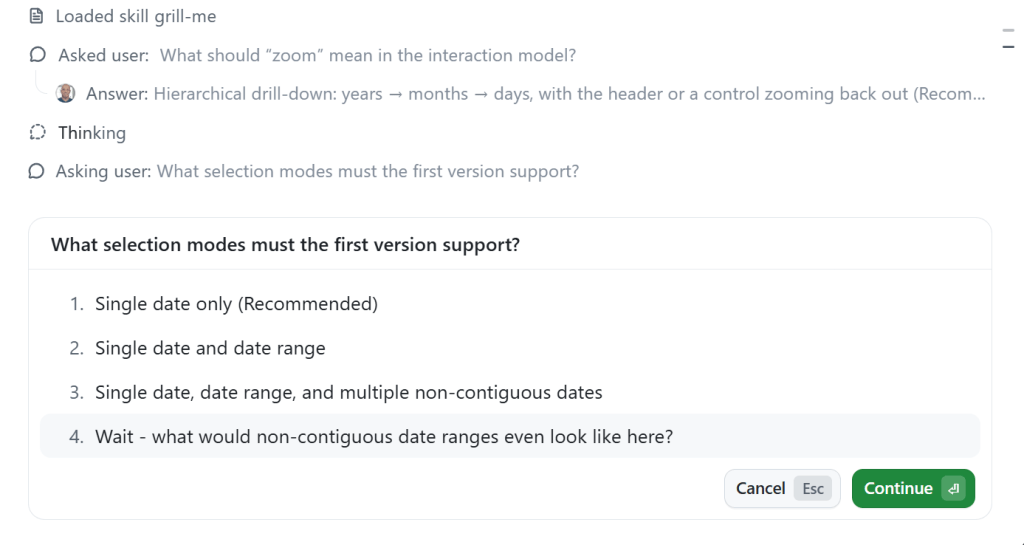
The planning process will keep going even if you interrupt to ask clarifying questions, etc.
这一步规划至关重要。重点不是让你全盘接受 AI 的每一条建议。如果那样做,你就否定了整个规划过程的价值。重点是让你深入思考问题,引导模型。这正是你的专业和经验发挥作用的地方。
你也可以反过来向模型提问。下面这张截图中,它问我关于“non-contiguous dates”的问题。我很确定自己知道模型在说什么,但我还是要请它澄清,确保我们理解一致。
即便你中途打断去问澄清问题,规划过程也会继续。
- Implement with Autopilot
Once the plan is finished, GitHub Copilot will likely prompt you to switch to Autopilot and start implementing the plan.
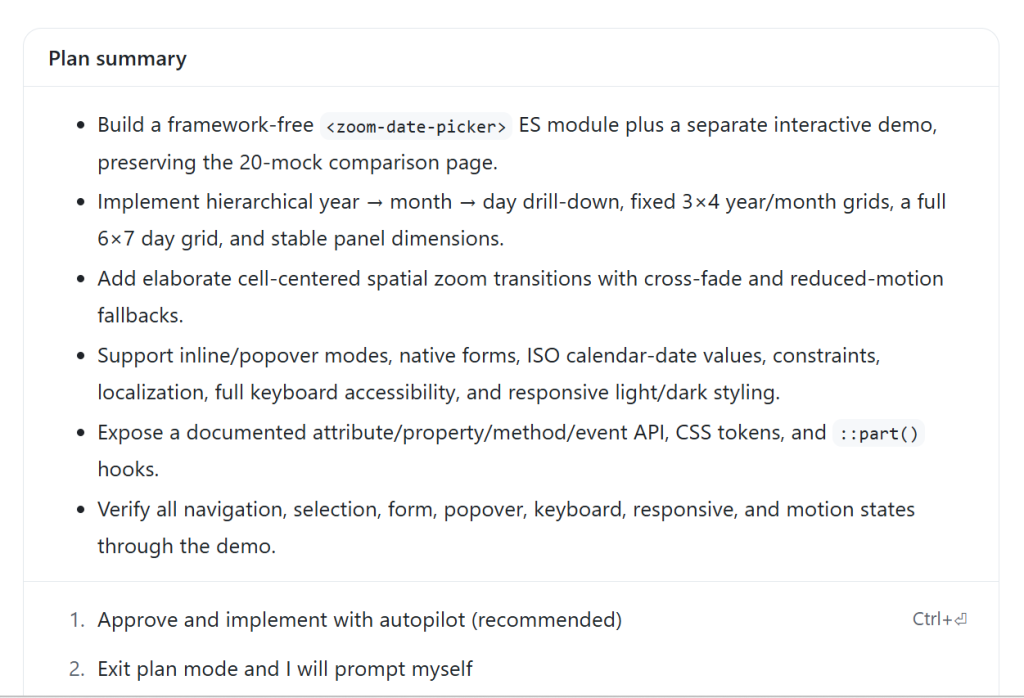
Autopilot is a built-in loop. It forces the model to continue working by ensuring that it has actually done what it said it would do—which in this case is completing every item in the plan.
GitHub Copilot will automatically act as an orchestrator during this phase. If it needs to read files in the codebase, it will use the “Explore” subagent with a small model. If it deems an action relatively complex, it will likely choose the “General Purpose” subagent with a larger model. While you can get fine-grained control over orchestration in GitHub Copilot with custom agents and instructions, you don’t need to do anything special to get the advantages of subagents and multimodel workflows. This works out of the box, even if you did not know that any of these things existed.
- 用 Autopilot 实现
计划完成后,GitHub Copilot 很可能会提示你切换到 Autopilot,开始实现计划。
Autopilot 是一个内置循环。它通过确认模型确实做了它声称要做的事——在这个例子里就是完成计划中的每一项——来迫使模型继续工作。
在这个阶段,GitHub Copilot 会自动扮演编排者的角色。如果需要读取代码库中的文件,它会使用“Explore”子 agent 搭配一个小模型。如果它觉得某个操作相对复杂,很可能会选择“General Purpose”子 agent 搭配更大的模型。虽然你可以用自定义 agent 和指令在 GitHub Copilot 里对编排做细粒度控制,但即便不做任何特殊设置,你也能享受到子 agent 和多模型工作流的好处。这些开箱即用,哪怕你之前根本不知道它们存在。
- Human review and iteration
This is where you get your dopamine hit. You get to see what the AI has created.
But it’s likely that you won’t get exactly what you wanted. That’s normal and expected. The model cannot read your mind, and it is error-prone. Iterate with the model until you get what you actually want. Whether that’s just code or an improved UI, this is the part where your taste will decide the quality of the final product.
For instance, here’s the date picker that GitHub Copilot gave me.
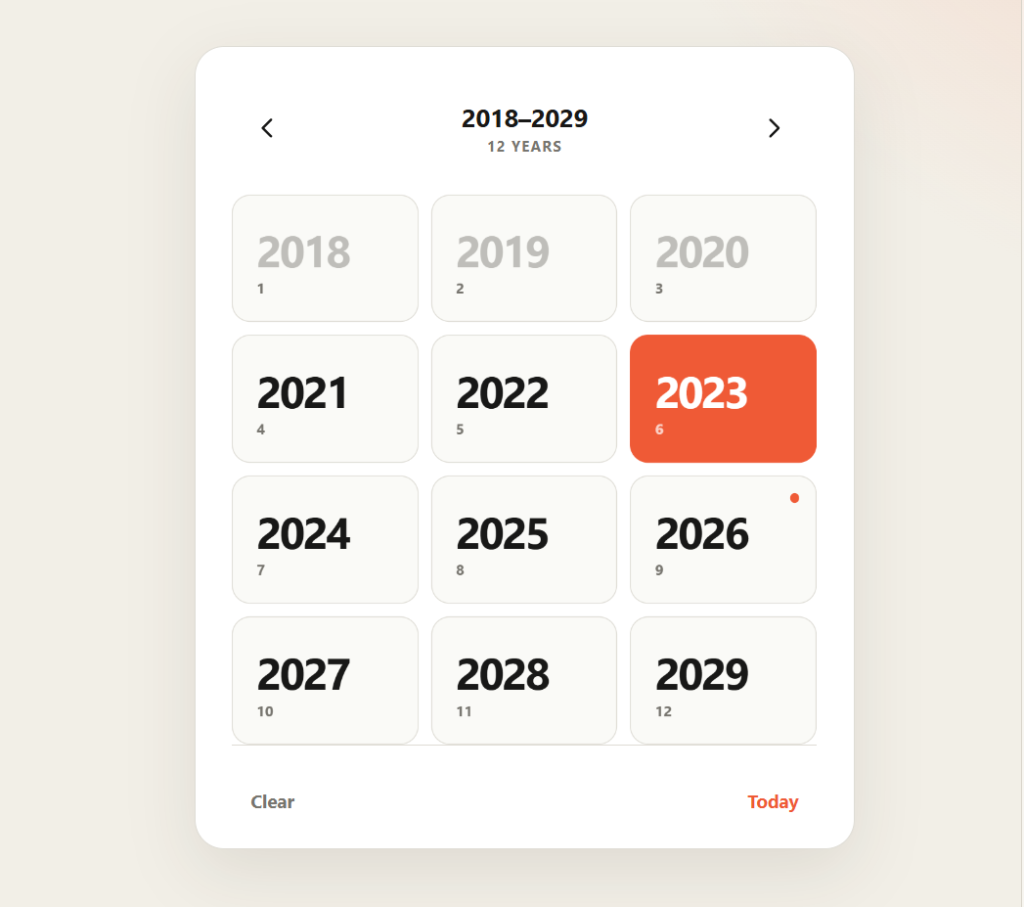
Already I can see it has some issues:
Animations are inconsistent
Text is unreadable when hovering over a selected date because of color contrast
It doesn’t need to say “12 YEARS” at the top.
When I click “Today”, it doesn’t take me to the day if I’m in the month or year view.
Also, I don’t love the design. It looks a little too much like it was created by AI—because it was!
- 人工审查与迭代
这就是你会得到多巴胺刺激的时候:终于能看到 AI 做出的东西。
但你很可能得不到完全想要的结果。这很正常,也在意料之中。模型读不了你的心,而且容易出错。和模型一起迭代,直到得到真正想要的东西。不管只是代码,还是改进后的 UI,这个阶段由你的品味决定最终产品的质量。
比如,这是 GitHub Copilot 给我的日期选择器。
我已经看到一些问题:
动画不一致
悬停在选中日期上时,因为颜色对比度问题,文字看不清
顶部不需要写“12 YEARS”。
当我点击“Today”时,如果在月份或年份视图,它不会跳到当前日期。
另外,我不喜欢这个设计。它看起来太像 AI 生成的了——因为它确实就是。
So here we’re just in follow-up mode. I’m going to use a CSS framework I created called Postrboard. I add it as a skill that just points to the CSS and tells the agent how to use it. You can feel free to install it yourself if you’d like to use it, or you can pick any other CSS framework out there that you like. Giving the model some design guidance is quite helpful, and often a CSS framework is all you need.
ok - we don't need a landing page here - just the component, output and settings panel in a minimal setting. Use the /postboard skill for the design and colors.
For the date picker, when I click on the day, it tries to zoom in, but can't because there is nothing to zoom to. There should be no zoom there.
It doesn't need to say "Zoom Out" at the top
When I mouse over a month or year that contains the selected day, I cannot read the hover text.
When I click "Today" it should take me to that day view, even if I'm on the month or the year.
The months don't need numbers under them and they don't need to be in boxes
Same goes for years. And it doesn't need to say "12 years" at the top."
Notice how conversational this is. Don’t overthink it. When you’re fixing a bunch of small things like this, just give it to the model. If you’ve got the context, you’ve got the prompt.
The most important thing is not to settle for AI output that is “good enough.” Insist on quality. Be ruthless about it. That part is still your responsibility, and knowing what a quality result is from something that isn’t is the value that you bring. No AI will ever replace your human touch and creativity.
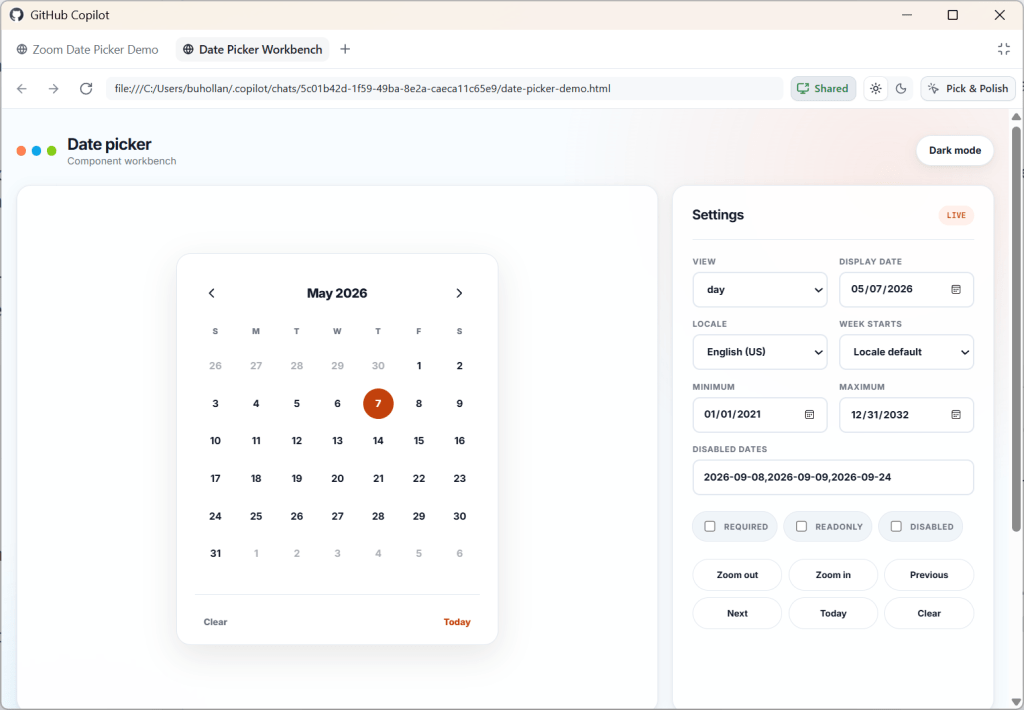
Here’s what my final date picker looks like. Scroll to the end of this post to see it in action.
所以这里我们只是处于后续跟进模式。我会用我自己建的一个叫 Postrboard 的 CSS 框架。我把它作为 skill 添加,这个 skill 直接指向 CSS,并告诉 agent 怎么使用。你想用的话可以自己安装,也可以选任何你喜欢的 CSS 框架。给模型一些设计指导很有帮助,而且通常一个 CSS 框架就够了。
ok - 我们这里不需要落地页,只要在极简环境里放组件、输出和设置面板。用 /postboard skill 来做设计和配色。
对日期选择器来说,当我点击某一天时,它会尝试放大,但因为没有可放大的内容就失败了。那里不应该有放大操作。
顶部不需要写“Zoom Out”。
当我用鼠标悬停在包含选中日期的月份或年份上时,悬停文字看不清。
当我点击“Today”时,即使我在月份或年份视图,也应该跳到当天视图。
月份下面不需要数字,也不需要放在方框里。
年份也一样。而且顶部不需要写“12 years”。
注意这些反馈有多口语化。别想太多。当你要修一大堆类似的小问题时,直接丢给模型就好。只要你有上下文,你就有提示词。
最重要的一点是,不要满足于“还行”的 AI 输出。要追求质量,要毫不留情。那部分仍然是你的责任,而分辨什么是高质量结果、什么不是,正是你带来的价值。没有 AI 能取代你的人情味和创造力。
这就是我最终日期选择器的样子。滚动到这篇文章末尾,可以看它的实际效果。
- Rubber duck the result
After you’ve iterated and are happy with what you’ve created, it’s time to do a final review.
Request a Rubber Duck review from GitHub Copilot. You can do this just by asking for it:
Perform a rubber duck review on this date picker component implementation
In a Rubber Duck review, GitHub Copilot will request a review from a model of a different AI family. For instance, since I was using GPT 5.6 Terra, it requested a review from Sonnet. Different models were trained on different data, so they have different blind spots. A Rubber Duck review helps identify potential issues that might be missed by a single model.
Note that you can use this at any point in this workflow. You can rubber duck prototypes. You can rubber duck plans. It all just depends on if you want a second AI review on something.
And if you want to take this a step further, you can combine rubber duck with Autopilot to get the models to work together in a loop to improve the final result.
/autopilot rubber duck this date picker implementation. When you have the result, review it carefully and make any necessary adjustments. Repeat the rubber duck review until both you and the reviewing model agree that the only items that remain have diminishing returns.
After this step, you will have an even more refined result than before and will have likely identified many extra edge cases. This step does cost more tokens, but you are really battle-hardening the code. Think of it as an investment in your future self who won’t have to deal with these issues because you caught them now.
- 对结果做橡皮鸭评审
迭代完并且对结果满意后,就该做最终审查了。
请 GitHub Copilot 做一次橡皮鸭评审。你只需要直接要求它:
对日期选择器组件实现做一次 rubber duck review。
在 Rubber Duck review 中,GitHub Copilot 会请求另一个 AI 家族的模型来做评审。比如,因为我用的是 GPT 5.6 Terra,它请来了 Sonnet。不同模型用不同数据训练,所以盲点也不同。Rubber Duck review 有助于发现单一模型可能漏掉的问题。
注意,你可以在工作流的任何节点使用这个功能。你可以对原型做 rubber duck,也可以对计划做 rubber duck。全看你是否想对某个东西获得第二个 AI 的意见。
如果你想更进一步,可以把 rubber duck 和 Autopilot 结合起来,让多个模型在一个循环里协作,改进最终结果。
/autopilot rubber duck this date picker implementation. When you have the result, review it carefully and make any necessary adjustments. Repeat the rubber duck review until both you and the reviewing model agree that the only items that remain have diminishing returns.
这一步之后,你会得到比之前更完善的结果,而且很可能已经发现了许多额外边界情况。这一步确实会多花 token,但你是在真正锤炼代码。把它看作对未来的自己的一笔投资:因为你现在抓住了这些问题,将来的你就不用再处理它们。
- Profit
At this point, you’re ready to stage and commit, or move on to the next feature you want to add along with this pull request.
I’d recommend starting a new chat session for anything you do next that doesn’t have to do with this date picker. You can think of chat sessions as being topical; if you start to diverge too much from the main topic, it’s probably time for a new session.
Here’s the final result from my workflow building the date picker for this post.
I realize that this is a bit of a contrived example, but can we all just pause for a moment and marvel at what we’re able to pull off with AI now? Building a date picker used to be one of the hardest things you could try to do. Just ask any of the heroes out there who have built them.
- 收获成果
到了这一步,你可以暂存并提交,或者继续在这个 pull request 里添加下一个功能。
我建议,接下来要做的事情只要和这个日期选择器无关,就新开一个聊天会话。你可以把聊天会话看作有主题的;如果开始偏离主线太多,多半就是该开新会话的时候了。
这就是我为这篇文章构建日期选择器的工作流最终成果。
我知道这个例子有点刻意,但能不能先停一下,好好感叹一下我们现在能用 AI 做到什么?构建日期选择器曾经是最难尝试的事情之一。随便问问那些做过日期选择器的高手吧。
Things don’t have to be complicated
This simple workflow will be enough for most people. The simplicity also helps you multitask. It’s easier to reason about what agent is in what state and what you were doing last when you keep things simple. Your context window is limited too.
There is so much happening in the AI space right now. There is no upper limit on the things that you can build and experiment with. You can add MCP servers, skills, instructions, and custom agents. You can set up workflows and loops, create agents that prompt agents, and stand up entire virtual dev teams.
But keep in mind that nobody really knows what they are doing right now. We’re all figuring this out as we go. A lot of what is today’s magical incantation for AI will be tomorrow’s anti-pattern.
Just focus on getting a repeatable, high-quality result in the simplest way that you can. Learn the harness and you’ll be just fine.
事情不必复杂
这个简单的工作流对大多数人来说已经够了。简单还能帮你更好地多任务并行。当事情保持简单时,你更容易想清楚哪个 agent 处于什么状态、你上一步在做什么。你的上下文窗口也有限。
现在 AI 领域发生了太多事情。你可以构建和实验的东西没有上限。你可以添加 MCP 服务器、skills、instructions 和 custom agents。你可以搭工作流和循环,创建能提示 agent 的 agent,甚至拉起整个虚拟开发团队。
但要记住,现在其实没人真正知道自己在做什么。我们都是边做边摸索。今天很多被视为 AI 神奇咒语的做法,明天可能就成了反模式。
专注于用最简单的方式获得可重复、高质量的结果。学会 harness,你就没问题。