Unibase Memory: Share Context Across ChatGPT, Claude, and Gemini
When using multiple AI tools, context is lost between sessions, wasting hours re-explaining. Unibase Memory is a Chrome extension that captures, organizes, and injects memory across ChatGPT, Claude, and Gemini, enabling shared context. The post covers a 5-step setup from installation to advanced workflows (research-to-draft, persistent brand voice, cross-tool building), with local encryption and optional decentralized sync. For engineers and creators juggling multiple AI models, it offers a practical solution to AI memory fragmentation.
How To Build a Multi-Model AI Team in 2026
By @sairahul1 · 2026-07-16T06:33:16.000Z
You are losing hours every week to a problem nobody talks about.
You use Claude to research. ChatGPT to write. Gemini to explore.
And every time you switch tools, you start from zero.
Copy. Paste. Summarize. Explain again.
The workflow looks automated.
The memory is still manual.
You are the API between your own AIs.
There is a fix. And it takes 5 minutes to set up.
如何在2026年组建多模型AI团队
作者:@sairahul1 · 2026-07-16T06:33:16.000Z
你每周都因一个没人谈论的问题浪费数小时。
你用Claude调研,用ChatGPT写作,用Gemini探索。
每次切换工具,都得从头开始。
复制。粘贴。总结。再解释一遍。
流程看似自动化,记忆却仍是手动的。
你成了自己AI之间的API。
这个问题有解,只需5分钟配置。

The problem nobody has solved until now
Every AI you use has a memory problem.
ChatGPT forgets what you told Claude. Claude has no idea what you just built in Gemini. Gemini cannot see the research you ran last week in ChatGPT.
So you re-explain context. Every. Single. Session.
The painful truth:
→ A senior developer loses 45 minutes per day re-explaining context across AI tools → A content creator re-pastes the same brand voice brief 20+ times per week → A founder explains their business model to every new AI chat like it's the first time
This is not an AI problem.
It is a memory infrastructure problem.
And it has been unsolved because every AI company wants you locked into their ecosystem.
Claude wants your memory in Claude. ChatGPT wants it in ChatGPT. Gemini wants it in Google.
None of them talk to each other.
Until now.
一个至今无人解决的问题
你用到的每个AI都有记忆问题。
ChatGPT忘记你曾告诉Claude的内容,Claude不知道你在Gemini做了什么,Gemini看不到你上周在ChatGPT中的调研。
所以你每次都得重新解释上下文。每。一。次。
痛苦的真相:
→ 一位高级开发者每天花45分钟在AI工具间反复解释上下文 → 一位内容创作者每周重复粘贴同一份品牌语调简报超过20次 → 一位创始人每次与新的AI对话都得像第一次一样解释自己的商业模式
这不是AI的问题,而是记忆基础设施的问题。
一直未解决,是因为每个AI公司都想把你锁在自己的生态里。
Claude想要你的记忆留在Claude,ChatGPT想要它留在ChatGPT,Gemini想要它留在Google。
它们彼此不沟通。
直到现在。

What shared memory actually means
Imagine this instead.
You research a topic with Claude. You capture that conversation as memory. You open ChatGPT. You inject that memory directly into the new chat. ChatGPT picks up exactly where Claude left off.
No copy-paste. No re-explanation. No context lost.
That is shared memory.
And a Chrome extension called Unibase Memory just made it real.
One tool. All three AIs. Memory that follows you.
共享记忆的真正含义
试想这样的场景:
你用Claude研究某个话题,将那段对话保存为记忆;打开ChatGPT,直接把那段记忆注入新的对话;ChatGPT从Claude停下的地方无缝继续。
无需复制粘贴,无需重新解释,上下文不丢失。
这就是共享记忆。
一个名叫Unibase Memory的Chrome扩展将其变为了现实。
一个工具,三大AI,记忆紧随你左右。

What is Unibase Memory
Unibase Memory is a Chrome extension that turns your AI conversations into reusable memory you can search, organize, and inject into any AI tool.
It works across ChatGPT, Claude, and Gemini.
No subscription per AI. No manual copy-paste. No starting from zero.
The core idea:
Your AI chats should be an asset — not a graveyard of lost context buried in chat history.
What it actually does:
→ Captures conversations from Claude, ChatGPT, and Gemini → Saves valuable web pages as memory with one right-click → Lets you search across all your memories by keyword → Injects selected memory directly into your current AI chat → Encrypts everything locally before any sync → Optionally backs up to Unibase's decentralized memory network
Behind it is a decentralized memory stack:
→ Membase stores and manages AI memory
→ Unibase decentralized storage keeps memory persistent across devices
→ Unibase DA provides verifiable data availability
Your conversation content is encrypted and readable only by you.
Unibase Memory是什么
Unibase Memory是一款Chrome扩展,能将你的AI对话转化为可复用的记忆,支持搜索、整理,并注入到任何AI工具中。
它兼容ChatGPT、Claude和Gemini。
无需为每个AI单独订阅,无需手动复制粘贴,无需从零开始。
核心理念:
你的AI对话应该是一项资产,而非埋没在聊天历史中的上下文墓地。
具体功能:
→ 从Claude、ChatGPT和Gemini捕获对话 → 右键一键将重要网页保存为记忆 → 按关键词搜索所有记忆 → 将选中的记忆直接注入当前AI对话 → 同步前在本地加密所有内容 → 可选备份到Unibase的去中心化记忆网络
背后是一套去中心化记忆栈:
→ Membase:存储和管理AI记忆 → Unibase去中心化存储:跨设备持久化记忆 → Unibase DA:提供可验证的数据可用性
你的对话内容经过加密,只有你本人可读。

Step 1 — Install and connect
5 minutes. No credit card. No setup friction.
Install:
→ Open Chrome → Go to Chrome Web Store → Search "Unibase Memory" or use the direct link → Click "Add to Chrome" → Pin the extension to your toolbar
Sign in:
→ Email → X (Twitter) account → Or your crypto wallet
That's it. The extension is live.
Now open any AI tool — ChatGPT, Claude, or Gemini — and refresh the page.
The Unibase Memory panel becomes available in your browser sidebar.
First thing to do after installing:
Go to Claude. Open your most useful recent conversation. Click the Unibase icon. Click Import to Memory.
You just turned a buried chat into a permanent, searchable, injectable memory.
第一步:安装与连接
5分钟搞定,无需信用卡,无配置负担。
安装:
→ 打开Chrome → 前往Chrome网上应用店 → 搜索“Unibase Memory”或使用直接链接 → 点击“添加至Chrome”,然后将扩展固定到工具栏
登录:
→ 邮箱 → X(Twitter)账号 → 或加密钱包
好了,扩展已激活。
现在打开任何AI工具(ChatGPT、Claude或Gemini),刷新页面。
Unibase Memory面板将在浏览器侧边栏中出现。
安装后第一件事:
前往Claude,打开你最有用的一次最近对话,点击Unibase图标,选择“导入至记忆”。
你刚刚把一条被埋没的对话变成了永久、可搜索、可注入的记忆。

Step 2 — Capture memory from anywhere
There are two ways to capture memory.
From your AI chats:
Click "Import to Memory" inside the extension panel.
Choose the time range you want:
→ Current chat only → Last 24 hours → Last 7 days → Last 14 days
Unibase pulls those conversations into your memory workspace.
Every message. Organized. Searchable.
From any web page:
Right-click on any page or selected text.
Click "Save to Unibase Memory."
The full page or selected section becomes a memory item.
Use this for:
→ Competitor research pages you want to reference later
→ Reddit threads that contain useful patterns
→ Documentation you keep returning to
→ Articles you want your AI to already know about
The rule that changes how you work:
Stop treating AI chats as throwaway sessions.
Every valuable conversation should become memory immediately after it ends.
Takes 3 seconds. Saves you 30 minutes next week.
第二步:从任何地方捕获记忆
捕获记忆有两种方式。
从AI对话中:
在扩展面板中点击“导入至记忆”。
选择所需时间范围:
→ 当前对话 → 最近24小时 → 最近7天 → 最近14天
Unibase会将那些对话提取到你的记忆工作区。
每条消息都有序排列,可供搜索。
从任意网页:
右键点击页面或选中的文本。
选择“保存到Unibase Memory”。
整个页面或所选部分将成为一条记忆。
用途:
→ 后续需要参考的竞品调研页面 → 包含有用模式的Reddit帖 → 频繁查阅的文档 → 希望AI已知晓的文章
改变工作方式的法则:
别再把AI对话当成一次性会话。
每次有价值的对话结束后,立刻将其转化为记忆。
只需3秒,下周就能省下30分钟。

Step 3 — Organize so you can actually find things
Captured memory is useless if you can't find it.
Unibase Memory gives you a real workspace — not just a history dump.
Search:
Type any keyword across all your memories.
Find the exact conversation, page, or context you need in seconds.
Star:
Mark your most important memories for instant access.
Your go-to brand brief. Your research on a key topic. Your best prompt frameworks.
Starred memories live at the top.
Tags:
Organize memories into categories that match how you actually work.
Default tags to start with: → Research → Writing → Strategy → Code → Ideas
Create your own. Remove the defaults. The system is flexible.
AI Tag Suggestions:
Turn this on after a one-time local model download.
Unibase will suggest tags automatically for each new memory based on the content.
You stop doing taxonomy work. The AI does it.
第三步:整理以便查找
无法找到的记忆毫无用处。
Unibase Memory为你提供真正的工作空间,而非历史堆积。
搜索:
输入关键词,搜索所有记忆。
几秒钟内找到所需的对话、页面或上下文。
星标:
标记最重要的记忆以便快速访问。
例如常备的品牌简报、关键课题研究、最佳提示词框架。
星标记忆始终置顶。
标签:
将记忆按实际工作方式分类。
默认标签:→ 研究 → 写作 → 策略 → 代码 → 创意
可自定义,可删除默认标签,系统非常灵活。
AI标签建议:
一次性下载本地模型后开启此功能。
Unibase会根据内容自动为新记忆建议标签。
你无需再做分类工作,AI代劳。

Step 4 — Inject memory into any AI session
This is the step that changes everything.
You have organized memories.
Now you use them.
Three ways to inject:
Option 1 — Across chats:
Select memories from multiple different conversations. Click Send. All selected context lands in your current AI chat input box. Edit, adjust, then submit.
Best for: pulling research from Claude into a ChatGPT writing session.
Option 2 — Full chat:
Open one specific conversation memory. Click Send. The entire conversation injects as context.
Best for: continuing a deep strategy session in a different AI tool.
Option 3 — Selected messages:
Open a conversation. Pick only the specific messages that matter. Click Send.
Best for: giving an AI just the conclusions from a longer research session — not everything.
The workflow this unlocks:
Morning research session in Claude:
→ Explore a topic deeply → Capture the conversation as memory
Afternoon writing session in ChatGPT:
→ Open Unibase Memory → Find the Claude research → Click Send → ChatGPT now has full context → Start writing immediately
Zero re-explanation. Zero copy-paste. Zero context lost between tools.
第四步:注入记忆到任何AI会话
这一步将改变一切。
你已经有了整理好的记忆。
现在来使用它们。
三种注入方式:
选项1 — 跨对话注入:
从多个不同对话中选择记忆,点击发送,所有选中的上下文将进入当前AI会话输入框,可编辑调整后提交。
最佳场景:将Claude的研究成果拉入ChatGPT的写作会话。
选项2 — 完整对话:
打开一条完整的对话记忆,点击发送,整个对话作为上下文注入。
最佳场景:在另一个AI工具中继续深度的策略讨论。
选项3 — 选定消息:
打开一条对话,只挑选重要的消息,点击发送。
最佳场景:只给AI较长时间研究后的结论,而非全部内容。
由此解锁的工作流:
上午在Claude中研究: → 深入探索主题 → 将对话捕获为记忆
下午在ChatGPT中写作: → 打开Unibase Memory → 找到Claude的研究 → 点击发送 → ChatGPT获得完整上下文 → 立即开始写作
无需重新解释,无需复制粘贴,跨工具上下文零丢失。

Step 5 — Sync to decentralized memory (optional but powerful)
Local memory is good.
Portable, recoverable, verifiable memory is better.
Turn on Membase sync and your memories move from your browser into Unibase's decentralized memory infrastructure.
What this means:
→ Your memory survives if you change devices → Your memory survives if you clear your browser → Every memory gets an on-chain record — verifiable but private → Content stays encrypted — Unibase only stores ciphertext → You can view the public proof while keeping the content private
How to verify your memory:
Turn on Hub Addresses in the settings panel.
Each synced memory shows: → Its on-chain record → Sync status → A link back to the original message
Open Unibase Explorer to see your full memory record.
Public proof. Private content.
Your memory. Your data. Your infrastructure.
第五步:同步到去中心化记忆(可选但强大)
本地记忆固然好,
但便携、可恢复、可验证的记忆更佳。
开启Membase同步后,你的记忆将从浏览器转移到Unibase的去中心化记忆基础设施中。
这意味着:
→ 更换设备时记忆依然存在 → 清理浏览器时记忆不丢失 → 每条记忆都有链上记录——可验证且私密 → 内容保持加密——Unibase只存储密文 → 你可以在内容保密的前提下查看公开证明
如何验证你的记忆:
在设置面板中开启Hub地址。
每条同步的记忆会显示:→ 链上记录 → 同步状态 → 指向原始消息的链接
打开Unibase Explorer可查看完整记忆记录。
公开证明,私密内容。
你的记忆,你的数据,你的基础设施。

The real workflows this enables
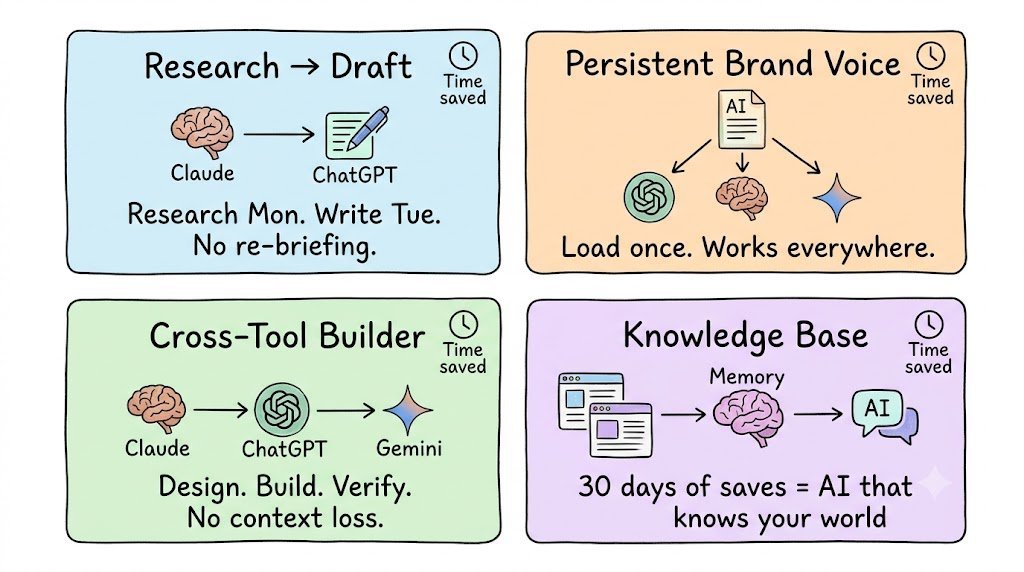
Workflow 1 — The Research-to-Draft pipeline
Monday: Spend 2 hours researching in Claude. → Deep dive on a topic → Capture conversation as memory
Tuesday: Open ChatGPT for writing. → Inject Monday's Claude research → ChatGPT has full context from the start → Skip the briefing. Start the draft.
Time saved: 40 minutes per project.
这些工作流成为现实
工作流1 — 研究到草稿流水线
周一:花2小时在Claude中研究。 → 深入主题 → 将对话捕获为记忆
周二:打开ChatGPT写作。→ 注入周一在Claude中的研究 → ChatGPT从一开始就拥有完整上下文 → 跳过简报,直接开始草稿。
节省时间:每个项目40分钟。
Workflow 2 — The Persistent Brand Voice
Build your brand voice, tone, and style guide in one Claude session.
Capture it as memory. Tag it "Brand."
Now every AI session starts with your brand voice already loaded.
ChatGPT writes in your voice. Claude edits in your voice. Gemini ideates in your voice.
No more generic outputs from AIs that don't know you.
工作流2 — 持久化品牌语调
在Claude的一次会话中构建你的品牌语调、语气和风格指南。
将其捕获为记忆,打上“品牌”标签。
现在每次AI会话都自动载入你的品牌语调。
ChatGPT用你的语调写作,Claude用你的语调编辑,Gemini用你的语调构思。
再也不用忍受不了解你的AI输出通用内容。
Workflow 3 — The Cross-Tool Builder
Use Claude for system design. Use ChatGPT for code generation. Use Gemini for research and fact-checking.
Memory bridges the gaps.
Claude's architecture thinking becomes ChatGPT's build context. ChatGPT's code becomes Gemini's review context.
One project. Three AIs. Zero context loss.
工作流3 — 跨工具构建
用Claude做系统设计,用ChatGPT生成代码,用Gemini做研究和事实核查。
记忆填补了鸿沟。
Claude的架构思路成为ChatGPT的构建上下文,ChatGPT的代码成为Gemini的审查上下文。
一个项目,三大AI,上下文零丢失。
Workflow 4 — The Knowledge Base
Every useful article, thread, and doc you read — right-click and save to memory.
Over 30 days you build a personal knowledge base that lives inside your AI workflow.
Your AI already knows the context before you start.
You stop explaining. You start building.
工作流4 — 知识库
你读过的每篇有用文章、帖子和文档——右键保存到记忆。
30天下来,你便建立起一个嵌入AI工作流的个人知识库。
你的AI在你开始之前就已经知道上下文。
你不再解释,而是直接构建。
5 things most people get wrong about AI memory
- Treating every session as disposable.
Your best AI conversations contain your best thinking.
They are not chat history. They are intellectual capital.
Capture everything valuable immediately after the session ends.
多数人对AI记忆的5大误区
- 视每次会话为一次性。
你最宝贵的AI对话中蕴含着最好的思考。
它们不是聊天历史,而是智力资本。
会话结束后立即捕获所有有价值的内容。
- Relying on a single AI tool's memory.
ChatGPT memory only works in ChatGPT. Claude Projects only works in Claude. Gemini history only works in Gemini.
Cross-tool work is where real workflows live.
Cross-tool memory is where productivity lives.
- 依赖单一AI工具的记忆。
ChatGPT记忆只在ChatGPT中有效,Claude Projects只在Claude中有效,Gemini历史只在Gemini中有效。
跨工具工作才是真实工作流的所在。
跨工具记忆才是生产力的所在。
- Pasting entire conversations as context.
More context is not always better.
A 10,000-word conversation pasted into a new chat creates noise.
Use selected message injection.
Give the AI the 500 words of conclusions — not the 10,000 words of exploration.
- 将整段对话粘贴作为上下文。
更多上下文并不总是更好。
将1万字的对话粘贴到新聊天中会产生噪音。
使用选定消息注入。
给AI500字的结论,而非1万字的探索过程。
- Not saving web research as memory.
Every article you read for a project is context.
Right-click. Save. Done.
Your AI should know what you know.
- 不保存网页作为记忆。
你为项目读过的每篇文章都是上下文。
右键点击,保存,搞定。
你的AI应该知道你所知道的东西。
- Ignoring the organization step.
100 unsorted memories is almost as useless as no memories.
Spend 2 minutes tagging and starring after every capture.
A well-organized memory system compounds in value every week.
- 忽略整理环节。
100条未整理的记忆几乎和没有记忆一样无用。
每次捕获后花2分钟打标签和加星标。
组织良好的记忆系统价值每周都在复利增长。
What this looks like after 30 days
Day 1: You install Unibase Memory. You import your last 7 days of AI chats. You have 40+ memories already.
Day 7: You have captured 15 web pages and 30+ AI sessions. You can find any context in under 10 seconds.
Day 14: Your brand voice, system prompts, and research templates are all tagged and starred. Every new AI session starts faster.
Day 30: You have a personal AI knowledge base. Your AIs know your voice, your projects, your preferences. You have stopped re-explaining anything.
The compounding is real.
Every memory you capture today saves you time every day after.
30天后的成效
第1天:安装Unibase Memory,导入最近7天的AI对话,瞬间拥有40多条记忆。
第7天:已捕获15个网页和30多次AI会话,任何上下文都能在10秒内找到。
第14天:品牌语调、系统提示词和研究模板都已打标签并加星标,每次新AI会话启动更快。
第30天:拥有个人AI知识库,你的AI了解你的语调、项目和偏好,你不再需要重复解释任何事。
复利效应真实存在。
今天捕获的每条记忆,都会在日后的每一天为你节省时间。
Get started
→ Install: Chrome Web Store → search "Unibase Memory" → Sign in with email, X, or wallet → Import your first 7 days of AI conversations → Start every AI session with the right memory already loaded
5 minutes of setup.
Weeks of time saved.
If this was useful:
→ Repost to every builder still copying context by hand → Follow @sairahul1 for more systems that remove manual work → Bookmark this — come back when you switch AI tools and lose context again
Subscribe to theaibuilders.co for more such interesting articles
I write about AI, building products, and systems that work without you.
Links:
→ Chrome Extension: unibase.com/invite/Rahul → Website: unibase.com/memory → Docs: unibaseio.gitbook.io/unibase-docs/unibase-memory
开始使用
→ 安装:Chrome网上应用店 → 搜索“Unibase Memory” → 使用邮箱、X或钱包登录 → 导入你最近7天的AI对话 → 让每次AI会话都从一开始就载入正确的记忆
5分钟配置,
节省数周时间。
如果觉得有用:
→ 转发给每个仍在手动复制上下文的构建者 → 关注 @sairahul1 获取更多消除手动劳动的系统 → 收藏本文——当你切换AI工具再次丢失上下文时回来查看
订阅 theaibuilders.co 获取更多此类有趣文章
我写AI、产品构建以及无需你劳作就能运行的系统。
链接:
→ Chrome扩展:unibase.com/invite/Rahul → 官网:unibase.com/memory → 文档:unibaseio.gitbook.io/unibase-docs/unibase-memory