跨仓库文档自动化:Aspire 团队把文档 PR 中位耗时压到 44.8 小时
Aspire 团队用 GitHub Agentic Workflows 在 10 人规模下把跨仓库文档自动化跑通。工作流以单 Markdown 文件定义,agent 先判断是否需要文档并起草内容,仅输出 JSON 意图;真正的写操作由受限的 safe-outputs handler 执行——GitHub App 安装范围只有产品仓库和文档仓库两个 repo,且只能开 PR 到 main 或 release/*。Aspire 13.3/13.4 期间,396 个合并的产品 PR 产生 82 个文档 PR,中位 44.8 小时合并,全部由原功能 PR 的 SME 评审,100% 合并率。关键设计是 milestone 到 release 分支的精确映射,以及 draft-only 流程。文中也坦承 v1 有 13% 误判率、大 diff 撑爆 prompt 预算等失败经验。适合正为“代码和文档分开仓库”头疼的工程团队。
“Where are the docs?” It’s a question nobody on a product team enjoys answering. The honest reply is usually some variant of “behind.” A writer is staring at a closed pull request, trying to reverse-engineer what changed. The pull request’s author has already moved on. By the time the doc actually publishes, the feature has shipped, sometimes more than once.
That used to be us on the Aspire team (we’re a small team of 10 building dev tools for distributed apps). A few months back, we were trying to figure out how to safely bring AI into automations we already trusted. That’s when we discovered GitHub Agentic Workflows. I started bolting prototypes into microsoft/aspire.
Here’s what that bought us, in numbers pulled straight out of GitHub: for Aspire 13.3 and 13.4, 82 feature-docs pull requests merged at a median of 44.8 hours after the product pull request, every one of them reviewed by the engineer who shipped the feature. No new headcount. No process retraining. Just a different way of asking “who writes this?”
“文档在哪儿?”这是任何产品团队都不喜欢回答的问题。诚实的答案往往都是某种形式的“还没跟上。”文档作者盯着一份已关闭的 PR,试图逆向工程出到底改了什么,而 PR 的作者早已转向下一个任务。等文档真正发布时,功能往往已经上线,有时还不止一次。
这正是我们 Aspire 团队(一个 10 人小团队,为分布式应用构建开发工具)过去的写照。几个月前,我们想弄明白如何在已经信任的自动化流程里安全地引入 AI,就在那时发现了 GitHub Agentic Workflows。我开始把原型一个个拼进 microsoft/aspire。
这是它带来的回报,数字直接来自 GitHub:在 Aspire 13.3 和 13.4 中,82 个功能文档 PR 在产品 PR 合并后的中位时间 44.8 小时内全部合并,而且每一个都由发布该功能的工程师审阅过。没有增加人手,没有重新培训流程。只是换了一种方式问“这个谁来写?”
Our product lives in microsoft/aspire and our docs site lives in microsoft/aspire.dev—different repo, deploy target, and review chain. Most teams figure out same-repo automation pretty quickly; cross-repo automation is where things get sharp. Broad repo-scoped tokens belong in a museum, and any responsible security posture (ours included) restricts them accordingly. That’s a good thing. It’s also a real bottleneck if the place where you write the docs isn’t the place where you write the code.
The default workflow for years was:
- Engineer ships a feature in microsoft/aspire.
- Docs writer notices weeks later.
- Docs writer opens the pull request, reads the diff, and pings the engineer to clarify what changed.
- Engineer is on the next feature, vaguely remembers, replies with half the picture.
- Docs draft ships, sometimes against a release that’s already out.
This is the reverse-engineering tax. We needed automation that crossed repos without handing an agent a write-everywhere token. GitHub Agentic Workflows turned out to be the answer.
我们的产品在 microsoft/aspire,文档站点在 microsoft/aspire.dev——不同的仓库、不同的部署目标、不同的评审链路。大多数团队很快就能搞定同仓库自动化;跨仓库自动化才是真正棘手的地方。大范围、作用于整个仓库的 token 应该进博物馆,任何负责任的安全姿态(包括我们的)都会严格限制它们。这是好事。但如果写文档的地方和写代码的地方不在同一个仓库,它也是一个实实在在的瓶颈。
多年来默认的工作流是:
- 工程师在 microsoft/aspire 发布一个功能。
- 几周后文档作者才注意到。
- 文档作者打开 PR,阅读 diff,然后去问工程师到底改了什么。
- 工程师已经在做下一个功能,记忆模糊,只回复了一半情况。
- 文档草稿发布时,有时对应的版本已经发布了。
这就是“逆向工程税”。我们需要的自动化要能跨越仓库,又不能给 agent 一个到处可写的 token。GitHub Agentic Workflows 最终成了答案。
GitHub Agentic Workflows is a project from the GitHub Next team that I keep describing to people as “GitHub Actions, but with a model as the work-item processor and guard rails that satisfy security review.” That’s reductive, but it’s close.
The shape of it:
- You author a workflow as a single markdown file (.github/workflows/my-thing.md). YAML-style frontmatter on top, an English-language prompt underneath.
- You run GitHub Agentic Workflows compile, and it generates a sibling .lock.yml (a normal GitHub Actions workflow) that you commit alongside.
- At runtime, the workflow runs an agent against your prompt with a constrained toolset.
- Critically, the agent doesn’t write to GitHub directly. It emits intent (a JSON blob describing the pull requests, issues, and comments it wants to create), and a separate, narrowly scoped job (the safe-outputs handler) materializes that intent against a per-workflow GitHub app.
That last bullet is the unlock. The agent gets read access and a prompt. Writes go through a tiny verifiable pipeline with explicit allow-lists. Security review nods. We ship.
GitHub Agentic Workflows 是 GitHub Next 团队的一个项目,我总跟人这样形容:“就像 GitHub Actions,但用模型作为工作项处理器,并且带有一层能通过安全评审的护栏。”这个说法有点简化,但也算接近。
它的形态是:
- 你把工作流写成单个 markdown 文件(.github/workflows/my-thing.md),顶部是 YAML 风格的 frontmatter,下面是英文提示词。
- 运行 GitHub Agentic Workflows compile,它会生成一个配套的 .lock.yml(一个普通 GitHub Actions 工作流),和它一起提交。
- 运行时,工作流用一个受限工具集,让 agent 按照提示词执行。
- 关键的是,agent 不会直接写 GitHub。它发出“意图”(一个 JSON blob,描述它想创建的 PR、issue 和评论),然后一个单独、范围极窄的作业(safe-outputs 处理器)根据每个工作流专属的 GitHub app 来落实这个意图。
最后这一点才是关键解锁。agent 拿到的是读权限和一段提示词。写入要经过一条极小的、可验证的流水线,并带有明确的允许列表。安全评审点了头。我们就上线了。
I love when the tools you’re using to build are built with the same tools you’re using to build with. The GitHub Agentic Workflows docs are built with Astro and Starlight. So is aspire.dev—Astro with Starlight, dressed up with the wider Starlight plugin ecosystem (astro-mermaid, starlight-llms-txt, starlight-sidebar-topics, starlight-image-zoom, the gorgeous @catppuccin/starlight theme, and more. Shout-out to Chris Swithinbank and the Starlight maintainers, the entire ecosystem feels designed by people who genuinely care).
There’s a real kinship there. The tool we use to automate docs and the docs site we automate into share the same foundation. Convenient, because the Mermaid sequence diagram in the next section renders the exact same way in both worlds.
我很喜欢一种感觉:用来构建的工具,本身也是用同样的工具构建出来的。GitHub Agentic Workflows 的文档是用 Astro 和 Starlight 构建的。aspire.dev 也是——Astro 搭配 Starlight,再配上更广阔的 Starlight 插件生态(astro-mermaid、starlight-llms-txt、starlight-sidebar-topics、starlight-image-zoom、漂亮的 @catppuccin/starlight 主题,等等。特别感谢 Chris Swithinbank 和 Starlight 维护者们,整个生态感觉就像是由真正在乎的人设计的)。
这里面有一种真实的亲近感。我们用来自动化文档的工具,和我们自动化进去的文档站点,共享同一个基础。很方便,因为下一节里的 Mermaid 时序图在两边渲染出的效果完全一样。
Here’s the flow we landed on. The protagonist is a workflow called pr-docs-check.md living in microsoft/aspire.
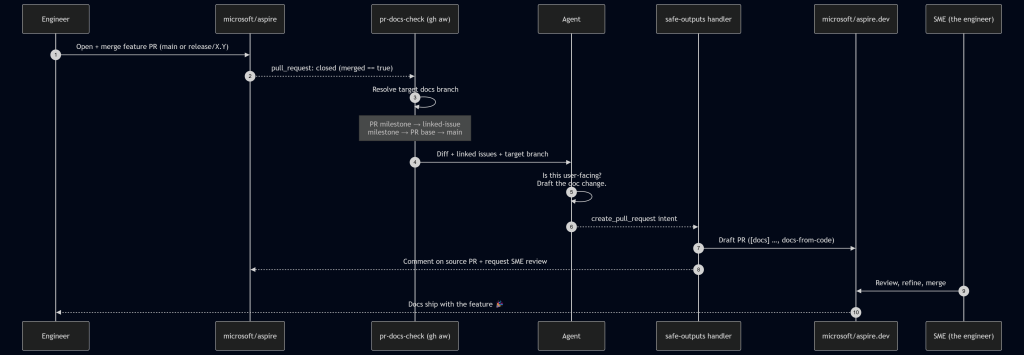
A run starts on pull_request: closed against main or release/*, gated by merged == true. From there, the workflow first runs a deterministic target branch resolver in plain bash before the agent ever wakes up:
- Pull request milestone title (e.g. 13.4 → release/13.4 on aspire.dev).
- Linked-issue milestone title (parse Fixes/Closes/Resolves #N from the body, fetch each issue, take the first non-empty milestone).
- Pull request base ref, if it matches release/X.Y[.Z].
- Fall back to main.
This is the linchpin. Milestones in the product repo map cleanly to release branches in the docs repo. When the agent finally runs, it knows exactly where the docs should land without any creative writing about target branches or guessing.
这是我们最终采用的流程。主角是一个叫 pr-docs-check.md 的工作流,它住在 microsoft/aspire 里。
一次运行从 pull_request: closed 开始,目标分支为 main 或 release/*,并且要求 merged == true。在那之后,工作流会先在纯 bash 中运行一个确定性的目标分支解析器,然后 agent 才醒来:
- PR 的里程碑标题(例如 13.4 → aspire.dev 上的 release/13.4)。
- 关联 issue 的里程碑标题(从 PR 正文解析 Fixes/Closes/Resolves #N,抓取每个 issue,取第一个非空里程碑)。
- PR 的基础分支,如果它匹配 release/X.Y[.Z]。
- 回退到 main。
这就是关键。产品仓库里的里程碑能干净地映射到文档仓库里的 release 分支。当 agent 最终运行时,它完全清楚文档应该落到哪里,不需要对目标分支做任何“创意发挥”或猜测。
The agent reads the diff, scans linked issues, and decides: does this need docs? If yes, it drafts the actual content in a checked-out microsoft/aspire.dev workspace, following our existing doc-writer skill (voice, MDX conventions, Starlight components). It then emits a create_pull_request safe-output and hands off.
The safe-outputs handler takes over:
- Title prefix: [docs]
- Label: docs-from-code
- draft: true (we never auto-merge)
- Base branch: agent-supplied, restricted to main or release/*
- Target repo: microsoft/aspire.dev
- Reviewer: the SME identified from the source pull request’s reviews—i.e., whoever the product team trusted to approve the feature, now gets asked to approve the doc for that feature.
A companion job posts a marker comment back on the source pull request with the docs pull request link and minimizes any older pr-docs-check comments on re-run. The engineer who just hit Merge gets a notification within a few minutes: “Here’s the docs draft. Look it over?”
agent 会读取 diff、扫描关联 issue,然后判断:这个需要文档吗?如果需要,它会在一个已检出的 microsoft/aspire.dev 工作区里,按照我们现有的 doc-writer 技能(语气、MDX 约定、Starlight 组件)起草实际内容。然后它发出一个 create_pull_request 安全输出,并把工作交接出去。
safe-outputs 处理器接下来接手:
- 标题前缀:[docs]
- 标签:docs-from-code
- draft: true(我们从不自动合并)
- 基础分支:由 agent 提供,限制为 main 或 release/*
- 目标仓库:microsoft/aspire.dev
- 评审人:从源 PR 的 reviews 中识别出的 SME——也就是产品团队信任来批准功能的人,现在被请求批准该功能的文档。
一个伴随作业会在源 PR 上发一条标记评论,附上文档 PR 的链接,并在重新运行时把旧的 pr-docs-check 评论折叠起来。刚刚点了 Merge 的工程师几分钟内就会收到一条通知:“这是文档草稿,要看一眼吗?”
The whole security story comes down to a small, boring stretch of frontmatter:
tools:
github:
toolsets: [repos, issues, pull_requests]
min-integrity: approved # only run pinned, integrity-checked actions
allowed-repos:
- microsoft/*
github-app:
app-id: ${{ secrets.ASPIRE_BOT_APP_ID }}
private-key: ${{ secrets.ASPIRE_BOT_PRIVATE_KEY }}
owner: "microsoft"
repositories: ["aspire.dev", "aspire"]

safe-outputs:
create-pull-request:
title-prefix: "[docs] "
labels: [docs-from-code]
draft: true # human-in-the-loop, always
base-branch: main
allowed-base-branches: [main, release/*]
target-repo: "microsoft/aspire.dev"
protected-files: blocked # AGENTS.md, manifests, security config: hands off
fallback-as-issue: true
That’s the deal in plain text. The agent gets a GitHub App token whose installation is scoped to exactly two repositories—the product repo and the docs repo—and nothing else in the org is reachable. It can only land pull requests against main or release/*. AGENTS.md and dependency manifests are off-limits by policy. If the pull request creation fails (network blip, conflict, anything), the framework falls back to filing an issue, so nothing is silently dropped.
This is the part security review actually liked. The agent’s reasoning is fuzzy. The action surface is not.
整个安全故事,最终归结为一段简短、不起眼的 frontmatter:
tools:
github:
toolsets: [repos, issues, pull_requests]
min-integrity: approved # only run pinned, integrity-checked actions
allowed-repos:
- microsoft/*
github-app:
app-id: ${{ secrets.ASPIRE_BOT_APP_ID }}
private-key: ${{ secrets.ASPIRE_BOT_PRIVATE_KEY }}
owner: "microsoft"
repositories: ["aspire.dev", "aspire"]

safe-outputs:
create-pull-request:
title-prefix: "[docs] "
labels: [docs-from-code]
draft: true # human-in-the-loop, always
base-branch: main
allowed-base-branches: [main, release/*]
target-repo: "microsoft/aspire.dev"
protected-files: blocked # AGENTS.md, manifests, security config: hands off
fallback-as-issue: true
这就是白纸黑字的约定。agent 拿到一个 GitHub App token,其安装范围被严格限制在两个仓库——产品仓库和文档仓库——组织里其它任何东西都碰不到。它只能往 main 或 release/* 开 PR。按照策略,AGENTS.md 和依赖清单一律不许碰。如果创建 PR 失败(网络抖动、冲突、任何原因),框架会回退为提交一个 issue,因此不会有任何东西被悄悄丢掉。
这正是安全评审真正喜欢的地方。agent 的推理是模糊的,但动作面不是。
Here are the stats from a rolling 30-day window (May 3 – June 2, 2026) spanning the back end of the Aspire 13.3 release and the run-up to 13.4:
| Metric | Value |
|---|---|
| Product pull requests merged in microsoft/aspire | 396 (338 main / 50 release/13.3 / 8 release/13.2) |
| pr-docs-check workflow runs | 396 |
| Draft docs pull requests created on microsoft/aspire.dev | 82 |
| – Merged | 82 (100%) |
| – Closed without merge | 0 |
| – Still open | 0 |
| Docs pull requests target branches | 52 → release/13.3, 27 → release/13.4, 3 → main |
| Median time-to-merge (docs) | 44.8 hours |
| Merged within 24 h / 7 days | 38% / 96% |
Note: Numbers captured at the time of writing; the workflows keep running, so the totals only go up.
下面是一个滚动 30 天窗口(2026 年 5 月 3 日 – 6 月 2 日)的数据,覆盖 Aspire 13.3 发布尾声和 13.4 的筹备期:
| 指标 | 数值 |
|---|---|
| microsoft/aspire 中合并的产品 PR | 396(338 个 main / 50 个 release/13.3 / 8 个 release/13.2) |
| pr-docs-check 工作流运行次数 | 396 |
| 在 microsoft/aspire.dev 上创建的文档草稿 PR | 82 |
| – 已合并 | 82(100%) |
| – 未合并关闭 | 0 |
| – 仍打开 | 0 |
| 文档 PR 目标分支 | 52 → release/13.3,27 → release/13.4,3 → main |
| 文档合并中位时间 | 44.8 小时 |
| 24 小时内 / 7 天内合并 | 38% / 96% |
注意:数字写于本文撰写时;工作流仍在持续运行,所以总数只会继续增加。
A few of those numbers deserve a second look:
396 runs → 82 pull requests is not a defect. The workflow runs on every merged pull request; most of them are internal refactors, test fixes, or dependency bumps with no user-facing surface. The agent saying “no docs needed” 300+ times is a feature.
100% merge rate says the agent’s docs picks are right. The tighter prompt we shipped after the v1 false-positive phase is paying off.
其中几个数字值得再看一眼:
396 次运行 → 82 个 PR 并不是缺陷。工作流会在每个已合并的 PR 上运行;其中大多数是内部重构、测试修复或依赖升级,没有用户可见的变化。agent 300 多次说“不需要文档”,这本身就是一项功能。
100% 的合并率说明 agent 对文档的判断是对的。我们在 v1 误报阶段之后收紧的提示词正在起效。
✅ What worked
- ✅ Milestone → release-branch mapping. This was the single highest-leverage choice we made. Engineers already set milestones on pull requests and issues; we got accurate target-branch routing for free.
- ✅ Draft-only, SME-as-reviewer. The agent never merges. The engineer who shipped the feature is the one who confirms the docs are right. We’ve stopped reverse-engineering features at the doc layer. The engineer just tells the docs draft what to say, in the place where they already are.
- ✅ Scoped GitHub app per workflow. Each workflow gets its own app token with explicit repo and permission scopes. Security review approved. We approved too; the first time we needed to rotate keys.
- ✅ protected-files: blocked. The agent cannot touch AGENTS.md, package manifests, or repo security config. Period.
✅ 有效做法
- ✅ 里程碑 → release 分支映射。这是我们做出的杠杆效应最高的选择。工程师本来就会在 PR 和 issue 上设置里程碑;我们免费得到了准确的目标分支路由。
- ✅ 仅草稿 + SME 作为评审人。agent 从不合并。发布该功能的工程师负责确认文档准确。我们不再在文档层逆向工程功能。工程师可以直接在文档草稿上说应该怎么写,而且就在他们已经在的地方。
- ✅ 每个工作流使用范围受限的 GitHub app。每个工作流都有自己专属的 app token,并带有明确的仓库和权限范围。安全评审批准了。我们也批准了;第一次需要轮换密钥反而让我们更放心。
- ✅ protected-files: blocked。agent 不能碰 AGENTS.md、包清单或仓库安全配置。没有商量余地。
❌ What didn’t (at first)
- ❌ The agent’s “is this docs-worthy?” gate was too generous in the first version. It drafted pull requests for changes that were genuinely internal, such as a CI tweak or a logging refactor. The result: 9 closures of 69 pull requests (≈13%), so we tightened the prompt’s user-facing-change definition and added explicit negative examples (CI, internal helpers, tests-only). Now, the rate is trending down.
- ❌ Cross-repo pull request creation needed a mirrored checkout pattern that wasn’t obvious from the docs. The agent works in one repo; safe-outputs needs to find the target repo to push a branch. We solved it by checking out microsoft/aspire.dev twice—once as the current workspace, once under _repos/aspire.dev—so the safe-outputs handler can rediscover it deterministically.
- ❌ Big diffs blow prompt budgets. We pre-extract pull request metadata (linked issues, milestone, base ref) in pre-agent-steps bash, so the agent gets a small, structured summary instead of a giant payload. This is GitHub Agentic Workflow’s designed-in pattern, and it works.
❌ 最初没做好的地方
- ❌ 第一版里,agent 判断“这需要文档吗?”的门槛太宽松了。它会为真正内部的变更也起草 PR,比如 CI 调整或日志重构。结果是 69 个 PR 中有 9 个被关闭(约 13%),于是我们收紧了提示词里对“用户可见变更”的定义,并加入了明确的负面示例(CI、内部辅助工具、仅测试改动)。现在这个比例正在下降。
- ❌ 跨仓库创建 PR 需要一种镜像检出模式,而文档里没有直接说明。agent 在一个仓库里工作;safe-outputs 需要找到目标仓库才能推送分支。我们的解决办法是把 microsoft/aspire.dev 检出两次——一次作为当前工作区,一次放在 _repos/aspire.dev 下——这样 safe-outputs 处理器就能确定性地重新找到它。
- ❌ 大 diff 会撑爆提示词的预算。我们会在 pre-agent-steps 的 bash 里预先提取 PR 元数据(关联 issue、里程碑、基础分支),让 agent 拿到一份小而结构化的摘要,而不是一个巨大的负载。这是 GitHub Agentic Workflow 设计好的模式,也确实有效。
The changes we made shifted our thinking. A feature wasn’t considered done until the docs were. Docs no longer trail along behind it like a tin can on a string. The engineer’s review is the gate; the bot does the typing.
Critically, this doesn’t replace docs writers; it un-burdens them. Our writers used to spend most of their time reverse-engineering features. Now they spend their time on the things only a human can do well: narrative pages, sample programs, conceptual walkthroughs, the parts of the docs that don’t fall out of a diff. The bot handles the mechanical “this new option was added; here’s the reference page update” work that was never enjoyable for anyone.
这些改变转变了我们的思考方式。一个功能不再只是在代码合并后就算完成,而是要等文档也到位。文档不再像易拉罐一样被拖在后面。工程师的评审是闸门,机器人负责打字。
关键是,这并没有取代文档作者,而是给他们减了负。我们的作者过去大部分时间都花在逆向工程功能上。现在,他们把时间花在只有人类才能做好的事情上:叙事性页面、示例程序、概念讲解,以及那些不会从 diff 中直接落下来的文档部分。机器人处理的是那些从来没人觉得愉快的机械活,比如“新增了某个选项,更新一下参考页”这类工作。
Huge thanks to the GitHub Next team for GitHub Agentic Workflows (and for making the safe-outputs primitive a first-class part of the design), and to Chris Swithinbank and the Starlight maintainers for the docs platform we automate into. A genuine thank-you, too, to the security folks whose guardrails forced us to design this the right way the first time. The boring secret of good automation is that strong security constraints make the system more trustworthy and more correct.
If you build a product in one repo and ship docs in another—and especially if you have to do it inside any nontrivial security boundary—GitHub Agentic Workflows is worth a serious look. Start with one workflow, such as pr-docs-check, and watch what happens to your median time-to-docs.
非常感谢 GitHub Next 团队带来 GitHub Agentic Workflows(也感谢他们把 safe-outputs 原语设计成一等公民),也感谢 Chris Swithinbank 和 Starlight 维护者们提供了我们自动化进去的文档平台。同样真心感谢那些安全同事,正是他们的护栏逼我们第一次就把系统设计对了。好的自动化有一个无聊的秘密:强安全约束会让系统更可信,也更正确。
如果你在一个仓库里做产品、在另一个仓库里发布文档——尤其是必须在任何不可小觑的安全边界内这样做——那么 GitHub Agentic Workflows 值得认真看一看。从一个工作流开始,比如 pr-docs-check,然后看看你的文档中位交付时间会发生什么变化。
pr-docs-check is the one I wrote this post about, but it’s not running alone. If you’re curious about the rest, the source is public:
- milestone-changelog.md: runs every two hours, picks up newly merged pull requests in the active milestone, and maintains a 13.x-Change-log wiki page (new features, improvements, notable bug fixes) with a companion editorial-feedback issue. 346 runs.
- release-update-support-mdx.md: on a stable Aspire release, drafts a [support] pull request on aspire.dev that updates the support policy page (promotes the new version, demotes the previous one, refreshes the “Last updated” badge).
- update-integration-data.md: lives in the docs repo; runs pnpm update:all daily, refreshes NuGet metadata + GitHub stats + sample data, and opens a chore: Update integration data PR with supersede-and-close logic for stale runs. 27 runs, eight merged pull requests.
- repo-pulse.md: a rolling three-day repo dashboard pinned to a single issue and updated in place: recent merges, pull requests awaiting review, new issues, discussion activity. One issue, always fresh.
Happy automating, friends! 🤖🚀
pr-docs-check 是这篇帖子写的工作流,但它并不是孤军奋战。如果你对其余的感兴趣,源码都是公开的:
- milestone-changelog.md:每两小时运行一次,拾取当前里程碑中新合并的 PR,维护一个 13.x-Change-log wiki 页面(新功能、改进、值得注意的 bug 修复),并带有一个配套的编辑反馈 issue。共运行 346 次。
- release-update-support-mdx.md:在稳定的 Aspire 版本发布时,在 aspire.dev 上起草一个 [support] PR,更新支持策略页面(提升新版本、降级前一个版本、刷新“Last updated”徽章)。
- update-integration-data.md:位于文档仓库;每天运行 pnpm update:all,刷新 NuGet 元数据、GitHub 统计和示例数据,并打开一个 chore: Update integration data PR,对过时运行采用 supersede-and-close 逻辑。共运行 27 次,合并了 8 个 PR。
- repo-pulse.md:一个滚动三天的仓库仪表盘,固定在一个 issue 上并原地更新:最近的合并、待评审的 PR、新 issue、讨论动态。一个 issue,始终保持新鲜。
祝自动化愉快,朋友们!🤖🚀