Claude Code Dynamic Workflows:把编排逻辑搬进代码的新原语
Anthropic 发布 Dynamic Workflows,一种将大规模任务编排写成 JavaScript 脚本、交由独立运行时执行的原语。脚本持有循环、分支和中间结果,主 Claude 上下文仅接收最终答案,解决了 subagent 和 Agent Teams 面临的上百个并行任务时上下文溢出与注意力稀释的瓶颈。文章详解架构、原语与执行模型,并以 Bun 迁移 Rust(11 天/75 万行/99.8% 测试通过)和个人 133 会话分析案例展示效果。对比 n8n/Coze/Dify 后指出,Workflow 是“确定性脚本 + 节点调 LLM”,图灵完备的代码表达力优于可视化 DAG,且编排可由模型现场生成。适用代码库级排查、大迁移、对抗验证等场景,但 token 消耗高、有并发与恢复等限制。适合需要大规模自动化编码任务的工程师。

When a task is too big to fit in a single conversation, let Claude write the orchestration as a script.
On May 28, Anthropic released Claude Opus 4.8, alongside a new feature—Dynamic Workflows.
First, a number: 11 days, ~750,000 lines of Rust, 99.8% of existing tests passing. This is the report card delivered by Bun creator Jarred Sumner after migrating the entire Bun runtime from Zig to Rust, and the main force behind this migration was Dynamic Workflows.
Released as a research preview, it targets jobs that a single agent cannot finish in one run. The official blog post describes it like this:
Some problems are too big for one pass by a single agent, especially in complex, legacy codebases: a bug hunt across an entire service, a migration that touches hundreds of files, a plan you want stress-tested from every angle before you commit to it.
Bug hunts spanning an entire service, migrations that touch hundreds of files, a plan that needs to be scrutinized from every angle before you dare commit—the common thread is that the scale exceeds what a single conversation can coordinate. The answer Dynamic Workflows provides is to have Claude write the orchestration process as an executable script.
当任务大到一次对话装不下时,让 Claude 把编排过程写成一段脚本
5 月 28 日,Anthropic 发布了 Claude Opus 4.8,随之而来还带来了一个新功能——Dynamic Workflows(动态工作流)。
先看一个数字:11 天、约 75 万行 Rust 代码、99.8% 的原有测试通过。这是 Bun 作者 Jarred Sumner 把整个 Bun 运行时从 Zig 迁移到 Rust 交出的成绩单,而扛起这场迁移的主力,正是这个 Dynamic Workflows。
它作为研究预览(research preview)放出,瞄准的是那一类单个 Agent 一次跑不完的活,官方博客的原话是这样描述的:
Some problems are too big for one pass by a single agent, especially in complex, legacy codebases: a bug hunt across an entire service, a migration that touches hundreds of files, a plan you want stress-tested from every angle before you commit to it.
整个服务范围的 bug 排查、动辄上百个文件的迁移、一个需要从各个角度反复推敲才敢拍板的方案——这些任务的共同点是规模超出了一轮对话能协调的范围。Dynamic Workflows 给出的答案,是让 Claude 把这套编排过程写成一段可执行的脚本。
To understand where Workflow fits, it helps to review the collaboration layers already present in Claude Code.
At the bottom is a single session: one agent instance works serially from start to finish. One level up are subagents—the main agent spawns several helpers to search files, read code, run commands, and report the results back. Higher still are Agent Teams, launched earlier this year, where multiple independent Claude Code instances collaborate in parallel like a team, and the members can communicate with each other.
These layers share a bottleneck: the orchestrator is always Claude itself. It decides turn by turn what to spawn next, and every subagent’s result must first land in Claude’s context window before it can plan the next move. This mechanism is flexible for modest workloads, but when you need to coordinate dozens or hundreds of parallel tasks, problems arise: the context window cannot hold that many intermediate results, and Claude’s attention gets diluted by a flood of process data.
Workflow takes a different approach. This time Claude no longer schedules each turn manually; it first writes the entire orchestration process as a JavaScript script—loops, branches, and intermediate result collection are all baked into the code—then hands it to a separate runtime for execution. The official documentation captures this shift concisely:
A workflow moves the plan into code. With subagents and skills, Claude is the orchestrator: it decides turn by turn what to spawn next, and every result lands in Claude's context. A workflow script holds the loop, the branching, and the intermediate results itself, so Claude's context holds only the final answer.
The plan has been moved into code. The script itself owns the loops, branches, and intermediate results; Claude’s context holds only the final answer. This is a continuation of the same line of thinking as “squeezing a large codebase into a limited context window”—the former addresses “how to use context sparingly,” while Workflow tackles “what to do when the workload is so large it simply cannot fit in context.”
要理解 Workflow 的位置,得先把 Claude Code 已有的几层协作能力捋一遍。
最底层是单个 session,一个 Agent 实例从头干到尾,串行处理。往上一层是 subagent——主 Agent 派生出若干小弟去搜文件、读代码、跑命令,干完把结果汇报回来。再往上是今年早些时候推出的 Agent Teams,多个独立的 Claude Code 实例像团队一样并行协作,队员之间还能互相通信。
这几层有一个共同的瓶颈:编排者始终是 Claude 本身。它逐轮决策下一步派谁去干什么,而每一个 subagent 的返回结果,都要先回到 Claude 的上下文窗口里,它读完才能决定接下来怎么走。这套机制在任务规模不大时很灵活,可一旦要协调几十上百个并行任务,问题就来了:上下文窗口装不下那么多中间结果,Claude 的注意力也会被海量的过程信息稀释。
Workflow 换了个思路。这一次 Claude 不再亲自逐轮调度,它先把整个编排过程写成一段 JavaScript 脚本——循环、分支、中间结果的收集全都固化在代码里——再交给一个独立的运行时去执行。官方文档把这个转变概括得很精炼:
A workflow moves the plan into code. With subagents and skills, Claude is the orchestrator: it decides turn by turn what to spawn next, and every result lands in Claude's context. A workflow script holds the loop, the branching, and the intermediate results itself, so Claude's context holds only the final answer.
计划被搬进了代码。脚本自己持有循环、分支和中间结果,Claude 的上下文里只剩下最后那个答案。这跟“把大型代码库塞进有限上下文窗口”的思路是同一条路线上的延续——前者解决的是“上下文怎么省着用”,Workflow 解决的是“当工作量大到上下文根本装不下时怎么办”。
Placing Agent Teams and Dynamic Workflows side by side:
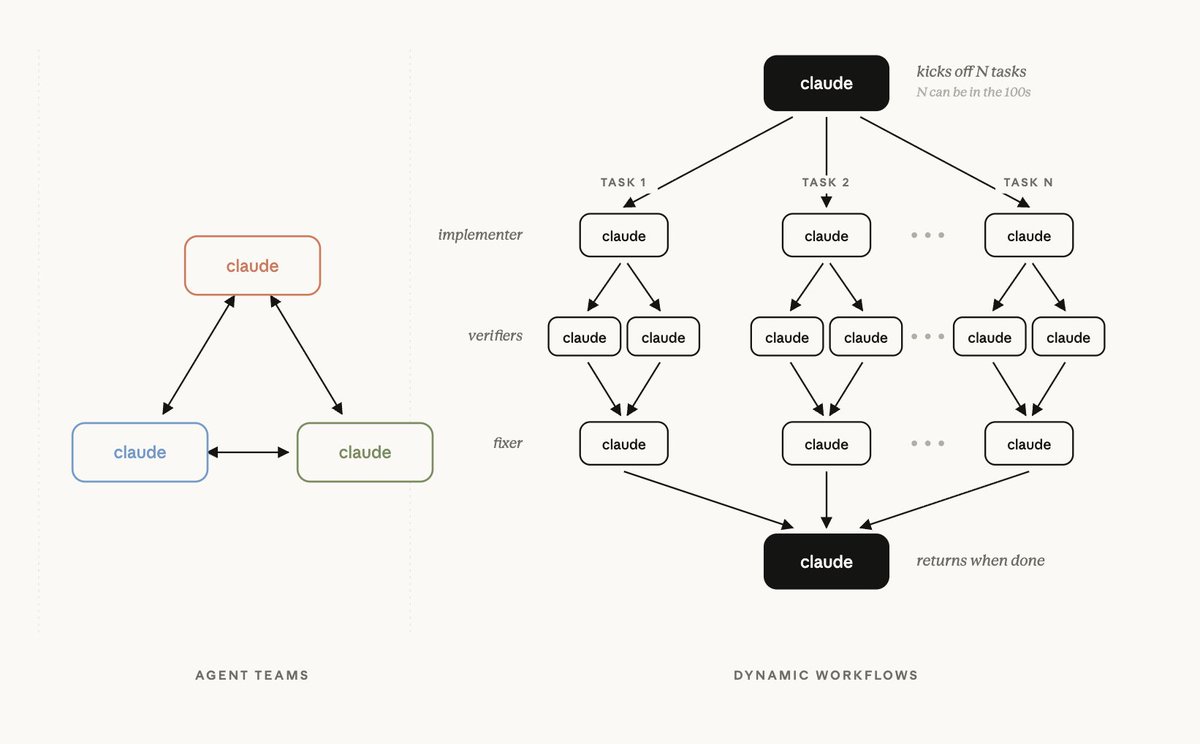
Image from Anthropic PM Cat Wu’s tweet announcing Dynamic Workflows. On the left, Agent Teams form a mesh; on the right, Dynamic Workflows adopt a tree structure: “one Claude fans out to hundreds of tasks, each task goes through implementer → two verifiers → fixer, then fans back in.” The later Bun example, where each file gets two reviewers, is already visible here in embryo.
把 Agent Teams 和 Dynamic Workflows 摆在一起看:
图片出自 Anthropic 产品经理 Cat Wu 发布 Dynamic Workflows 的推文。左边 Agent Teams 是网状协作,右边 Dynamic Workflows 则是“一个 claude 扇出上百个 task,每个 task 走 implementer → 两个 verifier → fixer 三层,最后扇入返回”的树状结构——后面 Bun 案例里“每个文件配两个 reviewer”的设计,在这张图上已经能看到雏形。
Before dissecting the architecture, let’s dispel a common misconception: many assume that Workflow is an orchestration engine running on Anthropic’s servers, so they go looking for its API protocol and worry about third‑party proxy compatibility.
The reality: the Workflow tool itself makes no server‑side requests. It is a JavaScript orchestration script that Claude Code runs locally on your machine—agent(), parallel(), pipeline() are control flows executing on your computer. The only parts that actually “call the server” are the subagents spawned by agent() calls inside the script, and those subagents call the model exactly the same way your main conversation does.
A direct corollary: if your Workflow fails while using a third‑party API proxy, it’s not the Workflow’s fault—it uses the exact same API that Claude Code has always used for model calls, i.e., Anthropic’s native Messages API (not OpenAI’s /v1/chat/completions):
POST {ANTHROPIC_BASE_URL}/v1/messages

Headers:
  x-api-key: <key>                         # or the common third‑party Authorization: Bearer <key>
  anthropic-version: 2023-06-01
  anthropic-beta: context-1m-2025-08-07    # 1M context carries this beta flag
  content-type: application/json

Body:
  {
    "model": "claude-opus-4-8",   # raw model id; [1m] is only a local marker, not in body
    "system": [ {... cache_control ...} ],  # system is an array with prompt caching
    "messages": [...],
    "tools": [...],               # Claude Code packs dozens of tool definitions
    "stream": true                # streaming by default
  }
Once this relationship is clear, Workflow’s runtime model becomes obvious: a brain‑dead, deterministic JavaScript runtime acts as the conductor—it merely loops, concatenates strings, and awaits, containing no LLM whatsoever. Only when execution reaches an agent(...) line does the runtime temporarily hire an LLM subagent to do the work. Meanwhile, the “real Agent”—the main Claude you are chatting with—is not running at all during script execution: its turn ends right after issuing the Workflow call; the script runs independently in the background, and when it finishes, a notification wakes the main agent to read the final result.
开始拆架构之前,得先破除一个最常见的误解:很多人以为 Workflow 是某个跑在 Anthropic 服务端的编排引擎,于是去找它的 API 协议、担心第三方中转兼容性。
实际情况是:Workflow 工具本身不请求任何服务端。它是 Claude Code 在你本机跑的一段 JavaScript 编排脚本——agent()、parallel()、pipeline() 这些都是在你电脑上执行的控制流。真正去“请求服务端”的,是脚本里 agent() 调用 spawn 出来的每个 subagent,而 subagent 调用模型的方式,和你主对话窗口完全一样。
这件事有个直接推论:如果你用第三方 API 中转,Workflow 跑挂了,那跟 Workflow 没关系——它用的就是 Claude Code 平时调模型一直在用的那套接口,即 Anthropic 原生的 Messages API(不是 OpenAI 的 /v1/chat/completions):
POST {ANTHROPIC_BASE_URL}/v1/messages

Headers:
  x-api-key: <key>                         # 或第三方常用的 Authorization: Bearer <key>
  anthropic-version: 2023-06-01
  anthropic-beta: context-1m-2025-08-07    # 1M context 会带这个 beta flag
  content-type: application/json

Body:
  {
    "model": "claude-opus-4-8",   # 裸 model id,[1m] 只是本地标识,不会进 body
    "system": [ {... cache_control ...} ],  # system 是数组,带 prompt caching
    "messages": [...],
    "tools": [...],               # Claude Code 会塞几十个 tool 定义
    "stream": true                # 默认流式
  }
把这层关系理清之后,Workflow 的运行模型就清晰了:一个无脑的、确定性的 JavaScript 运行时当指挥,它只会循环、拼字符串、await,本身不含任何 LLM;只有当脚本执行到 agent(...) 那一行,运行时才去临时雇一个 LLM subagent 干活。而“真正的 Agent”——也就是你正在对话的主 Claude——在脚本执行期间根本没在运行:它在发出 Workflow 调用后那一回合就结束了,脚本在后台独立跑,跑完用一条通知把它叫醒,让它去读最后的结果。
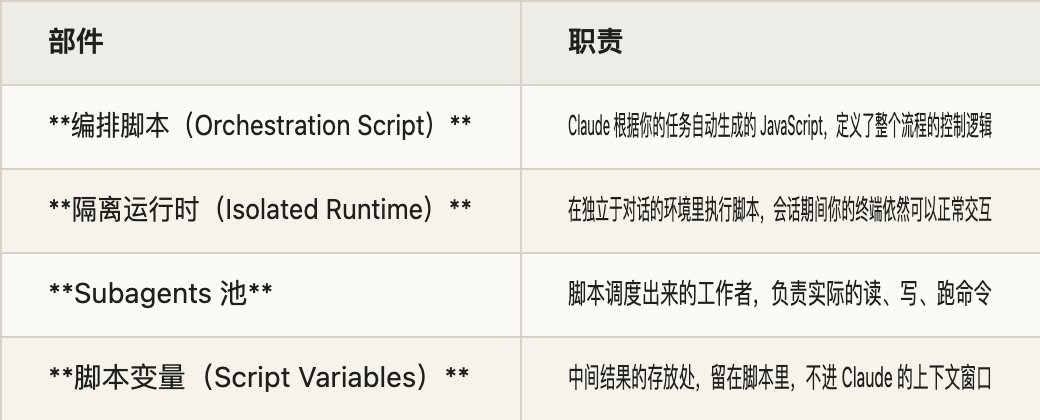
When a Workflow runs, four components work together:
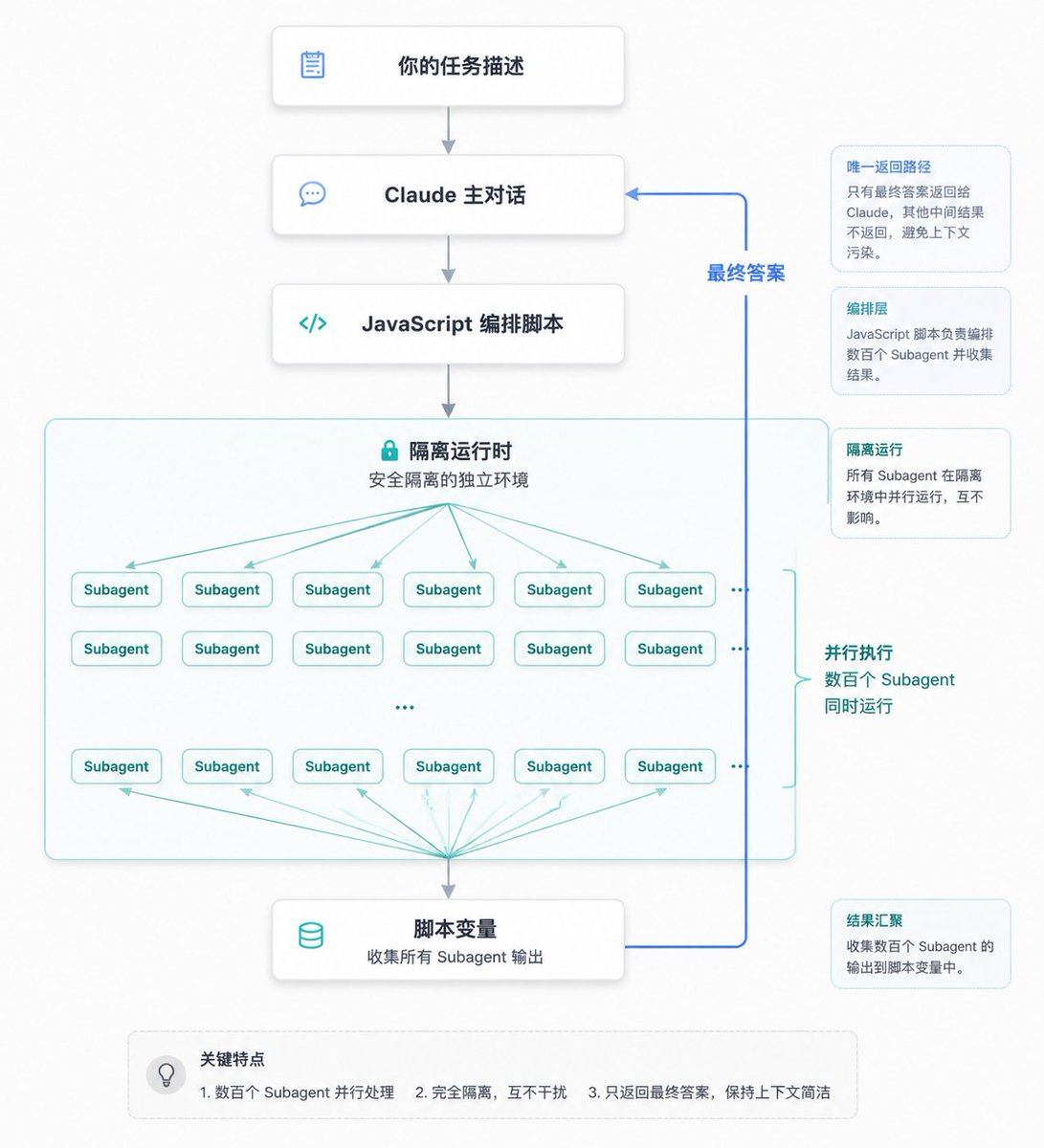
The most critical path in these diagrams is that subagent results flow into script variables first; the runtime handles loops and validations internally, and only the aggregated answer returns to Claude. This is fundamentally different from the subagent model, where “every result passes through Claude’s brain.”
The official documentation provides a three‑way comparison table that clearly lays out the positioning differences among Workflows, Subagents, and Skills:
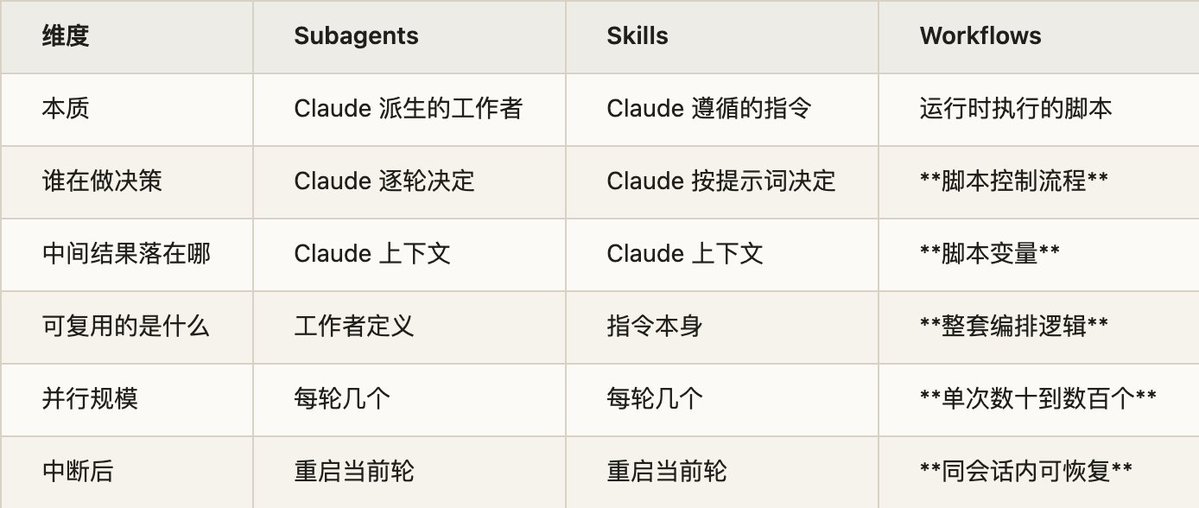
When reading this table, pay attention to the “What is reusable?” row. Subagents and Skills reuse “a worker” or “an instruction,” while Workflows reuse the entire orchestration logic—meaning a complex workflow that schedules hundreds of agents for cross‑validation can be written once, saved, and rerun repeatedly. This is what sets Workflows apart from the other primitives.
一个 Workflow 跑起来,背后是四个部件在配合:
这张图里最关键的一条线,是 subagent 的结果先流进脚本变量,在运行时内部完成循环和校验,最后只有汇总过的答案才回到 Claude。这跟 subagent 那种“每个结果都要经过 Claude 大脑”的模式有本质区别。
官方文档给了一张三者对照表,把 Workflow 和 Subagents、Skills 的定位差异讲得很清楚:
读这张表的时候,注意“可复用的是什么”这一行。subagent 和 skill 复用的是“一个工作者”或“一条指令”,而 Workflow 复用的是整套编排逻辑——这意味着一个调度数百个 agent 做交叉验证的复杂流程,写好一次就能存下来反复运行。这是 Workflow 区别于其它原语的地方。
Since a Workflow is a JS script, what does it actually look like? Let’s dissect the skeleton.
Every script must start with export const meta = {...}, and meta must be a pure literal—no variables, function calls, or template interpolations. It defines the script’s name, a one‑line description (displayed in the permission popup), and the phases:
export const meta = {
  name: 'find-flaky-tests',
  description: 'Find flaky tests and propose fixes',   // one‑line, shown in permission popup
  phases: [                                            // each phase() call corresponds to one entry
    { title: 'Scan', detail: 'grep test logs for retries' },
    { title: 'Fix',  detail: 'one agent per flaky test' },
  ],
}
// script body starts here
phase('Scan')
const flaky = await agent('grep CI logs for retry markers', { schema: FLAKY_SCHEMA })
phase('Fix')
// ...
After meta comes the script body. There aren’t many core primitives; a single table captures them:

The prompt for each agent() is written right in the script as a plain JS string. To feed different inputs to different agents, a common pattern is to write the prompt as a “function returning a string” and use .map() to insert loop variables at call time. Data flows between agents through plain string concatenation—there is no message bus: per‑item data is injected into each agent’s prompt with .map(), and cross‑phase data is JSON.stringify‑ed from the previous phase’s return value and concatenated into the next phase’s prompt.
既然 Workflow 是一段 JS 脚本,那它到底长什么样?这一节把骨架拆开看。
每个脚本必须以 export const meta = {...} 开头,而且 meta 必须是纯字面量——不能有变量、函数调用、模板插值。它定义了脚本的名字、一行描述(会显示在权限弹窗上)和阶段划分:
export const meta = {
  name: 'find-flaky-tests',
  description: 'Find flaky tests and propose fixes',   // 一行,显示在权限弹窗
  phases: [                                            // 每个 phase() 调用对应一条
    { title: 'Scan', detail: 'grep test logs for retries' },
    { title: 'Fix',  detail: 'one agent per flaky test' },
  ],
}
// 脚本体从这里开始
phase('Scan')
const flaky = await agent('grep CI logs for retry markers', { schema: FLAKY_SCHEMA })
phase('Fix')
// ...
meta 之后就是脚本体。能用的核心原语不多,一张表就能记住:
每个 agent() 的提示词,就写在脚本里,是普通的 JS 字符串。要给不同 agent 喂不同的输入,常见写法是把 prompt 写成一个“返回字符串的函数”,调用时用 .map() 把循环变量插进去。数据就是这样在 agent 之间流动的——靠的就是普通的字符串拼接,没有什么消息总线:逐项数据用 .map() 插进每个 agent 的 prompt,跨阶段数据则把上一阶段的返回值 JSON.stringify 后拼进下一阶段的 prompt。
The easiest pitfall in a Workflow script is confusing pipeline with parallel. The essential difference is whether there is a barrier: parallel waits for the entire batch to finish before proceeding, while pipeline lets each item flow through all stages independently, without waiting for others. The following pattern is a typical waste:
const a = await parallel(...)   // ❌ barrier: waits for all to finish
const b = transform(a)          // only flatten / map / filter, no cross‑item dependency
const c = await parallel(b.map(...))
If five tasks vary in speed, the barrier makes the fast ones wait for the slow ones. The correct approach is to embed the transform into a pipeline stage, so that each piece of data flows to the next step as soon as it is ready:
// ✅ findings for dimension 'bugs' can start verification while 'perf' is still under review
const results = await pipeline(
  DIMENSIONS,
  d => agent(d.prompt, { label: `review:${d.key}`, phase: 'Review', schema: FINDINGS }),
  review => parallel(review.findings.map(f => () =>
    agent(`Adversarial verification: ${f.title}`, { phase: 'Verify', schema: VERDICT })
      .then(v => ({ ...f, verdict: v }))
  ))
)

You truly need a barrier only in three situations: when the next phase requires deduplication or merging across the entire set; when you need an early exit based on a total count (e.g., “0 bugs? skip the whole verification phase”); or when the next phase’s prompt needs to reference “all other findings” for cross‑comparison. Otherwise, when in doubt, use pipeline.
整段脚本里最容易踩的坑,是 pipeline 和 parallel 分不清。两者的本质分界是有没有屏障(barrier):parallel 会等这一批全部跑完才往下走,pipeline 则让每个 item 各自独立地流过所有 stage,互不等待。下面这种写法就是典型的浪费:
const a = await parallel(...)   // ❌ 屏障:等全部跑完
const b = transform(a)          // 只是 flatten / map / filter,没有跨 item 依赖
const c = await parallel(b.map(...))
如果 5 个任务快慢不一,中间这个屏障会让快的干等慢的。正确的做法是把中间的 transform 塞进 pipeline 的一个 stage,让每条数据一旦就绪就立刻流向下一步:
// ✅ 维度 'bugs' 的发现可以在 'perf' 还在 review 时就开始 verify
const results = await pipeline(
  DIMENSIONS,
  d => agent(d.prompt, { label: `review:${d.key}`, phase: 'Review', schema: FINDINGS }),
  review => parallel(review.findings.map(f => () =>
    agent(`对抗性验证: ${f.title}`, { phase: 'Verify', schema: VERDICT })
      .then(v => ({ ...f, verdict: v }))
  ))
)
只有三种情况才真正需要屏障:下一阶段前要对全集去重或合并;要根据总数提前退出(比如“0 个 bug 就跳过整个验证阶段”);下阶段的 prompt 要引用“其他所有发现”做横向比较。除此之外,有疑问就用 pipeline。
There are three ways to launch a Workflow from Claude.
First, simply include the word “workflow” in your prompt. Claude Code highlights it to indicate that the request might trigger a workflow:
Run a workflow to audit every API endpoint under src/routes/ for missing auth checks
If you casually mentioned “workflow” without intending to trigger one, press alt+w to dismiss the highlight.
Second, enable ultracode mode and let Claude decide on its own:
/effort ultracode
Third, run an already saved Workflow, which appears as a slash command:
/deep-research What changed in the Node.js permission model between v20 and v22?
Saved Workflows live in two locations, which determine their visibility:
.claude/workflows/      # project‑level, available to anyone who clones the repo — team sharing
~/.claude/workflows/    # user‑level, visible only to you but available in every project
When saving, press Tab to toggle between these two locations. If a project‑level and user‑level Workflow have the same name, the project‑level one takes precedence. Once saved, it becomes a /<name> command that appears in the slash autocomplete menu alongside regular slash commands.
After the script is generated—before it actually runs—you have a chance to review what it intends to do. While it is running, you can press Ctrl+G to open the script in the editor and inspect the code Claude wrote. This “visible and reviewable code” trait is what makes Workflows more reassuring than black‑box automation.
让 Claude 起一个 Workflow,有三条路子。
第一条是在 prompt 里直接出现 workflow 这个词。Claude Code 会把它高亮出来,提示你这句话可能触发一个工作流:
Run a workflow to audit every API endpoint under src/routes/ for missing auth checks
如果你只是顺口提了一句 workflow、并不想真的触发,按 alt+w 就能忽略这个高亮。
第二条是开启 ultracode 模式,让 Claude 自己判断要不要起 Workflow:
/effort ultracode
第三条是运行一个已经保存好的 Workflow,它会以斜杠命令的形式出现:
/deep-research What changed in the Node.js permission model between v20 and v22?
保存下来的 Workflow 放在两个位置,决定了它的可见范围:
.claude/workflows/      # 项目级,克隆仓库的人都能用,跟团队共享
~/.claude/workflows/    # 个人级,只有你能看到,但在每个项目里都能用
保存时按 Tab 在这两个位置之间切换。如果项目级和个人级有同名 Workflow,项目级优先。存好之后它就成了一个 /<name> 命令,出现在斜杠自动补全菜单里,跟普通的 slash command 混在一起。
脚本生成之后、真正跑起来之前,你有机会审一眼它要干什么。运行中按 Ctrl+G 还能在编辑器里打开脚本,看 Claude 到底写了段什么样的代码。这种“代码可见、可审”的特性,是 Workflow 相比黑盒式自动化更让人放心的地方。
The Workflow runtime is isolated from your conversation—the script executes in an independent environment, and your session remains responsive while it runs. This isolation mechanism also imposes a set of hard constraints you must understand.
Concurrency is capped: at most 16 subagents can run simultaneously (actually min(16, CPU cores − 2); machines with fewer cores will see a lower cap), and a single run allows a maximum of 1,000 agents. The latter acts as a fuse to prevent runaway scripts from burning money in an infinite loop.
Regarding permissions, all subagents spawned inside a Workflow automatically run in acceptEdits mode—file edits no longer produce per‑action confirmation dialogs—and they inherit the tool allowlist of your current session. However, one class of action will still interrupt execution: shell commands, web scraping, and MCP tools that are not on the allowlist will pop up a confirmation dialog mid‑run. Hence the official recommendation: before a large‑scale run, add the commands your agents need to the allowlist so you don’t get stuck on a permission popup partway through.
Another easy‑to‑miss detail: the script itself has no direct filesystem or shell access; all reading, writing, and execution must happen through subagents. The script is purely the “orchestrating brain”; the limbs are all attached to the subagents.
Resumability is a capability unique to Workflows among subagents and Agent Teams. Each run leaves a journal; after modifying the script, you can re‑run it with resumeFromRunId. Unchanged agent() calls hit a cache, and only the changed parts and everything after them are re‑executed. This is very handy for debugging orchestration logic—change one prompt line and re‑run; the agents that previously succeeded hit the cache, saving both money and time. But note one critical boundary: resumption only works within the same session. If you pause mid‑run you can resume and completed work is not lost; however, once you exit Claude Code, the next time you run that Workflow it must start from scratch.
Workflow 的运行时跟你的对话是隔离的——脚本在独立环境里执行,跑的过程中你的会话依然能响应。这套隔离机制也带来一组必须了解的硬约束。
并发是有上限的:最多 16 个 subagent 同时跑(实际是 min(16, CPU 核数 − 2),核心少的机器会更低),单次运行最多 1000 个 agent。后面这个数字是防止脚本陷入死循环失控烧钱的保险丝。
权限上,Workflow 内部派生的所有 subagent 自动以 acceptEdits 模式运行,文件编辑不再逐个弹窗确认,并且继承你当前会话的工具允许列表(tool allowlist)。但有一类情况仍然会打断运行——不在允许列表里的 shell 命令、网络抓取和 MCP 工具,跑到一半还是会向你弹确认框。所以官方的建议是:大规模运行之前,先把 agent 们需要用到的命令加进允许列表,免得跑了一半被一个权限弹窗卡住。
还有一点容易被忽略:脚本本身没有直接的文件系统或 shell 访问权限,所有的读写和执行都得通过 subagent 来完成。脚本是纯粹的“调度大脑”,手脚都长在 subagent 身上。
可恢复是 Workflow 相比 subagent、Agent Teams 独有的能力。每次运行都会留一份 journal,改完脚本后用 resumeFromRunId 重跑,没改动的 agent() 调用直接命中缓存,只有改动及其之后的部分才重新跑。这一点对调试编排逻辑很省事——改一行 prompt 重跑,前面已经跑对的那些 agent 直接命中缓存,不用再花一遍钱和时间。但要注意一条界线:恢复只在同一个会话内有效。运行中途暂停了可以接着跑,已完成的工作不会丢;可一旦你退出了 Claude Code,下次进来这个 Workflow 只能从头再跑一遍。
Concepts can feel abstract, so Anthropic built a ready‑to‑use Workflow for you to try: /deep-research.
Its usage is simple—follow it with a question:
/deep-research <question>
When it runs, it does three things: first, it fans out a batch of web searches from multiple angles; then it fetches and cross‑checks those sources; next it votes on each claim; finally it produces a report with citations, discarding any claims that fail cross‑verification.
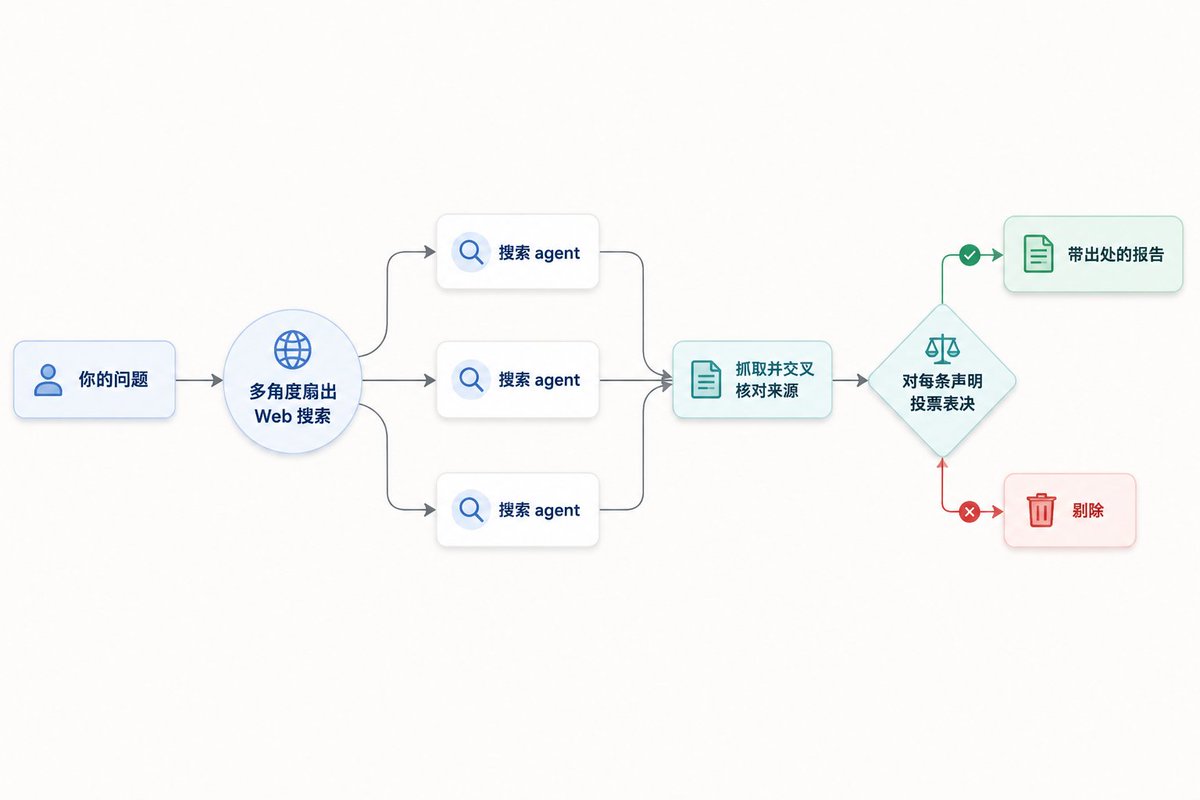
It requires the WebSearch tool to be available. The value of this built‑in Workflow is that it bakes “counter‑hallucination” directly into the orchestration. A single agent searching is easily led astray by one source, whereas multi‑path search plus cross‑voting essentially uses a structured process to converge on the truth. If you want a taste of what Workflows feel like, running /deep-research is the lowest‑cost entry point.
说概念有点抽象,Anthropic 直接内置了一个现成的 Workflow 让你上手体验——/deep-research。
它的用法就是后面跟一个问题:
/deep-research <question>
跑起来之后,它干的事情分三段:先从多个角度扇出(fan out)一批 Web 搜索,然后抓取并交叉核对这些来源,接着对每一条声明(claim)投票表决,最后产出一份带出处的报告,没通过交叉验证的声明会被直接剔除。
它依赖 WebSearch 工具可用。这个内置 Workflow 的价值在于,它把“对抗幻觉”这件事用编排的方式做了进去——单个 Agent 搜索容易被某个来源带偏,而多路搜索加交叉投票,本质上是在用结构化的流程逼近事实。想感受 Workflow 是什么体验,跑一个 /deep-research 是成本最低的入口。
If you don’t want to manually decide whether a task warrants a Workflow every time, you can hand that decision to Claude—enable ultracode.
/effort ultracode
This command does two things: it raises the reasoning effort to xhigh, and it allows Claude to automatically decide when to use a Workflow to handle your task. Once enabled, a single request may be broken into several successive Workflows—for instance, one to understand the code, one to make changes, and one to verify. This setting applies to every task within the current session; new sessions reset it.
The cost is straightforward: the official docs clearly state that ultracode mode consumes significantly more tokens and takes more time per request than lower effort levels. To return to everyday mode, just dial it back:
/effort high
This design of “letting the model decide its own scheduling scale” takes a different path from Codex’s Goals (persistent objectives)—more on that at the end.
如果你不想每次都手动判断“这个任务值不值得起 Workflow”,可以把这个决定权交给 Claude——开启 ultracode。
/effort ultracode
这条命令同时做两件事:把推理努力(effort)拉到 xhigh,同时允许 Claude 自动判断什么时候该用 Workflow 来处理你的任务。开启之后,一个请求可能被拆成连续好几个 Workflow——比如先跑一个理解代码,再跑一个做修改,最后跑一个验证。这个设置对当前会话里的每个任务都生效,新会话则会重置。
代价也很直白:官方文档说得很清楚,ultracode 模式下每个请求消耗的 token 和耗时都明显高于较低的努力档位。想退回日常工作模式,降回去就行:
/effort high
这种“让模型自己决定调度规模”的设计,跟 Codex 那套 Goals(持久目标)走的是不同的方向,这点最后再细说。
When people talk about orchestration, the first thought is often a DAG—Airflow, Argo, GitHub Actions’ needs: — where a static dependency graph is drawn up front and then executed. Is a Workflow the same?
The answer depends on which graph you’re asking about: as a program, it is not necessarily a DAG; but the trace of any single execution is always a DAG.
Let’s start at the program level. Claude Code’s Workflow is a piece of Turing‑complete imperative JavaScript; unlike traditional orchestrators, the dependency graph is not frozen before execution. It can express things that a DAG cannot—the most typical being a loop, for example: “keep finding bugs until two consecutive rounds produce no new ones”:
let dry = 0
while (dry < 2) {                            // ← a back‑edge; a cycle in the control‑flow graph
  const fresh = (await parallel(FINDERS.map(...))).filter(isNew)
  if (!fresh.length) { dry++; continue }
  dry = 0
  confirmed.push(...await verify(fresh))
}
Beyond loops, it can also write branches decided at runtime (if (bugs.length === 0) return—which path you take depends on the previous LLM output), and dynamic fan‑out (how many agents the next stage launches depends on how many results the previous stage returned)—the shape of the graph is not known in advance. At the “program structure” level, it has cycles and data‑dependent branches, making it strictly more powerful than a DAG.
But if you focus on “one specific execution,” it is always a DAG. Two reasons: data flows only forward in time—a value cannot depend on something produced later; and loops get unrolled—the agents in iteration N+1 of a while are different nodes from those in iteration N. The cycle exists in the “program,” but when unrolled into a “trace” it gets straightened into a chain.

A one‑line takeaway: a program with while is not a DAG, but the execution trace of a single run is always a DAG. This is precisely why it’s more flexible than traditional DAG‑based orchestrators—their graph is fixed before the run, whereas a Workflow’s topology is produced by the imperative script and determined only at runtime.
聊到编排,很多人脑子里第一反应是 DAG(有向无环图)——Airflow、Argo、GitHub Actions 的 needs:,都是先把一张静态的依赖图画死,再按图执行。Workflow 是不是也是这样?
答案要看你问的是哪张图:作为程序,它不一定是 DAG;但任何一次执行的轨迹,一定是 DAG。
先说程序层面。Claude Code 的 Workflow 是一段图灵完备的命令式 JavaScript,不像传统编排器那样跑之前就把依赖图定死。它能写出 DAG 表达不了的东西,最典型的就是循环——比如“一直找 bug,直到连续两轮都没有新增”:
let dry = 0
while (dry < 2) {                            // ← 这是一条回边,控制流图里的环
  const fresh = (await parallel(FINDERS.map(...))).filter(isNew)
  if (!fresh.length) { dry++; continue }
  dry = 0
  confirmed.push(...await verify(fresh))
}
除了循环,它还能写运行时才决定的分支(if (bugs.length === 0) return,走哪条路取决于上一步 LLM 的输出),以及动态扇出(下一阶段起几个 agent,取决于上一阶段返回了多少条结果)——图的形状事先并不知道。在“程序结构”这个层面,它有环、有数据决定的分支,比 DAG 严格更强。
但只要你盯住“某一次具体执行”,它又一定是 DAG。原因有两个:数据只往时间前方流,一个值不可能依赖它之后才产生的值;循环会被展开,while 第 N+1 轮的那些 agent,和第 N 轮是不同的节点——环在“程序”里,展开成“轨迹”后就被拉直成一条链了。
一句话记住:带 while 的程序不是 DAG,但它跑一次产生的执行轨迹,永远是 DAG。 这正是它比传统 DAG 编排器更灵活的地方——传统工具的图在跑之前就定死了,而 Workflow 的拓扑是命令式脚本跑出来的,形状运行时才定。
All the concepts so far pale in comparison to the Bun case study. Let’s revisit those opening numbers: 11 days, ~750,000 lines of Rust, 99.8% of original tests passing, from first commit to merge.
Bun is a JavaScript runtime written in Zig; performance is its calling card. Migrating such a large runtime wholesale from Zig to Rust is the kind of engineering that sounds hair‑raising—just Rust’s borrow checker with its strict ownership rules would make a manual migration extremely painful. Jarred Sumner pulled it off with three chained Workflows.
Phase one was lifetime mapping. The first Workflow did exactly one thing: for every struct field in the Zig codebase, compute its correct Rust lifetime. This step was extracted because it serves as the foundation for all subsequent porting—Rust’s memory safety is built on lifetime annotations; if this layer is wrong, the generated .rs files won’t even compile.
Phase two was parallel file porting—the part that best demonstrates Workflow’s scale advantage. The next Workflow converted each .zig file into a behaviorally equivalent .rs file, with hundreds of agents working in parallel and two reviewers per file for cross‑review. Comparing this volume with Agent Teams makes the gap clear—Agent Teams max out at a handful of members before coordination becomes unwieldy, whereas here hundreds of agents ran in parallel with dual review.
Phase three was the compile‑and‑test fix loop. Having files ported is only half‑baked; the real battle is getting them to compile and pass tests. The third Workflow drove the entire build and test suite, looping to fix failures until both ran clean. This is a classic example of the while‑loop pattern discussed earlier—relying on the script’s looping logic for many iterations, without Claude supervising each turn.
A table summarizes the characteristics of each phase:
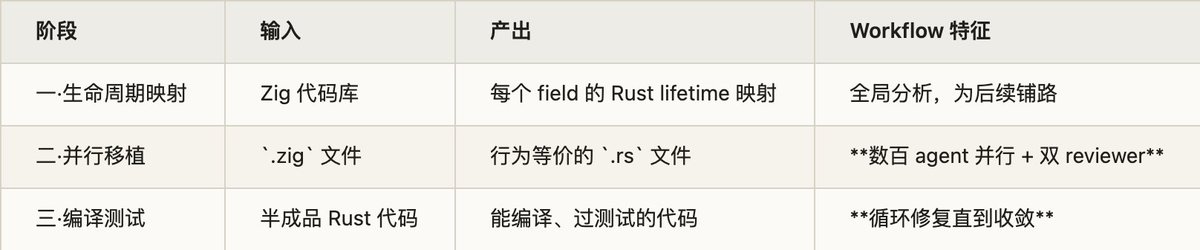
But it didn’t end there. After the port was merged, an overnight workflow was run specifically for cleanup—scanning the code for unnecessary data copies and opening a separate PR for each optimization for human final review. This “run overnight by itself handling long‑tail cleanup and produce a pile of PRs to review” is a fascinating side of Workflows.
To be clear, the official note states that this Rust version of Bun had not yet entered production—the whole pipeline ran and passed tests, but it still had some distance to go before going live. Jarred himself said he’ll write a dedicated article with more details.
前面所有的概念,都不如 Bun 这个案例有说服力。开头那组数字可以再看一眼:11 天、约 75 万行 Rust、99.8% 的原有测试通过,从第一个 commit 到合并。
Bun 是一个用 Zig 写的 JavaScript 运行时,性能是它的招牌。把这样一个庞大的运行时从 Zig 整体迁移到 Rust,是那种听起来就让人头皮发麻的工程——光是 Rust 借用检查器(borrow checker)对内存所有权的严格要求,就足以让人工迁移举步维艰。Jarred Sumner 用三个串联的 Workflow 把它啃了下来。
阶段一是生命周期映射。 第一个 Workflow 专门做一件事:给 Zig 代码库里每一个 struct field 算出它对应的、正确的 Rust lifetime。这一步单独拎出来做,是因为它是后面所有移植工作的地基——Rust 的内存安全建立在生命周期标注之上,这一层没算对,后面写出来的 .rs 文件根本过不了编译。
阶段二是并行文件移植,也是最能体现 Workflow 规模优势的一段。 下一个 Workflow 把每个 .zig 文件移植成一个行为等价的 .rs 文件,数百个 agent 同时开工,每个文件还配两个 reviewer 做交叉审查。把这个量级跟 Agent Teams 对比一下就能感受到差距——Agent Teams 同时跑三五个队员就到协调上限了,而 Workflow 在这里是几百个 agent 并行外加双重 review。
阶段三是编译与测试的 fix loop。 文件移植完只是半成品,真正的硬仗是让它们能编译、能通过测试。第三个 Workflow 驱动整个 build 和 test 套件,循环修复,直到两者都干净跑过。这正是上一节讲的 while 循环模式的典型场景——靠脚本里的循环逻辑反复迭代,而不靠 Claude 逐轮盯着。
三个阶段各自的特征可以列成一张表:
事情到这还没完。移植合并之后,又跑了一个 overnight workflow(过夜工作流)专门处理收尾——扫描代码里不必要的数据拷贝,每发现一处优化就单独开一个 PR 交给人做最终审查。这种“夜里挂着自己干长尾清理、产出一堆待 review 的 PR”的用法,是 Workflow 很有意思的一个侧面。
需要说清楚的是,官方明确标注了 Bun 的这个 Rust 版本当时还没进入生产环境——这整套流程跑通了、测试过了,但离上线还有距离。Jarred 自己也说,后续会专门写文章讲这件事的更多细节。
Bun is an extreme case; most people won’t get to run a cross‑language mega‑migration. I tried a more down‑to‑earth task myself: using a Workflow to create a “usage profile” of my own Claude Code chat history.
The task: the ~/.claude directory held 133 sessions, 130MB of jsonl records. I wanted to extract usage patterns, recurring pain points, and automation candidates. The job’s hallmarks were large data volume and multiple dimensions—a perfect fit for fan‑out.
I split the task into “main agent preprocessing + Workflow orchestration.” The main agent first did reconnaissance and cleanup: the jsonl was clogged with tool‑call noise; feeding it directly to an agent would waste context. So it first wrote a script to compress 133 sessions into “title + real user input + metadata,” yielding 601 genuine human inputs, then split them into 10 batches. Then the Workflow took over: 10 analysis agents worked in parallel, each chewing on one batch (extracting domain distribution, sticking points, automation candidates according to a unified schema); finally one synthesis agent cross‑batch aggregated and deduplicated, producing a prioritized report.

The execution skeleton, with declarations stripped out, looked roughly like this:
phase('Analyze')
const batches = Array.from({ length: 10 }, (_, i) =>
  `${DIR}/batch_${String(i + 1).padStart(2, '0')}.md`)

const findings = await parallel(batches.map((path, i) => () =>
  agent(ANALYZE_PROMPT(path), {                 // ANALYZE_PROMPT is a function returning a string
    label: `Analyze:batch_${String(i + 1).padStart(2, '0')}`,
    phase: 'Analyze',
    schema: FINDING_SCHEMA,                      // forced structured output; auto‑retry on mismatch
  })
))

const ok = findings.filter(Boolean)              // discard failures (skipped agents return null)
log(`Analysis done: ${ok.length}/${batches.length} batches returned valid results`)

phase('Synthesize')
const corpus = JSON.stringify(ok, null, 1)       // stuff all 10 findings into the synthesis prompt
const report = await agent(SYNTH_PROMPT, { label: 'Synthesis Report', phase: 'Synthesize' })
return report                                    // this return value is the only thing that re‑enters main context
The bill for this run: 11 agents, 818k tokens, 254 seconds. I also hit a pitfall—the first run crashed with TypeError: undefined is not an object (evaluating 'batches.map') because args weren’t passed correctly and got treated as a string. The fix perfectly illustrates the value of Workflows as “script as file, iterable”: I didn’t resend the entire script; I simply edited the on‑disk script file, hard‑coded the paths to be self‑contained, and re‑ran with scriptPath.
This case also answers a question many ask: “Couldn’t you just use a few subagents for this? What’s the difference?” Yes, you could—the difference is not about “can it be done?,” but about “where does the orchestration logic live, and where do intermediate results go?” If you spawned 10 subagents with the Agent tool, all 10 results would come back into main context as tool results; then in the next turn you’d have to read them with your own brain and decide how to combine them; the orchestration logic is improvised on the spot, and every coordination step burns main‑context tokens. With a Workflow, the orchestration is written in code; the 10 intermediate results never enter the main context, only the final report does; schema validation and concurrency control are automatic.
Honestly, I must add: for this particular “one‑shot map‑reduce,” the gap isn’t that large—10‑way parallel with one merge, subagents suffice. The real win of Workflows multiplies with complexity: when you have more stages, need loops (keep going until N consecutive rounds yield nothing new), need multiple rounds of adversarial verification, or need to fan‑out to dozens of units, manual coordination via subagents becomes painful, while scripting it is natural.
Bun 是个极端案例,普通人未必有机会跑一次跨语言大迁移。我自己拿一个更接地气的任务试了一下:用 Workflow 给自己的 Claude Code 历史会话做一次“使用画像”。
任务是这样的:~/.claude 目录下攒了 133 个会话、130MB 的 jsonl 记录,想从里面提炼出使用模式、反复出现的痛点和可以自动化的点。这个活的特点是数据量大、维度多,正好适合 fan-out。
整个任务拆成了“主 Agent 预处理 + Workflow 编排”两段。主 Agent 先做侦察和清洗:jsonl 里塞满了工具调用的噪声,直接喂给 agent 会浪费上下文,于是先写个脚本把 133 个会话压缩成“标题 + 用户真实输入 + 元数据”,得到 601 条真实的人类输入,再切成 10 个批次。然后才是 Workflow 上场:10 个分析 agent 并行各啃一个批次(按统一的 schema 抽取领域分布、卡点、自动化候选),最后 1 个综合 agent 跨批汇总去重,产出一份带优先级的报告。
这次运行的执行体,去掉声明部分后大致是这样:
phase('分析')
const batches = Array.from({ length: 10 }, (_, i) =>
  `${DIR}/batch_${String(i + 1).padStart(2, '0')}.md`)

const findings = await parallel(batches.map((path, i) => () =>
  agent(ANALYZE_PROMPT(path), {                 // ANALYZE_PROMPT 是返回字符串的函数
    label: `分析:batch_${String(i + 1).padStart(2, '0')}`,
    phase: '分析',
    schema: FINDING_SCHEMA,                      // 强制结构化输出,不匹配自动重试
  })
))

const ok = findings.filter(Boolean)              // 丢掉跑挂的(被跳过的 agent 返回 null)
log(`分析完成:${ok.length}/${batches.length} 批返回有效结果`)

phase('综合')
const corpus = JSON.stringify(ok, null, 1)       // 把 10 份发现整个塞进综合 prompt
const report = await agent(SYNTH_PROMPT, { label: '综合报告', phase: '综合' })
return report                                    // 这个返回值就是唯一回到主上下文的东西
跑下来的账单:11 个 agent、81.8 万 token、254 秒。这中间我还踩了一个坑——第一次跑直接挂了,报 TypeError: undefined is not an object (evaluating 'batches.map'),原因是 args 没正确传进去、被当成了字符串。修法很能体现 Workflow“脚本即文件、可迭代”的价值:我没有重发整段脚本,只是直接 Edit 那个落盘的脚本文件、把路径写死成自包含,再用 scriptPath 重跑。
这个案例还顺带回答了一个很多人会问的问题:这事派几个 subagent 一样能做,区别在哪? 确实能做——区别不在“能不能”,在“编排逻辑放哪、中间结果流到哪”。如果用 Agent 工具派 10 个 subagent,10 份结果会作为 tool result 全部回到主上下文,然后你得在下一个回合用自己的脑子读完、决定怎么合;编排逻辑是临场判断,每一步协调都烧主上下文的 token。而 Workflow 把编排写成了代码,10 份中间结果不进主上下文,只回最终那份报告,schema 自动校验、并发自动管控。
不过得诚实地补一句:就这一次这种“一把梭 map-reduce”而言,两者差距其实没那么大——10 路并行、合一次就完了,subagent 也够用。Workflow 真正赚到的是随复杂度放大的那部分:当阶段变多、需要循环(一直找到连续 N 轮无新增)、需要多轮对抗式验证、或者要 fan-out 到几十个单元时,用 subagent 手动协调会非常痛,用脚本写就很自然。
Seeing “code‑based multi‑step orchestration with LLMs in each step” easily prompts the thought: isn’t this just n8n, Coze, Dify? Only now the model does the orchestration automatically.
This intuition captures the key commonality, but the “only difference is AI‑auto‑orchestration” needs some tempering.
First, the commonality—and it’s stronger than expected. Anthropic’s “Building Effective Agents” gives an authoritative definition: Workflows are systems where LLMs and tools are orchestrated through “predefined code paths”; by contrast, Agents are systems where the LLM dynamically directs its own process at runtime. Under this definition, Dynamic Workflows and n8n/Dify/Coze are in the same category—their control flow is deterministic; the LLM never decides “which edge to take next” at runtime. Once the script is written, a dumb runtime executes it; the LLM only works inside each node. What falls outside this category is the main conversation’s ReAct‑style agent (that’s where the model really decides the next step on the fly). This judgment is completely valid.
But “the only difference” misses two harder distinctions. Laying them out:

Condensing the table into one sentence: Workflow ≈ taking n8n’s graph and replacing it with code generated on‑the‑fly by the model. It swaps two things—the author (human → model) and the medium (visual DAG → imperative code). The first brings immediacy and custom‑tailoring (no need for a human to pre‑build; generated specifically for the current task); the second brings greater expressiveness (can write loops and dynamic fan‑out, which a visual DAG cannot).
As for the most eye‑catching difference, “AI‑auto‑orchestration,” we need to be more precise: AI intervention happens at “code‑writing time,” not at “process‑running time.” In n8n, a human writes the orchestration, and the runtime deterministically executes it; in Workflow, the model writes the orchestration, and the runtime deterministically executes it—while it runs, the model is asleep. How the process runs is the same; the only difference is who authored the orchestration script.
Notably, both sides are converging: Coze and Dify are adding agent nodes (nodes themselves become autonomous) and code nodes (allowing JS/Python), moving toward “code + autonomous nodes”; meanwhile, Workflow scripts can be saved into .claude/workflows/ as reusable artifacts, moving toward “build once, reuse many times.” So a more precise conclusion is: your essential judgment holds—both are deterministic process orchestration with LLMs as steps—but the differences go beyond “AI‑auto‑orchestration” to include the medium being Turing‑complete code rather than a visual DAG, and each node being an autonomous agent rather than a fixed connector.
看到“用代码编排多步流程 + 步骤里塞 LLM”,很容易冒出一个念头:这不就是 n8n、Coze(扣子)、Dify 那套吗?无非是现在让模型自动来编排。
这个直觉抓住了最关键的共性,但“唯一区别是模型自动编排”这句话,得往回拉一拉。
先说共性,而且这个共性比想象的更硬。Anthropic 在《Building Effective Agents》里给过一个权威定义:Workflows 是 LLM 和工具通过“预定义代码路径”(predefined code paths)被编排的系统;与之相对的 Agents,才是 LLM 在运行时动态指挥自己流程的系统。按这个定义,Dynamic Workflow 和 n8n/Dify/Coze 是同一类——它们的控制流都是确定性的,LLM 不会在运行时决定“下一步走哪条边”,脚本一旦写好,执行它的就是个无脑运行时,LLM 只在节点内部干活。真正不在这个范畴里的,是主对话那个 ReAct 式 agent(那才是模型实时决定下一步)。这一点的判断完全成立。
但“唯一区别”这个说法漏掉了两个更硬的差异。把它们摊开看:
把这张表压成一句话:Workflow ≈ 把 n8n 那张图,换成模型现场生成的一段代码。 它换掉了两样东西——作者(人 → 模型)和载体(可视化 DAG → 命令式代码)。第一样带来即时性和定制性(不用人预先搭,针对当次任务量身生成),第二样带来表达力的提升(能写循环和动态扇出,这是可视化 DAG 做不到的)。
至于“AI 自动编排”这个最抢眼的差异,还得再精确一点:AI 的介入发生在“写代码”那一刻,不在“跑流程”那一刻。 n8n 是人写编排、运行时确定性执行;Workflow 是模型写编排、运行时确定性执行——执行期间模型在睡觉。两者跑流程的方式是一样的,差别只在编排脚本的作者是谁。
值得一提的是,两边其实在互相靠拢:Coze、Dify 都在加 agent 节点(节点本身变自主)和 code 节点(可以写 JS / Python),往“代码 + 自主节点”挪;而 Workflow 的脚本也能存进 .claude/workflows/ 当可复用产品,往“建一次反复用”挪。所以更准确的结论是:你的本质判断成立——都是确定性流程编排、LLM 当步骤;但区别不止“AI 自动编排”一条,还有载体是图灵完备代码而非可视化 DAG,以及每个节点是个自主 agent 而非固定连接器。
Since a Workflow is essentially “deterministic script + LLM calls at nodes,” it was completely feasible to roll your own before the official launch. The single core ingredient: claude -p.
claude -p (--print, headless mode) runs an entire agent loop non‑interactively—thinking, invoking tools, editing files—and exits when done. It reads from stdin, writes to stdout, and can be pipelined like any ordinary CLI tool. Treat each step as a claude -p invocation, wrap an orchestration loop in shell or Python around it, and you have a DIY Workflow:
# fan-out: 10 batches in parallel, each launching a claude -p
for f in batch_*.md; do
  claude -p "Analyze this batch: $(cat $f)" --output-format json > "out_$f.json" &
done
wait                                    # ← barrier, wait for all to finish, analogous to parallel()

# reduce: concatenate the 10 results and run one more claude -p to synthesize
claude -p "Synthesize these findings: $(cat out_*.json)" > report.md
A quick comparison shows structural isomorphism with the 133‑session Workflow: & plus wait is the barrier of parallel(), and $(cat ...) string concatenation is variable interpolation in the prompt. There are plenty of community practices like this; the futuresearch.ai post built an 18‑way parallel scanning pipeline using claude -p plus filesystem polling—subagents wrote results to disk (.json for success, .error for failure), and the orchestrator only polled filenames without pulling the output into context, reducing complexity from O(n × output size) to O(n × filename).
So what does the official Workflow add over the DIY version? Answer: the model is unchanged; what it saves is all the engineering grunt work.
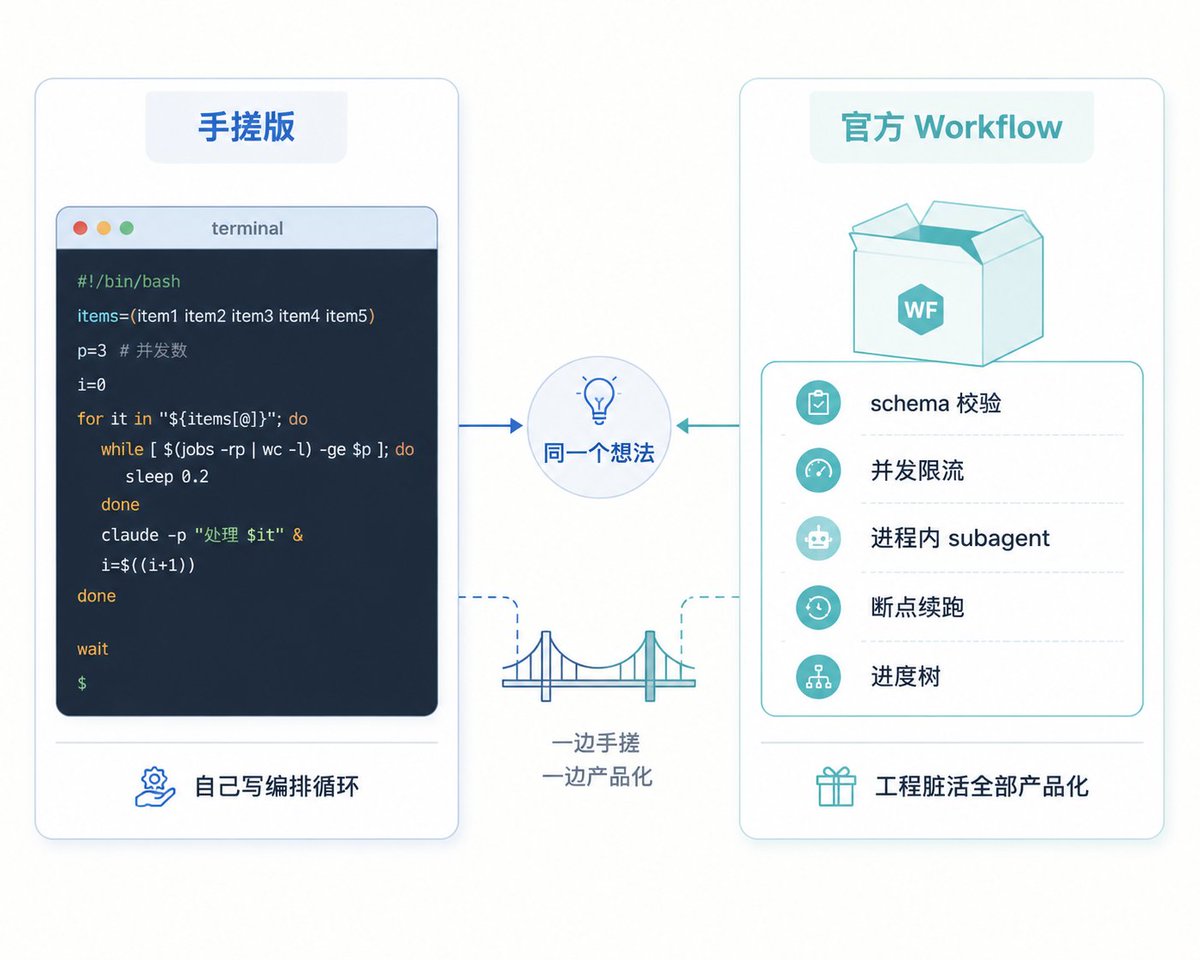
In one sentence: Workflow productizes this DIY harness, saving the dirty work of engineering, not changing the model. Once you internalize this, you’ll have a solid grasp of its capability boundary—it’s not magic; it’s a runtime that polishes “claude -p + orchestration loop” into a smooth experience.
既然 Workflow 本质是“确定性脚本 + 在节点处调 LLM”,那在官方推出之前,自己手搓一个类似的东西,完全可行。核心拼图就一个:claude -p。
claude -p(即 --print,headless 模式)会非交互地跑完一整个 agent loop——思考、调工具、改文件——跑完即退出。它读 stdin、写 stdout,可以像普通命令行工具一样接进管道。把每一步当成一次 claude -p 调用,外面用 shell 或 Python 写编排循环,就是 DIY 版的 Workflow:
# fan-out:10 个批次并行,每个起一个 claude -p
for f in batch_*.md; do
  claude -p "分析这个批次:$(cat $f)" --output-format json > "out_$f.json" &
done
wait                                    # ← 屏障,等全部跑完,对应 parallel()

# reduce:把 10 份结果拼起来,再起一个 claude -p 综合
claude -p "综合这些发现:$(cat out_*.json)" > report.md
对照一下就会发现,这跟前面那个 133 会话的 Workflow 是同构的:& 加 wait 就是 parallel() 的屏障,$(cat ...) 拼字符串就是 prompt 里的变量插值。社区里这类实践不少,futuresearch.ai 那篇就用 claude -p 加文件系统轮询搭了一套 18 路并行的扫描流水线——子 agent 把结果写盘(成功写 .json、失败写 .error),编排器只轮询文件名而不把输出收进上下文,把复杂度从 O(n × 输出大小) 压到 O(n × 文件名)。
那官方 Workflow 比手搓版多了什么?答案是:模型没变,省掉的全是工程脏活。
一句话:Workflow 是把这套手搓 harness 产品化了,省的是工程脏活,不是改变模型。 理解了这一层,你对它的能力边界也就有了底——它不是什么魔法,就是一个把“claude -p + 编排循环”打磨得足够顺手的运行时。
Not every task needs a Workflow. At its core, it trades many parallel agents for efficiency, and those parallel agents burn tokens for real. So when is that trade‑off worth it?
The official docs focus on four categories.
First, codebase‑wide batch audits—repo‑wide bug scans, profiling‑guided optimization audits, security audits. The common thread is “search plus independent verification”: Claude searches the entire service in parallel, then individually verifies each finding to ensure only real issues surface in the report. Check authorization gaps, input validation, or hardening dangerous patterns across the codebase—all share this shape.
Second, large‑scale migrations and modernization—framework replacements, deprecated API migrations, cross‑language ports, with Bun being the most extreme example.
Third, high‑stakes decisions that need heavy deliberation. When the cost of a wrong answer is high, have Claude approach the problem from several independent angles, then deploy adversarial agents to try to overturn the results, iterating until the answers converge—this adversarial verification can approach a quality level that a single pass cannot achieve.
Fourth, long‑tail cleanup, like Bun’s overnight workflow that automatically scans for issues and opens PRs one by one.
Conversely, these tasks make a Workflow overkill: small fixes that take one or two steps, exploratory work that requires frequent human decisions mid‑stream, or changes touching high‑risk code like security or payments.
Placing Claude Code’s existing collaboration primitives side by side, the selection logic roughly looks like this:
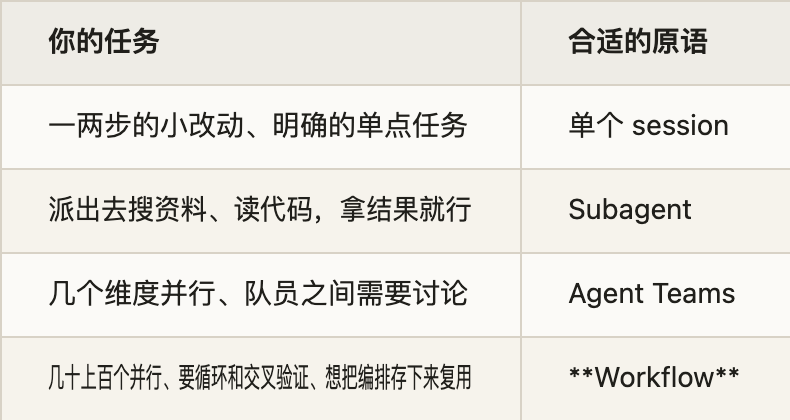
One‑line differentiation: if you need “legwork,” use subagents; if you need a “meeting discussion,” use Agent Teams; if you need a “pipeline job,” use Workflows.
不是每个任务都需要起一个 Workflow。它本质上是用大量并行 agent 换效率,而并行 agent 是实打实烧 token 的。那什么时候这笔账划算?
官方文档给出的适用场景集中在四类。
一是代码库范围的批量排查,比如全仓库 bug 扫描、性能剖析引导的优化审计、安全审计。这类任务的共同点是“搜索加独立验证”——Claude 并行搜遍整个服务,再对每个发现单独验证,确保报告里浮现的都是真问题。授权检查、输入校验、危险模式的全库加固也是同一个形状。
二是大规模迁移与现代化,框架替换、API 弃用迁移、跨语言移植都算,Bun 是其中最极致的例子。
三是需要反复推敲的关键决策。当错误答案的代价很高时,让 Claude 从多个独立角度各做一遍,再派对抗性的 agent 试图推翻这些结果,迭代到答案收敛为止——这种对抗式验证能逼近单次跑达不到的质量。
四是长尾清理,像 Bun 那个 overnight workflow,挂着自动扫描问题、逐个开 PR。
反过来,这几类任务用 Workflow 就是杀鸡用牛刀:一两步就能搞定的小修补、需要你中途频繁拍板的探索性工作、以及碰安全和支付这类高风险代码的改动。
把 Claude Code 现有的几种协作原语放一起,选型逻辑大致是这样:
一句话区分:需要“跑腿”用 subagent,需要“开会讨论”用 Agent Teams,需要“流水线作业”用 Workflow。
Dynamic Workflows are currently a research preview with requirements for both version and plan.
You need Claude Code v2.1.154 or later. Platform coverage is broad: CLI, Desktop, VS Code extension, Claude API, plus the three major clouds Amazon Bedrock, Google Cloud Vertex AI, and Microsoft Foundry.
Plan differences are important: on Max, Team, and API‑based usage, Workflows are enabled by default; on Pro they are off by default—you must manually enable them under /config’s Dynamic workflows line; on Enterprise plans they are also off by default at launch, requiring an admin to toggle them on from settings. The first time a Workflow would be triggered, Claude Code shows you what it’s about to run and asks for confirmation—it never runs blindly.
If you want to disable it entirely, there are several layers of control:
// ~/.claude/settings.json
{
  "disableWorkflows": true
}
Or via an environment variable at launch:
export CLAUDE_CODE_DISABLE_WORKFLOWS=1
Individuals can also toggle it directly in /config; organizations can disable it uniformly through managed settings or the admin dashboard.
Dynamic Workflows 目前是研究预览状态,对版本和计划都有要求。
版本上需要 Claude Code v2.1.154 或更高。平台覆盖得相当全:CLI、Desktop、VS Code 扩展、Claude API,以及 Amazon Bedrock、Google Cloud Vertex AI、Microsoft Foundry 三大云。
计划上的差异要留意:Max、Team 以及通过 API 使用的场景,默认就开着;Pro 计划默认关闭,需要去 /config 里的 Dynamic workflows 一行手动打开;Enterprise 计划发布时也默认关闭,得由管理员在设置里开启。第一次触发 Workflow 时,Claude Code 会把即将运行的内容摆给你看并要求确认,不会闷头就跑。
如果你想彻底关掉它,有几个层面的开关:
// ~/.claude/settings.json
{
  "disableWorkflows": true
}
或者用环境变量,在启动时生效:
export CLAUDE_CODE_DISABLE_WORKFLOWS=1
个人也可以直接在 /config 里切换,组织层面则能通过 managed settings 或管理后台统一禁用。
The official docs are unusually candid here: a single Workflow consumes significantly more tokens than a normal Claude Code conversation. The reason is straightforward—dozens or hundreds of subagents running simultaneously, each burning tokens, compounded by “extra redundancy” like cross‑validation and adversarial reviews. The 133‑session case used 11 agents and 818k tokens—and that was just a lightweight 10‑way parallel run. All this consumption counts against your plan’s usage and rate limits.
A few practical tips from the docs are worth jotting down. First, start with a small, well‑scoped task to gauge how much it costs in your own workflow before letting it loose on bigger jobs. Second, before a large run, verify with /model that you’re on the right model, and you can ask Claude to switch to a smaller model for phases that don’t need the strongest capabilities—not every step requires the most expensive brain. Third, as mentioned earlier, add the necessary commands to the allowlist ahead of time to avoid getting stuck with a permission popup hours into a run.
Thankfully, a Workflow can be stopped at any time without losing the work that has already completed.
这部分官方说得格外坦诚:单次 Workflow 的 token 消耗,明显高于一次普通的 Claude Code 对话。道理不复杂,几十上百个 subagent 同时跑,每个都在烧 token,再叠加交叉验证、对抗式 review 这些“额外冗余”的设计,账单自然往上走。前面那个 133 会话的案例,11 个 agent 就吃掉了 81.8 万 token——这还只是 10 路一把梭的轻量编排。这些消耗都计入你所在计划的用量和速率限制。
官方给的实用建议有几条可以记下来。一是从一个范围明确的小任务开始,先摸清楚它在你的工作里大概花多少,再决定要不要放手让它跑大活。二是大规模运行之前,先用 /model 确认自己在合适的模型上,并且可以要求 Claude 在那些不需要最强能力的阶段改用更小的模型——不是每一步都得动用最贵的脑子。三是前面提过的,提前把命令加进允许列表,避免中途被权限弹窗打断一个跑了几小时的任务。
好在 Workflow 随时可以叫停,已经完成的工作不会白费。
During the research preview, several boundaries are worth noting up front so you don’t have to look them up after encountering them:
- No mid‑run human input: aside from permission popups, a running Workflow won’t pause for your approval. Processes that need staged sign‑offs must be split into multiple independent Workflows.
- The script itself has no file or shell access: all reading, writing, and execution go through subagents; the script only coordinates.
- Concurrent and total caps: maximum 16 concurrent subagents, up to 1,000 agents per run.
- Not recoverable across sessions: after you exit Claude Code, the next time you open it the Workflow starts from scratch.
- How to pass parameters to custom Workflows: the built‑in /deep-research accepts a question parameter, but the docs are still vague about how to pass parameters to your own saved Workflows.
- The entire feature is still a research preview—behavior and constraints may change with version updates.
研究预览阶段,几个边界先摆在这,省得踩到了再回来查:
- 运行中途不接受人工输入:除了权限确认弹窗,Workflow 跑起来就不停下来等你拍板。需要分段签核的流程,得拆成多个独立的 Workflow。
- 脚本本身没有文件和 shell 访问权限:读写和执行全靠 subagent,脚本只负责调度。
- 并发与总量都封顶:最多 16 个并发 subagent,单次运行 1000 个 agent 上限。
- 跨会话不可恢复:退出 Claude Code 后,下次进来 Workflow 从头再跑。
- 自定义 Workflow 怎么传参:内置的 /deep-research 能接收一个问题参数,但你自己存的 Workflow 怎么传参,官方文档这块还语焉不详。
- 整个功能仍在研究预览,行为和约束都可能随版本调整。
At this point, we can step back and view all of Claude Code’s extension primitives in one table:
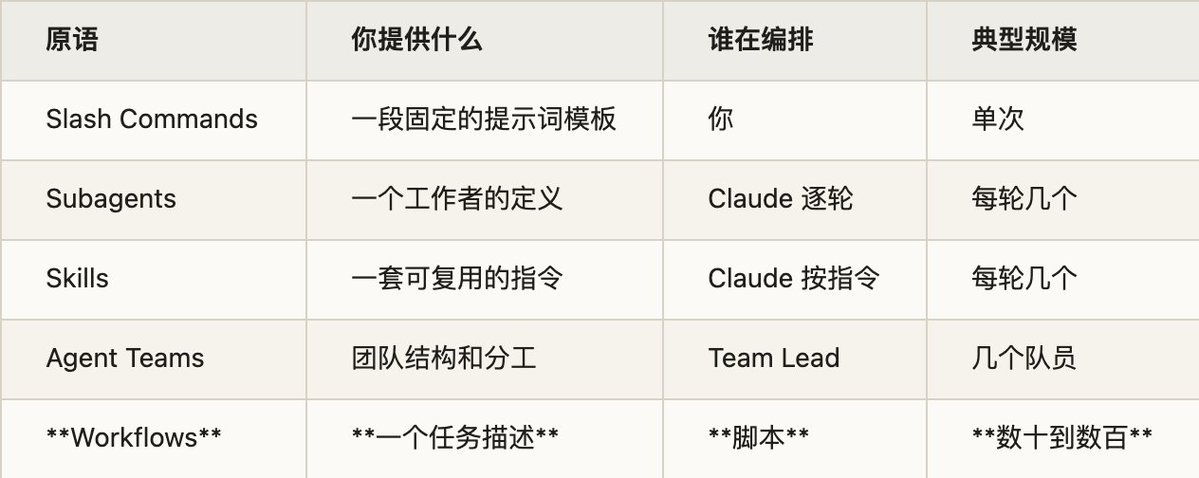
From top to bottom, the orchestration authority shifts step by step from “you” to “Claude” to “code.” Workflow sits at the far right—you give a single task description, the orchestration work is handed to a script written by Claude, and the scale reaches hundreds of agents.
This brings us back to the earlier foreshadowing: why Dynamic Workflows launched on the same day as Opus 4.8. When you have hundreds of agents working in parallel and reviewing each other’s conclusions, the reliability of each node becomes magnified—each node is a probabilistic LLM, the same question can yield inconsistent answers from different angles, and uncertainty compounds over multi‑step processes. Opus 4.8 specifically strengthened this area: the official word is that “it lets code defects slip through unnoticed roughly four times less often than the previous generation,” and it’s more inclined to proactively flag uncertainties. This honesty boost is exactly what makes the “hundred‑agent cross‑validation” approach viable—for cross‑validation to work, the reviewer must actually point out problems, not just nod along. A strong model isn’t optional for Workflows; it’s the load‑bearing wall.
到这里,可以把 Claude Code 的几种扩展原语放在一张表里通盘看一遍:
这张表从上到下,编排权一步步从“你”转移到“Claude”,再转移到“代码”。Workflow 站在最右端——你只给一句任务描述,编排的活儿交给 Claude 写的脚本,规模冲到数百个 agent。
这里就要回到开头那个伏笔:为什么 Dynamic Workflows 和 Opus 4.8 同一天发布。当你让几百个 agent 并行干活、还要它们互相 review 彼此的结论时,每个节点的可靠性就被放大了——节点是概率性的 LLM,同一个问题换个角度问都可能给出不一致的答案,而多步流程里的不确定性会层层累积。Opus 4.8 这一代专门强化了这块:官方说它“让代码缺陷悄悄溜过、不被发现的概率比前一代低了约四倍”,更倾向于主动标记自己拿不准的地方。这种诚实性的提升,正是“数百 agent 交叉验证”这套打法能成立的前提——交叉验证要管用,前提是 reviewer 真的会指出问题,而不是一味点头。强模型不是 Workflow 的可选项,是它的承重墙。
Finally, let’s place Workflows in a larger picture. Making “code‑fied orchestration logic” an explicit product choice is itself intriguing: orchestration moves from a spontaneous, on‑the‑fly model behavior to a code asset that can be read, reviewed, saved, and rerun. Placed alongside Codex’s Goals, an interesting divergence emerges. Both aim to solve “how to keep a large task moving forward,” but the paths are opposite: Codex Goals bet on goal persistence—nailing the objective in place and letting the model figure out how to approach it step by step; Claude Code Workflows take the code‑fied orchestration route—writing the process as a script and relying on that script to prevent drift. One governs “where to go,” the other governs “how to go”; they are two different engineering philosophies. It’s too early to say which will go further, but the fact that two leading products are simultaneously attacking the problem of “carrying super‑scale workloads” tells us this is the next major battleground in AI coding.
Let me offer my own judgment. I find dynamic workflows incredibly powerful and likely representative of the future direction. It stands on two tightly interlocking pieces: one, solidifying “orchestration” from the model’s ad‑hoc improvisation into controllable code; the other, a sufficiently honest and strong frontier model capable of supporting hundreds of agents cross‑validating each other—exactly why it had to launch alongside Opus 4.8. The frontier model is the foundation; code‑fied orchestration is what makes “hundreds of agents collaborating without going off the rails” possible. Neither can be absent.
Precisely because it depends so deeply on frontier model capability, my prediction is: within a year, this approach of “model writes an orchestration script on‑the‑fly and dispatches an agent fleet” will grow from one company’s research preview into a standard feature of nearly all coding agents.
As a side note, the research behind this article was itself run by a Workflow: fifteen agents worked in parallel—closely reading primary conversation logs, cross‑referencing industry materials—270k tokens, 169 seconds, finally returning a consolidated set of materials. Using a Workflow to explain Workflows is probably the most direct trial of it.
最后把 Workflow 放进更大的图景里看。它把“编排逻辑代码化”作为一个明确的产品选择,这件事本身值得玩味:编排从模型每次现想现做的临时行为,变成了一段可以读、可以审、可以存、可以反复跑的代码资产。把它和 Codex 的 Goals 摆在一起看,会发现一个有趣的分野。两者都想解决“大任务怎么持续推进”,但路径相反:Codex Goals 押注的是目标持久化——把目标钉在那,让模型自己想办法一步步逼近;Claude Code Workflow 走的则是编排代码化这条路——把过程写成脚本,靠脚本保证流程不跑偏。一个管“往哪走”,一个管“怎么走”,是两套不同的工程哲学。哪条路最后跑得更远现在下结论还太早,但两家头部产品在“承载超大规模工作”这个问题上同时发力,本身就说明这是 AI Coding 下一阶段的主战场。
最后,说点我自己的判断。我觉得 dynamic workflow 这套东西相当强大,大概率代表了未来的方向。它能站住,靠的是两块拼图严丝合缝:一块是把“编排”从模型的临场发挥固化成可控的代码,另一块是一个足够诚实、足够强的前沿模型,撑得起几百个 agent 互相交叉验证——这也正是它要跟 Opus 4.8 同天登场的原因。前沿模型是地基,编排代码化则是让“几百个 agent 协作还不跑偏”成为可能的关键,两者缺一不可。
也正因为它对前沿模型的能力依赖得这么深,我的判断是:一年之内,这套“模型现写编排脚本、再调度一支 agent 舰队”的打法,会从某一家的研究预览,长成几乎所有 coding agent 的标配。
顺带一提,这篇文章背后的调研,本身就是一个 Workflow 跑出来的:十五个 agent 并行分头干活——精读一手对话记录、交叉比对业界资料——27 万 token、169 秒,最后汇成一份素材交回来。用 Workflow 把 Workflow 讲清楚,大概是对它最直接的一次试用。