Claude Code 的 /goal 命令:告别手动“继续”,让 AI 自主完成编码任务
Claude Code 新增的 /goal 命令可以让 AI 助手持续运行,直到满足你设定的完成条件,无需反复输入“continue”。作者详解其工作原理:每轮结束后,一个轻量评价模型(默认 Claude Haiku)自动检查对话记录,若目标未达成则立即启动下一轮。成功的关键在于写出具体、可衡量且能从输出中验证的目标(例如“所有测试通过且 lint 干净”)。文章还给出了项目准备建议(创建 CLAUDE.md、配置 hooks、开启 Auto Mode),并警告模糊的目标会导致 token 浪费和评价幻觉。最后对比了 /goal 与 /loop、stop hooks 的适用场景。适合所有希望摆脱 AI 编码中“逐轮监督”的开发者。

/goal is the most time-saving feature in all of AI right now. Let's break down how it works and the best way to use it.
You know the drill.
You give Claude Code a task, it does one turn of work, then stops and waits for you to say "keep going." You nudge it forward. It does another turn. Stops again. For small tasks, this is fine. For a 200-file refactor or a full feature implementation? It's exhausting.
The /goal command recently released by Claude fixes this entirely.
You set a completion condition. Claude works autonomously, turn after turn, until that condition is met. No babysitting. No "continue" prompts. You can literally walk away from the terminal and come back when it's done.
Here's how it works, how to use it well, and where it breaks down.
/goal 是整个 AI 领域目前最省时间的功能。下面我们来剖析它的原理和最佳用法。
你懂的。
你给 Claude Code 一个任务,它执行一轮工作后就停下来,等着你说“继续”。你推它一把,它再干一轮,然后又停了。小任务还好,要是重构 200 个文件或实现一个完整特性?这能把人累死。
Claude 最新推出的 /goal 命令彻底解决了这个问题。
你设定一个完成条件,Claude 便会自主工作,一轮接一轮,直到条件满足。不用再盯着,不用反复敲“继续”。你完全可以离开终端,等它干完再回来。
下面就来了解它的机制、最佳实践以及不足之处。
The mechanic is surprisingly simple:
- You type /goal followed by a clear completion condition.
- Claude takes a full turn (reasons, plans, edits files, runs tests, etc.).
- A fast evaluator model (Claude Haiku by default) reads the conversation transcript and answers one question: "Is the goal condition met yet?"
- If no, Claude immediately starts another turn.
- If yes, the goal auto-clears, and control returns to you. That's it. A loop with a model-verified exit condition.
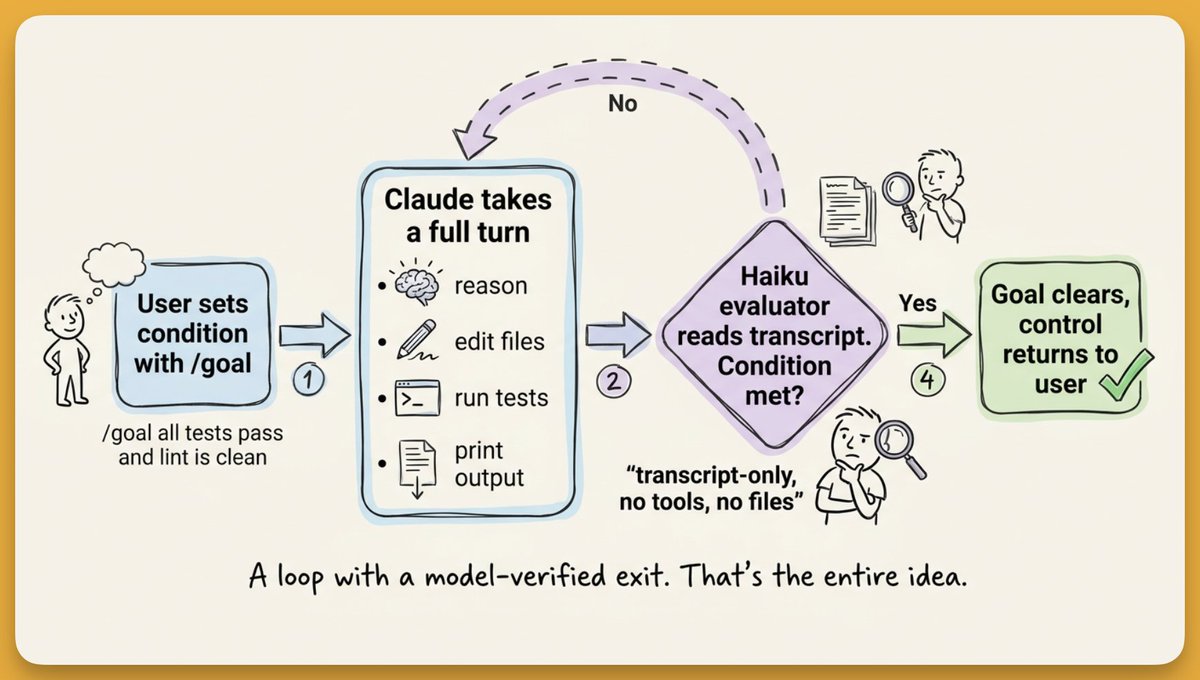
原理简单得出奇:
- 输入 /goal,后面跟上明确的完成条件。
- Claude 执行一个完整回合(推理、规划、编辑文件、跑测试等)。
- 一个快速的评估模型(默认是 Claude Haiku)读取对话记录,只回答一个问题:“目标条件满足了吗?”
- 如果没有,Claude 立即开始下一回合。
- 如果满足,目标自动清除,控制权归还给你。 就这样——一个依靠模型验证退出条件的循环。
What Good Goals Look Like
This is where 80% of your success (or failure) lives. The goal condition needs to be specific, measurable, and verifiable from the transcript.
Goals that work well:
/goal all tests in test/auth pass and the lint step is clean
/goal CHANGELOG.md has an entry for every PR merged this week
/goal every call site of the old API has been migrated and the build succeeds
Notice the pattern: each one describes an observable end state. Claude can run the tests, show the output, and the evaluator can confirm "yes, all tests passed."
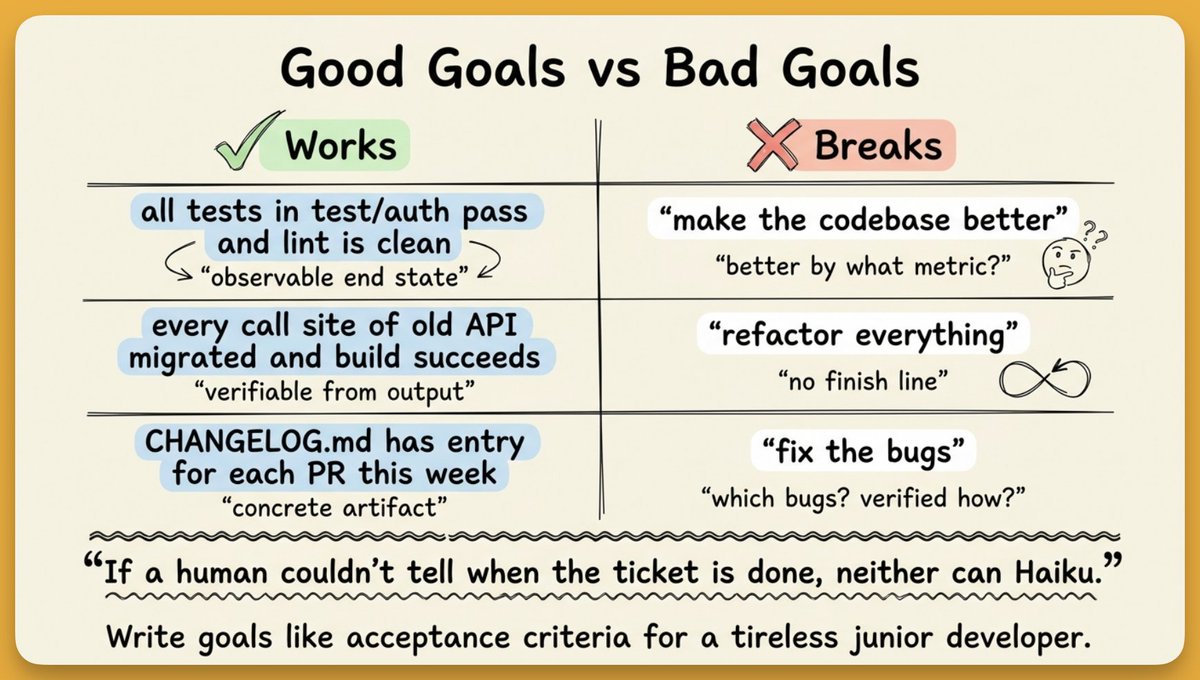
Vague goals lead to two failure modes: Claude loops forever trying to satisfy an unclear condition, or the evaluator halluccinates success because there's nothing concrete to check against. Both burn tokens for nothing.
The mental model that helps:
Treat /goal like a ticket you're assigning to a very literal junior developer who never gets tired. Write the exact acceptance criteria you'd put in that ticket.
好的目标长什么样
你的成功(或失败)80% 取决于此。目标条件必须具体、可度量,并且能从对话记录中得到验证。
好用的目标示例:
/goal test/auth 下的所有测试通过,并且 lint 步骤干净
/goal CHANGELOG.md 中包含了本周合并的每个 PR 的条目
/goal 旧 API 的所有调用点都已迁移,并且构建成功
注意其中的模式:每个目标都描述了一个可观测的最终状态。Claude 可以运行测试、展示输出,评估模型便能确认“是的,所有测试通过。”
模糊的目标会导致两种失败模式:Claude 为了满足不明确的条件而无限循环,或者评估模型因为没有具体参照而“幻觉”出成功。两种情况都是白白消耗 token。
一个有用的思维模型:
把 /goal 看作你分配给一个非常较真、永不知疲倦的初级开发者的工单。把你写在那张工单上的精确验收标准写进去。
The goal command works best when Claude already understands your project. Three things make a massive difference:
- CLAUDE.md at your project root. Define architecture decisions, coding conventions, and your "Definition of Done." Claude reads this automatically during every turn.
- Hooks for auto-validation. Auto-run lint or type-checking after every file edit so Claude catches issues mid-run.
- Auto Mode enabled. Reduces permission prompts for tool use. Without it, a 30-turn run stalls waiting for you to approve every file write.
当 Claude 已经理解你的项目时,/goal 命令的效果最好。以下三点至关重要:
- 项目根目录下的 CLAUDE.md。在其中定义架构决策、编码惯例以及你的“完成的定义”。Claude 每一轮都会自动读取该文件。
- 用于自动验证的钩子。每次文件编辑后自动运行 lint 或类型检查,让 Claude 在运行过程中就能发现问题。
- 启用 Auto Mode。减少工具使用的权限提示。没有它,一个 30 轮的运行可能因为等你批准每次文件写入而停滞。
Workflow Patterns Worth Trying
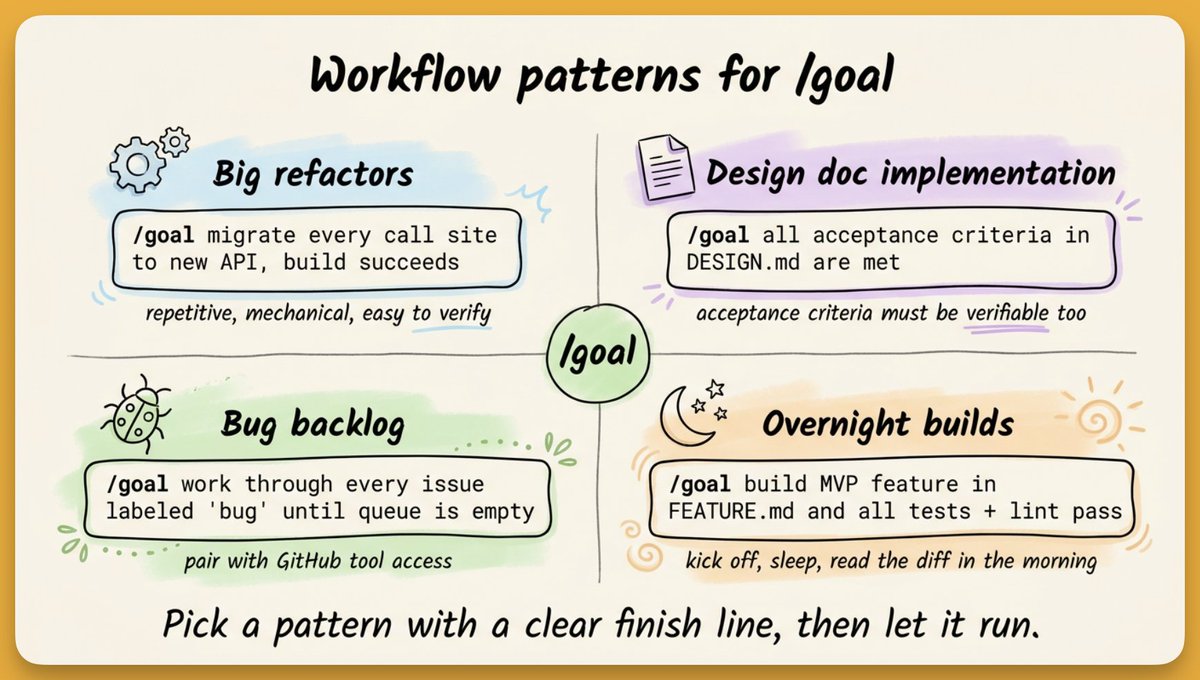
Combine /goal with Agent View (the dashboard for multiple Claude Code sessions) and you're managing a team of autonomous agents across different parts of your codebase.
值得尝试的工作流模式
将 /goal 与 Agent View(多个 Claude Code 会话的控制面板)结合,你便是在管理一支由自主智能体组成的团队,它们分布在代码库的不同部分。
- Token burn on vague goals. Loose conditions mean Claude spins on turns that don't make progress.
- The evaluator only sees the transcript. If Claude doesn't explicitly print a test result or file diff, the evaluator can't verify it.
- Complex multi-step objectives overwhelm it. "Redesign auth, add OAuth, write tests, update docs, deploy" is too much for one goal. Break it into sequential goals.
- No built-in token budget. Claude keeps going until done or interrupted (Ctrl+C). Community plugins add token caps and adversarial review for longer runs.
- 模糊目标导致 token 消耗。条件松散会让 Claude 在毫无进展的回合里原地打转。
- 评估模型只能看到对话记录。如果 Claude 没有明确打印测试结果或文件差异,评估模型就无法验证。
- 复杂的多步目标难以应付。“重新设计认证、添加 OAuth、编写测试、更新文档、部署”这样的任务对一个目标来说太多了。应将其分解为一系列顺序目标。
- 没有内置的 token 预算。Claude 会一直执行,直到完成或被中断(Ctrl+C)。社区插件为长时间运行增加了 token 上限和对抗性审查。
- /goal stops when a condition is model-verified met. Best for outcome-based work.
- /loop repeats on a schedule. Better for polling or periodic tasks.
- Stop hooks give you custom evaluation logic after every turn. More flexible, more setup. For any coding task with a defined end state, /goal is the right pick.
- /goal 在条件经模型验证满足后停止。最适合基于结果的工作。
- /loop 按计划重复执行。更适合轮询或周期性任务。
- Stop Hooks 允许在每个回合后加入自定义的评估逻辑。更灵活,但也需要更多设置。 对于任何具有明确最终状态的编码任务,/goal 都是正确选择。
If you're not sure how to phrase your goal, let Claude write it for you. Paste something like this into Claude Code before running /goal:
Write me a /goal prompt. Ask me what I'm trying to do first, then keep asking follow-up questions until you can describe 'done' in specific, measurable terms.
Take what it gives you, put /goal at the front, and run it. Then close the terminal and go do something else.
Start with something well-scoped before graduating to larger runs. The more precise your condition, the more reliable the result.
The feature doesn't solve every problem. But for any task where you can write a clear finish line, it removes the biggest friction in AI-assisted coding: you, sitting there, pressing enter over and over.
要是不知道怎么表述目标,就让 Claude 替你写。在运行 /goal 之前,把下面这段话粘贴到 Claude Code 中:
写一个 /goal 提示。先问我想做什么,然后不断追问,直到你能用具体、可度量的方式描述“完成”为止。
把得到的提示拿过来,前面加上 /goal,然后运行。接着就可以关掉终端去干别的了。
从范围明确的任务开始,再逐渐过渡到更大的任务。条件越精确,结果越可靠。
这个功能并非万能。但只要能写出一条清晰的终点线,它就能消除 AI 辅助编程中最大的阻力——你自己坐在那里,一遍又一遍地按回车。