DeepSeek Harness 速通:一切皆插件,Agent 在运行中插拔自己
DeepSeek 在 V4 Pro 发布后正式推出自己的 Agent 产品 DeepSeek Harness,核心口号是一切皆插件。它的内核名为 Cordis,只负责插件的加载、卸载与依赖管理,支持在 Agent 运行中热插拔,并用 88 页论文定义了时间/空间可组合性。UI、工具、Skills、存储、Agent 循环全部以插件形式暴露,官方预设 100 多个一方插件,也开放社区插件入口。安装只需一条 `npx @deepseek-ai/dsh web`,且未锁死在自家模型上,可以接入其他厂商的 Base URL 和协议。文章拆解了标准、PTC、极简、创造四种模式,其中创造模式允许 Agent 检查自身运行环境、现场创建并挂载新插件;会话被设计成只追加事件日志,失败后可按来源查看轨迹,便于审计和复现。作者也指出 V4 Pro 涨价明显,缓存命中价涨了 12 倍、高峰输出 27 元,且 Harness 对普通用户门槛高、UX 粗糙,更适合关注 Agent 可组合性与基础设施设计的工程师。
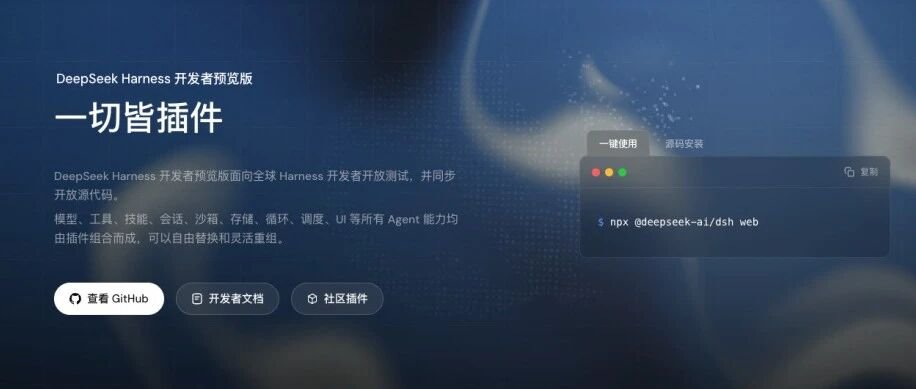
After the official release of DeepSeek V4 Pro yesterday, the long-teased Agent product from DeepSeek has finally arrived.
Its name is DeepSeek Harness.
The philosophy is clear: everything is a plugin.
在昨天正式发布DeepSeek V4 Pro正式版之后。
预告了很久的,DeepSeek家自己的Agent产品终于也发出来了。
名字叫,DeepSeek Harness。
理念也很清晰,一切皆插件。

Possibly the fastest ever—by the time I finished writing this, it had hit 37,000 stars on GitHub.
可能是有史以来最快的速度,截止到我写完文,它在Github上到了3万7的Star。

Honestly, after trying it out, going through the developer docs thoroughly, and using a few plugins, I think this is a genuinely special product.
It’s bound to be polarizing: those who like it will say it’s the future; those who don’t will say it’s too rough, has no user experience, and no one can figure out how to use it.
So in this post I want to try to talk through a few questions: what is DeepSeek Harness as I understand it? Why use a very engineering name like DeepSeek Harness instead of DeepSeek Code? And how the hell is this thing supposed to be used?
说实话,我在体验完,又完整的扒了开发者文档,用了一些插件之后,我觉得这确实是一个很特别的产品。
这也必然是个二极管产品,喜欢的人会觉得,这就是未来,不喜欢的人会觉得,这玩意太糙了毫无用户体验谁用的明白啊。
所以,我也想用这篇文章,来试图聊聊几个问题,我理解中的DeepSeek Harness是什么?为什么不用DeepSeek Code要用DeepSeek Harness这个很工程的名字?以及这玩意到底应该怎么用。
Let’s start with how to understand DeepSeek Harness.
DeepSeek put a very important formula on its official site:
Agent = Model + Harness.
先来聊聊,DeepSeek Harness到底该如何理解。
DeepSeek在官网上放了一条很重要的公式。
Agent = Model + Harness。

This formula was proposed by LangChain when they talked about Agent Harness. A good Agent must be made up of both a Harness and a model. If you’re not familiar with Harness, you can check out an explainer I wrote earlier: “Read This One Article to Understand What the Viral Harness Engineering Actually Is.”
这个公式,是LangChain之前在聊Agent Harness的时候提出来的,一个好的Agent,必然是由Harness和模型一起构成的,对Harness不了解的,可以去看看我之前写的一篇科普文:一文带你看懂,火爆全网的Harness Engineering到底是个啥。

The Claude Code, Codex, and Workbuddy you use are all essentially Harnesses. They need to be paired with models like Claude Fable 5 or GPT 5.6-Sol; otherwise they’re just empty shells.
A Harness is actually quite complex—it contains a lot of parts.
Tools, the Skills system, sessions, sandbox, storage, the Agent loop, scheduling, sub-agents, workflows, and so on.
In the past, all of these were wrapped up inside a shell named after a piece of software, like Codex.
你用的Claude Code、Codex、Workbuddy这些,本质都是Harness,要跟模型比如Claude Fable 5、GPT 5.6-Sol这些搭配起来用才行,要不然就是个纯空壳。
而一个Harness的构成,其实还是蛮复杂的,东西特别多。
工具、Skills系统、会话、沙箱、存储、Agent循环、调度、子Agent、工作流等等等等。
在过去,这些所有的东西,都是被封装在一个以软件为名的壳里,比如Codex。

Almost everything mentioned above is prebuilt by the vendor. We’re mostly using a software service the vendor keeps providing—a product—while all those internals are hidden in the back end. Ordinary users can’t see them and don’t need to know about them.
The only things ordinary users actually customise and manage are Skills, MCP, and the like. Everything else is packaged by Codex; you can’t change it, and you wouldn’t bother changing it anyway.
我们上面所说的一切,几乎都是厂商自己做好的,我们更多的是在用对方持续不断提供给我们的软件服务,也就是一个产品,而那些东西,全都被藏在了后方,普通用户是看不到的,也不需要知道。
普通用户真正要做自定义管理的,其实就是Skill、MCP之类的,其他的所有东西,全部都是Codex封装好的,你改不了,没事也不会去改。
In DeepSeek Harness, all of these things—every single one—are packaged as plugins. That means you can customise all of them.
It’s like the modular phones we used to play with: every hardware part could be swapped out by us.
DeepSeek Harness is similar. There is only one true core, a kernel called Cordis. Its author joined DeepSeek, and this time they even published an 88-page paper.
而在DeepSeek Harness中,所有所有所有的这些东西,全部都被包装成了插件,也就是说,你全部都可以自定义。
就很像我们以前玩过的所谓的模块化手机,所有的硬件部分都可以我们随便改。
DeepSeek Harness也类似,真正的核心只有一个东西,叫Cordis的内核,这个内核的作者加入了DeepSeek,然后这一次,他们甚至发了一篇88页的论文。
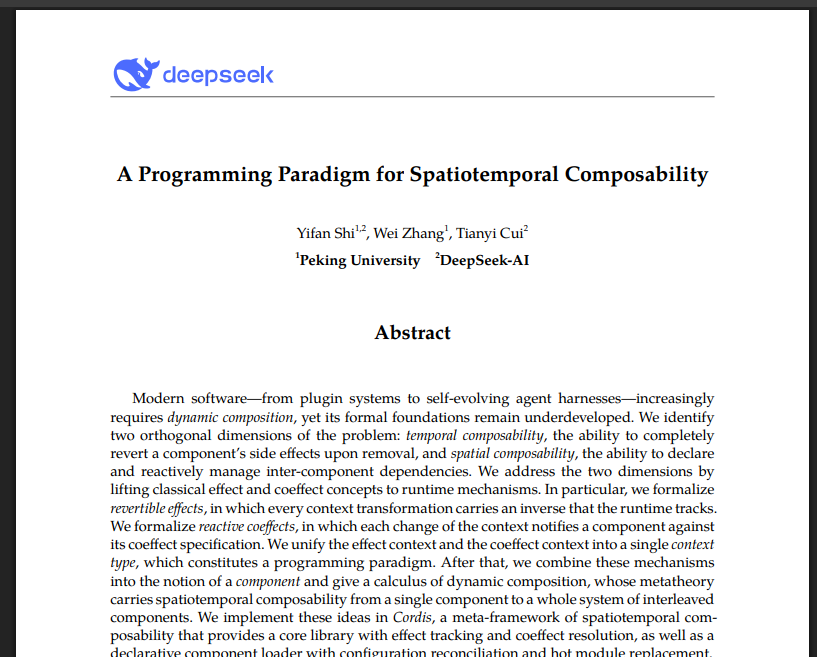
The kernel does one very restrained thing: it only handles plugin loading, unloading, and dependency management. It doesn’t care about anything else.
The killer feature is that you can swap plugins while the Agent is running without crashing its state.
The core is based on two properties:
Temporal composability—when a plugin is unloaded, can the side effects it produced be fully undone?
Spatial composability—if a plugin depends on other plugins, can it dynamically re-resolve its dependencies when those plugins appear, disappear, or change?
Once you look at these two properties, you’ll get it.
The whole point of the Cordis kernel is to let an Agent keep developing, installing, and uninstalling plugins for itself while running—constantly plugging and unplugging to add or remove its own capabilities, forming a kind of self-evolution.
That is the underlying mechanism of DeepSeek Harness.
So it’s less of an Agent product and more of a research demonstration: it ships with more than 100 first-party plugins to show off the Cordis kernel.
This is also the idea DeepSeek keeps emphasizing:
Everything is a plugin.
这个内核干的事情极其克制,只负责插件的加载、卸载和依赖管理,其他的什么都不管。
最牛逼的是,可以在Agent运行的过程中,随时更换插件,还能保证Agent运行状态不崩。
核心是两个特性:
Temporal composability,时间可组合性,也就是一个插件卸载之后,它之前产生的副作用能不能完整撤销。
**Spatial composability,空间可组合性,**一个插件如果依赖其他插件,当其他插件出现、消失、改变时,它能不能动态地重新处理自己的依赖
所以你看这两个特性你就懂了。
整个Cordis的内核本身,是为了让Agent在运行过程中不断的给自己开发、安装卸载插件,不断的插拔自己给自己添加和删除能力,从而形成某种意义的自进化。
这就是DeepSeek Harness的底层机制。
所以与其说它是一个Agent产品,不如说这是一个为了展示Cordis内核给大家预设了100多个一方插件的科研成果。
这也就是DeepSeek反复强调的理念:
一切皆插件。
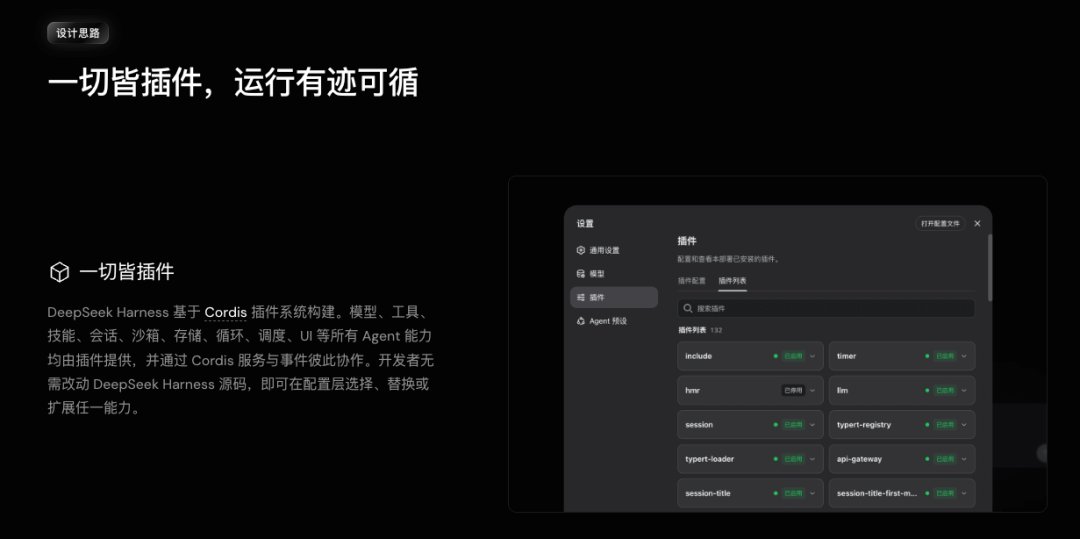
So now you know why DeepSeek calls it Harness instead of Code or Build, and why this release is also called a developer preview.
所以,现在你也知道,DeepSeek为啥叫Harness,不叫Code和Build之类的,为啥这次的版本,也叫开发者预览版。

Because what they’ve built is not an Agent product; it’s infrastructure—a Harness system.
It needs developers from all over the world to come in, plug and unplug, and build all kinds of plugins, enriching the entire DeepSeek Harness ecosystem, forming a new-era platform while completing Agent self-evolution.
That’s why the whole community is split into heated debate.
One side says the idea is amazing and this is the future; the other side says who would actually use this—why would I bother plugging and unplugging for no reason.
Every new thing brings controversy, but it doesn’t matter. I think the best way for everyone is to just try it.
Official site is here:
因为人做的不是Agent产品,人做的是一个基建,是Harness系统。
它需要全世界开发者进来,来一起插拔,帮他做各种各样的插件出来,丰富整个DeepSeek Harness的生态,从而形成一个新时代的平台,同时完成Agent的自进化。
所以,整个社区,才会吵得不可开交。
一边说这个理念太牛逼了太好了,另一边说这玩意鬼才用,我为什么没事要插拔。
一个新事物诞生必然有他的争议,但是无所谓,我觉得对于大家来说,最好的方式,还是上手用一用。
官方网址在此:

Install command:
npx @deepseek-ai/dsh web
If you can’t understand it or don’t know how to run it, just throw this command at any local Agent product you have and let it handle the installation.
Once installed, it will pop up a local URL.
安装命令:
npx @deepseek-ai/dsh web
你要是看不懂,不知道咋运行,那就把这个命令随便扔给任何一个你的本地Agent产品,让它帮你装。
装好以后,就会给你弹出一个本地网址。

Just copy it into your browser and open it.
The first run will ask you to fill in your DeepSeek API key. Go get one from the official site and remember to top up a little money.
你直接复制到浏览器打开就行。
第一次运行会让你填上你的DeepSeek API,你去官网搞一个就行,记得充一点钱。

API platform official site:
https://platform.deepseek.com/
After pasting it in, you can enter the homepage.

It’s a standard web UI, but even the interface itself is a UI plugin.
So you can freely change this UI as well.
For example, @黑哥小黑子 (blake), a friend in the group, casually made a skin plugin...
一个标准的WebUI界面,甚至这个界面本身,也是一个UI插件。
所以这个UI界面,你也是可以随便改的。
比如群友@黑哥小黑子(blake,随手就做了皮肤插件。。。

For models, you can choose between two: Flash and Pro.
然后模型这块,可以选两个,Flash和Pro。
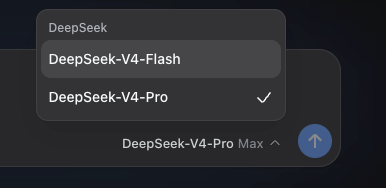
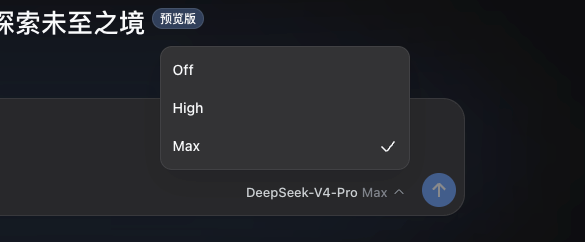
You can also choose thinking effort.
也可以选思考强度。
One thing to note about the models: DeepSeek has officially announced a price increase.
And it’s not a small one. To be honest, the increase is a bit outrageous.
这里模型需要注意一下,DeepSeek也正式官宣涨价了。
而且涨的不是一丁点两点,这个涨幅说实话,是有一点离谱的。
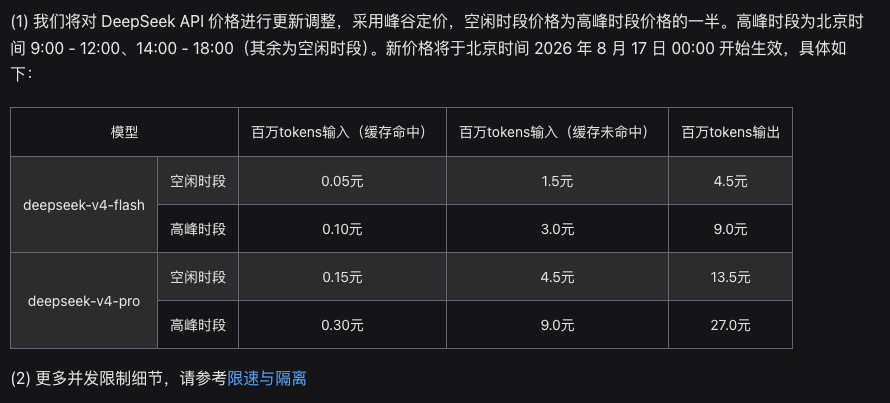
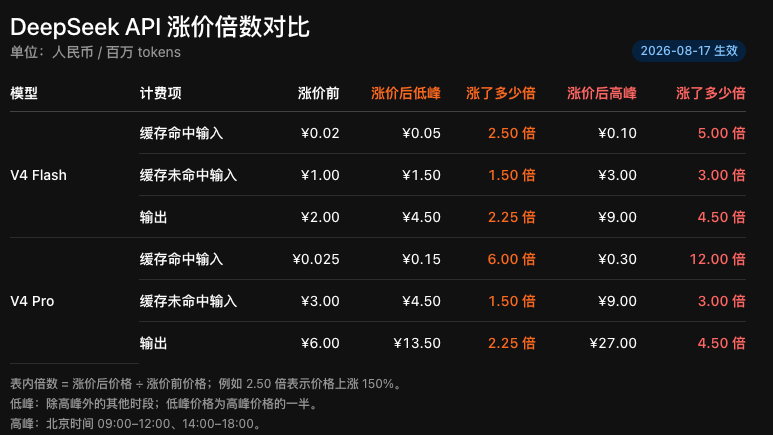
V4 Pro’s cache-hit price has gone up 12x directly.
The peak output price has reached an absurd 27 yuan.
With this price-to-performance ratio combined with DeepSeek V4 Pro’s capabilities, I think it has lost a lot of its former appeal as a price killer. I predicted around 2x before, but the peak-time increase is way too aggressive—starting at 3x.
Let me show you how current mainstream model prices compare.
V4 Pro的缓存命中价格,直接涨了12倍。
高峰期的输出价格,直接来到了离谱的27块钱。
这个价格的性价比配合DeepSeek V4 Pro的性能,我是觉得从曾经的价格屠夫一下子少了很多的吸引力,我之前预测就是2倍左右,结果高峰期涨价实在有点太狠了,起步都是3倍。
给大家对比一下现在其他主流模型的价格。
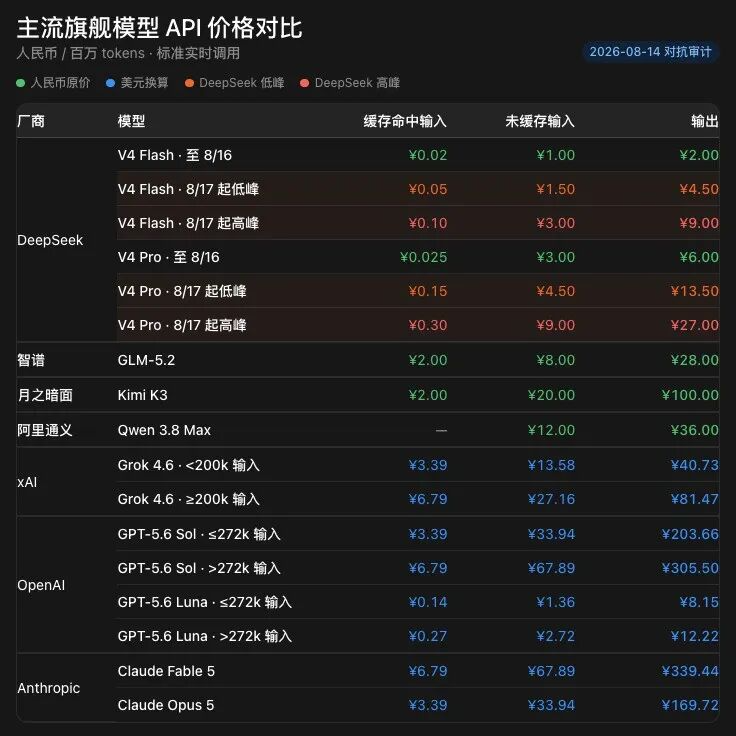
Actually, it can no longer pull much of a gap over GLM or Qwen 3.8 Max.
Not to mention GLM-5.3 should be coming soon, with prices likely staying the same and capabilities basically being open-source SOTA again. Then in terms of API-only cost-effectiveness, DeepSeek V4 Pro may not beat GLM anymore.
其实跟GLM、Qwen 3.8 Max已经不是特别能拉开差距了。
更别提GLM-5.3应该马上也要发了,价格大概率是不变的,能力基本上又是个开源SOTA,那DeepSeek V4 Pro的性价比,单从API角度来说,就可能比不过GLM了。
In DeepSeek Harness, you’re not locked into DeepSeek models.
It supports adding model providers from the catalog, and also custom providers, Base URLs, protocols, and model lists. Later you can connect other vendors’ models freely.
而在DeepSeek Harness里,其实也并没有把你锁死在DeepSeek模型上。
它支持添加目录里的模型提供方,也支持自定义提供方、Base URL、协议和模型列表。以后你完全可以把别家的模型接进来。
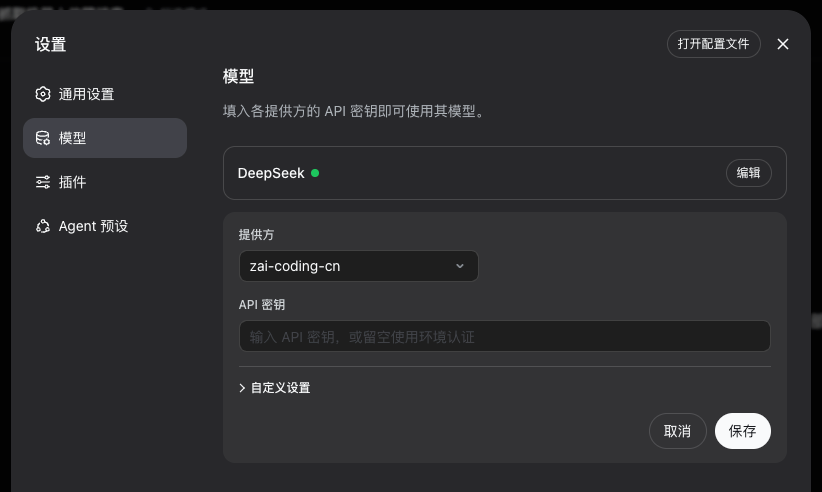
For example, you can absolutely use GLM inside DeepSeek Harness.
Then go back to the homepage, click “Choose Workspace,” and add a project directory. This becomes the project file scope your Agent can operate on.
比如,你就完全可以在DeepSeek Harness里用GLM。
然后回到首页,点击“选择工作区”,添加一个项目目录,这就是你的Agent,能操作的项目文件范围。
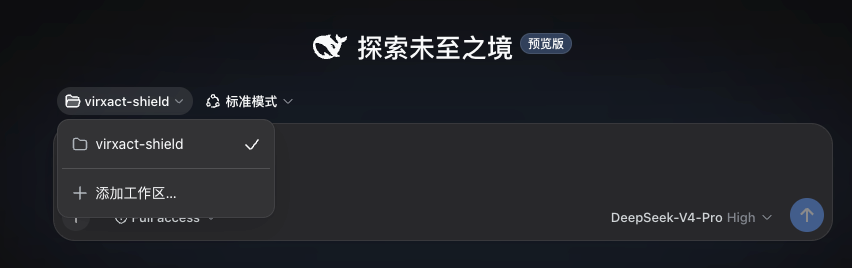
Next is the most special part, and the one ordinary users find hardest to understand—the part that confuses everyone: the four modes.
I think once you know about the Cordis kernel, you shouldn’t mistake these for DeepSeek Harness’s real modes.
They are just a few template presets—pure templates for out-of-the-box convenience.
Let me briefly explain the differences between the four modes.
接下来就是最特别的了,也是普通用户最难理解的,大家搞得最懵逼的,四种模式。
我觉得大家在前面知道了DeepSeek Harness的内核Cordis之后,千万不要把它当成是DeepSeek Haness真正的模式来去理解。
这就是他们给你的几种模板预设,对,就是纯粹的模板,方便你开箱即用的。
然后我简单的说一下四种模式的区别。

- Standard mode
If you’re a first-time user or don’t know the underlying mechanisms well, trust me—just pick Standard mode. It has full code-Agent capabilities, including file reading and editing, Shell, file search, web search, Skills, planning, goals, background tasks, sub-agents, workflows, and more. All these plugins are preconfigured for you.
- 标准模式
你如果是第一次使用,或者对底层机制没有那么了解的,相信我,无脑选择标准模式就可以了,标准模式拥有完整的代码Agent能力,包括文件读取与编辑、Shell、文件搜索、网页搜索、Skills、计划、目标、后台任务、子Agent和工作流等等,这些插件都已经给你预设好了。

- PTC mode
PTC mode has all the capabilities of Standard mode.
The difference is in how tools are presented.
In Standard mode, the model typically makes one tool call, gets the result, then decides the next step. PTC mode gives the model a Code Mode SDK, letting it write a TypeScript program that combines multiple tool operations in a single run_code.
What used to take maybe five model round-trips—reading, searching, filtering, parallel calls, and result consolidation—can now be compressed into one program execution. This reduces back-and-forth chatter between the model and tools, suits structured, multi-step, parallel tasks, and saves tokens.
But this requires the model to have stable enough code-planning ability, and debugging is quite hard. Beginners don’t need to touch it; just use Standard mode.
Turn on PTC when you hit lots of repetitive tool round-trips, or when you want to test DeepSeek models’ programmatic tool-calling ability.
- PTC模式
PTC模式拥有标准模式的全部能力。
区别出现在工具呈现方式上。
标准模式里,模型通常发起一次工具调用,拿到结果,再决定下一步。PTC模式会给模型一套Code Mode SDK,让模型写一段TypeScript程序,在一次run_code里组合多个工具操作。
原来可能需要五次模型往返的读取、搜索、筛选、并行调用和结果整理,有机会被压进一次程序执行,这会减少模型与工具之间来回对话的次数,也更适合结构化、多步骤、可并行的操作,同时也更省Token。
但是这就需要模型具备足够稳定的代码规划能力,调试难度还挺高的,小白先不用碰,就用标准模式就行。
等你遇到大量重复工具往返,或者想测试DeepSeek模型的程序化工具调用能力,再开PTC。
3. Minimal mode
Minimal mode gives the model only two core tools: a persistent Bash and a file editor.
It also fixes the system prompt to a very simple line: “You are a helpful software engineering assistant,” removing context compression and a bunch of extra abilities.
This mode is mainly for benchmarking models in the smallest environment.
For example, it’s great when you want to compare two models’ bare-Agent abilities.
But don’t use it for daily work, or you’ll find it basically unusable...
3. 极简模式
极简模式只给模型两个核心工具:一个持久Bash,一个文件编辑器。
它还会把系统提示词固定成一句非常简单的“你是一个有帮助的软件工程助手”,去掉上下文压缩和大量额外能力。
这个模式主要用于最小环境下的模型基准测试。
就比如你想比较两个模型裸Agent能力时,它非常好用。
但是没事别日常用,你会发现根本没法用。。。
4. Creation mode
This is the most special part of DeepSeek Harness.
Creation mode has all the capabilities of Standard mode, and can also inspect its own running Cordis environment, experiment with plugins in memory, and help you create new Agents and plugins.
In other words, it lets an Agent modify itself directly.
For example, you can tell it:
“Build me a mode that can only read code and not modify files, dedicated to security auditing.”
Or tell it:
“Build me a research Agent that connects to internal company search, always uses a specific model, and has three dedicated Skills.”
You can even let the Agent inspect its existing plugins and capabilities first. If you find it lacks a plugin, you can create one on the spot and mount it onto the currently running process.
To use an analogy: the Agent realises it doesn’t have a wrench, so it builds one on the spot, plugs it onto its hand, and continues working with it.
This is the core feature of the entire DeepSeek Harness, and the best demonstration of the Cordis kernel.
4. 创造模式
这个才是DeepSeek Harness最特别的地方。
创造模式拥有标准模式的完整能力,还能检查自己正在运行的Cordis环境,在内存中试验插件,帮助你创建新的Agent和插件。
就是说,它能让Agent直接改造自己。
比如,你可以告诉它:
“帮我做一个只允许读代码、不允许改文件,专门负责安全审计的模式。”
也可以告诉它:
“帮我做一个接入公司内部搜索、固定使用某个模型、拥有三种专属Skills的研究Agent。”
甚至你可以先让Agent来检查自己身上已有的插件和能力,如果你发现它没有某个插件的话,可以直接创造一个插件,然后直接挂到自己正在运行的流程中。
用一个比喻来说,就是Agent发现自己没有扳手,于是现场造了一把扳手,插到自己手上,接着用这把扳手继续干活。
这个是整个DeepSeek Harness的最核心的特点,也是Cordis内核最棒的体现。
Another developer-friendly and quite special thing about DeepSeek Harness is that they designed the session as an append-only event log.
The system prompts the model sees, user messages, reasoning content, tool calls and results, permission changes, context injections, compression, and sub-agent scheduling all become events in the log.
The history seen by the model in the next turn is also re-derived from this log.
然后DeepSeek Harness还有一个对开发者很友好也是很特别的一点。
就是他们把会话设计成一份只追加的事件日志。
模型看到的系统提示词、用户消息、推理内容、工具调用和结果、权限变化、上下文注入、压缩、子Agent调度,都会成为日志里的事件。
下一轮模型看到的历史,也是从这份日志重新推导出来的。

This is genuinely meaningful and valuable.
After many Agents fail, you can only see task failure or infinite loops; you have no idea at which step it started going off track.
The trace view in the Harness lets you inspect every run by source. For developers, this means observability, auditability, and reproducibility, making it great for research.
All the official first-party plugins can be seen in the plugins section of the settings page. You don’t need to understand them; just use them directly.
If you feel something is missing, you can build it yourself in Creation mode.
Alongside DeepSeek Harness, a community plugin entry also launched.
这件事还是挺有意义的,价值很大。
很多Agent失败以后,你只能看到任务失败或者无限循环,根本不知道它在哪一步开始跑偏的。
Harness里的轨迹视图可以按来源查看每一次运行,对开发者来说,这意味着可观测、可审计、可复现,非常适合做研究。
目前官方的第一方插件,你都可以在设置页面的插件里面看到,看不懂也不用管,你直接用就行了。
如果你觉得缺什么,你也可以用创造模式自己造。
跟DeepSeek Harness一起上线的,还有社区插件入口。
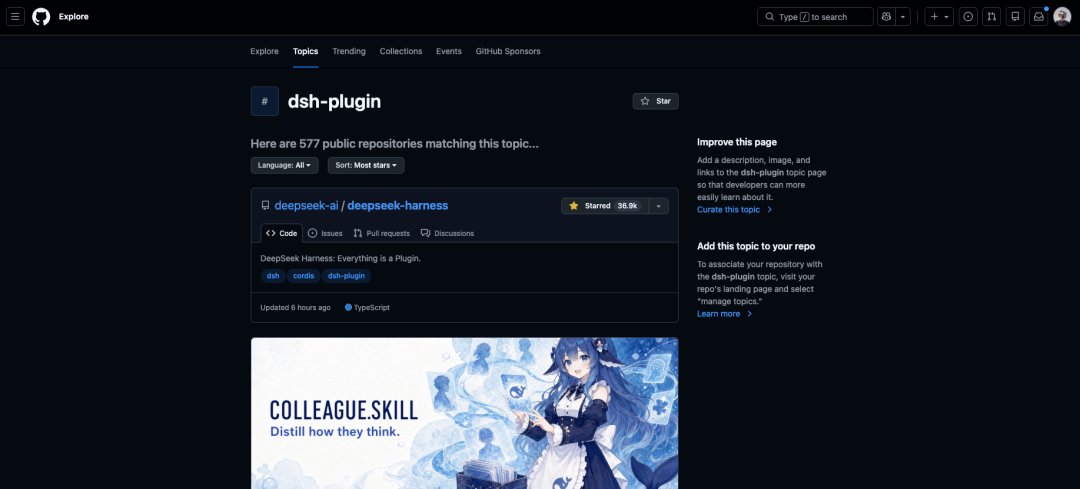
There are many third-party plugins developed by the community.
I looked through them, and there are some good ones I think are worth recommending. They can greatly improve your experience.
- dsh-at-file
https://github.com/omdsh-dev/dsh-at-file
Once installed, you can just type @ in the input box to reference files. Very convenient.
有很多开发者开发的三方插件。
我挑了一下,有些不错的,我觉得可以推荐大家装上,能大大的增强你的使用体验。
- dsh-at-file
https://github.com/omdsh-dev/dsh-at-file
装完后直接在输入框@就可以调用文件了,很方便。

- dsh-genui
https://github.com/omdsh-dev/dsh-genui
Lets the model render charts, tables, forms, diffs, Mermaid diagrams, interactive panels, and more directly in replies. Very useful.
- dsh-automation
https://github.com/titanwings/dsh-automation
Adds automation capabilities to DeepSeek Harness. It’s a must-have, though the interaction design is a bit problematic = =
- DSH-better-sidebar
https://github.com/omdsh-dev/DSH-better-sidebar
Adds a VS Code-like workbench to DSH: file management, code editing, a real terminal, Git, diffs, embedded browser, background tasks, and sub-agent status all packed into the sidebar. It makes DeepSeek Harness more capable and easier to use.
- ModLens
https://github.com/liustack/modlens
Gives the text-only DeepSeek models visual capabilities. After configuring the vision channel, you can paste images directly into the conversation and the model can read them. A must-have.
- dsh-genui
https://github.com/omdsh-dev/dsh-genui
允许模型在回复里直接渲染图表、表格、表单、Diff、Mermaid、交互面板之类的,很有用。
- dsh-automation
https://github.com/titanwings/dsh-automation
给DeepSeek Harness补上了自动化的能力,刚需,就是这个交互感觉做的稍微有点问题= =
- DSH-better-sidebar
https://github.com/omdsh-dev/DSH-better-sidebar
直接给 DSH 补上了一套类似 VS Code 的工作台,文件管理、代码编辑、真实终端、Git、Diff、内嵌浏览器、后台任务和子代理状态,全都塞进了侧边栏里,能让功能更多,也更好用一点。
- ModLens
https://github.com/liustack/modlens
给纯文本的DeepSeek模型补上视觉能力,配置好视觉通道以后,直接往对话里粘贴图片,模型就可以读图了,刚需。
Anyway, I’ll leave the other interesting parts of this Harness for you to explore.
Finally, I still want to say this.
DeepSeek Harness is a very interesting system, and the idea of plugging and unplugging plugins is great. But from a product perspective, it’s really not friendly to ordinary users.
Too many developer terms, too high a barrier to entry, too few features, and a poor user experience—every step can drive ordinary users away.
But DeepSeek is probably a team that places more emphasis on research and exploration.
As their slogan says:
Explore the unknown.
Go, DeepSeek.
总之,这个Hanress的其他有趣的地方,就交给大家去探索了。
最后,我还是想说。
DeepSeek Harness是一个非常有趣的系统,插件插拔的概念也很棒,但是从产品角度来说,其实对普通用户还是非常不友好的。
过多的开发者术语、过高的使用门槛、过少的功能、过差的用户体验,每一步其实都是会让普通用户劝退的。
但是DeepSeek可能本身就是这么一个更加注重科研和探索的团队吧。
就像他们的Slogan所说的。
探索未至之境。
加油,DeepSeek。