Grok 4.6 使用指南:短提示词加验证循环胜过冗长规格
作者以 Grok 4.6 作为主力模型使用数周,覆盖编码与知识工作,并用同一提示词与 4.5 做对照。核心发现:短提示词配合明确偏好,效果接近两页纸的详细规格;真正拉高结果的是追加一句“实现后验证并迭代到生产可用”,让模型打开应用、点击真实路径、修正嵌套公式。4.6 在浏览器自动化、视觉 QA、收件箱清理、Excalidraw 改造等任务上表现稳定,但 3D 与视频仍需人工检查,因为模型无法通过截图验证时间维度的正确性。作者疑似 xAI 成员,文章带有发布推广口吻,但方法论与提示词例子有参考价值,适合用 Cursor 等 AI 编码工具的工程师。

Grok 4.6 is out! I've used it for a few weeks as my daily driver across the normal mix of coding and knowledge work, and built a few projects with it specifically to push on where it holds up.
It's good at all of it. What stands out most is how it communicates and how fast it is, more than any single jump in capability.
Grok 4.6 发布了!过去几周我把它当作日常主力模型,用来处理日常的编码和知识类工作,还专门为它做了几个项目,看它到底在哪些地方站得住。
它样样都做得不错。最突出的不是某一项能力的单点飞跃,而是它的沟通方式和速度。
It's collaborative in a way that's easy to work alongside. The summaries are dense with actual information instead of restating the task back at me, and the short updates while it's running tell me enough to know whether to interrupt.
It stays quiet through small changes and starts narrating once it's touching a lot of files. Getting that split right took more tuning than you'd think. It still tells me things I don't need sometimes, which we're working on.
它的协作方式很适合并肩工作。总结里塞满了真正有用的信息,而不是把我的任务复述一遍;运行中的简短更新也足够让我判断要不要打断它。
改动小的时候它保持安静,一旦涉及大量文件才开始解说。想把这种分寸调对,比想象中更费功夫。它有时候还是会说些我不需要的话,这点我们还在改进。
4.5 was fast too. 4.6 is fast and noticeably smarter, and that combination pushed me toward a more synchronous way of working. Rather than front-loading a lot of context and waiting, I ask for something small, look at it, and keep going. The same session can move into a longer-horizon task just by asking for one.
I move between sync and async depending on what the best models happen to be good at that month. Async gets more done while I'm somewhere else, but I lose the thread and end up reviewing a big diff cold. 4.6 pulls me back toward sync, which is where I'd rather be when I care about the result.
4.5 也很快。4.6 是又快又明显更聪明,这两者加在一起,让我更愿意用同步的方式工作。我不会再一次性塞进大量上下文然后干等,而是先要一个小东西,看一眼,继续推进。同一个会话里,只要再提一句,就能转到更长线的任务。
我会看当月最好的模型擅长什么,在同步和异步之间切换。异步能在我忙别处时完成更多事,但我容易断了线,最后只会在没有上下文的情况下审阅一大段 diff。4.6 把我拉回同步模式——当我在意结果时,我也更希望待在这种模式里。
Most of those weeks were ordinary work. It navigated websites for me, including creating API keys by clicking through a provider's console. It did functional and visual QA on running apps. It got my inbox down to the handful of threads that actually needed a reply, which never stops feeling good. It helped me draft the launch posts for Cursor SDK Bridge and /rename-chat, and put together a launch video for both of them with Remotion!
那几周的大部分工作都很普通。它替我浏览网站,包括在服务商控制台里点来点去地创建 API 密钥。它给运行中的应用做功能测试和视觉 QA。它把我的收件箱过滤到只剩几封真正需要回复的邮件——这种感觉永远不会腻。它还帮我起草了 Cursor SDK Bridge 和 /rename-chat 的发布文案,并用 Remotion 给两者剪了一支发布视频。
I spent part of those weeks testing prompting styles against each other. Long versus short, and whether specific phrasings like "work very hard" change the outcome. What I found is that the phrasing barely made no difference at all.
Length did, though not the way I assumed. A long prompt buys specificity, so if you know exactly what you want, write it down. A short prompt hands more of the decision to the model's taste. That trade used to argue for writing everything out. With 4.6 the taste is good enough that a short prompt plus a clear preference usually lands somewhere good.
Long specs still work fine when you have one. I gave it a detailed spec for a feedback widget with session capture, a server handler, and cloud agent dispatch, and it followed the whole thing end to end with a sensible structure. It does repeat itself in components unless you ask it to break them up.
那几周我花了一部分时间对比不同的提示词风格:长的、短的,以及像“work very hard”这种特定说法会不会改变结果。结果发现,措辞几乎没有任何影响。
长度确实有影响,但影响方式和我想的不一样。长提示词买来的是明确性,所以你要是很清楚自己想要什么,就把它写下来。短提示词则把更多决定权交给模型的品味。过去这个权衡往往让人倾向于把所有细节都写出来;到了 4.6,模型的品味已经足够好,短提示词加上一个明确的偏好,通常就能落在不错的位置。
当你手里确实有一份详细规格时,长规格依然管用。我给过一个带会话捕获、服务端处理和云端 Agent 分发的反馈组件详细规格,它从头到尾跟了下来,结构也很合理。不过它会反复写重复的组件,除非你明确要求它拆分。
One of the projects I built was a spreadsheet app, and I gave it to both models twice. One run got a two page specification covering every toolbar item, keyboard shortcut, and formula I could think of. The other got three sentences.
Build a polished Sheets/Excel-style app in Next.js and an AI chat that can analyze the sheet. Use the Cursor SDK for all AI features. Preload a realistic sample workbook so it looks good immediately.
The two apps came back nearly identical. What actually changed the result was adding one sentence:
Verify the function and design after implementation, and keep on iterating and verifying until it's production ready.
That single line was the highest-leverage thing I found in those weeks! With it, the model opens the app, clicks through real user paths, checks that nested formulas evaluate correctly, and fixes what it finds. None of that works without solid browser use, which is what makes the loop possible at all.
我做的其中一个项目是电子表格应用,我把同样的需求给了两个模型,每个跑两次。一次是两页纸的规格说明,把每个工具栏项、键盘快捷键和公式都写全了;另一次只给了三句话:
Build a polished Sheets/Excel-style app in Next.js and an AI chat that can analyze the sheet. Use the Cursor SDK for all AI features. Preload a realistic sample workbook so it looks good immediately.
两个应用做出来几乎一模一样。真正改变结果的是多加的一句话:
Verify the function and design after implementation, and keep on iterating and verifying until it's production ready.
那句话是我那几周里找到的杠杆率最高的东西!有了它,模型会打开应用、按真实用户路径点一遍、检查嵌套公式算得对不对,然后修复发现的问题。这一切都离不开扎实的浏览器使用能力,正是它让这个循环成为可能。
The same principle holds when the output is harder to inspect. "Improve the textures" on a 3D scene got me nowhere, while "capture the current frame, list what's wrong with it, then fix only those things" worked immediately.
Every comparison from here on ran the same prompt through both models in isolated workspaces, so none of it is my memory of last month.
当输出更难检查时,这个原则同样成立。让模型“改进 3D 场景的纹理”毫无进展;而让它“截取当前帧,列出问题,然后只修这些问题”立刻就有效果。
此后的每次对比,我都是在隔离工作区里把同一个提示词分别喂给两个模型,所以这些结果不靠我上个月的记忆。

You also don't need to tell it to work hard or keep pushing until it's finished. It will keep going on its own for a good while. What matters far more is saying what done means, because otherwise it decides that for you.
你也不用叮嘱它“多用点力”或者“别停,直到做完”。它自己会持续推进很久。更重要的是把“完成”的定义说清楚,否则它就替你决定了。
I played an unreasonable amount of Age of Empires 2 growing up. Thousands of hours. So recreating it was the first project I wanted to try. I asked for a browser strategy game with an economy, construction, combat, fog of war, objectives, and a HUD a new player could read without instructions.
我小时候玩《帝国时代 2》玩到了不合理的地步,足足几千小时。所以重制它是我第一个想试的项目。我要求做一个浏览器策略游戏,包含经济、建造、战斗、战争迷雾、目标,以及一个新手不用看说明就能读懂的 HUD。

4.5 built a workable flat prototype. 4.6 came back with an isometric 3D world on the first try, HUD and minimap already in place. Much closer to the real thing!
4.5 做出了一个能用的平面原型。4.6 第一次就交回一个等距 3D 世界,HUD 和小地图都已经就位,比原版像多了!
Still on the nostalgia trip, I did MSN Messenger next.
怀旧之旅还没结束,我接着做了 MSN Messenger。

Both models clearly knew the reference and did a good job. 4.6 just has more polish, down to the separate conversation windows and the winks.
两个模型显然都懂这个参考对象,完成得都不错。4.6 只是更精致,连独立的聊天窗口和眨眼表情这种细节都照顾到了。
I use Excalidraw constantly and it's open source, which made it the obvious place to see how the models handle a real codebase instead of an empty folder. I asked both for a presentation mode: save named views, reorder them, and present them as a guided walkthrough. The prompt was deliberately vague about how to build it.
我一直在用 Excalidraw,而且它是开源的,所以很自然用它来看看模型面对真实代码库(而不是空文件夹)时表现如何。我让两个模型实现一个演示模式:保存命名的视图、调整顺序,并作为引导式演示来播放。提示词故意不写具体怎么做。
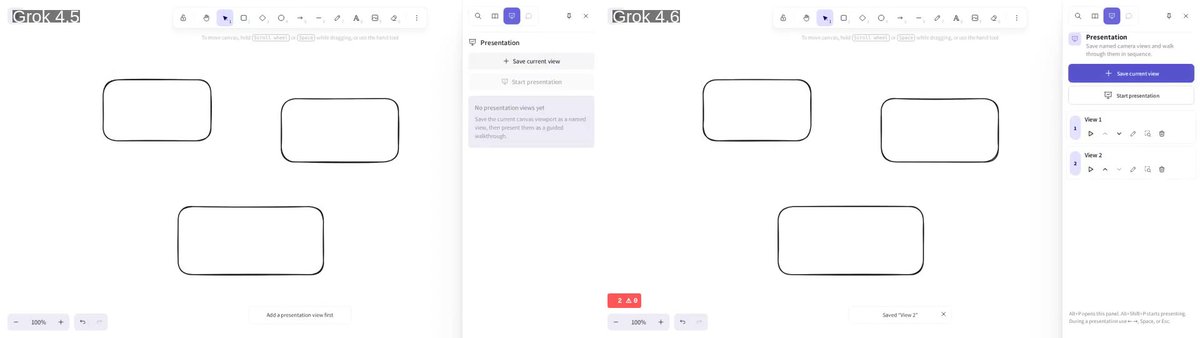
Both land in roughly the same place, which is impressive for a prompt that vague! 4.6 just pays more attention to detail on the first pass, which in practice means fewer rounds of me pointing at things.
This is also where skipping verification bites. On an earlier run the summary read as finished and adding a view didn't actually work. One round of "run it and show me" surfaced the broken import.
两个模型最终落在差不多的地方,对这么模糊的提示词来说已经很难得了!4.6 只是第一遍就更注意细节,实际上意味着我少了几轮“这里点一下那里点一下”的返工。
而跳过验证也正是在这里咬人。早前有一次运行,摘要读起来像是完成了,但添加视图的功能其实不能用。只要说一句“跑起来给我看看”,立刻就暴露了坏掉的 import。
I don't put together decks and reports every day, but a lot of people do, and I wanted to see how it handled that kind of work. So I gave both models the same fictional quarterly and asked for a board deck.
我不是每天都要做幻灯片和报告,但很多人要。我想看看它在这类工作上的表现,于是给了两个模型同一个虚构的季度数据,让它们做一份董事会汇报。

Both are competent, and the gap is in presentation rather than analysis. 4.5 mostly lays the numbers out on slides, while 4.6 puts real work into structure and hierarchy, so it reads like a deck somebody made rather than a data dump.
两者都够格,差别在呈现而不是分析。4.5 基本是把数字摆到幻灯片上,4.6 则在结构和层级上下了真功夫,读起来像有人认真做过的汇报,而不是数据倾倒。
This one deserves more space, because I've been spending a lot of time on it lately. Remotion is video as code: every frame is a React component that renders off the current frame number, and the whole thing compiles to an MP4 through headless Chromium and FFmpeg. Your video lives in git. It's a genuinely fun way to work! It's also a strange thing to hand a model, because you can't tell whether it succeeded by checking that it runs.
I asked for a 60 to 90 second launch film for the X TypeScript SDK and gave it the docs to work from.
这个值得多说几句,因为我最近花了很多时间在它上面。Remotion 把视频当作代码:每一帧都是一个 React 组件,根据当前帧号渲染,整个项目通过 headless Chromium 和 FFmpeg 编译成 MP4。你的视频活在 git 里。这种工作方式真的很有趣!但把它交给模型也很特别,因为你没法靠“能跑”来判断它是否成功。
我让它为 X TypeScript SDK 做一支 60 到 90 秒的发布短片,并把文档给它当素材。

I judge these on whether there's a storyline and whether the pacing holds. Most models fail the same way here, with uppercase titles, boxed text, and everything landing on screen at once. Both films avoid most of that, and 4.6 is the more compelling watch.
After a few days of running this across different models, video is where I see the widest spread. Two models that feel equally capable on a web app can be nowhere near each other here.
我判断这些作品的标准是:有没有故事线,节奏是否撑得住。多数模型在这里以同样的方式翻车——全大写标题、文本框,以及所有内容同时涌上屏幕。这两支短片大多避免了我说的这些问题,而 4.6 那支更耐看。
在不同模型上跑了好几天之后,我发现视频是差距最大的领域。两个在 Web 应用上感觉旗鼓相当的模型,在这里可能差得十万八千里。
Almost everything I had to steer came back to one thing: how easily the model can verify its own work.
A website is the easy case. The DOM is text, so it can read the page, take a screenshot, and compare against what it intended. That's why the verification loop works as well as it does on UI work.
3D is harder, because there's a whole dimension you can't inspect by reading. Video is harder still, since time is the extra dimension and checking your work means capturing a sequence of frames and reasoning about the delta between them. Physics has the same shape of problem. The model has a good sense of how the world should behave, but confirming that it did behave that way isn't something one screenshot can answer.
The practical answer is to give it a way to look, or to accept that you're the one checking.
几乎所有我需要引导的地方,最后都归结到一件事:模型能不能方便地验证自己的工作。
网站是最简单的情况。DOM 是文本,模型可以读页面、截图,然后跟自己的意图比对。这就是为什么验证循环在 UI 工作上效果这么好。
3D 更难,因为你有一个没法靠读来检查的维度。视频更难,因为额外维度是时间,检查工作意味着截取一帧帧画面,再推理它们之间的变化。物理也有同样的问题。模型对世界应该怎样运转有很好的感觉,但要确认它确实那样运转了,不是一张截图能回答的。
实际解决办法是给它一个“看”的方式,或者接受由你自己来检查。
There's real value in spiky models, the ones that are extraordinary at one particular thing. But most of my work isn't one particular thing. What I want day to day is a model I know well: one where I've built up intuition for how it behaves, where it's reliable enough to hand something over, and where I understand the shortcomings well enough to work around them without thinking about it.
That's exactly what 4.6 has turned into for me. On the coding side it handles interactive and visual work where I'm reacting as it goes, plus long sessions in a real repository. On the knowledge work side it's the inbox, the browser QA, and the click-through tasks with no API behind them. It isn't the best imaginable model at any one of those, but it's good at all of them and I know what to expect.
I still stay involved where the output gets judged on how it looks. Motion, 3D, and final polish want a reference and a screenshot loop rather than a description. And I write the acceptance criteria down instead of trusting a summary that says it's done.
有些模型是“偏科生”,在某一件事上特别出色,这当然有真正的价值。但我大部分工作并不是某一件事。我日常想要的是一个我熟悉的模型:我已经对它怎么表现建立了直觉,它可靠到我能放心交活,我也清楚它有哪些短板,可以不加思索地绕开。
4.6 对我而言正是这样。编码方面,它能处理边做边改的交互式和视觉工作,也能在真实仓库里进行长时间会话。知识工作方面,它负责收件箱、浏览器 QA,以及那些背后没有 API 的点击型任务。它不是这些领域里想象中最好的模型,但它全都擅长,而且我知道能期待什么。
在那些按观感评判结果的地方,我仍会留在局内。动效、3D 和最终打磨需要的是参考图和一轮轮截图,而不是一段描述。我还会把验收标准写下来,而不是相信一句“做完了”的摘要。
Grok 4.6 is available now in Cursor, SpaceXAI API on OpenRouter and anywhere else you get your tokens!
Try it out and let me know what you think. We're going to keep improving it, so leave feedback either way, good or bad, since that's what tells us where to push next.
Curious to hear what you end up building with it!
Grok 4.6 现在已经可以在 Cursor、OpenRouter 上的 SpaceXAI API,以及其他任何你能拿到 token 的地方使用!
去试试吧,然后告诉我你的感受。我们会持续改进它,所以无论好坏都请留下反馈,那是我们决定下一步往哪推的依据。
我也很好奇你会用它做出什么!