Claude Code 新增 routines:云端定时/API/Webhook 触发自动化
Anthropic 以 research preview 形式给 Claude Code 加入 routines:把提示词、仓库和连接器打包成一个可重复运行的自动化,跑在 Anthropic 云端,不再依赖本地电脑。触发方式有三种——按 schedule 定时(每小时/每晚/每周)、通过每个 routine 独享的 HTTP endpoint 与 auth token 触发、以及订阅 GitHub 仓库事件,对每个匹配的 PR 开一个 session 并持续跟进评论与 CI 失败。文章列举了 backlog 清理、文档漂移、部署验证、告警分诊等使用模式,并给出配额:Pro 每天 5 个、Max 15 个、Team/Enterprise 25 个,超出部分按 extra usage 计费。适合想用 Claude Code 做无人值守自动化、或评估云端 agent 编排的工程师;需注意这是官方发布稿,无真实案例数据。
Define repeatable routines that work your backlog, review your PRs, and respond to events in the cloud.
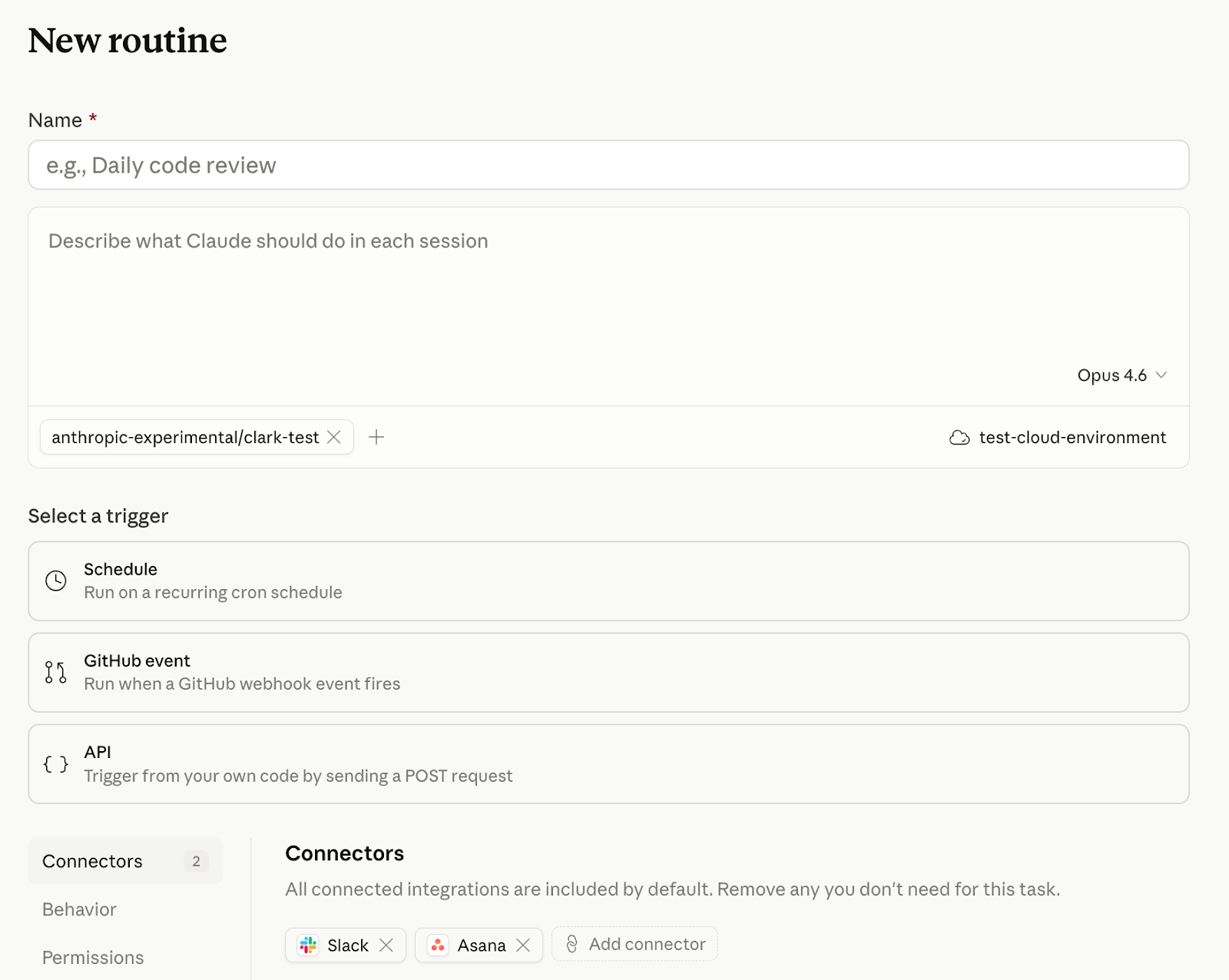
Today, we're introducing routines in Claude Code in research preview. A routine is a Claude Code automation you configure once — including a prompt, repo, and connectors — and then run on a schedule, from an API call, or in response to an event. Routines run on Claude Code’s web infrastructure, so nothing depends on your laptop being open.
定义可重复的例程,让它们处理你的待办事项、审查你的 PR,并响应云中的事件。
今天,我们以研究预览的形式在 Claude Code 中推出例程。例程是一种 Claude Code 自动化,你只需配置一次——包括提示词、仓库和连接器——然后即可按计划、通过 API 调用或在事件发生时运行。例程运行在 Claude Code 的 Web 基础设施上,因此一切都与你的笔记本电脑是否开机无关。
Developers already use Claude Code to automate the software development cycle, but until now, they've managed cron jobs, infrastructure, and additional tooling like MCP servers themselves. Routines ship with access to your repos and your connectors, so you can package up automations and set them to run on a schedule or trigger.
开发人员已经在使用 Claude Code 自动化软件开发周期,但在此之前,他们需要自己管理 cron 任务、基础设施以及 MCP 服务器等额外工具。例程自带对仓库和连接器的访问权限,因此你可以将自动化打包,并设置它们按计划运行或由事件触发。
How it works
Scheduled routines
Give Claude Code a prompt and a cadence (hourly, nightly, or weekly) and it runs on that schedule:
Every night at 2am: pull the top bug from Linear, attempt a fix, and open a draft PR.
If you're using /schedule in the CLI, those tasks are now scheduled routines.
工作原理
定时例程
给 Claude Code 一个提示词和一个节奏(每小时、每晚或每周),它就会按该计划运行:
每晚 2 点:抓取 Linear 中最严重的 bug,尝试修复,并开启一个草稿 PR。
如果你在 CLI 中使用 /schedule,这些任务现在就是定时例程。
API routines
You can also configure routines to be triggered by API calls. Every routine gets its own endpoint and auth token. POST a message, get back a session URL. Wire Claude Code into your alerting, your deploy hooks, your internal tools—anywhere you can make an HTTP request:
Read the alert payload, find the owning service, and post a triage summary to #oncall with a proposed first step.
If you're building cloud-hosted agents on the Claude Platform rather than automating Claude Code, scheduled deployments in Claude Managed Agents give your own agents the same run-on-a-schedule behavior.
API 例程
你也可以将例程配置为通过 API 调用触发。每个例程都有自己的端点和身份验证令牌。发送一条消息,就能得到一个会话 URL。将 Claude Code 接入你的告警系统、部署钩子、内部工具——任何你能发出 HTTP 请求的地方:
读取告警负载,找到所属服务,并将分诊摘要连同建议的第一步发布到 #oncall。
如果你是在 Claude Platform 上构建云托管 Agent,而不是自动化 Claude Code,那么 Claude Managed Agents 中的定时部署会让你的 Agent 获得相同的按计划运行行为。
Webhook routines, starting with GitHub
Subscribe a routine to automatically kick off in response to GitHub repository events. Claude will create a new session for every PR matching your filters and run your routine.
Please flag PRs that touch the /auth-provider module. Any changes to this module need to be summarized and posted to #auth-changes.
Claude opens one session per PR and will continue to feed updates from that PR to the session, so it can address follow-ups like comments and CI failures.
We plan to expand webhook-based routines to trigger from more event sources in the future.
Webhook 例程,从 GitHub 开始
订阅一个例程,让它针对 GitHub 仓库事件自动启动。Claude 会为你筛选条件匹配的每个 PR 创建新会话,并运行你的例程。
请标记触及 /auth-provider 模块的 PR。任何对该模块的更改都需要总结并发布到 #auth-changes。
Claude 会为每个 PR 打开一个会话,并持续向该会话推送该 PR 的更新,从而能够处理评论和 CI 失败等后续事项。
我们计划未来将基于 Webhook 的例程扩展到更多事件源。
What teams are building
A few common patterns have emerged for early users creating routines:
Scheduled routines
Backlog management: triage new issues nightly, label, assign, and post a summary to Slack
Docs drift: scan merged PRs weekly, flag docs that reference changed APIs, and open update PRs
团队正在构建什么
早期创建例程的用户已经涌现出一些常见模式:
定时例程
待办管理:每晚筛选新 issue,打上标签、指派负责人,并将摘要发布到 Slack
文档漂移:每周扫描已合并的 PR,标记引用了已变更 API 的文档,并为这些文档开启更新 PR
API routines
Deploy verification: your CD pipeline posts after each deploy, Claude runs smoke checks against the new build, scans error logs for regressions, and posts a go/no-go to the release channel
Alert triage: point Datadog at the routine's endpoint, Claude pulls the trace, correlates it with recent deployments, and has a draft fix waiting before on-call opens the page
Feedback resolution: a docs feedback widget or internal dashboard posts the report, Claude opens a session against the repo with the issue in context, and drafts the change
API 例程
部署验证:你的 CD 流水线在每次部署后发布消息,Claude 对新构建运行冒烟检查,扫描错误日志以寻找回归,并向发布频道发布 go/no-go 结论
告警分诊:将 Datadog 指向例程的端点,Claude 拉取追踪信息,将其与最近的部署关联起来,并在值班人员打开页面之前就准备好一份草拟修复方案
反馈解决:文档反馈小组件或内部仪表板发布报告,Claude 在问题上下文中打开一个仓库会话,并草拟变更
GitHub routines
Library port: every PR merged to a Python SDK triggers a routine that ports the change to the parallel Go SDK, and opens a matching PR
Bespoke code review: on PR opened, run your team's own checklist across security and performance, leaving inline comments before a human reviewer looks
GitHub 例程
库移植:每次合并到 Python SDK 的 PR 都会触发一个例程,将该变更移植到对应的 Go SDK,并开启一个匹配的 PR
定制代码审查:当 PR 打开时,按照你团队自己的清单进行安全和性能检查,在人工审查者查看之前留下行内评论
Getting started
Routines are available today for Claude Code users on Pro, Max, Team, and Enterprise plans with Claude Code on the web enabled. Head to claude.ai/code to create your first routine, or type /schedule in the CLI.
如何开始使用
今天起,Pro、Max、Team 和 Enterprise 套餐中的 Claude Code 用户(需启用 Claude Code on the web)可以使用例程。前往 claude.ai/code 创建你的第一个例程,或在 CLI 中输入 /schedule。
Routines draw down subscription usage limits in the same way as interactive sessions. In addition, routines have daily limits: Pro users can run up to 5 routines per day, Max users can run up to 15 routines per day, and Team and Enterprise users can run up to 25 routines per day. You can run extra routines beyond these limits with extra usage. See the docs for more information.
例程与交互式会话一样,都会消耗订阅的使用额度。此外,例程还有每日限制:Pro 用户每天最多可运行 5 个例程,Max 用户每天最多可运行 15 个例程,Team 和 Enterprise 用户每天最多可运行 25 个例程。你可以通过额外用量在超出这些限制后继续运行更多例程。更多信息请参阅文档。