Claude Code 技能实战:Anthropic 内部数百条技能的经验与分类
Anthropic 工程师基于内部使用数百条 Claude Code 技能的经验,系统总结了技能的九大类型(库/API 参考、产品验证、数据获取、业务流程、代码模板、代码质量、CI/CD、Runbook、基础设施运维),并给出了具体编写技巧:聚焦非显而易见的提示、构建 Gotchas 部分、利用文件系统渐进式披露、避免过度约束、合理设计配置、用 description 字段触发选择、在技能内存入数据(如日志文件或 SQLite)、以及用脚本/库减少模型 token 消耗。文章还讨论了技能的分发方式(仓库内嵌 vs 插件市场)、依赖组合与埋点测量。适合正在构建 Agent 工作流的工程师参考。

Skills have become one of the most used extension points in Claude Code. They’re flexible, easy to make, and simple to distribute.
But this flexibility also makes it hard to know what works best. What type of skills are worth making? What's the secret to writing a good skill? When do you share them with others?
We've been using skills in Claude Code extensively at Anthropic with hundreds of them in active use. These are the lessons we've learned about using skills to accelerate our development.
技能已成为 Claude Code 最常用的扩展点之一。它们灵活、易于创建且便于分发。
但这种灵活性也让人难以判断什么方法最有效。哪些技能值得制作?编写优秀技能的秘诀是什么?何时与他人分享?
Anthropic 内部已在 Claude Code 中广泛使用技能,有数百种技能处于活跃使用中。以下是我们关于如何利用技能加速开发的经验总结。
If you’re new to skills, I’d recommend reading our docs or watching our newest course on new Skilljar on Agent Skills, this post will assume you already have some familiarity with skills.
A common misconception we hear about skills is that they are “just markdown files”, but the most interesting part of skills is that they’re not just text files. They’re folders that can include scripts, assets, data, etc. that the agent can discover, explore and manipulate.
In Claude Code, skills also have a wide variety of configuration options including registering dynamic hooks.
We’ve found that some of the most interesting skills in Claude Code use these configuration options and folder structure creatively.
如果你刚接触技能,建议阅读我们的文档或观看 Skilljar 上关于 Agent 技能的最新课程,本文假设你已经对技能有一定了解。
关于技能的一个常见误解是它们“只是 markdown 文件”,但技能最有趣的部分在于它们不仅仅是文本文件。技能是文件夹,可以包含脚本、资源、数据等,Agent 可以发现、探索和操作这些内容。
在 Claude Code 中,技能还拥有丰富的配置选项,包括注册动态钩子。
我们发现,Claude Code 中一些最有趣的技能创造性地使用了这些配置选项和文件夹结构。

After cataloging all of our skills, we noticed they cluster into a few recurring categories. The best skills fit cleanly into one; the more confusing ones straddle several. This isn't a definitive list, but it is a good way to think about if you're missing any inside of your org.
在整理我们所有的技能后,我们注意到它们聚集为几个反复出现的类别。最好的技能清晰地属于某一类;令人困惑的技能则跨越多个类别。这并非一份定论性的列表,但它能帮助你思考你的组织中是否遗漏了某些类型。
Skills that explain how to correctly use a library, CLI, or SDKs. These could be both for internal libraries or common libraries that Claude Code sometimes has trouble with. These skills often included a folder of reference code snippets and a list of gotchas for Claude to avoid when writing a script.
Examples:
- billing-lib — your internal billing library: edge cases, footguns, etc.
- internal-platform-cli — every subcommand of your internal CLI wrapper with examples on when to use them
- frontend-design — make Claude better at your design system
这类技能解释如何正确使用库、CLI 或 SDK。既可用于内部库,也可用于 Claude Code 有时难以处理的常见库。这些技能通常包含一个参考代码片段文件夹和一个禁忌列表,帮助 Claude 在编写脚本时避免出错。
示例:
- billing-lib — 你的内部计费库:边缘案例、陷阱等
- internal-platform-cli — 内部 CLI 封装的每个子命令及使用示例
- frontend-design — 让 Claude 更好地理解你的设计系统
Skills that describe how to test or verify that your code is working. These are often paired with an external tool like playwright, tmux, etc. for doing the verification.
Verification skills are extremely useful for ensuring Claude's output is correct. It can be worth having an engineer spend a week just making your verification skills excellent.
Consider techniques like having Claude record a video of its output so you can see exactly what it tested, or enforcing programmatic assertions on state at each step. These are often done by including a variety of scripts in the skill.
Examples:
- signup-flow-driver — runs through signup → email verify → onboarding in a headless browser, with hooks for asserting state at each step
- checkout-verifier — drives the checkout UI with Stripe test cards, verifies the invoice actually lands in the right state
- tmux-cli-driver — for interactive CLI testing where the thing you're verifying needs a TTY
这类技能描述如何测试或验证代码是否正常工作。通常与外部工具(如 Playwright、tmux 等)配对使用进行验证。
验证技能对于确保 Claude 输出的正确性极为有用。值得让一位工程师花一周时间完善你的验证技能。
可以尝试以下技术:让 Claude 录制输出视频,以便你确切了解它测试了什么;或在每一步强制执行程序化状态断言。这些通常通过在技能中包含各种脚本来实现。
示例:
- signup-flow-driver — 在无头浏览器中执行注册→邮件验证→新手引导流程,并在每一步设置钩子断言状态
- checkout-verifier — 使用 Stripe 测试卡驱动结账 UI,验证发票确实进入正确状态
- tmux-cli-driver — 用于需要 TTY 的交互式 CLI 测试
Skills that connect to your data and monitoring stacks. These skills might include libraries to fetch your data with credentials, specific dashboard ids, etc. as well as instructions on common workflows or ways to get data.
Examples:
- funnel-query — "which events do I join to see signup → activation → paid" plus the table that actually has the canonical user_id
- cohort-compare — compare two cohorts' retention or conversion, flag statistically significant deltas, link to the segment definitions
- grafana — datasource UIDs, cluster names, problem → dashboard lookup table
这类技能连接你的数据和监控堆栈。这些技能可能包含获取数据所需的库(含凭据)、特定仪表盘 ID 等,以及常见工作流或获取数据方式的说明。
示例:
- funnel-query — “我需要关联哪些事件才能查看注册→激活→付费流程”以及包含规范 user_id 的表
- cohort-compare — 比较两个群体的留存或转化率,标记统计显著的差异,并链接到分段定义
- grafana — 数据源 UID、集群名称、问题→仪表盘查找表
Skills that automate repetitive workflows into one command. These skills are usually fairly simple instructions but might have more complicated dependencies on other skills or MCPs. For these skills, saving previous results in log files can help the model stay consistent and reflect on previous executions of the workflow.
Examples:
- standup-post — aggregates your ticket tracker, GitHub activity, and prior Slack → formatted standup, delta-only
- create-<ticket-system>-ticket — enforces schema (valid enum values, required fields) plus post-creation workflow (ping reviewer, link in Slack)
- weekly-recap — merged PRs + closed tickets + deploys → formatted recap post
这类技能将重复性工作流自动化成一个命令。这些技能通常是相当简单的指令,但可能依赖其他技能或 MCP。对于这类技能,将之前的执行结果保存在日志文件中可以帮助模型保持一致性,并反思之前的执行情况。
示例:
- standup-post — 聚合你的工单跟踪器、GitHub 活动和之前的 Slack 消息→格式化的站会报告(仅增量)
- create-<ticket-system>-ticket — 强制执行模式(有效枚举值、必填字段)以及创建后工作流(在 Slack 中 ping 审查者、添加链接)
- weekly-recap — 合并的 PR + 关闭的工单 + 部署 → 格式化的周报
Skills that generate framework boilerplate for a specific function in codebase. You might combine these skills with scripts that can be composed. They are especially useful when your scaffolding has natural language requirements that can’t be purely covered by code.
Examples:
- new-<framework>-workflow — scaffolds a new service/workflow/handler with your annotations
- new-migration — your migration file template plus common gotchas
- create-app — new internal app with your auth, logging, and deploy config pre-wired
这类技能为代码库中的特定功能生成框架样板代码。你可以将这些技能与可组合的脚本结合使用。当你的脚手架有自然语言要求,且无法纯粹由代码满足时,这类技能特别有用。
示例:
- new-<framework>-workflow — 用你的注解创建新服务/工作流/处理器的脚手架
- new-migration — 迁移文件模板及常见陷阱
- create-app — 新内部应用,预配置认证、日志和部署设置
Skills that enforce code quality inside of your org and help review code. These can include deterministic scripts or tools for maximum robustness. You may want to run these skills automatically as part of hooks or inside of a GitHub Action.
- adversarial-review — spawns a fresh-eyes subagent to critique, implements fixes, iterates until findings degrade to nitpicks
- code-style — enforces code style, especially styles that Claude does not do well by default.
- testing-practices — instructions on how to write tests and what to test.
这类技能在组织内部强制执行代码质量并帮助审查代码。可以包含确定性脚本或工具以实现最大稳健性。你可能希望作为钩子的一部分或在 GitHub Action 内自动运行这些技能。
- adversarial-review — 生成一个“换双新眼睛”的子代理来批判代码,实现修复,迭代直到发现的问题降级为微调
- code-style — 强制执行代码风格,特别是 Claude 默认表现不佳的风格
- testing-practices — 关于如何编写测试以及测试什么的指导。
Skills that help you fetch, push, and deploy code inside of your codebase. These skills may reference other skills to collect data.
Examples:
- babysit-pr — monitors a PR → retries flaky CI → resolves merge conflicts → enables auto-merge
- deploy-<service> — build → smoke test → gradual traffic rollout with error-rate comparison → auto-rollback on regression
- cherry-pick-prod — isolated worktree → cherry-pick → conflict resolution → PR with template
这类技能帮助你在代码库中获取、推送和部署代码。这些技能可能引用其他技能来收集数据。
示例:
- babysit-pr — 监控 PR → 重试不稳定的 CI → 解决合并冲突 → 启用自动合并
- deploy-<service> — 构建 → 冒烟测试 → 逐步流量推出并比较错误率 → 回归时自动回滚
- cherry-pick-prod — 隔离工作目录 → 挑选提交 → 解决冲突 → 带模板的 PR
Skills that take a symptom (such as a Slack thread, alert, or error signature), walk through a multi-tool investigation, and produce a structured report.
Examples:
- <service>-debugging — maps symptoms → tools → query patterns for your highest-traffic services
- oncall-runner — fetches the alert → checks the usual suspects → formats a finding
- log-correlator — given a request ID, pulls matching logs from every system that might have touched it
这类技能接收一个症状(如 Slack 消息、警报或错误特征),进行多工具调查,并生成结构化报告。
示例:
- <service>-debugging — 将症状映射到工具和查询模式,适用于高流量服务
- oncall-runner — 获取警报 → 检查常见嫌疑 → 格式化发现
- log-correlator — 给定请求 ID,从可能接触过的每个系统拉取匹配的日志
Skills that perform routine maintenance and operational procedures — some of which involve destructive actions that benefit from guardrails. These make it easier for engineers to follow best practices in critical operations.
Examples:
- <resource>-orphans — finds orphaned pods/volumes → posts to Slack → soak period → user confirms → cascading cleanup
- dependency-management — your org's dependency approval workflow
- cost-investigation — "why did our storage/egress bill spike" with the specific buckets and query patterns
这类技能执行日常维护和操作流程——其中一些涉及破坏性动作,借助护栏可以更安全。它们使工程师更容易在关键操作中遵循最佳实践。
示例:
- <resource>-orphans — 查找孤立的 Pod 或卷 → 发布到 Slack → 等待观察期 → 用户确认 → 级联清理
- dependency-management — 组织的依赖审批工作流
- cost-investigation — “为什么我们的存储或出站流量账单激增”,包含具体的存储桶和查询模式
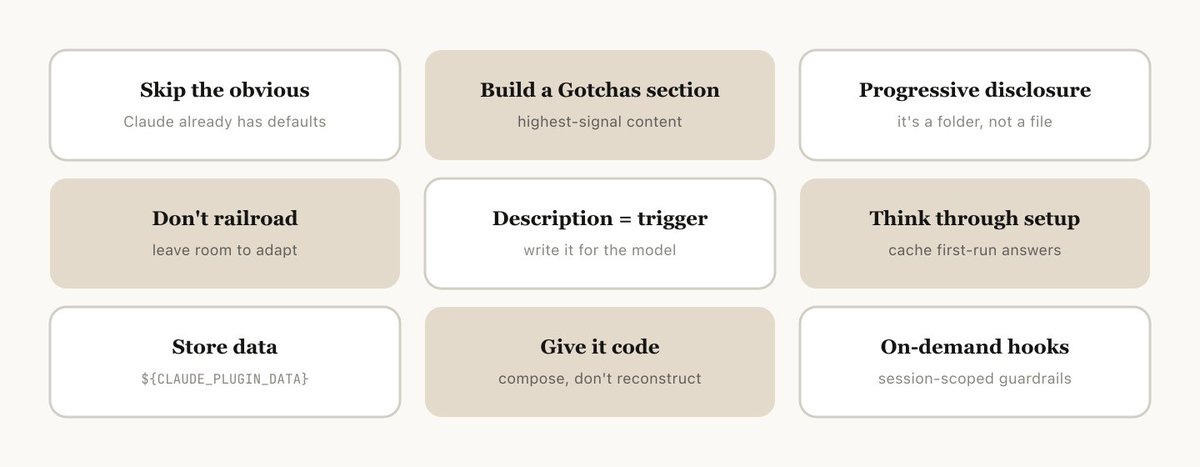
Once you've decided on the skill to make, how do you write it? These are some of the best practices, tips, and tricks we've found.
We also recently released Skill Creator to make it easier to create skills in Claude Code.
Claude Code knows a lot about your codebase, and Claude knows a lot about coding, including many default opinions. If you’re publishing a skill that is primarily about knowledge, try to focus on information that pushes Claude out of its normal way of thinking.
The frontend design skill is a great example — it was built by one of the engineers at Anthropic by iterating with customers on improving Claude’s design taste, avoiding classic patterns like the Inter font and purple gradients.
一旦决定了要制作哪种技能,如何编写呢?以下是我们发现的一些最佳实践、技巧和窍门。
我们最近还发布了 Skill Creator,以便更轻松地在 Claude Code 中创建技能。
Claude Code 对你的代码库了解很多,Claude 本身对编码也有很多了解,包括许多默认观点。如果你发布的技能主要是关于知识的,请尽量聚焦于能推动 Claude 跳出常规思维的信息。
前端设计技能就是一个很好的例子——它由 Anthropic 的一位工程师通过与客户迭代改进 Claude 的设计品味而构建,避免了像 Inter 字体和紫色渐变这样的经典模式。
The highest-signal content in any skill is the Gotchas section. These sections should be built up from common failure points that Claude runs into when using your skill. Ideally, you will update your skill over time to capture these gotchas.
任何技能中信号最强的部分就是“禁忌”部分。这些部分应基于 Claude 在使用你的技能时遇到的常见失败点来构建。理想情况下,你应随时间推移更新技能以捕捉这些禁忌。

Like we said earlier, a skill is a folder, not just a markdown file. You should think of the entire file system as a form of context engineering and progressive disclosure. Tell Claude what files are in your skill, and it will read them at appropriate times.
The simplest form of progressive disclosure is to point to other markdown files for Claude to use. For example, you may split detailed function signatures and usage examples into references/api.md.
Another example: if your end output is a markdown file, you might include a template file for it in assets/ to copy and use.
You can have folders of references, scripts, examples, etc., which help Claude work more effectively.
如前所述,技能是一个文件夹,而不仅仅是 Markdown 文件。你应该将整个文件系统视为上下文工程和渐进式信息揭示的一种形式。告诉 Claude 你的技能中有哪些文件,它会在适当的时候读取它们。
渐进式揭示的最简单形式是给 Claude 指向其他 Markdown 文件。例如,你可以将详细的函数签名和使用示例拆分到 references/api.md 中。
另一个例子:如果你的最终输出是一个 Markdown 文件,你可以在 assets/ 中包含一个模板文件供复制使用。
你可以拥有引用、脚本、示例等文件夹,这些都能帮助 Claude 更高效地工作。

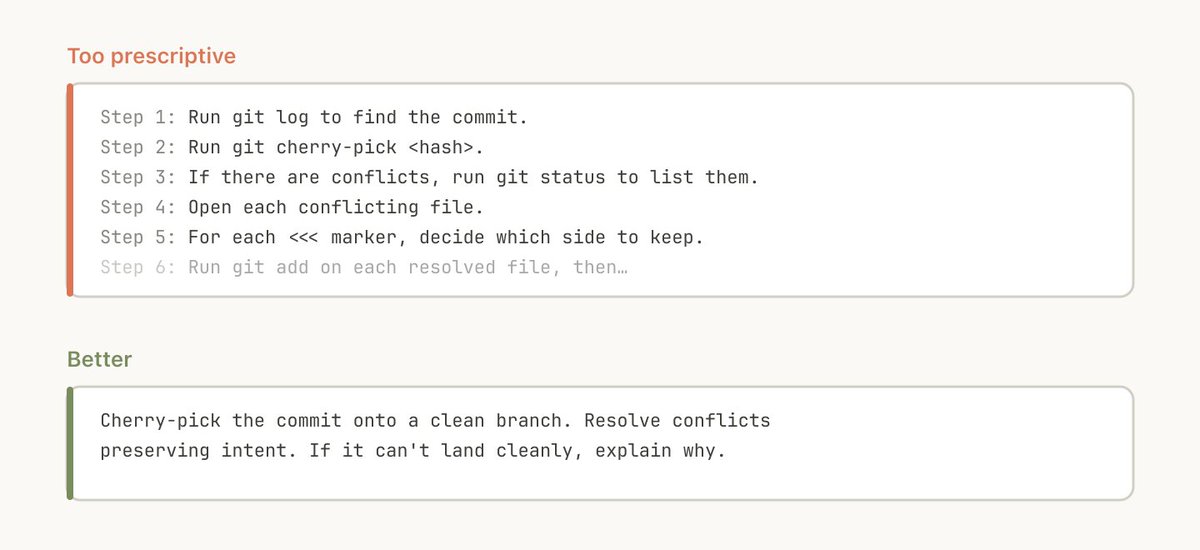
Claude will generally try to stick to your instructions, and because Skills are so reusable you’ll want to be careful of being too specific in your instructions. Give Claude the information it needs, but give it the flexibility to adapt to the situation. For example:
Claude 通常会努力遵循你的指令,而由于技能的可重用性很强,你需要小心不要将指令定得过于具体。给 Claude 所需的信息,但也要给予其适应情况的灵活性。例如:
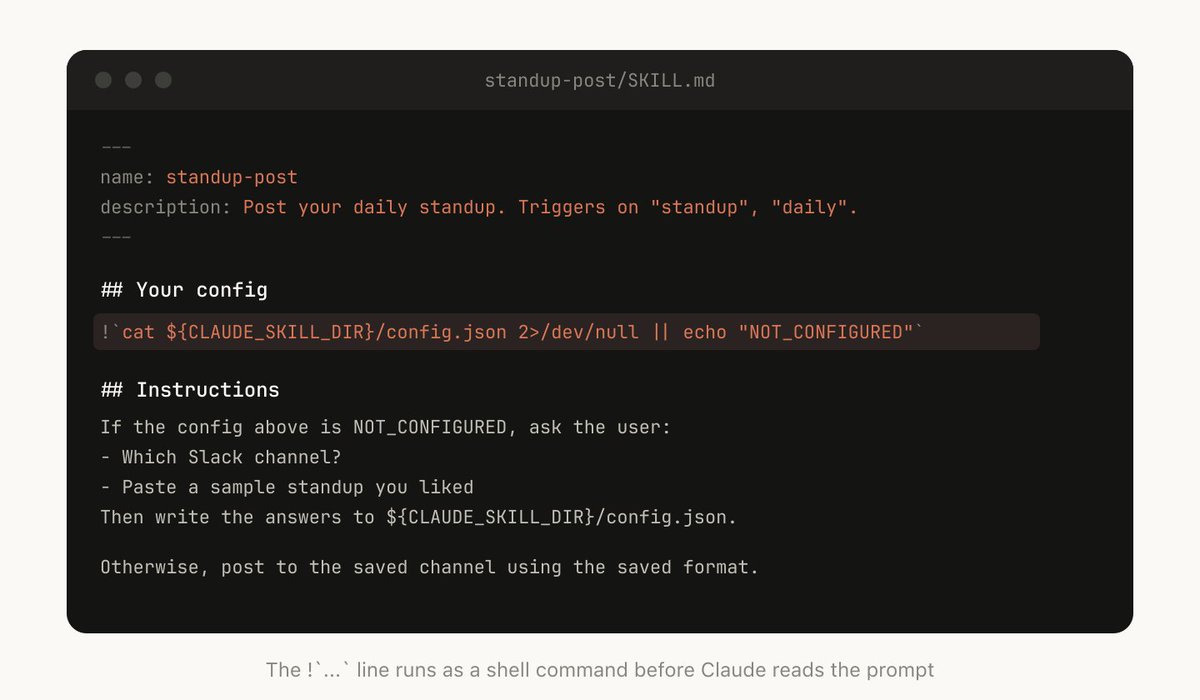
Some skills may need to be set up with context from the user. For example, if you are making a skill that posts your standup to Slack, you may want Claude to ask which Slack channel to post it in.
A good pattern to do this is to store this setup information in a config.json file in the skill directory like the above example. If the config is not set up, the agent can then ask the user for information.
If you want the agent to present structured, multiple choice questions you can instruct Claude to use the AskUserQuestion tool.
某些技能可能需要用户提供上下文才能设置。例如,如果你正在制作一个发布站会报告的技能,你可能希望 Claude 询问发布到哪个 Slack 频道。
实现这一点的好模式是像上面的示例那样,将设置信息存储在技能目录中的 config.json 文件中。如果配置未设置,Agent 可以询问用户获取信息。
如果你希望 Agent 展示结构化的多选题,可以指示 Claude 使用 AskUserQuestion 工具。
When Claude Code starts a session, it builds a listing of every available skill with its description. This listing is what Claude scans to decide "is there a skill for this request?" Which means the description field is not a summary — it's a description of when to trigger this PR.
当 Claude Code 启动会话时,它会构建所有可用技能及其描述的列表。Claude 扫描这个列表来判断“是否有技能适合这个请求?”这意味着描述字段不是摘要——而是描述何时触发这个 PR。

Some skills can include a form of memory by storing data within them. You could store data in anything as simple as an append only text log file or JSON files, or as complicated as a SQLite database.
For example, a standup-post skill might keep a standups.log with every post it's written, which means the next time you run it, Claude reads its own history and can tell what's changed since yesterday.
Data stored in the skill directory may be deleted when you upgrade the skill, so you should store this in a stable folder, as of today we provide ${CLAUDE_PLUGIN_DATA} as a stable folder per plugin to store data in.
某些技能可以通过在内部存储数据来包含一种记忆形式。你可以以简单的仅追加文本日志文件或 JSON 文件存储数据,也可以用复杂的 SQLite 数据库。
例如,一个站会报告技能可以保留一个 standups.log 文件,记录每次发布的报告,这样下次运行时,Claude 读取其自身历史,就能知道昨天以来发生了什么变化。
存储在技能目录中的数据在升级技能时可能会被删除,因此应将其存储在稳定的文件夹中。目前,我们为每个插件提供 ${CLAUDE_PLUGIN_DATA} 作为稳定的数据存储文件夹。

One of the most powerful tools you can give Claude is code. Giving Claude scripts and libraries lets Claude spend its turns on composition, deciding what to do next rather than reconstructing boilerplate.
For example, in your data science skill you might have a library of functions to fetch data from your event source. In order for Claude to do complex analysis, you could give it a set of helper functions like so:
Claude can then generate scripts on the fly to compose this functionality to do more advanced analysis for prompts like “What happened on Tuesday?”
你可以给予 Claude 的最强大工具之一就是代码。给 Claude 脚本和库,让它将时间花在组合上,决定下一步做什么,而不是重建样板代码。
例如,在数据科学技能中,你可以有一个函数库来从事件源获取数据。为了让 Claude 进行复杂分析,你可以给它一组辅助函数,如下所示:
然后 Claude 可以动态生成脚本,组合这些功能,以进行更高级的分析,例如回答“周二发生了什么?”


Skills can include hooks that are only activated when the skill is called, and last for the duration of the session. Use this for more opinionated hooks that you don’t want to run all the time, but are extremely useful sometimes.
For example:
- /careful — blocks rm -rf, DROP TABLE, force-push, kubectl delete via PreToolUse matcher on Bash. You only want this when you know you're touching prod — having it always on would drive you insane
- /freeze — blocks any Edit/Write that's not in a specific directory. Useful
- when debugging: "I want to add logs but I keep accidentally 'fixing' unrelated
技能可以包含仅在调用技能时激活的钩子,持续到会话结束。用于那些你不想一直运行但有时极其有用的强硬钩子。
例如:
- /careful — 通过 Bash 上的 PreToolUse 匹配器阻止 rm -rf、DROP TABLE、force-push、kubectl delete。只有在你知道正在操作生产环境时才需要启用它——一直开启会让人崩溃。
- /freeze — 阻止对特定目录以外的任何编辑或写入。调试时很有用:‘我想添加日志,但总会不小心‘修复’无关的代码。’
One of the biggest benefits of Skills is that you can share them with the rest of your team.
There are two ways you might to share skills with others:
- check your skills into your repo (under ./.claude/skills)
- make a plugin and have a Claude Code Plugin marketplace where users can upload and install plugins (read more on the documentation here)
For smaller teams working across relatively few repos, checking your skills into repos works well. But every skill that is checked in also adds a little bit to the context of the model. As you scale, an internal plugin marketplace allows you to distribute skills and let your team decide which ones to install.
Managing a Marketplace
How do you decide which skills go in a marketplace? How do people submit them?
We don't have a centralized team that decides; instead we try and find the most useful skills organically. If you have a skill that you want people to try out, you can upload it to a sandbox folder in GitHub and point people to it in Slack or other forums.
Once a skill has gotten traction (which is up to the skill owner to decide), they can put in a PR to move it into the marketplace.
A note of warning, it can be quite easy to create bad or redundant skills, so making sure you have some method of curation before release is important.
Composing Skills
You may want to have skills that depend on each other. For example, you may have a file upload skill that uploads a file, and a CSV generation skill that makes a CSV and uploads it. This sort of dependency management is not natively built into marketplaces or skills yet, but you can just reference other skills by name, and the model will invoke them if they are installed.
Measuring Skills
To understand how a skill is doing, we use a PreToolUse hook that lets us log skill usage within the company (example code here). This means we can find skills that are popular or are undertriggering compared to our expectations.
技能的最大好处之一是可以与团队其他成员共享。
与他人共享技能有两种方式:
- 将技能检入仓库(位于 ./.claude/skills)
- 制作插件,并建立 Claude Code 插件市场,用户可以在其中上传和安装插件(更多信息请查阅文档)
对于在相对较少仓库中工作的小团队来说,将技能检入仓库效果不错。但每个检入的技能都会给模型上下文增加一点负担。随着规模扩大,内部插件市场可以让你分发技能,并让团队决定安装哪些。
管理市场
如何决定哪些技能进入市场?用户如何提交?
我们没有集中的决策团队,而是通过有机方式寻找最有用的技能。如果你有一个希望他人尝试的技能,可以上传到 GitHub 的沙箱文件夹,并在 Slack 或其他论坛中提供链接。
一旦技能获得一定热度(由技能所有者决定),他们可以提交 PR 将其移入市场。
注意:很容易创建低质量或冗余的技能,因此在发布前确保有某种审核方法非常重要。
组合技能
你可能希望技能之间相互依赖。例如,你可能有一个文件上传技能和一个 CSV 生成技能(生成 CSV 并上传)。这种依赖管理尚未内置于市场或技能中,但你可以通过名称引用其他技能,如果它们已安装,模型会调用它们。
衡量技能
为了了解技能的表现,我们使用 PreToolUse 钩子来记录公司内部的技能使用情况(示例代码见此处)。这样我们可以发现哪些技能受欢迎,哪些技能的触发频率低于预期。
Skills are incredibly powerful, flexible tools for agents, but it’s still early and we’re all figuring out how to use them best.
Think of this more as a grab bag of useful tips that we’ve seen work than a definitive guide. The best way to understand skills is to get started, experiment, and see what works for you. Most of ours began as a few lines and a single gotcha, and got better because people kept adding to them as Claude hit new edge cases.
I hope this was helpful, let me know if you have any questions.
技能对于 Agent 来说是极其强大且灵活的工具,但这仍处于早期阶段,我们都在摸索如何最好地使用它们。
请将本文视为一个有用的技巧锦囊,而不是一份权威指南。理解技能的最佳方式就是开始使用、实验,并找到适合自己的方法。我们的大多数技能都是从几行代码和一个禁忌点开始的,随着 Claude 遇到新的边缘情况,人们不断添加内容,技能才逐渐完善。
希望本文对你有所帮助,如有任何问题,欢迎询问。