把 Claude Code 的每一分钱花在刀刃上:token、缓存与会话管理
Claude Code 的账单由 prefill 与 decode 两个阶段决定:输入 token 一次读完,输出 token 逐字生成,因此输出定价约为输入的 5 倍。prompt caching 自动开启,共享前缀从缓存读取只需 0.1x,但切换 /model、/effort、fast mode 或使用 /compact 都会破坏缓存,导致整个对话重新按全价 prefill。会话成本取决于进入上下文的 token 数量、它们存活的轮数以及并发运行的上下文数。文章给出大量可执行建议:用 @ 引用文件省掉 Read 调用、把常用命令的安静参数写进 CLAUDE.md、让超过 30,000 字符的命令输出落盘、用 /rewind 而非 /compact 裁剪错误分支、把噪音任务交给子代理并指定 haiku 模型。也明确缓存过期时间:订阅 1 小时,API key 5 分钟(可用 ENABLE_PROMPT_CACHING_1H=1 延长)。适合重度 Claude Code 用户控制成本与上下文。
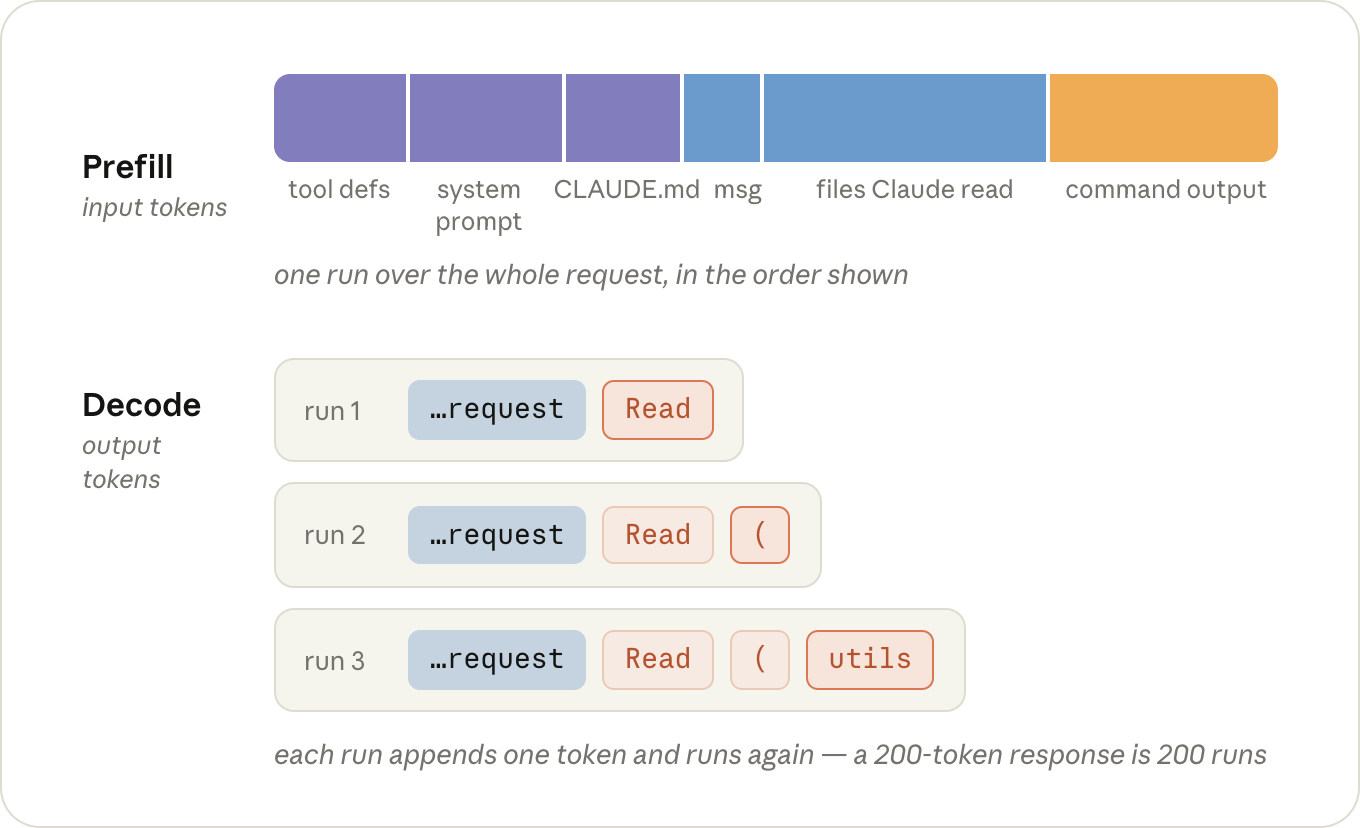
A request goes through the GPU in two phases, and they cost different amounts.
First, during prefill, the model reads your request and context: the system prompt, your CLAUDE.md, your message, and everything that's been added to the conversation since (the files Claude has read and the output of the commands it ran). Those are your input tokens.
Then, during decode, it writes output tokens: its thinking, the tool calls it makes, and the text you see. This happens one token at a time; a 200-token response is 200 runs of the model, one after the other. Per token, decode keeps the GPU busy for a lot longer, which is why output is priced at roughly 5x input.
一个请求在 GPU 上要经历两个阶段,成本并不相同。
第一阶段是 prefill(预填充),模型读取你的请求和上下文:系统提示词、你的 CLAUDE.md、你的消息,以及对话进行到现在新增的所有内容(Claude 读过的文件、它运行的命令的输出)。这些就是你的输入 token。
第二阶段是 decode(解码),模型写出输出 token:它的思考过程、执行的工具调用、你看到的文本。这个阶段是一个 token 一个 token 依次生成的;200 个 token 的回复就是模型连续跑 200 次。按单个 token 算,decode 让 GPU 忙碌的时间要长得多,所以输出的定价大约是输入的 5 倍。
A lot of the output tokens in a session are thinking tokens, and how much thinking the model does per turn is what the effort level controls. Like the model, the level you pick with /effort sticks around as your default for the next session too.
Tip: run /model and /effort once in a fresh session to see what you're actually on. Both remember whatever you picked last time, and you want that decision to be deliberate.
Tip: if you already know a session is going to be grunt work, MAX_THINKING_TOKENS=0 claude turns thinking off for that one session (except on Fable 5), which is the step below /effort low.
会话里的大量输出 token 其实是思考 token,而模型每轮思考多少,正是由 effort 级别控制的。和模型一样,你用 /effort 选的级别也会保留下来,作为下一次会话的默认值。
提示:在新会话里运行一次 /model 和 /effort,看看自己当前实际用的是哪个。两者都会记住你上次的选择,最好让这个选择是经过深思熟虑的。
提示:如果你事先知道这次会话只是机械性劳动,可以用 MAX_THINKING_TOKENS=0 claude 单独关掉这一次的思考(Fable 5 除外),这比 /effort low 还要再低一档。
If a request starts with exactly the same tokens as a request the server just saw, the state for that shared beginning comes out the same, so the server can keep it around from last time and only prefill whatever comes after it. This is called prompt caching.
Reading from the cache costs 0.1x the input price, because the server loads the state instead of computing it. Writing tokens into the cache costs a bit more than normal input, up to 2x, since the server also has to hold on to the state afterwards. But the write happens once per token, and the 0.1x reads happen on every turn after it.
Claude Code manages the prompt cache on every request, there's nothing to turn on. However you can break it, so it's important to know how to avoid these cost spikes.
如果一个请求的开头和服务器刚刚见过的某个请求完全一样,那么这段共同前缀的中间状态也完全相同。服务器可以把上次的状态留着,这次只需 prefill 新加的部分。这就叫 prompt caching(提示词缓存)。
从缓存读取的成本是输入价格的 0.1 倍,因为服务器是直接加载状态,而不是重新计算。把 token 写进缓存则比普通输入略贵,最高到 2 倍,因为服务器之后还得把状态保存下来。不过写入每个 token 只发生一次,而 0.1 倍的读取会在之后的每一轮都发生。
Claude Code 会在每个请求上自动管理提示词缓存,不需要你开启任何东西。但你也有可能弄坏它,所以有必要了解怎么避免这些成本尖峰。
Say we type "fix the failing test in utils.test.ts". Here's what Claude Code sends for it:
Claude Code assembles the first request out of the system prompt (tool definitions included), your CLAUDE.md, and your message, and sends it off (input tokens). Nothing is in the cache yet, so all of it gets prefilled and written into the cache.
The model can't fix a test it hasn't seen, so it thinks for a moment and responds with a Read call for utils.test.ts (output tokens). Claude Code reads the file, appends it to the conversation, and sends the whole thing again (input tokens). This time everything from request 1 is read back out of the cache at a tenth of the price, and the only thing prefilled at full price is what's new: the Read call and the file.
Now the model wants the file under test (output). Another Read, another append, and everything goes out again: requests 1 and 2 from the cache, the second file at full price (input).
The model responds with an Edit (output). Claude Code applies it, appends the result, and sends everything again. Same story: the Edit and its result are new, everything in front of them is a cache read (input).
The model runs npm test (output). Claude Code appends the test output and sends everything again, with the test output as the only new part (input).
The tests pass, and the model responds with a short summary (output). No tool call means nothing to append and no request 6, so we're done.
假设我们输入“fix the failing test in utils.test.ts”。Claude Code 是这样发送请求的:
Claude Code 用系统提示(含工具定义)、你的 CLAUDE.md 和你的消息组装出第一个请求并发出(输入 token)。此时缓存里还什么都没有,所以全部内容都要 prefill,并写入缓存。
模型没法修复一个它没见过的测试,所以它想了一下,返回一个对 utils.test.ts 的 Read 调用(输出 token)。Claude Code 读取文件,追加到对话里,然后再次发送整个内容(输入 token)。这一次,请求 1 里的所有内容都按 1/10 的价格从缓存读回,唯一以全价 prefill 的是新增部分:Read 调用和文件内容。
现在模型想看被测文件(输出)。又是一次 Read、又一次追加,然后把全部内容重新发出:请求 1 和 2 走缓存,第二个文件以全价输入。
模型返回一个 Edit(输出)。Claude Code 应用它,追加结果,再全部发送一遍。同样的故事:Edit 和它的结果是新的,它们之前的所有内容都是缓存读取(输入)。
模型运行 npm test(输出)。Claude Code 追加测试输出,再全部发送一遍,只有测试输出是新增部分(输入)。
测试通过了,模型返回一段简短总结(输出)。没有工具调用就没什么可追加的,也就没有请求 6,到此结束。
That's five requests for one small fix, and every one of them contained the entire conversation up to that point. A typical turn is lopsided: tens of thousands of tokens going in, a few hundred coming out. But only what's new in that turn gets prefilled at full price.
That's the whole per-turn bill: cache reads on the history, full input price on whatever's new, and the output price on the response.
This applies on a subscription too. You don't see these prices directly, but the same requests are what draw down your limits.
修一个小问题就用了五个请求,而每个请求都包含了到那一刻为止的完整对话。一个典型回合非常不对称:进去的 token 有几万,出来的只有几百。但只有这一轮新增的内容才按全价 prefill。
这就是每一轮的完整账单:历史部分按缓存读取计费,新增部分按输入全价计费,回复部分按输出价格计费。
订阅套餐也一样。你不会直接看到这些价格,但消耗你额度的正是同样的这些请求。
The cache has to match from the very start of the request forward, and requests always go out in the same order: tool definitions, then the system prompt, then the conversation (with CLAUDE.md at the front of it).
If anything in that prefix changes, everything behind it gets prefilled again. A tool result appended to the end of the conversation is the ideal case, since nothing is behind it. What throws the cache away is anything that changes the request further towards the front, or changes what the cache is keyed on:
/model: every model has its own cache, so on the next turn the entire conversation gets prefilled again at full price. (This includes opusplan, which switches models every time you go in or out of plan mode.)
/effort: the effort level is part of what the cache is keyed on too, so it's the same story. It's why both /model and /effort ask you to confirm when you switch in the middle of a conversation.
缓存必须从请求的起点开始完全匹配,而请求总是按同样的顺序发出:先是工具定义,然后是系统提示,再是对话(CLAUDE.md 位于对话最前面)。
如果这个前缀里的任何东西变了,它后面的所有内容都要重新 prefill。工具结果追加在对话末尾是最理想的情况,因为后面没有任何内容。真正让缓存失效的,是任何改变请求靠前部分、或改变缓存 key 的东西:
/model:每个模型都有自己的缓存,所以切换后的下一轮,整个对话都要按全价重新 prefill。(这里面包括 opusplan,它每次进出 plan 模式都会切换模型。)
/effort:effort 级别也是缓存 key 的一部分,所以情况完全相同。这也是为什么在对话中途切换 /model 和 /effort 时,两者都会要求你确认。
Fast mode: also part of the key, and the re-prefill happens at fast mode prices, so if you're going to turn it on, turn it on at the start. (Turning it off again is free, cache-wise.)
/compact: the conversation gets replaced with a shorter one, so nothing in it matches anymore (the system prompt in front of it survives). Writing the summary itself is cheap as long as the old conversation is still in the cache, so it's a lot cheaper before a long break than after one.
Fast mode:它同样是 key 的一部分,重新 prefill 会按 Fast mode 的价格计算,所以如果你打算开启,最好一开始就开。(关掉它从缓存角度是免费的。)
/compact:对话会被替换成更短的版本,所以里面的内容不再有任何匹配(前面的系统提示不受影响)。只要旧对话还在缓存里,写摘要本身就很便宜,所以在长时间休息之前 /compact 比之后要便宜得多。
Time: every turn resets the clock, but the cache expires after an hour on a subscription or five minutes on an API key (ENABLE_PROMPT_CACHING_1H=1 makes it an hour). Come back later than that, and the next turn prefills the whole conversation again. Resuming an old session almost always does too: the cache is usually gone by then, and the system prompt gets rebuilt at launch anyway.
时间:每一轮都会重置计时,但缓存的过期时间在订阅版是一个小时,在 API key 上是五分钟(ENABLE_PROMPT_CACHING_1H=1 可以改成一个小时)。超过这个时间再回来,下一轮就会把整个对话重新 prefill。恢复旧会话几乎也总是如此:到那时缓存通常已经没了,而且系统提示在启动时本来就会重建。
None of this means you should never switch models or effort. It means there are cheap moments to do it, the start of a session or right after a /clear, and expensive ones, the middle of a long conversation.
Tip: if the last few turns went somewhere you don't want to keep, /rewind to just before them instead of running /compact. Rewinding only cuts those turns off the end, so everything before them is still cached and it costs nothing. Compacting rewrites the whole conversation, so it always costs something.
这些都不是说你不要切换模型或 effort。而是说切换有便宜的时候——会话开头或刚 /clear 之后——也有贵的时候——一段长对话的中途。
提示:如果最后几轮走偏了、你不想保留,用 /rewind 回到之前,而不是跑 /compact。Rewind 只是把末尾这几轮剪掉,所以之前的内容仍然在缓存里,成本为零。Compacting 会重写整个对话,所以它总是要花钱。
The main thing to know here is that nothing gets sent just once. Everything that ends up in the conversation, a file Claude read or the output of a command it ran, gets sent again on every turn after it, for the rest of the session.
It's cached, so each of those re-sends is cheap, but cheap isn't nothing, and it's taking up room in the context the model has to think around on every turn too.
That's really the whole cost model of a session: how many tokens end up in the context, how many turns they stay there, and how many contexts you're running at the same time.
这里要明白的重点是:没有任何内容只会被发送一次。凡是进入对话的东西——Claude 读过的文件、运行命令的输出——都会在之后的每一轮、直到会话结束,反复发送。
这些重复发送走缓存,所以很便宜,但便宜不等于免费,而且它们还会占用模型的上下文空间,模型每轮都要在这些内容旁边思考。
这其实就是会话的全部成本模型:有多少 token 进入了上下文,它们在里面待多少轮,以及你同时跑着多少个上下文。
Part of what's in the context is there before you type anything: the tool definitions, the system prompt, CLAUDE.md, and whatever else gets loaded at startup.
Tip: run /context in a fresh session to see what's in there before you've typed anything. Keep CLAUDE.md to specific instructions and move workflow-specific ones into skills, which only get loaded when they're used. If there's an MCP server you don't need in this session, turn it off with /mcp.
Nearly everything else that gets added during the session is tool results: the files Claude reads, and the output of the commands it runs.
How much Claude reads mostly comes down to how much it has to figure out on its own. If you say "the tests are failing", it first has to find out which tests: a grep or two, a few files opened to see which one is relevant, and all of those results stay in the context long after they've stopped being useful.
"Fix the failing test in utils.test.ts" skips the searching and costs one Read call for the file, and "Fix the failing test in @utils.test.ts" doesn't cost the Read call either.
会话中新增的几乎所有东西都是工具结果:Claude 读的文件,以及它运行的命令输出。
Claude 读多少,主要取决于它需要自己搞清楚多少。如果你只说“测试挂了”,它得先找出是哪些测试:一两次 grep,打开几个文件看看哪个相关,而这些结果在早就没有用之后,还会继续留在上下文里。
“Fix the failing test in utils.test.ts”直接跳过了搜索,只需要一次 Read 调用读那个文件;而“Fix the failing test in @utils.test.ts”连这次 Read 调用都省了。
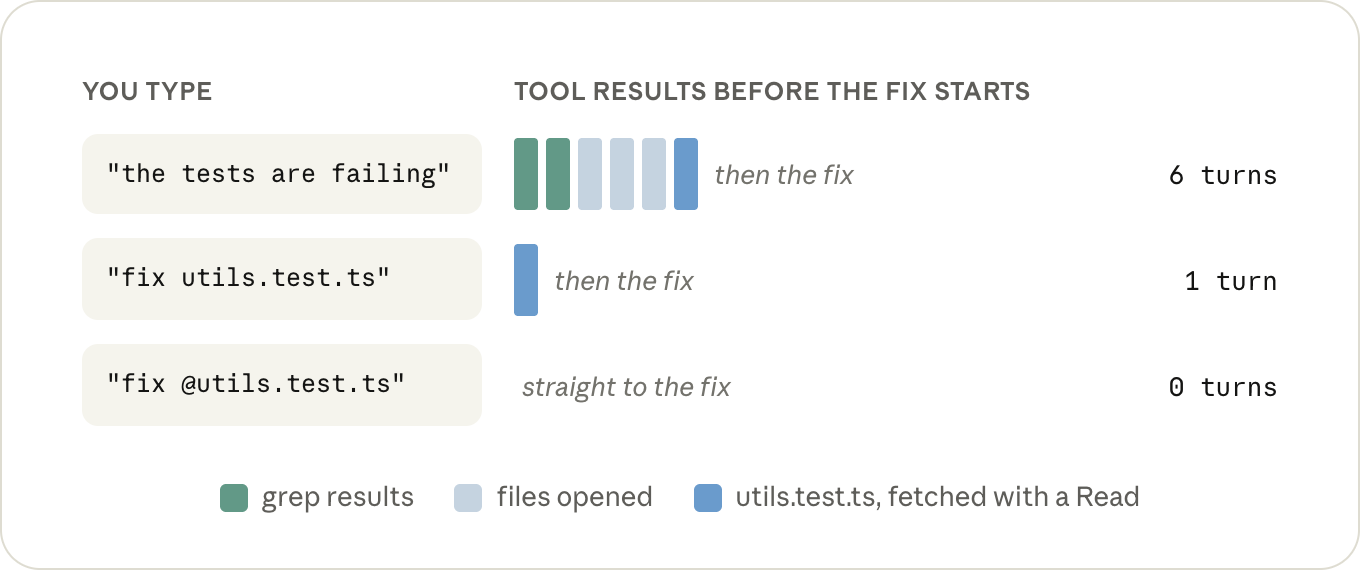
Tip: when you're referring to a file, @-mention it instead of typing the path. Claude Code attaches the file to your message before anything gets sent, so it's in the very first request and there's no Read call for it. The file itself takes up the same room in the context either way, so you only need to mention it once per conversation: it stays there, and @-mentioning it again on a later turn generally attaches a second copy.
提示:提到文件时用 @ 提及,而不是手打路径。Claude Code 会在发送任何内容之前把文件附加到你的消息里,所以它在第一个请求里就已经在了,不需要 Read 调用。无论哪种方式,文件本身在上下文里占用的空间是一样的,所以每个对话只需要提一次:它会一直在那里;之后再在后面的回合里 @ 一次,通常反而会附加第二份副本。
The other thing that fills up the context is the output of the commands Claude runs. Every time it runs your tests, a build, or a git log, whatever that prints gets appended to the conversation just like a file it read, and stays there for the same number of turns.
Really big outputs are actually fine: after 30,000 characters Claude Code writes the output to a file and only puts a short preview and the path in the conversation (BASH_MAX_OUTPUT_LENGTH if you want to change it).
The problem is everything under that. A test runner that prints 400 passing tests one line at a time comes in under the limit, and those 400 lines are now part of every remaining turn.
Claude will often take care of this for you with flags and tail, and if you'd rather not leave it up to Claude, there's a small hook in the docs that rewrites noisy commands before they run so only the lines that matter come back.
另一个把上下文塞满的东西,是 Claude 运行的命令输出。每次它跑测试、构建或 git log,不管打印出什么,都会像它读过的文件一样被追加到对话里,并在同样多的回合里一直待着。
特别大的输出其实没问题:超过 30,000 个字符后,Claude Code 会把输出写进文件,只在对话里放一段简短预览和路径(想改可以用 BASH_MAX_OUTPUT_LENGTH)。
问题出在阈值以下的东西。一个测试运行器一次一行打印 400 条通过测试,总数低于上限,从这以后,这 400 行就成了之后每一轮的一部分。
Claude 通常会自己用 flag 和 tail 处理这种情况;如果你不想交给 Claude,文档里有一个小 hook,可以在跑之前重写那些很吵的命令,只让有用的行回来。
Tip: put the two or three commands you run all day in CLAUDE.md, quiet flags included, the way you'd type them yourself ("run a single test file with npx vitest run <file> --reporter=dot"). It's a small addition, but it saves a turn and a few hundred lines of output in every session after it.
提示:把每天都要跑的两三条命令写进 CLAUDE.md,带上安静 flag,就像你自己会敲的那样(例如“run a single test file with npx vitest run <file> --reporter=dot”)。这只是一个小改动,但之后的每个会话都能省下一轮调用和几百行输出。
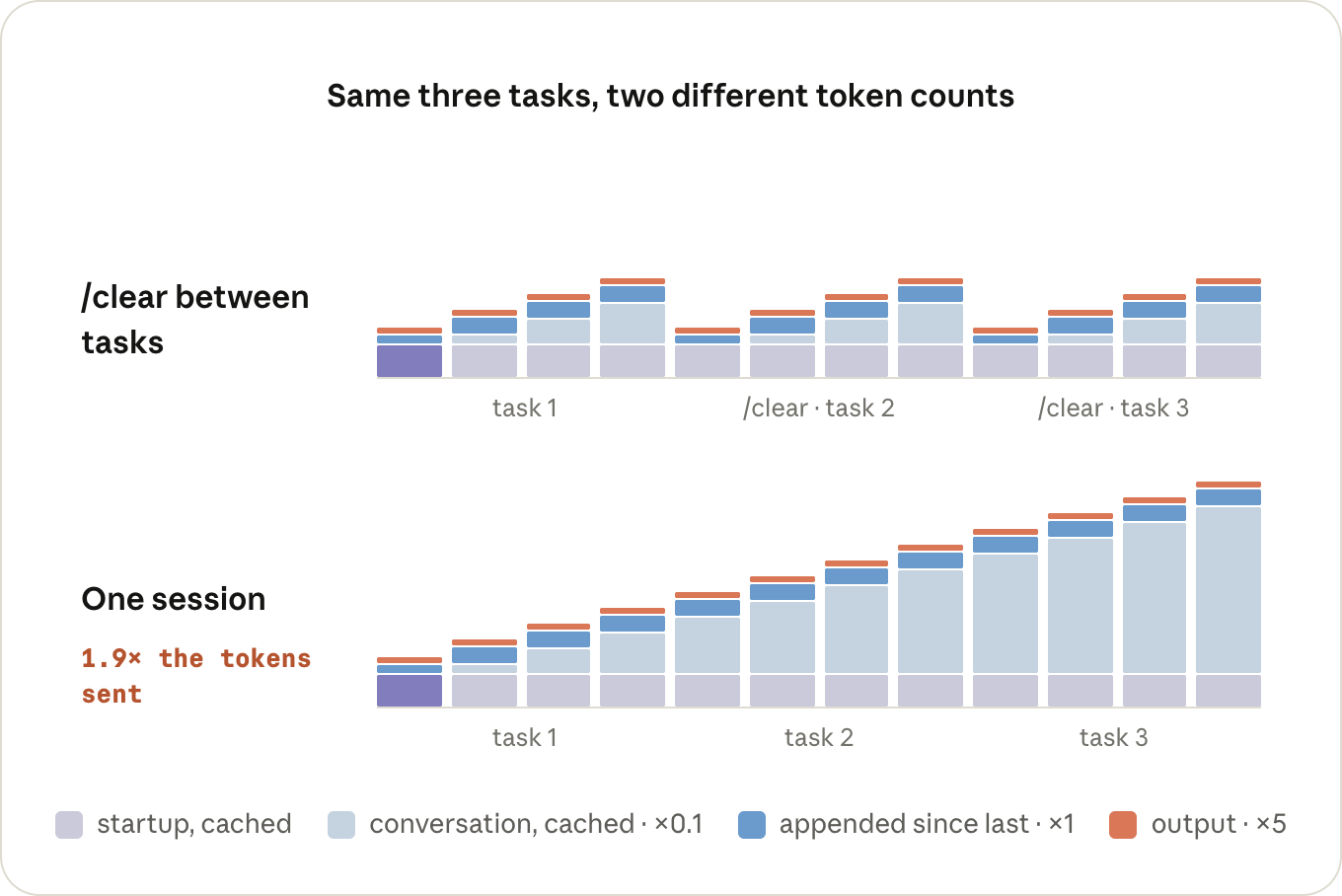
One long session costs more than the same work spread over a few short ones, and by more than you'd think, because turn 40 is also re-reading the 39 turns before it. You want the context in your session to be short and relevant, so don't carry one task's context into the next: /clear when you start something new, and /compact when the earlier part of the same task is done.
一个长会话的花费,比把同样的工作拆成几个短会话更高,而且高得超乎想象,因为第 40 轮也要重读前面的 39 轮。你应该让会话里的上下文保持精简和切题:开始新任务时 /clear,同一个任务的前半部分做完后 /compact。
Tip: /rename before you /clear if you'll want the session back later. When you /compact, tell it what to keep, or put a "Compact instructions" section in CLAUDE.md if it's always the same thing. And if you're on a 1M model and would rather have the auto-compact safety net where it used to be, /autocompact 200k puts it back (needs Claude Code v2.1.221+).
提示:如果之后还想找回这个会话,/clear 之前先 /rename。跑 /compact 时,告诉它要保留什么;如果每次要保留的东西都一样,可以在 CLAUDE.md 里放一个“Compact instructions”小节。另外,如果你用的是 1M 模型,想把自动压缩的安全网放回原来的位置,/autocompact 200k 就能把它放回去(需要 Claude Code v2.1.221+)。
Keep an eye on turns that happen when you're not typing, too. A /loop fires as a full turn in the session you set it up in, carrying that whole conversation with it every time, and if it's been more than an hour since the last turn, it's a cache miss on top. Start a fresh session in another terminal and run the loop from there.
还要留意你在不输入时发生的回合。 /loop 会在你启动它的会话里作为一个完整回合触发,每次都带着整个对话;如果距离上一轮已经超过一个小时,它还要额外承担一次缓存未命中。在另一个终端里开一个新会话,从那里跑循环吧。
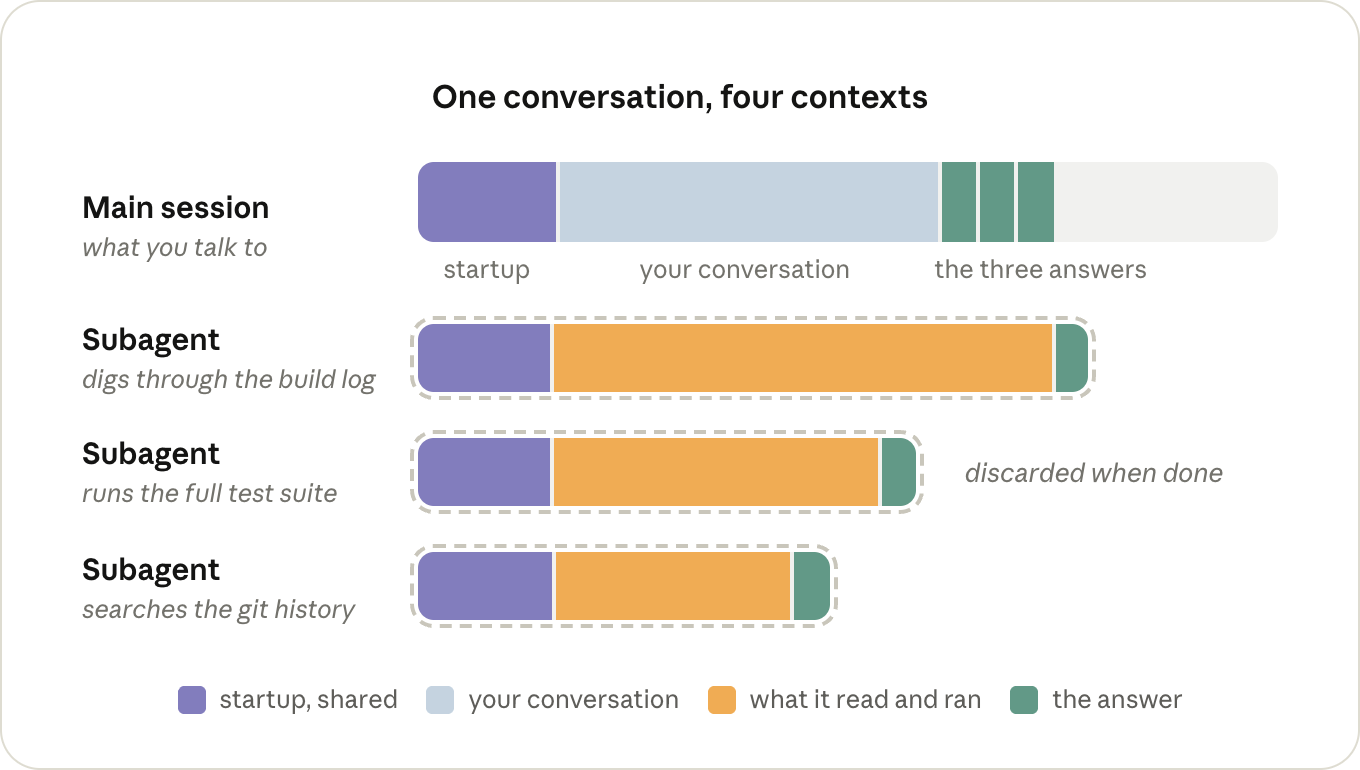
The other way to keep something out of your context is to have it happen in a different one, which is what subagents are for. A subagent gets its own context window, with its own system prompt, the tools, and your CLAUDE.md, but not your conversation. It runs its own turns, and the only thing that comes back to the main session is its answer. Everything else is thrown away once it's done.
The downside of not having your conversation is that a subagent sometimes has to re-read things the main session already had, and it's paying for its own turns while it does. For a small job it's just overhead.
It pays off when a job produces a lot of output you don't need to keep, like going through a log. Claude will often reach for one on its own for that kind of thing, and you can ask for one directly when it doesn't ("go through this log in a subagent"). Just keep in mind that the main session only gets back what the subagent chose to report.
另一种把东西挡在上下文之外的方法,是让它在另一个上下文里发生,这正是子代理的用途。子代理有自己的上下文窗口,有自己的系统提示、工具和你的 CLAUDE.md,但没有你的对话。它自己跑自己的回合,回到主会话的只有它的答案。它做完之后,其他一切都丢弃。
没有你的对话的缺点是:子代理有时要重读主会话已经读过的东西,而且它这么做时还要为自己的回合付费。对小任务来说,这纯粹是额外开销。
当一个任务产生大量你不需要保留的输出,比如翻日志时,子代理就划算了。Claude 遇到这类事情经常会主动用子代理;它没主动时,你也可以直接要求(“go through this log in a subagent”)。只是要记住,主会话只会拿到子代理选择汇报的内容。
Tip: if there's a noisy job you hand off over and over, give it a subagent definition of its own with model: haiku (or sonnet). Otherwise it runs on whatever your main session is running on.
提示:如果有个很吵的任务你反复交给子代理,可以给它单独定义一个子代理,指定 model: haiku(或 sonnet)。否则它会跟着主会话当前的模型跑。
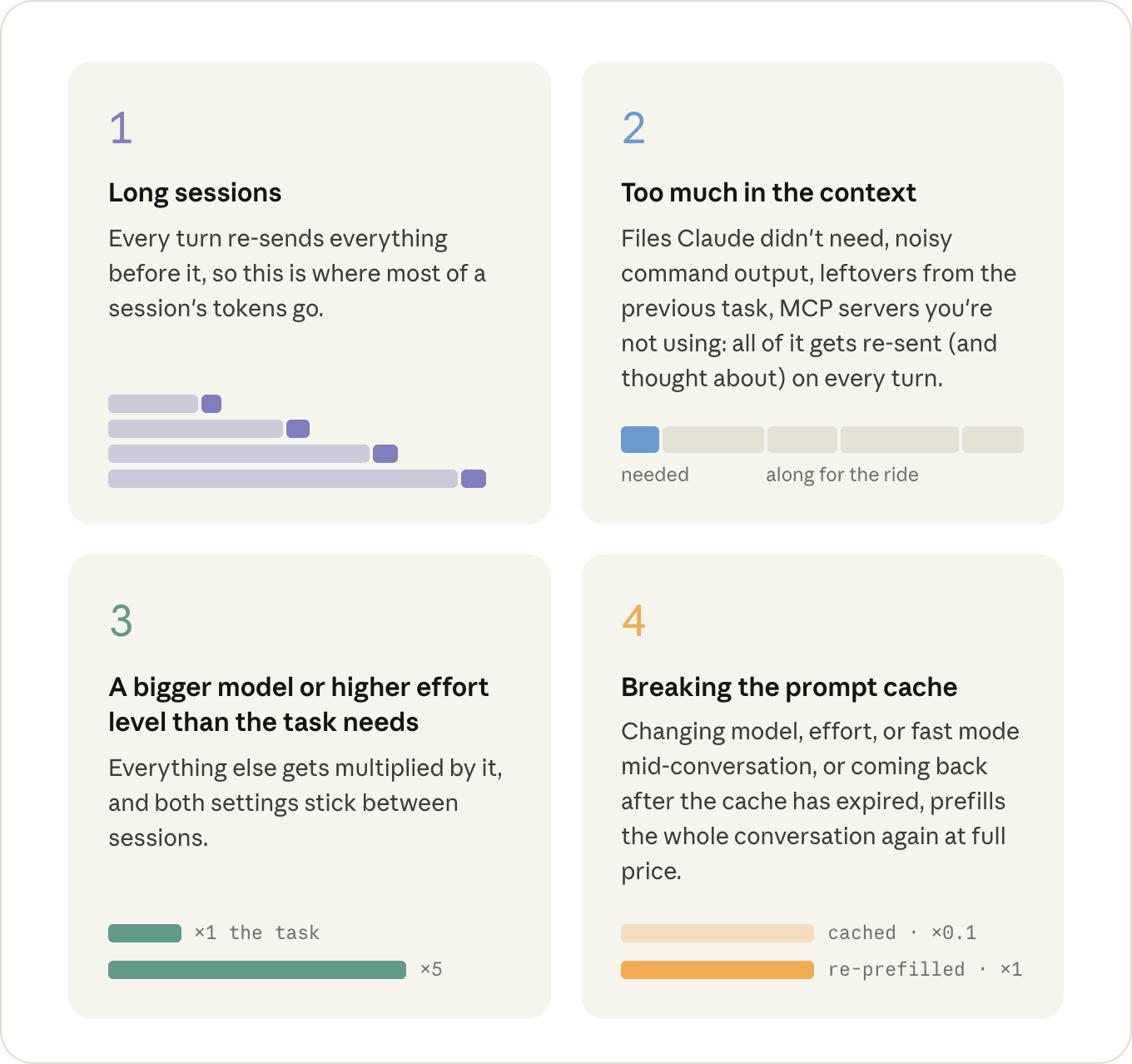
Of everything above, four things are worth keeping an eye on, roughly in order of how much they cost:
以上所有内容里,有四件事值得盯住,大致按它们花钱多少排序: