为 AI Agent 设计的自演进上下文数据库
OpenViking 是面向 AI Agent 的开源上下文数据库,把记忆、知识资源与技能统一挂载到 viking:// 虚拟文件系统,让 Agent 用 ls/tree/find 这类文件操作浏览上下文,而不是查询黑盒向量库。写入时内容会被加工成 L0 摘要、L1 概览、L2 详情三层,按需加载以节省 token;检索采用目录递归下钻,并保留完整浏览轨迹供排查。适合正在构建 Agent 记忆、Agentic RAG 或上下文管线的工程师参考或直接集成。
OpenViking is an open-source context database for AI agents. It unifies agent memory, knowledge RAG, and reusable skills into a single virtual filesystem exposed through the viking:// protocol. Instead of querying a black-box vector store, agents can explore their own context with familiar commands like ls, tree, and find. The project is primarily written in Python with Rust components and targets developers and teams building stateful, long-horizon LLM applications that need predictable and observable memory.
OpenViking 是一个面向 AI agent 的开源上下文数据库。它把 agent 的记忆、知识 RAG 和可复用技能统一成一个通过 viking:// 协议暴露的虚拟文件系统。agent 无需查询黑盒向量库,直接用 ls、tree、find 这些熟悉的命令就能浏览自己的上下文。项目主要使用 Python 编写,并包含 Rust 组件,面向的是构建有状态、长周期 LLM 应用,需要可预测、可观测记忆的开发者与团队。
Long conversations, scattered knowledge bases, and ad-hoc skills all put pressure on LLM agents. Native memory is a black box: you cannot see what was recalled, how deep it was loaded, or why a wrong answer came back. Plain RAG usually returns isolated text chunks, losing the surrounding structure, while dumping everything into the prompt burns tokens quickly. OpenViking treats context as structured data: typed directories, layered content, and a deterministic retrieval path that is observable and token-aware.
长对话、零散的知识库和临时拼凑的技能,都会给 LLM agent 带来压力。原生记忆是一个黑盒:你看不到召回的内容、加载的深度,也无法解释错误答案的来源。普通 RAG 往往只返回孤立的文本块,丢失了周围的结构;而把所有内容都塞进 prompt 又会迅速烧掉 token。OpenViking 把上下文当作结构化数据来处理:类型化的目录、分层的正文,以及一条可观测、省 token 的确定性检索路径。
Each entry written into OpenViking is processed into three tiers. L0 is a one-sentence abstract (~100 tokens) for quick relevance checks; L1 is an overview (~2k tokens) containing core information and usage scenarios; L2 is the full original content, loaded on demand. Every directory carries its own .abstract and .overview views, so relevance can be judged before any full file is read. Retrieval starts with a vector search that locates the best-matching directory, then drills down layer by layer, preserving the surrounding context. Every query also records its directory-browsing trajectory, making it easy to debug why a particular result was returned.
写入 OpenViking 的每条内容都会被处理成三层:L0 是一句话摘要(约 100 token),用于快速检查相关性;L1 是概览(约 2k token),包含核心信息和使用场景;L2 是完整原始内容,按需加载。每个目录都带有自己的 .abstract 和 .overview 视图,无需读取任何完整文件即可先判断相关性。检索先通过向量搜索定位最匹配的目录,再逐层深入,保留周围上下文。每次查询还会记录目录浏览轨迹,便于调试某个结果为什么会被返回。
OpenViking runs as a server with a CLI client. openviking-server init generates the config interactively, doctor validates it, and the server exposes an HTTP API. The ov CLI talks to the server and supports operations like add-resource, ls, tree, find, and grep against viking:// URIs. The repository is organized around a Python core, Rust crates such as ragfs (filesystem layer) and ov_cli (CLI), a bot/ directory containing VikingBot, and agent-plugins/ for MCP servers and skills. Cache crates provide Redis and Mooncake backends for the filesystem layer.
OpenViking 以服务端 + CLI 客户端的方式运行。openviking-server init 交互式生成配置,doctor 校验配置,服务端提供 HTTP API。ov CLI 连接服务端,支持对 viking:// URI 执行 add-resource、ls、tree、find、grep 等操作。仓库围绕几个部分组织:Python 核心、Rust crates(如文件系统层 ragfs 和 CLI ov_cli)、包含 VikingBot 的 bot/ 目录,以及存放 MCP server 和技能的 agent-plugins/。缓存 crate 为文件系统层提供 Redis 和 Mooncake 后端。
Requires Python 3.10+. Install with pip, then run the init wizard:
pip install openviking --upgrade
openviking-server init      # interactive wizard: providers, models, ov.conf
openviking-server doctor    # validate setup
openviking-server           # start (background: nohup openviking-server > openviking.log 2>&1 &)
With the server running, use the ov CLI to add a resource and browse it:
ov status
ov add-resource https://github.com/volcengine/OpenViking # --wait
ov ls viking://resources/
ov tree viking://resources/volcengine -L 2
# wait some time for semantic processing if not --wait
ov find "what is openviking"
ov grep "openviking" --uri viking://resources/volcengine/OpenViking/docs/en
The init wizard supports Volcengine, OpenAI, Codex OAuth, Kimi, GLM, and local Ollama; for Ollama it can auto-install the runtime and pull suitable models. A hosted playground is available at OpenViking Studio.
需要 Python 3.10 及以上版本。用 pip 安装后,运行 init 向导:
pip install openviking --upgrade
openviking-server init      # interactive wizard: providers, models, ov.conf
openviking-server doctor    # validate setup
openviking-server           # start (background: nohup openviking-server > openviking.log 2>&1 &)
服务启动后,用 ov CLI 添加资源并浏览:
ov status
ov add-resource https://github.com/volcengine/OpenViking # --wait
ov ls viking://resources/
ov tree viking://resources/volcengine -L 2
# wait some time for semantic processing if not --wait
ov find "what is openviking"
ov grep "openviking" --uri viking://resources/volcengine/OpenViking/docs/en
init 向导支持 Volcengine、OpenAI、Codex OAuth、Kimi、GLM 以及本地 Ollama;对于 Ollama,它还能自动检测并安装运行时、拉取适合你硬件的模型。另外还提供了在线体验环境 OpenViking Studio。
OpenViking ships with integrations that inject context recall into your agent and auto-commit session memory. Officially supported agents include Claude Code, Codex, OpenClaw, Hermes, Cursor, TRAE / TRAE CN / TraeCode CLI 2.0, OpenCode, pi, plus generic MCP clients and LangChain/LangGraph. Agent Plugins 1.0 offers a plugin-based path. OpenViking Helper, a desktop console in beta for macOS and Windows, visually configures integrations and inspects session traces. For teams that want a ready-made agent, VikingBot is an agent framework built on OpenViking and can be started with openviking-server --with-bot after installing openviking[bot].
OpenViking 自带集成能力,可以把上下文召回注入你的 agent,并自动提交会话记忆。官方支持的 agent 包括 Claude Code、Codex、OpenClaw、Hermes、Cursor、TRAE / TRAE CN / TraeCode CLI 2.0、OpenCode、pi,以及通用 MCP client 和 LangChain/LangGraph。Agent Plugins 1.0 提供基于插件的接入方式。OpenViking Helper 是面向 macOS 和 Windows 的桌面控制台(beta 版),可以可视化配置集成并检查会话轨迹。想要开箱即用的 agent,可以直接使用 VikingBot——一个基于 OpenViking 构建的 agent 框架,安装 openviking[bot] 后通过 openviking-server --with-bot 启动。
The project reports benchmark results on long-conversation user memory (LoCoMo) and multi-turn agent tasks (tau2-bench), using Doubao 2.0 Pro as the VLM and Doubao-embedding-vision-251215 as the embedding model. With OpenViking, all three agent integrations land at 80–83% accuracy on LoCoMo, up from 24–57% on native memory, while input tokens drop by 34.3–91.0% and query latency by 58.45–66.10%. On tau2-bench, experience memory lifts task success by +6.87 percentage points in retail and +11.87 points in airline compared to the same LLM without memory. Full results and reproduction scripts are in the benchmark/ directory.
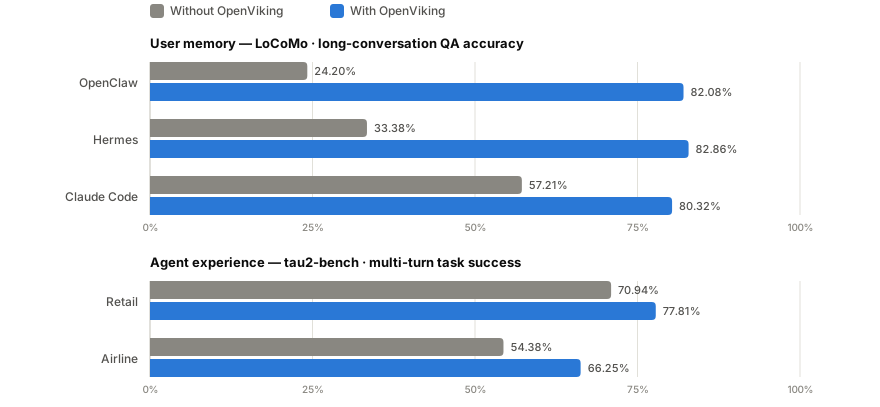
项目公布了在长对话用户记忆(LoCoMo)和多轮 agent 任务(tau2-bench)上的评测结果,使用 Doubao 2.0 Pro 作为 VLM、Doubao-embedding-vision-251215 作为 embedding 模型。接入 OpenViking 后,三种 agent 集成在 LoCoMo 上的准确率都在 80–83%,而原生记忆基线只有 24–57%;输入 token 下降 34.3–91.0%,查询延迟下降 58.45–66.10%。在 tau2-bench 上,相比同一 LLM 无记忆基线,经验记忆在零售场景把任务成功率提升 +6.87 个百分点,在航空场景提升 +11.87 个百分点。完整结果和复现脚本在 benchmark/ 目录下。
The open-source edition in this repo is fully functional under AGPLv3 — no feature gates, no activation keys. That said, the licensing is mixed: the main project is AGPLv3, crates/ov_cli and examples are Apache 2.0, and third_party retains its original licenses. The project is still early-stage; the README states there is plenty left to build, and OpenViking Helper is explicitly beta. If you need managed operations or dedicated support with an air-gapped option, those capabilities sit in the commercial editions (Managed SaaS on Volcano Engine and Self-Managed) rather than in the open-source build.
仓库里的开源版本在 AGPLv3 下功能完整——没有功能限制,没有激活码。不过许可证是混合的:主项目是 AGPLv3,crates/ov_cli 和 examples 是 Apache 2.0,third_party 保留各自的原许可证。项目仍处于早期阶段;README 明确说还有很多东西要建,OpenViking Helper 也标明是 beta。如果你需要托管运维、专职支持或气隙环境部署,这些能力在商业版(火山引擎托管 SaaS 和自管理版)里,而不是开源版中。