Agent 输出格式之争:为什么 Claude Code 团队改用 HTML
作者从 Markdown 转向 HTML 作为 Claude Code 的主要输出格式,理由是信息密度更高、可读性和分享便利性更好,还能通过滑动条、按钮等交互让用户与文档双向协作。文章给出大量可直接复用的 prompt,覆盖方案探索、代码评审、设计原型、研究报告和一次性编辑界面。作者也承认代价:HTML 生成比 Markdown 慢 2–4 倍,且 HTML diff 噪音大,版本控制体验差。适合用 Claude Code 做复杂规划、评审或产出的工程师参考。
Using Claude Code: The Unreasonable Effectiveness of HTML
By @trq212 · 2026-05-08T17:56:30.000Z
This is now also on the Claude Blog.
Markdown has become the dominant file format used by agents to communicate with us. It’s simple, portable, has some rich text capability and is easy for you to edit. Claude has even gotten surprisingly good at using ASCII to make diagrams inside of markdown files.
But as agents have become more and more powerful, I have felt that markdown has become a restricting format. I find it difficult to read a markdown file of more than a hundred lines. I want richer visualizations, color and diagrams and I want to be able to share them easily.
I'm also increasingly not editing these files myself, but using them as specs, reference files, brainstorming outputs, etc. When I do make edits, I’m usually prompting Claude to edit them, which removes one of markdown’s largest benefits.
I’ve started preferring HTML as an output format instead of Markdown and increasingly see this being used by others on the Claude Code team, this is why.
(if you want to start with some examples, you can see a bunch here: https://thariqs.github.io/html-effectiveness, just be sure to come back and read more about why)
使用 Claude Code:HTML 的惊人效果
作者 @trq212 · 2026-05-08T17:56:30.000Z
这篇文章也已同步发布在 Claude Blog 上。
Markdown 已成为智能体与我们沟通时最常用的文件格式。它简单、可移植、具备一定的富文本能力,而且方便你亲自编辑。Claude 甚至已经相当擅长用 ASCII 在 markdown 文件里画图。
但随着智能体越来越强大,我开始觉得 markdown 成了一种束缚。我发现自己很难读超过一百行的 markdown 文件。我想要更丰富的可视化、颜色和图表,而且希望能方便地分享它们。
同时,我也越来越不亲自编辑这些文件,而是把它们当作规格说明、参考文件、头脑风暴输出等来使用。真要改动时,我通常是让 Claude 去改,这反而让 markdown 的一大优势失去了意义。
我开始偏好用 HTML 而不是 Markdown 作为输出格式,也越来越多看到 Claude Code 团队里的其他人这么做。原因如下。
(如果你想先看一些例子,可以在这里看到一批:https://thariqs.github.io/html-effectiveness,看完记得回来继续读原因。)
Information Density
HTML can convey much richer information compared to markdown. It can of course do simple document structure like headers and formatting, but it can also represent all sorts of other information such as:
- Tabular data using tables
- Design data with CSS
- Illustrations with SVG
- Code snippets with script tags
- Interactions using HTML elements with javascript + CSS
- Workflows using SVG and HTML
- Spatial data using absolute positions and canvases
- Images using image tags
I would go so far as to say that there is almost no set of information that Claude can read that you cannot fairly efficiently represent with HTML. This makes it a highly efficient way for the model to communicate in-depth information to you and for you to review it.
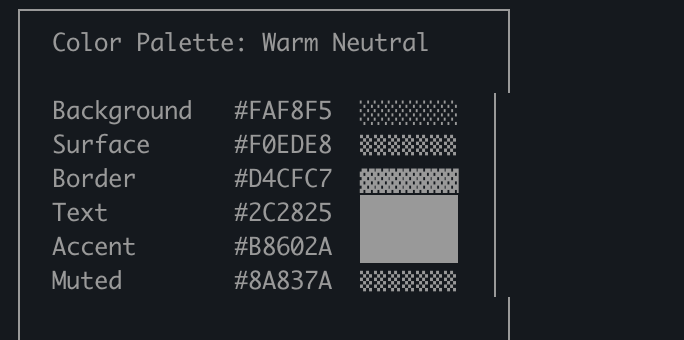
I’ve found that in the absence of being able to do this, the model may do more inefficient things in markdown like ASCII diagrams or, my favorite, estimating colors with unicode characters like in this screenshot from Claude Code.
信息密度
相比 markdown,HTML 能承载的信息丰富得多。它当然可以表达标题和格式这类简单文档结构,也能表示各种其他信息,例如:
- 用表格呈现的表格数据
- 用 CSS 表达的设计数据
- 用 SVG 绘制的插图
- 用 script 标签写的代码片段
- 用 javascript + CSS 实现的 HTML 元素交互
- 用 SVG 和 HTML 描述的工作流
- 用绝对定位和 canvas 表现的空间数据
- 用图片标签插入的图像
我甚至想说,Claude 能读到的信息,几乎没有哪一类是你不能用 HTML 相当高效地表达的。这让模型可以把深入的信息高效地传达给你,也方便你审阅。
我发现,如果没有这种表达能力,模型在 markdown 里就会去做一些更低效的事,比如 ASCII 图表,或者我最爱的——用 unicode 字符来“模拟颜色”,就像这张 Claude Code 截图里那样。
Visual Clarity & Ease of Reading
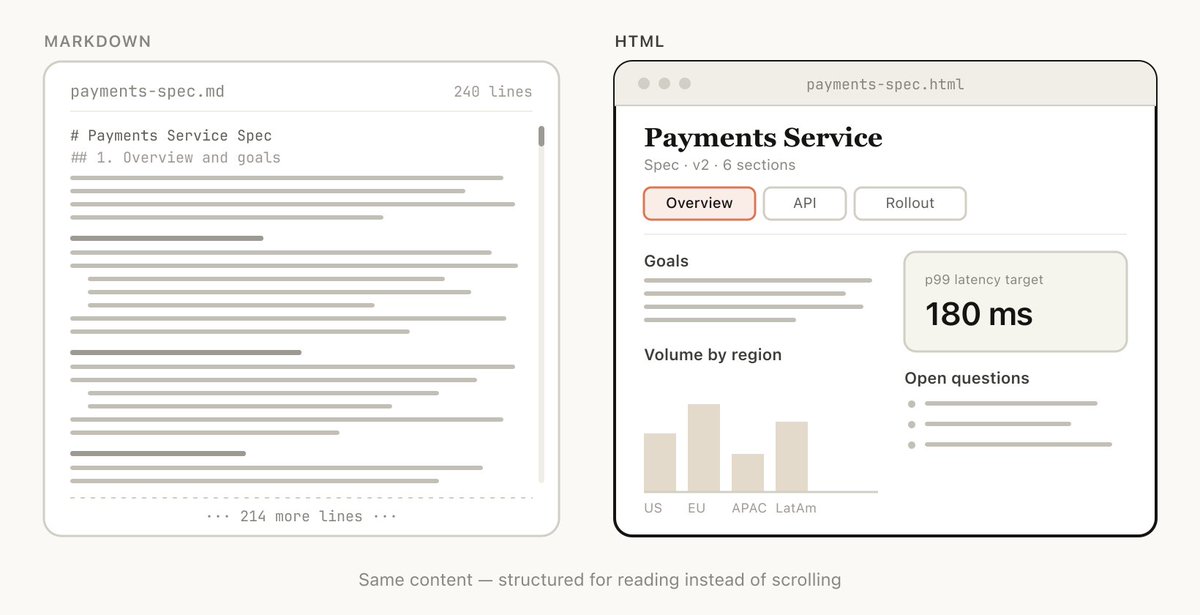
As Claude is able to do more complex work, it is also writing larger and larger specs and plans. In practice, I've found I tend to not actually read more than a 100-line markdown file, and I certainly am not able to get anyone else in my organization to read it.
But HTML documents are much easier to read, Claude can organize the structure visually to be ideal to navigate with tabs, illustrations, links, etc. It can even be mobile responsive so you can read it differently based on your form factor.
视觉清晰度与易读性
随着 Claude 能处理越来越复杂的工作,它写出的规格和计划也越来越长。实际上,我发现我往往读不完一份超过 100 行的 markdown 文件,更别说让组织里的其他人去读它了。
但 HTML 文档读起来要轻松得多。Claude 可以从视觉上组织结构,让导航变得理想:标签页、插图、链接等等。它甚至可以适配移动端,让你根据不同的设备形态用不同方式阅读。
Ease of Sharing
Markdown files are fairly hard to share since most browsers do not render them natively well. You often have to add them as attachments to emails or messages.
With HTML, as long as you upload the file (for example to S3), you can share the link easily. Your colleagues can open it wherever they wish and easily reference it.
The chance of someone actually reading your spec, report or PR writeup is much much higher if it’s in HTML.
易于分享
Markdown 文件很难分享,因为大多数浏览器不能很好地原生渲染它们。你往往只能把它们作为附件添加到邮件或消息里。
而 HTML 只要上传文件(比如传到 S3),就能轻松分享链接。你的同事无论在哪儿都能打开,也方便引用。
如果用的是 HTML,你的规格说明、报告或 PR 说明真正被人读到的概率会高得多。
Two-way Interaction
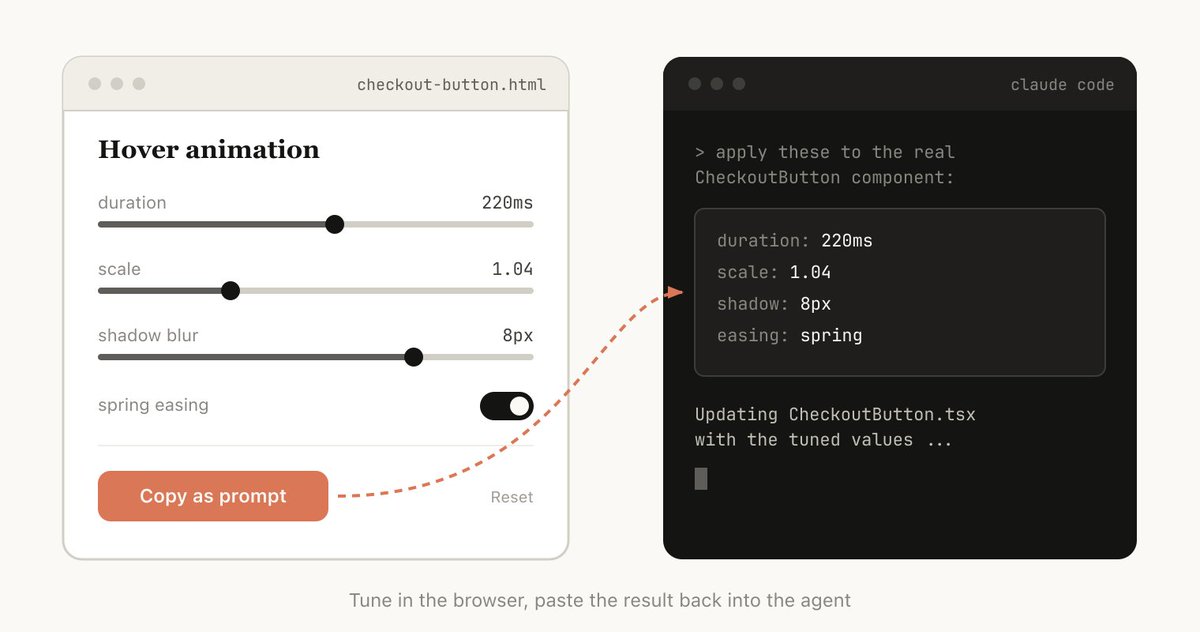
HTML can allow you to interact with the document, for example you might want to ask it to add sliders or knobs to adjust a design or allow you to tweak different options in the algorithm to see what happens. You can also ask it to let you copy these changes into a prompt to paste back into Claude Code.
Read more about my playgrounds post to see examples of this two way interaction: https://x.com/trq212/status/2017024445244924382
双向交互
HTML 允许你和文档互动。比如,你可以让 Claude 加上滑块或旋钮来调整设计,或者让你在算法里试不同的选项,看看会发生什么。你也可以让它把这些改动复制成一段 prompt,再粘贴回 Claude Code。
更多关于这种双向交互的例子,可以看看我关于 playground 的帖子:https://x.com/trq212/status/2017024445244924382
Data Ingestion
Why use Claude Code to make HTML files instead of ClaudeAI or Claude Design for example? One of the biggest reasons is all the context Claude Code can ingest.
For example, when writing this article, I asked Claude Code to read through my code folder and find all the HTML files I’ve generated, group and categorize them and then make an HTML file with all diagrams representing each type. The diagrams you see in this article are a direct result of that.
Besides the file system, Claude Code can find additional context using your MCPs (like Slack, Linear, etc.), your web browser (with Claude in Chrome), your git history, etc.
数据摄取
为什么不用 ClaudeAI 或 Claude Design,而是用 Claude Code 来做 HTML 文件?最大的原因之一是 Claude Code 能摄取大量上下文。
比如,写这篇文章时,我让 Claude Code 通读我的代码文件夹,找出我生成的所有 HTML 文件,对它们分组、归类,然后做一个包含每类示意图的 HTML 文件。你在这篇文章里看到的图,就是那个过程的直接产物。
除了文件系统,Claude Code 还能通过你的 MCP(如 Slack、Linear 等)、你的浏览器(通过 Claude in Chrome)、你的 git 历史等获取更多上下文。
It’s Joyful
Making HTML documents with Claude is just more fun and makes me feel more involved and invested in the creation, and that by itself is enough.
它让人愉快
用 Claude 做 HTML 文档就是更有趣,也让我更投入、更在乎创作本身。仅这一点就足够了。
How to Get Started
I’m a little bit afraid that people will read this article and turn it into a /html skill or something. While there might be some value in that, I want to emphasize that you don’t need to do much to get Claude to do this. You can just ask it to “make a HTML file” or “make a HTML artifact”.
The trick is knowing what you want the artifact to do and how you might use it. You may over time make a skill, but for now I’d suggest just prompting from scratch to get a hang of how to use it in different cases.
如何开始
我有点担心大家读完这篇文章后,会把它做成一个 /html skill 之类的东西。虽然那可能有一定价值,但我想强调:要让 Claude 做这件事,你并不需要做太多。你只要让它“做一个 HTML 文件”或“做一个 HTML artifact”就行。
关键在于想清楚这个 artifact 要做什么、你会怎么用它。也许你慢慢会做出一个 skill,但现在我建议你直接从 prompt 开始,先体会它在不同场景下怎么用。
To make this more concrete, I’ve made many different HTML files for different use cases. You can view all of them here: https://thariqs.github.io/html-effectiveness/ but here’s an overview.
Specs, Planning & Exploration
HTML is a rich canvas for Claude to dive into a problem. When I start working on a problem instead of a simple markdown plan I expect to make a web of HTML files. For example, I might start with asking Claude Code to brainstorm and create some explorations of different options. I would then ask it to expand more into one, maybe make mockups or code snippets. Finally, when I feel good I’ll ask it to write an implementation plan. When I’m happy with the plan I’ll create a new session and pass in all of these files for it to implement.
When verifying I’ll also ask the verification agent to read in the files and it will have much broader context on what is needed.
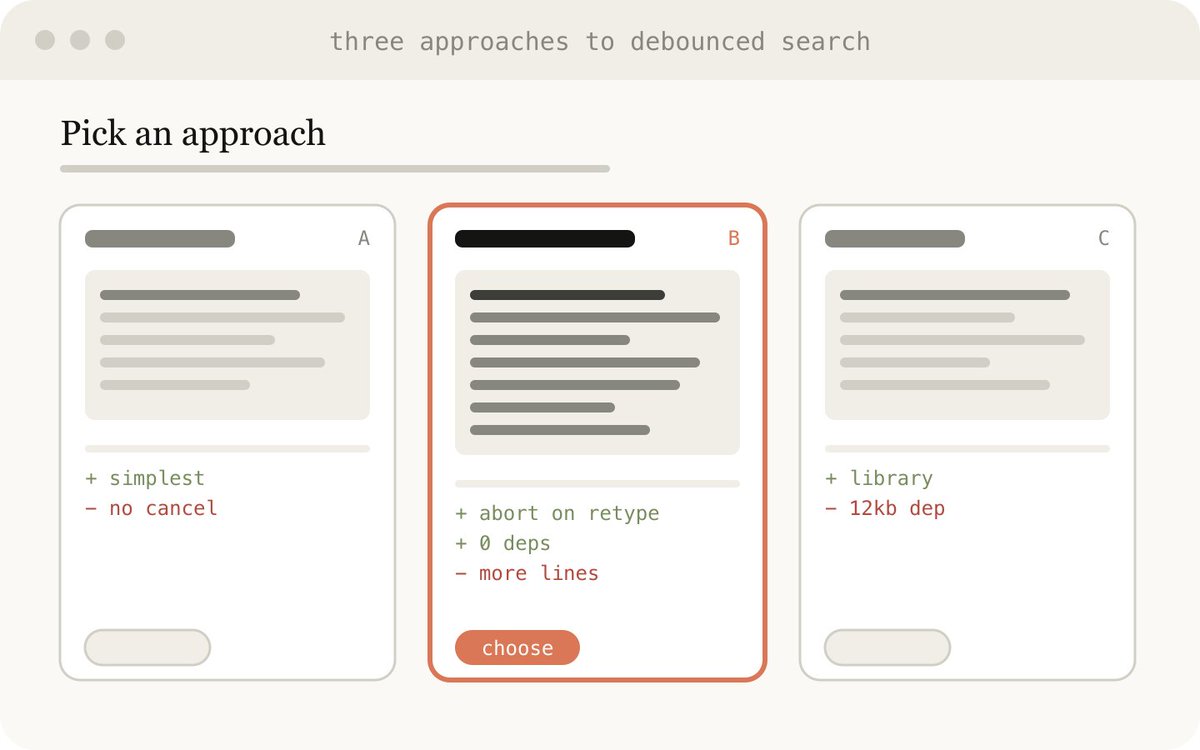
Example Prompts:
- I'm not sure what direction to take the onboarding screen. Generate 6 distinctly different approaches — vary layout, tone, and density — and lay them out as a single HTML file in a grid so I can compare them side by side. Label each with the tradeoff it's making.
- Create a thorough implementation plan in a HTML file, be sure to make some mockups, show data flow and add important code snippets I might want to review. Make it easy to read and digest.
Use Cases:
- Exploring other ways to implement something in code
- Exploring multiple visual designs
为了更具体一点,我为不同用例做了很多 HTML 文件。你可以在 https://thariqs.github.io/html-effectiveness/ 查看全部,但这里先给个概览。
规格、规划与探索
HTML 是 Claude 深入问题的富画布。当我开始处理一个问题时,我不会再写一份简单的 markdown 计划,而是预期会产出一组相互关联的 HTML 文件。比如,我可能先让 Claude Code 做头脑风暴,生成几种不同方案的探索;然后请它深入展开其中一种,也许做个 mockup 或代码片段;最后,等我感觉对了,再让它写实现计划。计划满意后,我会开一个新 session,把这些文件全部传进去让它实现。
验证时,我也会让验证 agent 读取这些文件,这样它就能对需求有更完整的上下文。
示例提示词:
- 我不确定 onboarding 界面该往哪个方向走。生成 6 种截然不同的方案——在布局、语气和密度上做出差异——并把它们放进单个 HTML 文件的网格里,方便我并排比较。给每个方案标注它所做的取舍。
- 做一个详尽的 HTML 实现计划,一定要包含一些 mockup,展示数据流,并加入我想审阅的重要代码片段。要易读、易消化。
适用场景:
- 探索同一功能的其它实现方式
- 探索多种视觉设计
Code Review & Understanding
Code can be difficult to read in a Markdown file. But with HTML we can render diffs, annotations, flowcharts, modules, etc. Use this to understand code that the agent has written, to get code review or to explain a PR to someone reviewing your code. I find this often works better than the default Github diff view, and I attach a HTML code explainer to every PR I make now.
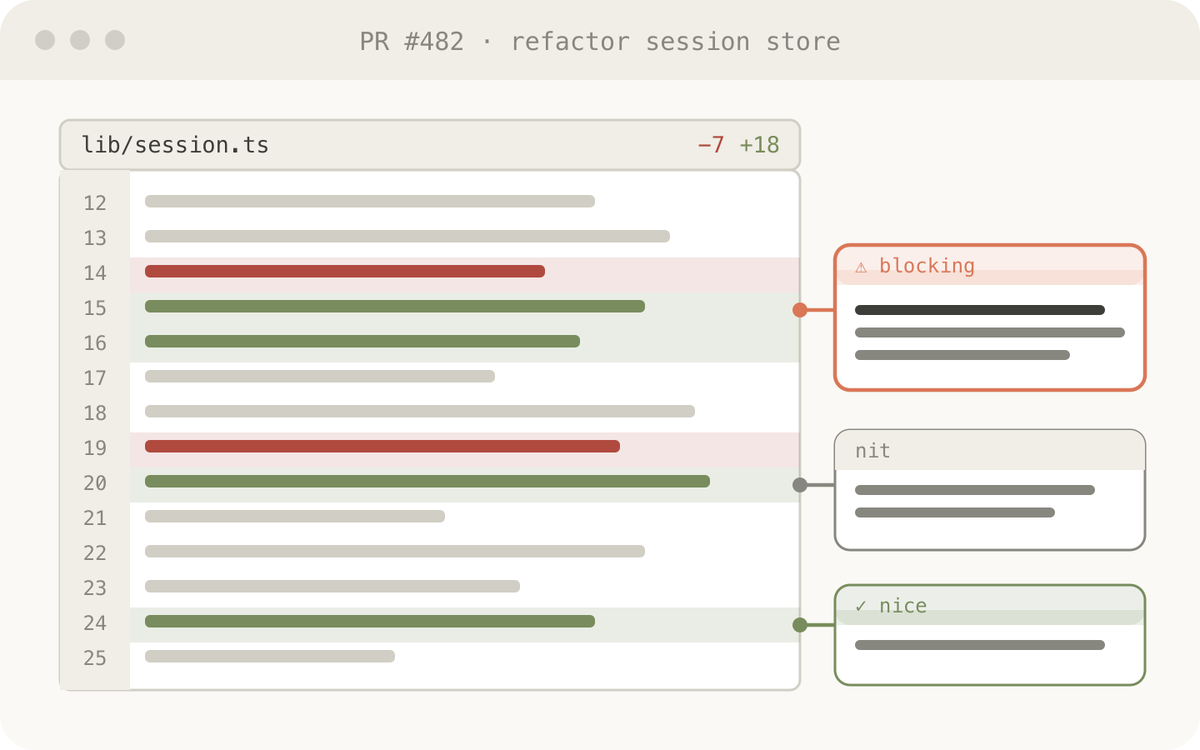
Example prompt:
Help me review this PR by creating an HTML artifact that describes it. I'm not very familiar with the streaming/backpressure logic so focus on that. Render the actual diff with inline margin annotations, color-code findings by severity and whatever else might be needed to convey the concept well.
Use Cases:
- Creating a PR
- Reviewing a PR
- Understanding a topic in Code
代码审查与理解
Markdown 文件里的代码很难读。但用 HTML,我们可以渲染 diff、批注、流程图、模块等等。可以用它来理解 agent 写过的代码、做代码审查,或者向审阅你 PR 的人解释改动。我发现它通常比 GitHub 默认的 diff 视图更好用,现在我每发一个 PR 都会附上一份 HTML 代码说明。
示例提示词:
帮我审查这个 PR,做一个描述它的 HTML artifact。我对 streaming/backpressure 逻辑不太熟,请重点讲这部分。渲染真实的 diff,在页边加行内注释,按严重程度给发现的问题标色,再加上其它有助于讲清概念的内容。
适用场景:
- 创建 PR
- 审查 PR
- 理解代码里的某个主题
Design & Prototypes
Claude Design is based on HTML because HTML is incredibly expressive at design, even if your end surface is not HTML. Claude can sketch out a design in HTML and then write it in your language of choice, be it React, Swift, etc.
You can also prototype interactions, such as animations, actions, etc. Consider asking Claude to make sliders, knobs, etc. to tune in exactly what you’re looking for.

Example prompt:
I want to prototype a new checkout button, when clicked it does a play animation and then turns purple quickly. Create a HTML file with several sliders and options for me to try different options on this animation, give me a copy button to copy the parameters that worked well.
Use this for:
- Creating design system artifacts
- Adjusting components
- Visualizing component libraries
- Prototyping Joyful Animations
设计与原型
Claude Design 基于 HTML,因为 HTML 在设计表达上极其丰富,即使你的最终界面并不是 HTML。Claude 可以用 HTML 先画出设计草稿,再用你选择的语言(React、Swift 等)写出来。
你还可以做交互原型,比如动画、动作等。可以试试让 Claude 做滑块、旋钮等控件,让你精确调出想要的效果。
示例提示词:
我想给一个新的结账按钮做原型:点击后它会播放一个动画,然后很快变成紫色。创建一个 HTML 文件,带上几个滑块和选项,让我试试这个动画的不同参数,再加一个复制按钮,把效果好的参数复制下来。
用途:
- 构建设计系统产物
- 调整组件
- 可视化组件库
- 做让人愉悦的动画原型
Reports, Research & Learning
Claude Code is incredibly good at synthesizing information across multiple data sources and converting it into a report for readability. You can prompt Claude to search your Slack, your codebase, git history, the internet, etc. and use it to generate extremely readable reports for yourself, for leadership, for your team, etc.
You could assemble this in the form of a long HTML document, an interactive explainer or even a slideshow/deck. Ask Claude to use SVG for diagrams to help visualize it.
For example, for my posts on prompt caching, I asked Claude to prepare an in-depth research file in HTML for me to read on all of our changes to prompt caching after reading the git history.
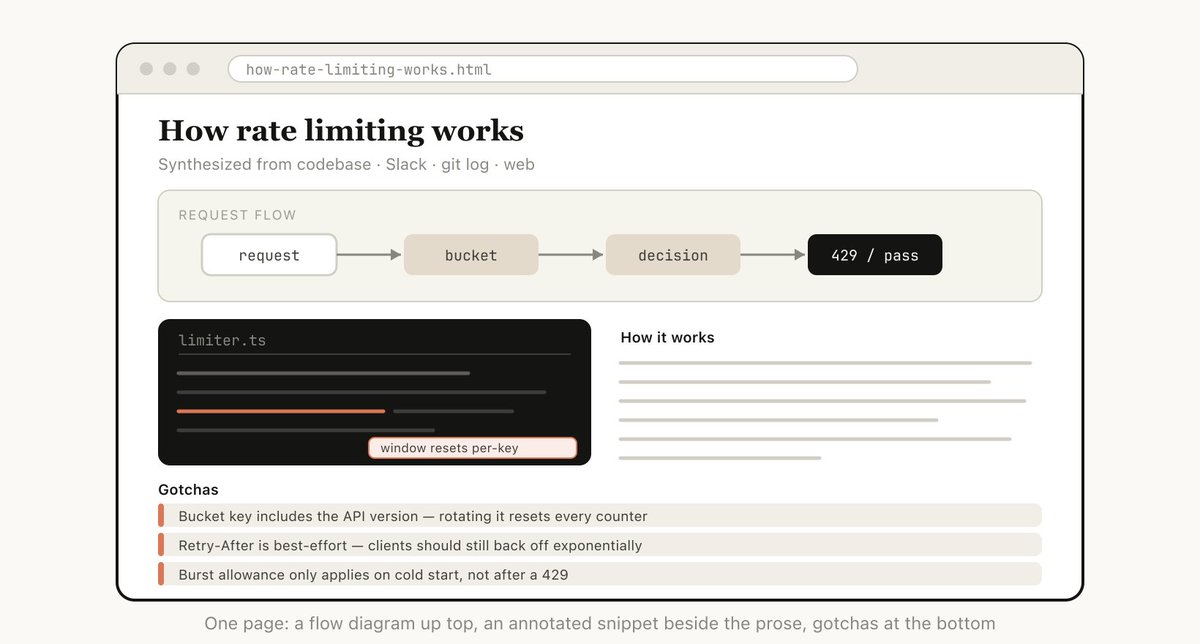
Example prompt: I don't understand how our rate limiter actually works. Read the relevant code and produce a single HTML explainer page: a diagram of the token-bucket flow, the 3–4 key code snippets annotated, and a "gotchas" section at the bottom. Optimize it for someone reading it once.
Use this for:
- Summarize how a feature works
- Explain a concept to me
- Weekly status reports to your boss
- Incident reports to your leadership
- SVG illustrations, flowcharts, technical diagrams, etc
报告、研究与学习
Claude Code 非常擅长把多个数据源的信息综合起来,并转换成可读性很高的报告。你可以让 Claude 搜索 Slack、代码库、git 历史、互联网等,然后为你自己、管理层或团队生成非常好读的报告。
你可以把它做成长篇 HTML 文档、交互式讲解页,甚至是幻灯片/演示文稿。让 Claude 用 SVG 画图表,帮助可视化。
比如,在写关于 prompt caching 的文章时,我让 Claude 读完 git 历史后,把所有关于 prompt caching 的改动整理成一份 HTML 深度研究文件给我看。
示例提示词: 我不太明白我们的 rate limiter 到底是怎么工作的。阅读相关代码,生成一个单独的 HTML 讲解页:包含 token-bucket 流程图、3–4 个带注释的关键代码片段,以及底部的“gotchas”部分。优化给只读一遍的人看。
用途:
- 总结一个功能怎么工作
- 向我解释一个概念
- 给老板写周报
- 给管理层写事故报告
- SVG 插图、流程图、技术图表等
Custom Editing Interfaces
Sometimes it’s hard to describe what you want purely in a text box. In this case, I'll ask Claude to build me a throwaway editor for the exact thing I'm working on. Not a product, or a reusable tool, but a single HTML file, purpose-built for this one piece of data.
The trick is always to end with an export: a "copy as JSON" or "copy as prompt" button that turns whatever I did in the UI back into something I can paste into Claude Code.
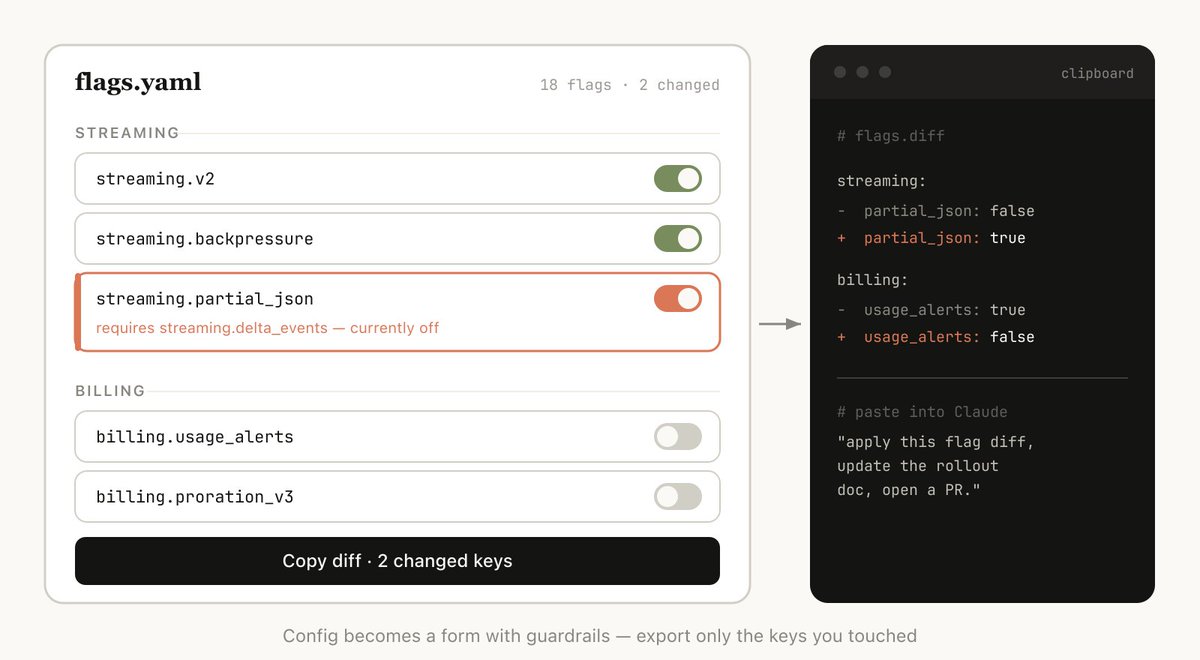
Example prompts:
- I need to reprioritize these 30 Linear tickets. Make me an HTML file with each ticket as a draggable card across Now / Next / Later / Cut columns. Pre-sort them by your best guess. Add a "copy as markdown" button that exports the final ordering with a one-line rationale per bucket.
- Here's our feature flag config. Build a form-based editor for it, group flags by area, show dependencies between them, warn me if I enable a flag whose prerequisite is off. Add a "copy diff" button that gives me just the changed keys.
- I'm tuning this system prompt. Make a side-by-side editor: editable prompt on the left with the variable slots highlighted, three sample inputs on the right that re-render the filled template live. Add a character/token counter and a copy button.
Use this for:
- Reordering, triaging, or bucketing anything (tickets, test cases, feedback)
- Editing structured config (feature flags, env vars, JSON/YAML with constraints)
- Tuning prompts, templates, or copy with live preview
- Curating datasets, approve/reject rows, tag examples, export the selection
- Annotating a document, transcript, or diff and exporting the annotations
- Picking values that are painful to express in text: colors, easing curves, crop regions, cron schedules, regexes.
自定义编辑界面
有时候,你想描述的东西很难纯粹通过文本框表达清楚。这时我会让 Claude 为我正在处理的这件事做一个一次性的编辑器。不是产品,也不是可复用工具,而是一个单一的 HTML 文件,专门为这一份数据而生。
诀窍永远是要以“导出”收尾:一个“copy as JSON”或“copy as prompt”按钮,把你在界面里做的一切变回能粘进 Claude Code 的内容。
示例提示词:
- 我需要重新排列这 30 个 Linear 工单的优先级。做一个 HTML 文件,每个工单是一张可拖拽卡片,分为 Now / Next / Later / Cut 四栏。先按你的最佳猜测排好。加一个“copy as markdown”按钮,导出最终排序,并为每个分组写一句理由。
- 这是我们的 feature flag 配置。为它做一个表单编辑器,按区域分组,显示依赖关系;如果我启用的 flag 其前置条件未开启,就提醒我。加一个“copy diff”按钮,只输出有变化的 key。
- 我在调这个 system prompt。做一个左右并排的编辑器:左边是可编辑的 prompt,高亮变量槽;右边是三个示例输入,实时渲染填充后的模板。加一个字符/token 计数器和一个复制按钮。
用途:
- 对任何东西进行重排、分类或分桶(工单、测试用例、反馈)
- 编辑结构化配置(feature flag、环境变量、带约束的 JSON/YAML)
- 带实时预览地调整 prompt、模板或文案
- 整理数据集:批准/拒绝行、给示例打标签、导出所选内容
- 给文档、转录文本或 diff 做批注并导出
- 挑选那些用文字很难表达的值:颜色、缓动曲线、裁剪区域、cron 表达式、正则表达式等
I’ve been telling many people about how I’ve switched to HTML and I’ve seen a few repeated questions.
Isn’t it less token efficient? While markdown often uses fewer tokens, I’ve found that the added expressiveness of HTML and the much higher likelihood of me reading it means I get overall better output. With the 1MM context window in Opus 4.7, the increased token usage is not really noticeable in the context window.
我已经在向很多人讲我转向 HTML 的事,也看到几个反复被问的问题。
Token 效率是不是更低了? 虽然 markdown 通常用更少的 token,但我发现 HTML 带来的更强表现力、以及我更有可能真正去读它,这意味着总体输出效果更好。在 Opus 4.7 的 1MM 上下文窗口下,增加的 token 用量在上下文窗口里其实不太明显。
When do you use markdown for now? I have honestly stopped using markdown altogether for almost everything, but I’m probably far on the HTML maximalist side of things.
那你现在什么时候还会用 markdown? 老实说,我几乎已经彻底不用 markdown 了。不过我也许是站在 HTML 最大化主义那一端的极端例子。
How do I view the HTML file? I tend just open it in a browser locally (you can ask Claude to open it), or upload to S3 if you want a shareable link.
HTML 文件怎么看? 我一般直接在本地浏览器打开(可以让 Claude 帮你打开);如果想要可分享的链接,就传到 S3。
Doesn't this take longer to generate than markdown? This does take longer! HTML can take 2-4x longer than Markdown, but I've found the results are worth it.
生成时间不是比 markdown 更长吗? 确实更长!HTML 可能比 Markdown 慢 2–4 倍,但我觉得结果值得。
What about version control? This is honestly one of the biggest downsides of HTML, HTML diffs are noisy and hard to review compared to Markdown.
版本控制怎么办? 坦白说,这是 HTML 最大的缺点之一:和 Markdown 相比,HTML 的 diff 很吵,很难审查。
How do I get Claude to match my taste / not make it ugly? The frontend design plugin helps Claude make good HTML files. But to match your own companies style, you can create a single design system HTML file by pointing Claude at your codebase. You can then use that design system file as a reference for other html files.
怎么让 Claude 合我的审美,别搞得很难看? frontend design 插件能帮 Claude 做出好看的 HTML 文件。但如果要匹配你们公司自己的风格,你可以让 Claude 看你的代码库,生成一个设计系统 HTML 文件,然后把它作为其他 HTML 文件的参考。
Stay in the Loop
All of the above is to say that I think the real reason I use HTML is that I feel much more in the loop with Claude. I had begun to fear that because I had stopped reading plans in depth I would simply have to leave Claude to make its choices.
But I am happy to say instead that I feel more in the loop than ever before when using HTML. I hope you do too.
保持参与感
以上所有内容想说明的是:我认为我使用 HTML 的真正原因,是我感觉与 Claude 的协作参与感强了很多。我之前曾经担心,因为不再深入阅读计划,我就只能让 Claude 自己做决定了。
但让我高兴的是,使用 HTML 时,我比以往任何时候都更有参与感。希望你也有同感。