Every Agentic Engineering Hack I Know (June 2026)
The author shares 22 practical hacks for agentic engineering with Claude Code and Codex. The core is a plan-first workflow: use /ce-plan to generate a plan.md that guides the agent; humans skim or ask inline instead of reading it. Hacks include: voice input via Monologue or Wispr Flow (LLMs handle imperfect transcription); running 4-6 separate agent sessions in cmux tabs; defaulting terminal tabs to Claude Code and bypassing all permission prompts with sound alerts on completion; giving Claude an email address via AgentMail to trigger sessions remotely; using last30days before planning to search community discussions and news in parallel; turning repeated tasks into reusable skills to compound agent capabilities. He stresses that human value lies in providing taste and direction, not typing, and warns against AI addiction. The post is packed with copy-paste config snippets and concrete tools, aimed at engineers deep into AI-assisted development.
Three months ago I posted "Every Claude Code Hack I Know." It hit 913K views. @kevinrose had asked what IDE to use, and my answer was: "No IDE. Just plan.md files and voice."
This used to be called vibe coding. Around last Thanksgiving the models got good enough that the toy became real, what people now call Agentic Engineering. It's the only reason I ship. This year I put out last30days (27K stars), Printing Press(4K+ stars), and Agent Cookie, just launched, and became a top contributor to some of the biggest projects in open source: Python, Go, GStack, and Paperclip. I hadn't shipped software anyone valued since high school. These are my hacks.
三个月前,我发表了《我所知道的所有 Claude Code 技巧》。收获了 91.3 万次浏览。当时 @kevinrose 问我用什么 IDE,我的回答是:“不用 IDE。只需要 plan.md 文件和语音。”
这曾经被称为“氛围编程/vibe coding”。去年感恩节前后,模型变得足够好,玩具变成了真实的东西,也就是现在人们所说的智能体工程/Agentic Engineering。这是我能发布产品的唯一原因。今年我陆续推出了 last30days(27K stars)、Printing Press(4K+ stars)和刚刚上线的 Agent Cookie,并成为 Python、Go、GStack、Paperclip 等一些最大开源项目的顶级贡献者。自从高中之后,我就再也没发布过让任何人觉得有价值的软件。这些就是我的技巧。
HACKS
- The YOLO TL;DR Hack: paste this entire article to your agent and tell it to make a plan to set up everything in it, then work that plan one hack at a time. That's my whole stack, no reading required.
技巧
- YOLO 极简法:把这整篇文章粘贴给你的代理,告诉它制定一个计划来设置其中所有内容,然后逐条执行那个计划。这就是我的全部技术栈,无需阅读。
1. The Moment You Have an Idea, Make a CE plan.md
Still rule number one. Still the most important thing I've learned.
The moment I have an idea, it's /ce-plan to make a plan.md. Not "let me think about this," not "let me start coding." /ce-plan, every time. It takes images too, so anything you can capture is a starting point:
- Crazy product idea: /ce-plan.
- Bug on GitHub: copy the issue URL, paste it, /ce-plan.
- Terminal error: Cmd+Shift+4 to screenshot, Ctrl+V to paste, /ce-plan fix this.
- Screenshots, error messages, design mockups, Slack threads: drop any of them in. When the idea is still fuzzy and I don't even know what I want yet, I start with /ce-brainstorm to think it through with the agent, then /ce-plan once it's sharp.
Under the hood, /ce-plan fans out research agents in parallel. One reads your codebase, finds patterns, checks your conventions. One searches your past solutions for learnings. If the topic warrants it, more go research external docs and best practices. All at once. Then it consolidates and writes a structured plan.md: what's wrong, the approach, which files to touch, acceptance criteria with checkboxes, patterns to follow from your own code. Grounded in your repo, your conventions, your history. Not generic advice.
/ce-work takes that plan and builds it. Context blows up? Start a new session, point it at the plan, pick up where you left off. The plan is the checkpoint that survives everything.
Traditional dev is 80% coding, 20% planning. This flips it. The thinking goes in the plan. The execution is mechanical.
Compound Engineering, from @kieranklaassen and @trevin is the plugin that makes it real.
I became a superfan, then a contributor, now I’m the 3rd biggest contributor behind the core team. My rule now: unless it is literally a one-line change, there is always a plan.md first.
HACKS
- Install Compound Engineering: /plugin marketplace add EveryInc/compound-engineering-plugin
- Paste a screenshot, bug URL, or error, then /ce-plan, then /ce-work.
- Fuzzy idea? /ce-brainstorm first.
1. 有了想法立即创建 CE plan.md
仍然是第一条规则。仍然是我学到的最重要的事情。
一有想法,就执行 /ce-plan 创建一个 plan.md。不是“让我想想”,不是“让我开始编码”。每次都用 /ce-plan。它也支持图片,所以你捕捉到的任何东西都可以作为起点:
- 疯狂的产品创意:/ce-plan。
- GitHub 上的 Bug:复制 issue URL,粘贴,/ce-plan。
- 终端错误:Cmd+Shift+4 截图,Ctrl+V 粘贴,/ce-plan fix this。
- 截图、错误信息、设计稿、Slack 对话线程:统统丢进去。 当想法还很模糊,我甚至不确定自己想要什么时,我会先用 /ce-brainstorm 和代理一起思考,等想法清晰后再执行 /ce-plan。
在底层,/ce-plan 会并行派出多个研究代理。一个代理读取你的代码库,寻找模式,检查你的约定。一个代理搜索你过去的解决方案以获取经验。如果主题需要,更多的代理会去研究外部文档和最佳实践。所有工作同时进行。然后它会整合并编写一个结构化的 plan.md:问题是什么、方案是什么、要修改哪些文件、带复选框的验收标准、要遵循你代码中的哪些模式。这些建议基于你的仓库、你的约定、你的历史,而不是泛泛的建议。
/ce-work 会接收那个计划并执行构建。上下文爆炸了?启动一个新会话,指向那个计划,从你中断的地方继续。计划就是那个能在任何情况下存活的检查点。
传统开发是 80% 编码、20% 计划。而这正好相反。思考体现在计划中,执行则是机械性的。
来自 @kieranklaassen 和 @trevin 的 Compound Engineering 是一个让这一切成真的插件。
我先是铁杆粉丝,然后是贡献者,现在成了核心团队之后的第三大贡献者。我的规则是:除非真的只是一行代码的改动,否则必须先有 plan.md。
技巧
- 安装 Compound Engineering:/plugin marketplace add EveryInc/compound-engineering-plugin
- 粘贴截图、Bug URL 或错误,然后运行 /ce-plan,再运行 /ce-work。
- 想法模糊?先用 /ce-brainstorm。
2. Don't Read the plan.md
I always make the plan.md. I almost never read it. Plans are for agents, you silly human.
Forcing a plan to exist makes the agents not lazy. It makes them research, commit to an approach, write down acceptance criteria, and then actually hit them. A coding agent with a plan ships finished work. A coding agent without one cuts corners and stops early. The plan is the leash.
So I let it write the plan, I skim the title, and I run /ce-work. If I have a question I ask it inline, right there in the session: "wait, why this approach?" Or I ask for a TLDR. Or, when when I don’t understand, "eli5 this plan." I get the one-paragraph version, nod, keep going. I do not sit there reading 300 lines of markdown. That's the agent's homework, not mine.
Make the plan. Trust the plan. Don't read the plan.
HACKS
- Don't let yourself read the plan. Ask inline: TLDR?, eli5 this plan, or "wait, why this approach?"
2. 别读 plan.md
我始终会创建 plan.md。但我几乎从不阅读它。计划是给代理用的,愚蠢的人类。
强制存在一个计划能让代理不偷懒。它促使代理研究、承诺某个方案、写下验收标准,然后真正去达成它们。一个带着计划的编码代理能交付完成的工作。一个没有计划的编码代理则会偷工减料、过早停止。计划就是缰绳。
所以我让它写计划,我扫一眼标题,然后运行 /ce-work。如果有疑问,我就直接在当前会话中内联提问:“等等,为什么选这个方案?”或者我让它给个 TLDR。再或者,当我搞不懂时,就说“给我用五岁小孩能懂的话解释这个计划。”我得到一段简要版本,点点头,继续前进。我不会坐在那里读 300 行的 markdown。那是代理的作业,不是我的。
制定计划。信任计划。别读计划。
技巧
- 别让自己读计划。内联提问:TLDR?给我解释这个计划,或者“等等,为什么选这个方案?”
3. Use /ce-plan for Your Deepest Non-Engineering Work, Make a Plan for the Plan
People think /ce-plan and /ce-work are for code. The biggest thing I've learned since March is that they aren't. The deepest knowledge work I do now runs through the same loop, and the trick is to make the first plan a plan for the plan. This isn't me forcing a code tool to do something it wasn't built for, either: /ce-plan has a universal planning mode built in, made for exactly this kind of non-code work.
It's not just business problems either. Strategy docs, product specs, competitive analysis, board updates, all the same loop.
Here's a real one. I met with Michael Margolis, the former GV research partner known for the bullseye-customer method, about a business challenge I was brewing on. He told me to read his book, free as a PDF on his site. The old move would be to skim it and move on. Instead I opened Claude Code and said, roughly:
"/ce-plan make a plan for the plan. I'm about to hand you two things: Margolis's book as a PDF, and the two-hour Granola transcript of the meeting I just had with him, which has the full context of what we discussed. I want a thoughtful plan for how my business problem, that conversation, and the lessons in the book come together into something I can actually use. Do not write that document now. Writing it is the work. Right now I only want the plan for how you'll read the book, mine the transcript, and produce a great document."
It spent the next 45 minutes creating an EPIC plan.
It's also the single best trick I know for making an LLM not lazy. Ask for the deliverable directly and it cuts corners. Ask it to first plan how it will produce the deliverable, then execute that plan, and it does the deep version every time.
HACKS
- Deep non-code work: /ce-plan make a plan for the plan, hand it your all your context and transcript, then /ce-work.
3. 用 /ce-plan 做你最深入的非工程工作,先做一个计划的计划
人们以为 /ce-plan 和 /ce-work 是给代码用的。自三月以来我学到的最重要的事情是:它们不是。我现在做的最深层的知识工作都通过同样的循环来完成,诀窍是让第一个计划成为“计划的计划”。这也不是我强行用代码工具做它本不适合的事:/ce-plan 内置了一个通用规划模式,正是为此类非代码工作而设计。
这不限于商业问题。战略文档、产品规格说明、竞争分析、董事会情况更新,全都用同样的循环。
举一个真实的例子。我与 Michael Margolis 会面,他是前 GV 研究合伙人,以“靶心客户法”闻名,讨论我当时正在酝酿的一个商业挑战。他让我读他的书,在他的网站上可以免费下载 PDF。老派的做法是略读一下然后就没了。相反,我打开了 Claude Code 并大致说了:
“/ce-plan 做一个计划的计划。我即将给你两样东西:Margolis 的书作为 PDF,以及我刚刚与他会面两小时的 Granola 转录稿,里面包含我们讨论的完整背景。我想要一个周全的计划,关于如何将我的商业问题、那次对话以及书中的经验结合起来,变成我能实际使用的东西。现在不要写那个文档。写它是后续的工作。现在我只想要一个计划,关于你将如何阅读那本书、挖掘转录稿、并生成一份优秀的文档。”
它接下来花了 45 分钟创建了一个史诗级的计划。
这也是我知道的让 LLM 不偷懒的唯一最佳技巧。直接要求交付物,它会偷工减料。先要求它计划如何产生交付物,然后执行那个计划,每次它都会做深度的版本。
技巧
- 深度非代码工作:/ce-plan make a plan for the plan,给它你的所有背景和转录稿,然后 /ce-work。
4. Get Voice-Pilled
Voice-to-LLM is different from voice-to-anything-else. The transcription doesn't have to be perfect because the listener understands context. It guesses what the mic got wrong. You can mumble, trail off, restart a sentence. Voice finally works because the thing on the other end is smart enough to fill the gaps.
My setup:
- Mac: Monologue (from Every) or Wispr Flow. Pick one, pipe speech into whatever app is focused, talk into Claude Code. I bought a gooseneck mic for the office.
- Phone: skip Monologue and Wispr Flow, switching to them on iOS is too annoying. Apple's built-in dictation is good enough, because you're talking to an LLM, not a human. It can mangle half the words and the agent still gets it. Lazy notes are fine. One honest admission: I'm great with voice when I'm alone. In the office I struggle with it. People say you can just whisper into the mic, but I find I don't actually do it, because I don't want to be rude or distract the people around me. So a desk in a shared room is still my weak spot for this whole workflow. If you've cracked voice in an open office without being that person, tell me how. I genuinely want the advice.
HACKS
- Mac: install Monologue or Wispr Flow. Phone: use Apple dictation. Get a gooseneck mic.
4. 拥抱语音交互
语音到 LLM 与语音到任何其他东西都不同。转录不需要完美,因为接收方能理解上下文。它会猜测麦克风哪里听错了。你可以含糊其辞、声音逐渐变小、重新开始一句话。语音终于能用了,因为另一头的东西足够聪明,能填补空白。
我的设置:
- Mac:使用 Monologue(来自 Every)或 Wispr Flow。选一个,将语音导入任何聚焦的应用,对着 Claude Code 说话。我买了一个鹅颈麦克风放在办公室。
- 手机:跳过 Monologue 和 Wispr Flow,在 iOS 上切换它们太烦人了。苹果自带的听写功能就足够好了,因为你在和 LLM 说话,而不是人类。它能搞错一半的词,代理仍然能理解。随便记的笔记也没问题。 一个坦诚的承认:我独自一人时用语音效果很好。在办公室我就有点挣扎。人们说你可以对着麦克风小声说,但我发现我实际上做不到,因为我不想显得无礼或打扰周围的人。所以,在共享房间里的办公桌仍然是我整个工作流程的弱点。如果你已经破解了如何在开放式办公室使用语音而不成为那个讨人厌的人,请告诉我怎么做。我真心想要这个建议。
技巧
- Mac:安装 Monologue 或 Wispr Flow。手机:使用苹果听写功能。买个鹅颈麦克风。
5. Lots and Lots of Tabs in cmux
This is how I actually spend a day. Four to six cmux tabs, sometimes more, each a separate session:
- One writing a plan.
- One building from a different plan.
- One running last30days.
- One fixing a bug I found testing the last thing. While /ce-plan spins up research in one window, I switch to another and /ce-work a plan that's already written. While that builds, a third window gets a new bug pasted in. By the time I cycle back, the first one is done and waiting.
I hear great things about Orca for the mobile work they are doing. I also used to be a Ghostty purist, but I was losing too many notifications in ghostty.
HACKS
- Use cmux.
- Keep 4 to 6 tabs open, a different task in each.
5. 在 cmux 里开很多标签页
这就是我实际度过一天的方式。四到六个 cmux 标签页,有时更多,每个都是独立的会话:
- 一个在写计划。
- 一个在根据另一个计划进行构建。
- 一个在运行 last30days。
- 一个在修复我测试上一个东西时发现的 Bug。 当 /ce-plan 在一个窗口中启动研究时,我切换到另一个窗口,对已经写好的计划执行 /ce-work。当那个窗口在构建时,第三个窗口被粘贴进一个新的 Bug。等我轮转回来时,第一个窗口已经完成并在等待了。
我听说 Orca 在移动工作方面做得很好。我以前也是 Ghostty 的纯粹主义者,但我在 Ghostty 中丢失了太多通知。
技巧
- 使用 cmux。
- 保持 4 到 6 个标签页打开,每个处理不同的任务。
6. Make Your Terminal Default Into Claude or Codex, Not a Shell
A new tab should open straight into Claude Code, not a shell. Open a tab, you're already talking to an agent. No cd, no typing claude. When a new session costs one keystroke, you start a lot more of them. I also don't use folders. Your agent can find your project.
HACKS
- Paste to your agent: "Make every new terminal tab open directly into Claude Code. In ~/.config/ghostty/config, add the line command = ~/.local/bin/claude-launcher.sh without disturbing any other settings already in that file. Then create ~/.local/bin/claude-launcher.sh that runs claude --dangerously-skip-permissions, and when Claude exits prints a short note and drops me into an interactive login zsh. chmod +x the script. This works for both Ghostty and cmux, since cmux reads the same Ghostty config."
6. 让终端默认打开 Claude 而非 Shell
一个新标签页应该直接打开 Claude Code,而不是一个 shell。打开一个标签页,你已经在和代理对话了。不需要 cd,不需要输入 claude。当一个新会话只需要一次按键时,你会开始多得多的会话。我也不用文件夹。你的代理能找到你的项目。
技巧
- 粘贴给你的代理:“让每个新终端标签页直接打开 Claude Code。在 ~/.config/ghostty/config 中,添加行 command = ~/.local/bin/claude-launcher.sh,不干扰该文件中已有的任何其他设置。然后创建 ~/.local/bin/claude-launcher.sh,它运行 claude --dangerously-skip-permissions,当 Claude 退出时打印一条简短提示并将我放入交互式登录 zsh。chmod +x 该脚本。这对 Ghostty 和 cmux 都有效,因为 cmux 读取相同的 Ghostty 配置。”
7. Remote Control Every Window, and Give Claude Code or Codex an Email Address
Two hacks that make every session reachable from anywhere.
Turn on remote control every time you open a new window
Set remote control to turn on automatically for every session.
Now every window is reachable from the Claude mobile app. Start a session at your desk, walk away, pick up the exact same live run on your phone mid-task. In a line somewhere, you're steering what's churning away on your Mac at home.
Give your Claude an email address
Claude Code can have an email address with AgentMail. The founder, Adi @adisingh taught me this. Email the inbox and a fresh session opens and starts working on whatever's in the subject and body, with any attachments available by path. Bug at dinner? Email it from your phone and a session is running before you're back at a screen. I open-sourced the whole thing: github.com/mvanhorn/agentmail-to-claude-code.
Three pieces:
- A daemon that watches an AgentMail inbox over WebSocket. On every allowlisted email it opens a fresh Claude session, writes the email to a prompt file, and tells Claude to read and act on it.
- Two terminal backends, cmux or standalone Ghostty, so it drives whatever you already launch into.
- A sender. I wired it to a cc command in my Hermes, so from my phone I run cc <task> and it lands as a working session on my Mac, no VPN, no SSH. The allowlist is the gate. Only addresses you control get through, and anything that fails DKIM or SPF is dropped before a session ever opens.
HACKS
- Always-on remote control: add "remoteControlAtStartup": true to ~/.claude/settings.json.
- Give Claude an email. Paste to your agent: "Give Claude Code an email address using github.com/mvanhorn/agentmail-to-claude-code. Clone it, set up an AgentMail inbox, fill cc.env with my API key, the inbox, an allowlist of only my own addresses, and my terminal (cmux or Ghostty), then run the daemon and install it as a launchd job. When I email that inbox, a fresh Claude Code session should open on this Mac and start on the subject and body."
7. 远程控制所有窗口并为 Claude 配邮箱
两个让每个会话都能从任何地方访问的技巧。
每次打开新窗口时开启远程控制
设置远程控制为每个会话自动开启。
现在每个窗口都可以从 Claude 移动应用中访问。在办公桌上开始一个会话,走开,在手机上拿起完全相同的实时运行。无论你在哪里排队,你都在操控家里 Mac 上正在运行的任务。
给你的 Claude 配一个邮箱地址
Claude Code 可以通过 AgentMail 拥有一个邮箱地址。创始人 Adi @adisingh 教了我这个。向该收件箱发送邮件,一个新会话就会打开并开始处理邮件主题和正文中的任何内容,任何附件也可以通过路径获取。吃饭时发现 Bug?从手机发封邮件,在你回到屏幕前一个会话就已经在运行了。我把整个项目开源了:github.com/mvanhorn/agentmail-to-claude-code。
三个组成部分:
- 一个守护进程,通过 WebSocket 监控 AgentMail 收件箱。每收到一封白名单内的邮件,它就打开一个新的 Claude 会话,将邮件写入提示文件,并告诉 Claude 阅读并据此行动。
- 两个终端后端,cmux 或独立 Ghostty,因此它可以驱动你已经启动的任何东西。
- 一个发送器。我把它连接到了 Hermes 中的一个 cc 命令,所以从我的手机上运行 cc <task>,它就会作为工作会话出现在我的 Mac 上,不需要 VPN,不需要 SSH。 白名单就是大门。只有你控制的地址才能通过,任何 DKIM 或 SPF 验证失败的邮件在会话打开之前就会被丢弃。
技巧
- 始终开启远程控制:在 ~/.claude/settings.json 中添加 "remoteControlAtStartup": true。
- 给 Claude 配邮箱。粘贴给你的代理:“使用 github.com/mvanhorn/agentmail-to-claude-code 给 Claude Code 配一个邮箱地址。克隆它,设置一个 AgentMail 收件箱,用我的 API 密钥、收件箱、仅包含我自己地址的白名单以及我的终端(cmux 或 Ghostty)填写 cc.env,然后运行守护进程并将其安装为 launchd 任务。当我向该收件箱发送邮件时,一个新的 Claude Code 会话应该在此 Mac 上打开并开始处理邮件主题和正文。”
8. Dangerously Skip Permissions, and Yes I Mean It
Claude Code asks permission for every edit and command. With six sessions you can't babysit it. Two settings make it livable. People say auto is the "safer" way to do this, but it slows me down too much.
skipDangerousModePermissionPrompt: true is the key. Without it, Claude asks you to confirm every session. You can also Shift+Tab to toggle. People tell me the newer "auto" mode gets you most of the way there with more safety. Maybe. I say YOLO. It's my computer. GitHub is there if I break or ruin everything. When I set up a friend's Claude Code, the AI actively tried to talk him out of enabling this. You have to be direct with it.
The other setting is a sound hook, non-negotiable with six sessions.
Walk away, come back when you hear it. With six sessions running, the sound is how you know which one just finished.
HACKS
Paste into ~/.claude/settings.json:
{ "permissions": { "allow": [ "WebSearch", "WebFetch", "Bash", "Read", "Write", "Edit", "Glob", "Grep", "Task", "TodoWrite" ], "deny": [], "defaultMode": "bypassPermissions" }, "skipDangerousModePermissionPrompt": true }
{ "hooks": { "Stop": [ { "hooks": [ { "type": "command", "command": "afplay /System/Library/Sounds/Blow.aiff" } ] } ] } }
Codex has the same YOLO mode. In ~/.codex/config.toml:
approval_policy = "never" sandbox_mode = "danger-full-access"
Or launch a one-off with codex --yolo.
8. 冒险跳过权限,我是认真的
Claude Code 会为每次编辑和命令请求权限。同时运行六个会话,你不可能一直盯着它。两个设置让它变得可用。人们说 auto 模式是“更安全”的方式,但那对我来说太慢了。
skipDangerousModePermissionPrompt: true 是关键。没有它,Claude 要求你确认每个会话。你也可以用 Shift+Tab 切换。人们告诉我更新的“auto”模式能以更高的安全性达到大部分效果。也许吧。我选择 YOLO。这是我的电脑。如果我搞砸了一切,还有 GitHub 呢。当我给朋友的 Claude Code 做设置时,AI 主动试图说服他不要启用这个选项。你必须对它直接干脆。
另一个设置是声音挂钩,对于六个会话来说这是必须的。
走开,听到声音再回来。当六个会话同时运行时,声音是你知道哪个刚完成的方式。
技巧
粘贴到 ~/.claude/settings.json:
{ "permissions": { "allow": [ "WebSearch", "WebFetch", "Bash", "Read", "Write", "Edit", "Glob", "Grep", "Task", "TodoWrite" ], "deny": [], "defaultMode": "bypassPermissions" }, "skipDangerousModePermissionPrompt": true }
{ "hooks": { "Stop": [ { "hooks": [ { "type": "command", "command": "afplay /System/Library/Sounds/Blow.aiff" } ] } ] } }
Codex 也有同样的 YOLO 模式。在 ~/.codex/config.toml 中:
approval_policy = "never" sandbox_mode = "danger-full-access"
或者用 codex --yolo 启动一次性的。
9. How I Run Most of My Code Through Codex Without Ever Opening the Codex CLI
I send work to Codex all day, and I almost never open the Codex CLI to do it. Claude plans, Codex builds, and I never leave my Claude session.
Three ways I hand work to Codex without leaving Claude:
-
Codex IDE extension: send a task, apply the result, never drop into the Codex terminal.
-
/ce-work --codex: delegates the build straight to Codex from inside the Compound Engineering loop.
-
Printing Press Codex mode: put codex at the end of the prompt when printing a new CLI and it hands the build to Codex. My settings, both engines cranked to extra-high reasoning:
-
Codex: reasoning xhigh, fast mode on, always.
-
Claude Code: reasoning xhigh, fast mode off. Its fast mode bills per token on top of your $200 Max plan, so I skip it. Two $200 plans side by side is a whole second engine. I push big parallel builds to Codex and keep Claude on planning and taste. Some friends run it the other way, Codex builds and Claude reviews.
HACKS
- Codex: reasoning xhigh, fast mode on. Claude Code: xhigh, fast mode off.
- Hand work to Codex: the Codex IDE extension, /ce-work --codex, or codex at the end of a Printing Press prompt.
9. 如何通过 Codex 运行大部分代码而无需打开 Codex CLI
我整天向 Codex 派发工作,但几乎从不打开 Codex CLI。Claude 负责规划,Codex 负责构建,我从未离开过我的 Claude 会话。
三种不离开 Claude 就把工作交给 Codex 的方式:
-
Codex IDE 扩展:发送一个任务,应用结果,从不需要进入 Codex 终端。
-
/ce-work --codex:从 Compound Engineering 循环内部直接将构建委托给 Codex。
-
Printing Press Codex 模式:在打印新的 CLI 时,在提示词末尾加上 codex,它就会将构建交给 Codex。 我的设置,两个引擎都开到超高推理:
-
Codex:推理 xhigh,始终开启 fast mode。
-
Claude Code:推理 xhigh,关闭 fast mode。它的 fast mode 在你 $200 Max 套餐基础上按 token 计费,所以我不用。 两个 $200 套餐并排就是整整第二个引擎。我将大型并行构建推给 Codex,让 Claude 专注于规划和审美。有些朋友反过来用,Codex 构建,Claude 评审。
技巧
- Codex:推理 xhigh,fast mode 开启。Claude Code:xhigh,fast mode 关闭。
- 将工作交给 Codex:使用 Codex IDE 扩展,/ce-work --codex,或在 Printing Press 提示词末尾加上 codex。
10. Research Before You Plan: last30days
Before I /ce-plan, I usually run /last30days on it first.
I was choosing between Vercel's agent-browser and Playwright. Instead of reading docs, I ran /last30days Vercel agent browser vs Playwright. In a few minutes: dozens of Reddit threads, X posts, YouTube videos, HN stories. Agent-browser uses far less context per call, Playwright dumps thousands of tokens just for tool definitions. I fed the whole output into /ce-plan integrate agent-browser. The plan came out grounded in what the community actually knows right now, not six-month-old training data.
last30days is open source, now past 26K stars. It searches Reddit, X, YouTube, TikTok, Instagram, HN, Polymarket, GitHub, and the web in parallel. I run it before I pick a library, before I build a feature, before I meet with a business partner, before I write an article. I ran it on a few of the things in this post. Research, plan, build. That's the real loop.
HACKS
- Install last30days. Before /ce-plan, run /last30days <topic>.
- Make sure you install a ScrapeCreators key
10. 规划前先研究:last30days
在执行 /ce-plan 之前,我通常会先对主题运行 /last30days。
我之前在 Vercel 的 agent-browser 和 Playwright 之间做选择。我没有去读文档,而是运行了 /last30days Vercel agent browser vs Playwright。几分钟内就得到了数十条 Reddit 讨论、X 帖子、YouTube 视频、HN 故事。Agent-browser 每次调用消耗的上下文远少于 Playwright,Playwright 仅工具定义就要倾倒数千个 token。我把整个输出喂给了 /ce-plan integrate agent-browser。最终的计划基于社区当前实际知道的信息,而不是六个月前的训练数据。
last30days 是开源的,现在已超过 26K stars。它并行搜索 Reddit、X、YouTube、TikTok、Instagram、HN、Polymarket、GitHub 和网络。我选库之前运行它,构建功能之前运行它,与商业伙伴会面之前运行它,写文章之前也运行它。我在这篇文章中的几件事上也用了它。研究、规划、构建。这才是真正的循环。
技巧
- 安装 last30days。在 /ce-plan 之前,运行 /last30days <主题>。
- 确保你安装了 ScrapeCreators 密钥。
11. Granola All the Things, and Put the RAW Transcript In your LLM
I had lunch with a candidate. We talked product, and food, and kids, ninety minutes of normal conversation with a product idea woven through it. Granola was running. After, I pasted the full raw transcript into Claude Code: /ce-plan turn this into a product proposal.
The trick is raw. I don't summarize first. I drop the whole messy transcript in, tangents about sushi and all, and let Claude do the extraction against my actual codebase and every prior strategy plan I've written. Granola context plus codebase plus prior plans equals gold. It one-shotted a proposal, ignored the restaurant talk, and I sent it that night. The guy works with us full time now.
And the upgrade since March: the Printing Press Granola CLI. It is magic. I pull any meeting as clean structured data straight into a session, search across every meeting I've ever had, find the one thing someone said three weeks ago, and pipe it into a plan. No more copy-paste. Every meeting's context is one command away.
HACKS
- Drop the raw Granola transcript into /ce-plan, don't summarize first. Install the Printing Press Granola CLI.
11. 用 Granola 记录一切,把原始转录稿喂给 LLM
我和一个候选人共进午餐。我们聊了产品、食物和孩子,九十分钟的普通对话中交织着一个产品创意。Granola 在后台运行。之后,我把完整的原始转录稿粘贴进了 Claude Code:/ce-plan turn this into a product proposal。
诀窍在于原始。我不先做总结。我把整份混乱的转录稿丢进去,包括关于寿司的题外话等等,然后让 Claude 根据我的实际代码库和我写过的每一个先前的战略计划来进行提取。Granola 上下文加上代码库再加上先前的计划等于金矿。它一次性生成了提案,忽略了餐厅闲聊部分,我当晚就发出了。那个人现在成了我们的全职同事。
自三月以来的升级:Printing Press Granola CLI。它简直是魔法。我可以将任何会议作为干净的结构化数据直接拉入会话,搜索我开过的所有会议,找到某人三周前说的某件事,然后将其注入到一个计划中。不再需要复制粘贴。每个会议的上下文都只需一个命令。
技巧
- 将原始的 Granola 转录稿丢入 /ce-plan,不要先做总结。安装 Printing Press Granola CLI。
12. Human Signal
Here's the mindset shift that took me longest. When you run six agents, your job is not to do the work. Your job is to be the signal.
The agents supply volume. You supply taste, direction, and the react-and-redirect loop. You look at what came back, you say "option two is closer but use the language from option one," "address the biggest risk," "this paragraph is too long," and they move. The rare, valuable thing in the loop is your judgment, not your typing. The more I leaned into being the human signal and stopped trying to also be a hand doing the work, the more I shipped.
Be the taste. Let them be the hands.
HACKS
- Add value to the world by directing your agents with your brain. It still has value.
12. 人类信号
这是我花了最长时间才完成的思维转变。当你运行六个代理时,你的工作不是去做事。你的工作是成为信号。
代理提供工作量。你提供品味、方向和反应-重定向循环。你看着反馈回来的东西,你说“选项二更接近但使用选项一的措辞”“解决最大的风险”“这段太长了”,然后它们就进行调整。循环中稀有且有价值的是你的判断力,而不是你的打字速度。我越是倾向于成为人类信号,不再试图同时充当完成工作的手,我交付的就越多。
成为品味。让它们成为双手。
技巧
- 用你的大脑指导代理来为世界增加价值。它仍然有价值。
13. HyperFrames for Video, for All the Things
Video used to be the thing I outsourced or skipped. Now I make it the same way I make everything else: I talk, an agent builds, I react.
HyperFrames lets me build video as HTML, so an agent can write it. The loop is identical to code, the output is just an MP4 instead of a PR. Each one is a folder with a script.md, scene by scene, kinetic typography, captions carrying every beat. The agent turns that script into the composition and renders it. No editor, no timeline.
Launch reels I made this way:
- Granola CLI demo
- Agent Cookie launch
The cost of a video dropped to a conversation, so anything that deserves one now gets one: launch reels, product demos, animated explainers, captioned clips. They don't only go on X, either: I'll drop a rendered demo straight into a PR, like this one on atlas-lean, Facebook's AI research project.
HACKS
- Build video in HyperFrames: write a script.md, have your agent render it to MP4.
- Upload GIFs to catbox and they render beautifully on GitHub, in PRs, READMEs, and issues.
13. 用 HyperFrames 做视频,搞定一切
视频曾经是我外包或跳过的内容。现在我用做其他事情一样的方式来做视频:我说话,代理构建,我反馈。
HyperFrames 让我将视频构建为 HTML,所以代理可以编写它。循环与代码完全相同,输出只是 MP4 而不是 PR。每个视频都是一个包含 script.md 的文件夹,逐场景、动态排版、承载每个节奏的字幕。代理将该脚本转换为合成并渲染它。不需要编辑器,不需要时间线。
我这样制作的发布视频:
- Granola CLI 演示
- Agent Cookie 发布
视频的成本降到了一个对话的级别,所以任何值得做视频的东西现在都会有一个:发布短片、产品演示、动画解说、带字幕的片段。它们也不仅仅出现在 X 上:我会把渲染好的演示直接丢进 PR,比如这个在 atlas-lean(Facebook 的 AI 研究项目)上的。
技巧
- 在 HyperFrames 中构建视频:写一个 script.md,让代理将其渲染为 MP4。
- 将 GIF 上传到 catbox,它们在 GitHub、PR、README 和 issue 中渲染效果很棒。
14. Your Notes Are Your Agent's Knowledge Base
The strategy-folder trick from March generalized. The reason a plan gets better every time is that Claude has access to every prior plan I've written. Compounding context. So I pointed it at my whole brain.
The tools I point it at:
- Bear, with the Bear CLI. A decade of notes, meetings, half-baked ideas, and decisions an agent can read and write. Personal RAG without calling it that. The more I put in, the smarter every session gets.
- Obsidian. I don't use it, but people love it for this and the plugin ecosystem is deep.
- gbrain. My synced brain across machines and agents.
- supermemory. A memory layer for agents a lot of people swear by. Digging in now, verdict to come. The shape of the hack is the point: pick a notes tool with a CLI or an API, point your agent at it, and let your own knowledge compound.
HACKS
- Point your agent at both: note-takers you write in (Bear, Obsidian) and agent brains that remember for you (gbrain, supermemory). Pick ones with a CLI or API so it can read them.
14. 你的笔记就是代理的知识库
三月份以来“策略文件夹”这个技巧已经泛化了。计划一次比一次好的原因是 Claude 可以访问我写过的每一个先前的计划。上下文在不断累积。所以我把它指向了我的整个大脑。
我指向的工具:
- Bear,配合 Bear CLI。十年的笔记、会议、半成熟的想法和决策,代理可以读写。这本质上就是个人 RAG,只是没这么叫。我放进去的东西越多,每次会话就越聪明。
- Obsidian。我自己不用,但很多人喜欢用它来做这事,而且它的插件生态很丰富。
- gbrain。我在不同机器和代理之间同步的大脑。
- supermemory。很多人推崇的代理记忆层。我正在深入探索,结论待定。 这个技巧的核心在于:选择一个有 CLI 或 API 的笔记工具,让你的代理指向它,然后让你自己的知识不断累积。
技巧
- 让你的代理同时指向:你用来写笔记的工具(Bear、Obsidian)和为你记忆的代理大脑(gbrain、supermemory)。选择那些有 CLI 或 API 的,这样代理可以读取它们。
15. Work From Anywhere - My Mac mini
HACKS
- Mosh, when you have to SSH in. It keeps the session local-feeling and responsive over bad wifi and roaming. On plain SSH, Claude Code crawls, every keystroke waiting on the round trip. The difference between usable and miserable on a remote box.
- Tmux, for airplanes. SSH into your remote machine inside a tmux session and the work runs there, not on your laptop. Wifi drops for twenty minutes over the Atlantic, you reconnect, attach, and it's exactly where you left it. I've shipped features the whole flight home from Europe.
- Hermes and OpenClaw, both running, for autonomous remote work. Hermes for the self-learning ecosystem that gets better at repeated tasks, OpenClaw for the breadth of agent-built skills. I swap between both. If you bailed on OpenClaw early, wipe it and start fresh.
- Agent Cookie to keep cookies and .env's in sync between your Mac mini and your primary Mac.
15. 随时随地工作——我的 Mac mini
技巧
- 当必须 SSH 连接时,使用 Mosh。它能在 Wi-Fi 信号差和漫游时保持会话像是本地的、响应迅速。在普通的 SSH 下,Claude Code 会变得极慢,每次按键都在等待往返。这决定了远程机器上是能用还是痛苦。
- 在飞机上用 Tmux。通过 tmux 会话 SSH 到你的远程机器,工作在远程机器上运行,而不是在你的笔记本上。跨越大西洋时 Wi-Fi 中断二十分钟,你重新连接,附加会话,它就在你离开时的位置。我曾在整个从欧洲回国的航班上发货功能。
- 同时运行 Hermes 和 OpenClaw,用于自主远程工作。Hermes 用于自学习生态系统,能更好地处理重复任务;OpenClaw 用于代理构建的技能的广度。我两者之间切换。如果你早期放弃了 OpenClaw,把它清空重新开始。
- 使用 Agent Cookie 在 Mac mini 和主 Mac 之间同步 cookies 和 .env 文件。
16. Proof: For Sending a Plan to a Colleague
A plan.md is perfect for me and useless to hand to someone who doesn't live in a terminal. That was the last real gap, and Proof, also from Every, closed it.
Opening a plan in Proof to read it like a document is nice. But where it became essential is sending a plan to a colleague. I drop a plan.md or a spec into Proof, send the link, and a non-terminal human can read it cleanly, comment inline, and those comments flow back into the loop with the agent. No more pasting markdown into Slack and watching it render into garbage. It's human-in-the-loop review for the whole plan-file workflow, and it's the first time sharing agentic work with a normal coworker hasn't felt awkward.
I loaded this very article into Proof while I was writing it. That's how it got reviewed.
And I wrote this whole article in cmux with the Proof review open right alongside it:

HACKS
- Share a plan: drop the .md into Proof, send the link, pull comments back into the loop.
16. 使用 Proof 向同事发送计划
一个 plan.md 对我来说非常完美,但交给一个不生活在终端里的人则毫无用处。那是我最后一个真正的缺口,而同样来自 Every 的 Proof 填补了它。
在 Proof 中打开一个计划像阅读文档一样浏览感觉很棒。但它的关键用途在于向同事发送计划。我把一个 plan.md 或规格说明丢进 Proof,发送链接,一个非终端人类就可以清晰地阅读,内联评论,而这些评论会流回与代理的循环中。不再需要把 markdown 粘贴到 Slack 然后看着它渲染成一团糟。这是整个计划文件工作流程中的人工参与审查,也是我第一次觉得与普通同事分享代理工作不再尴尬。
我在写这篇文章时,就把它加载到了 Proof 中。它就是那样被审阅的。
而整篇文章我都是在 cmux 中写的,旁边就开着 Proof 审阅界面:
技巧
- 分享计划:将 .md 文件丢进 Proof,发送链接,将评论拉回循环。
17. Write Your Own Skills
The biggest level-up isn't using agents. It's teaching them tricks that stick. Anything I do more than twice, I turn into a skill: a reusable command my agents can run forever. Automate your workflows by writing your own skills first.
You don't write them from scratch. The trick that unlocked this for me is to point your agent at a skill that already works and have it copy the shape. Literally: "look at the Compound Engineering skill and help me make one like this for [whatever I'm trying to automate]." It reads a great example, learns the structure, and scaffolds mine. I've built a pile of skills this way.
This is also most of my open source life now. If you look at my GitHub, the work is skills and the tools around them. last30days started as a skill I wanted for myself and is now open source past 26K stars. Printing Press is a whole factory for generating agent-native CLIs, and it's my most-used personal tool, with over 320 merged PRs into it. I'm one of the top contributors to Compound Engineering itself. None of it was a grand plan. Each piece was a workflow I ran often enough that it was worth making the agent permanently good at it.
Write the skill once. Every session after is faster. That's the compounding part of Compound Engineering.
HACKS
- Anything you do more than twice, make a skill: "look at the Compound Engineering skill and help me make one like this for [X]."
17. 编写自己的技能
最大的提升不是使用代理。而是教它们能持久沿用的技巧。任何我做过超过两次的事情,我都会把它变成一个技能:一个我的代理可以永远运行的、可复用的命令。通过先编写你自己的技能来自动化你的工作流程。
你不需要从头开始写。对我而言,解锁这个技巧的关键是让你的代理看一个已有的、好用的技能,让它模仿其结构。具体是:“看看这个 Compound Engineering 技能,帮我为 [我想自动化的任何事情] 做一个类似的。”它会阅读一个优秀的示例,学习其结构,并搭建我的技能。我通过这种方式构建了一大堆技能。
这也现在是我大部分开源工作的内容。如果你看我的 GitHub,工作就是技能和围绕它们的工具。last30days 起初是我想要的一个技能,现在成了开源的,超过 26K stars。Printing Press 是一个完整的工厂,用于生成代理原生 CLI,它是我个人最常用的工具,已经有超过 320 个合并的 PR。我是 Compound Engineering 本身的顶级贡献者之一。其中没有一项是宏大的计划。每一块都是我足够频繁运行的工作流程,因此值得让代理永久擅长它。
一次编写技能。之后的每一次会话都会更快。这就是 Compound Engineering 中的“复利”部分。
技巧
- 任何你做过超过两次的事情,都做一个技能:“看看这个 Compound Engineering 技能,帮我为 [X] 做一个类似的。”
18. Open Source: Contribute to the Projects You Love
The same loop that ships my own projects ships everyone else's. I've had hundreds of PRs merged into open source, including Python, Go, OpenCV, Vercel's Agent Browser, and OpenClaw. Not drive-by typo fixes, real features on tools I use every day.
Somewhere along the way I started landing near the top of the contributor lists:
- #3 on Compound Engineering, Superpowers, and Emdash
- #4 on GStack and Paperclip
- #6 on Vercel's Agent Browser
- #2 on Camoufox @pejmanjohn jokes that when he opens a repo, spotting my face in the contributor grid has become his personal game of "where's Waldo."
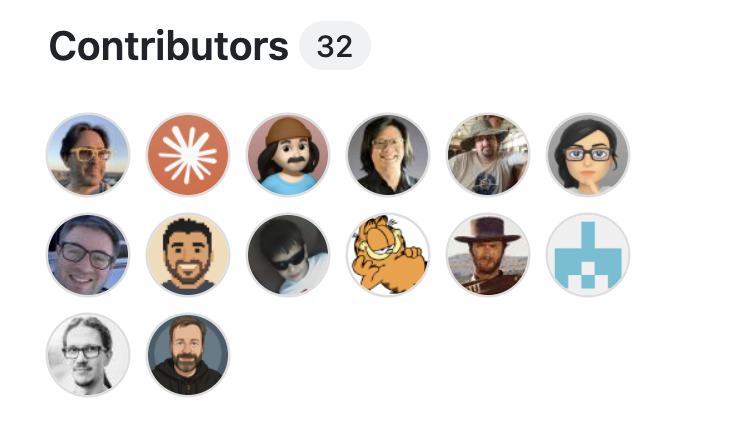
But the merged PRs aren't the real prize. It's the people. I jump into the Discord, meet the maintainers, make actual friends. It's been incredible for hiring too, I just hired an engineer I met this way for my new company. You contribute to something you love, you meet the people who love it, and it compounds.
HACKS
- Pick a tool you use every day, find one real thing it's missing, and ship it with the same /ce-plan + /ce-work loop.
- Show up in the project's Discord. The PRs get you in the door; the people are why you stay.
- Add value on X
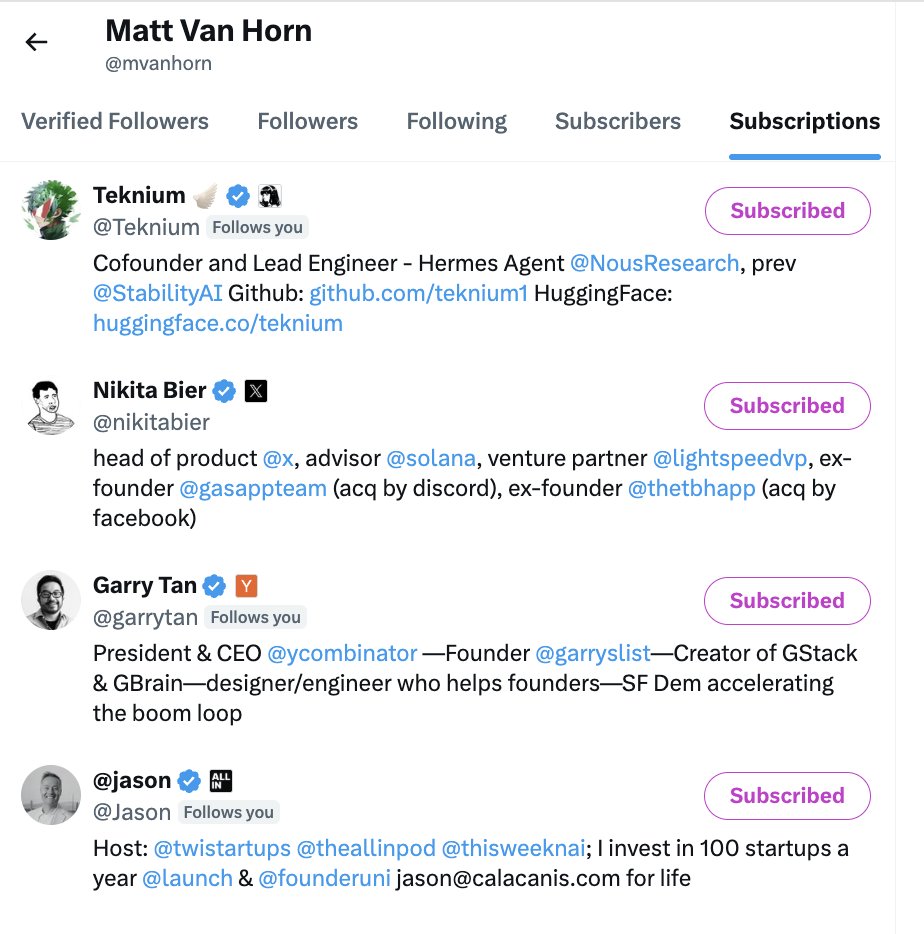
- On X Pay $1-3/month to subscribe to people you respect. I pay $1/month to @garrytan and when I submit a PR I can send an X post to him and he gets a special notification that I’m a paying customer. I also pay for @jason @teknium @Teknium.
18. 开源:为你热爱的项目做贡献
相同的循环既能交付我自己的项目,也能交付别人的项目。我已经有数百个 PR 被合并到开源项目中,包括 Python、Go、OpenCV、Vercel 的 Agent Browser 和 OpenClaw。不是路过随便改个拼写错误,而是我每天使用的工具上的真正功能。
不知从何时起,我开始出现在贡献者列表的顶部附近:
- Compound Engineering、Superpowers 和 Emdash 上排名 #3
- GStack 和 Paperclip 上排名 #4
- Vercel 的 Agent Browser 上排名 #6
- Camoufox 上排名 #2 @pejmanjohn 开玩笑说,当他打开一个仓库时,在贡献者网格中找到我的脸已经成了他个人的“寻找沃利”游戏。
但合并的 PR 并不是真正的奖赏。真正的是人。我加入 Discord,与维护者见面,交到真正的朋友。这对招聘也极有帮助,我刚刚为我的新公司雇佣了一位通过这种方式认识的工程师。为你热爱的东西做贡献,你会遇到那些同样热爱它的人,这也会不断累积。
技巧
- 选择一个你每天使用的工具,找到它缺少的一个真正的功能,用同样的 /ce-plan + /ce-work 循环来交付它。
- 出现在项目的 Discord 中。PR 让你进门;人才是你留下的原因。
- 在 X 上增加价值
- 在 X 上每月花 $1-3 订阅你尊重的人。我每月付 $1 给 @garrytan,当我提交一个 PR 时,我可以给他发一条 X 帖子,他会收到一个特殊通知,知道我是付费客户。我也付费订阅了 @jason @teknium @Teknium。
19. My Current Laptop Setup
My two-year-old laptop was barely functional under everything I run on it, six Claude sessions plus Codex all day. So I upgraded to an M5 Max with 64GB of RAM. It's a beast and I love it. It also still gets wrecked by the workload: my brand new machine has lasted as little as an hour on battery.
So I panic-bought power. I carry an Anker battery brick everywhere now, and I keep an Anker charger in the Tesla so the car tops me up on the go.
HACKS
- Never sleep: sudo pmset -a disablesleep 1. Carry an Anker battery brick; keep a charger in the car.
19. 我当前的笔记本电脑设置
我用了两年的笔记本电脑在我整天运行的所有东西(六个 Claude 会话加上 Codex)面前几乎无法正常工作。所以我升级到了 M5 Max,64GB 内存。它是一头猛兽,我很喜欢。但它仍然会被工作负载压垮:我的全新机器电池续航最短只有一小时。
所以我恐慌性地买了电源设备。我现在到处都带着 Anker 充电宝,并在特斯拉里放了一个 Anker 充电器,这样汽车可以在路上给我的机器充电。
技巧
- 从不休眠:sudo pmset -a disablesleep 1。随身携带 Anker 充电宝;在车里放一个充电器。
20. Printing Press: CLIs That Run Real Life
Most of these hacks live in the terminal. This is the one that leaves it. Printing Press is a fleet of CLIs that wrap real-world services so an agent can just do the errand. It's its own project now at @ppressdev, past 3.7K stars, and I'm building it with @trevin.
The piece that makes them actually work is auth, and that shipped last night: Agent Cookie. It hands a CLI your real browser session so it acts as you, no passwords to paste, nothing to re-auth. It's what turns "an agent that knows about a service" into "an agent that's logged into it."
A real afternoon, soup to nuts:
- Tesla preheat. Kids in the car in ten minutes: "preheat the car to 72." The Tesla CLI fires, the car's warm before we walk out.
- Instacart. "add Corona to Costco on Instacart."
- ESPN polling. A session watched a game for me and pinged me only when it got close. I didn't refresh anything, I got the one alert that mattered.
- Alaska Airlines for the kids' trip. Pulled fares and shoulder dates, checked our Atmos balance, fed it into /ce-plan, got a booking strategy with the cheapest days and buy reminders. From a soccer field. Not "AI writes my code." Agentic Engineering does the errands, watches the game, warms the car, and books the trip, while I'm doing something else.
HACKS
- Install a ready-made CLI from the library at printingpress.dev to hand an errand straight to your agent.
- Auth without the pain: Agent Cookie delivers your real browser session to a CLI so it acts as you.
- The real hack: print your own. Take something you do all day, an API or a service you live in, and have Printing Press generate an agent-native CLI for it. The one you build for your own workflow is the one that changes how you work.
20. Printing Press:管理现实事务的 CLI
这些技巧大多存在于终端中。而这个技巧走出了终端。Printing Press 是一系列包装了现实世界服务的 CLI,这样代理就可以直接去跑腿办事。它现在是自己的项目了,位于 @ppressdev,已超过 3.7K stars,是我和 @trevin 一起构建的。
让它们真正起作用的关键是认证,而这个昨晚刚刚发布:Agent Cookie。它把一个真实的浏览器会话交给 CLI,这样它就能以你的身份行事,不需要粘贴密码,不需要重新认证。它把“知道某个服务的代理”变成了“已登录该服务的代理”。
一个真实的下午,从头到尾:
- 特斯拉预热。十分钟后孩子要上车:“把车预热到 72 度。”Tesla CLI 触发,在我们走出去之前车已经热好了。
- Instacart。“在 Instacart 上的 Costco 里加 Corona 啤酒。”
- ESPN 轮询。一个会话替我观看了比赛,只在比赛接近尾声时提醒我。我没有刷新任何东西,只收到了一个重要的提示。
- 为孩子们的旅行安排阿拉斯加航空。获取了票价和肩期日期,检查了我们的 Atmos 余额,把信息喂给 /ce-plan,得到了包含最便宜日期的预订策略和购买提醒。这一切都发生在一个足球场上。 不是“AI 写我的代码”。智能体工程帮我跑腿、看比赛、预热汽车、预订行程,而我在做其他事情。
技巧
- 从 printingpress.dev 的库中安装一个现成的 CLI,将差事直接交给你的代理。
- 免去认证之痛:Agent Cookie 将你的真实浏览器会话交付给 CLI,让它以你的身份行事。
- 真正的技巧:自己打印一个。拿你整天在做的事情,一个 API 或你赖以生存的服务,让 Printing Press 为它生成一个代理原生 CLI。你为自己的工作流程构建的那个,才是能改变你工作方式的那个。
21. The Honest Part: AI Psychosis
Agents were supposed to do all the work for us. Instead, every friend I have is working the hardest they ever have in their lives.
The easy response is take a break, touch grass. But that's not what this is about. This is about addiction. Building with agents is the greatest video game ever made, and the loop is that good.
I have friends I genuinely worry about. They're so lit up by being able to build anything that they don't do anything else. Then they launch, and there are no users. And that is okay. I've launched plenty of things with no users. The trap isn't the empty launch, it's vanishing into the build and losing the people around you.
So be careful. Talk to your loved ones. Ask yourself if anyone actually wants the thing you're making. And if the honest answer is that it's just a tool for you, that's okay too. Some of the best things I've built were only ever for me.
If you do want an audience, it's the Gary Vaynerchuk path he always preached for content. You start somewhere, posting into the ether hoping one person notices. Then three, then ten, then a hundred, and you work your way to thousands. Nobody starts at thousands. Same with anything you build.
HACKS
- Take breaks. Touch grass.
- Talk to your loved ones.
- Build something people want, even if "people" is just you.
21. 坦诚相对:AI 带来的心理风险
代理本该为我们做所有的工作。然而,我的每个朋友都比以往任何时候都更努力地工作。
简单的回答是休息一下,接触接触自然。但这不仅仅是这个。这是关于成瘾的问题。用代理构建是有史以来最棒的视频游戏,而这个循环就是那么迷人。
我有一些真正让我担心的朋友。他们因为能够构建任何东西而兴奋不已,以至于不再做任何其他事情。然后他们发布了产品,却发现没有用户。这没关系。我也发布过很多没有用户的东西。陷阱不是空发布,而是消失在构建中,失去你身边的人。
所以要小心。和你爱的人谈谈。问问自己,是否真的有人想要你正在做的东西。如果诚实的答案只是为你自己做的工具,那也没关系。我构建过一些最好的东西,它们从来只是给我自己用的。
如果你确实想要一个受众,那就是 Gary Vaynerchuk 一直为内容布道的路径。你从某个地方开始,向虚空发帖,希望有一个人注意到。然后三个人,然后十个人,然后一百个人,你一步步走向数千人。没有人是从数千人开始的。你构建的任何东西都是如此。
技巧
- 休息一下。接触自然。
- 和你爱的人谈谈。
- 构建人们想要的东西,即使“人们”只是你自己。
22. This Article Was Written This Way
This is a markdown file. Claude Code in cmux, me talking into Monologue: "evolve the no-IDE opener," "make the don't-read-the-plan section spicier," "add the Tesla and Instacart story." It rewrites, I react, and it's in Proof for review. last30days fed the fresh material. No Zed this time, by the way. I stopped using it. No IDE. No typing code. Talk, plan, build. From a desk, a couch, a car, a soccer field.
That's everything I know in June. A voice app, a plan-file plugin, a couple of config changes, a pile of tabs, a Mac Mini, two remote boxes, and a fleet of CLIs that run real life.
HACKS
- Copy this whole article, paste it into your agent, and tell it to set up everything it can. Good things will happen to your agentic engineering workflow.
22. 本文的创作方式
这是一个 markdown 文件。通过 cmux 中的 Claude Code,我对着 Monologue 说话:“改进无 IDE 的开篇语”,“把别读计划那部分写得更劲爆些”,“加上特斯拉和 Instacart 的故事。”它重写,我反馈,然后放入 Proof 进行审阅。last30days 提供了新鲜素材。顺便说一下,这次没有用 Zed。我已经停止使用它了。没有 IDE。不打代码。说话、计划、构建。在书桌前、沙发上、车里、足球场上。
这就是我在六月所知道的一切。一个语音应用,一个计划文件插件,一些配置改动,一堆标签页,一个 Mac Mini,两台远程机器,以及一系列管理现实事务的 CLI。
技巧
- 复制整篇文章,粘贴给你的代理,告诉它设置所有它能设置的东西。你的智能体工程工作流将会迎来好事。