From Scratch: Build Automated Claude Code Workflows with Hooks
A tutorial on using Claude Code Hooks to automate shell commands at lifecycle events, replacing unreliable prompt instructions. Covers 5 key events (PostToolUse, PreToolUse, etc.), 3 hook types (command/prompt/agent), and config file structure. Provides 5 ready-to-use examples: desktop notification, auto-formatting, file protection, context recovery after compaction, and commit message linting. Exit code 2 blocks dangerous actions and feeds stderr back to Claude. For developers seeking reliable Claude Code workflows.
You ask Claude Code to write features, supplement tests, format files, and then commit. It writes the features, adds most of the tests, formats two files, but misses one. Then it tells you, "All done." You check: nothing committed, formatting not fully aligned. These issues shouldn't require your post-hoc checks. In Claude Code, they can all be configured as automated workflows. That's why hooks exist.
你让 Claude Code 写功能、补测试、格式化文件,最后顺手提交。
它功能写了,测试也补了大半,格式化跑了两个文件,但偏偏漏了一个。然后它很自然地告诉你:“搞完了。”
你一看:没提交,格式也没完全对齐。
但这些问题,其实不该靠你事后检查。在 Claude Code 里,它们都可以配置成自动流程。
这就是 Hook 存在的理由。
Claude Code hooks are shell commands automatically executed at fixed nodes in Claude's lifecycle. You don't need to instruct Claude; the hook runs on its own. Claude may not run a formatter. A hook attached to PostToolUse can run Prettier after every file edit. Claude may forget to notify you. A hook on Notification can pop up whenever Claude needs your input. Hooks pull behavior out of Claude's judgment and into your project rules—code quality, notifications, security checks. These crucial tasks should live in hooks, not prompts. GitButler's guide: start with three—PostToolUse auto-formatting, PreToolUse interception of dangerous commands, Stop desktop notification—to get the widest coverage with the least effort.
Claude Code hooks 是在 Claude 生命周期的固定节点自动执行的 shell 命令。不需要你给 Claude 下任何指令,Hook 就已经跑完了。
Claude 可能不跑格式化工具。挂在 PostToolUse 上的 Hook 会在每次文件编辑后跑 Prettier。
Claude 可能忘了通知你。挂在 Notification 上的 Hook 每次 Claude 需要你介入时都会弹窗。
Hook 把行为从 Claude 的判断里抽出来,放到你的项目规则里。代码质量、通知、安全检查。这些最要紧的事应该放在 Hook 里,不是 prompt 里。
GitButler 的指南:从三个开始:PostToolUse 自动格式化、PreToolUse 拦截危险命令、Stop 桌面通知,覆盖最广,上手最容易。
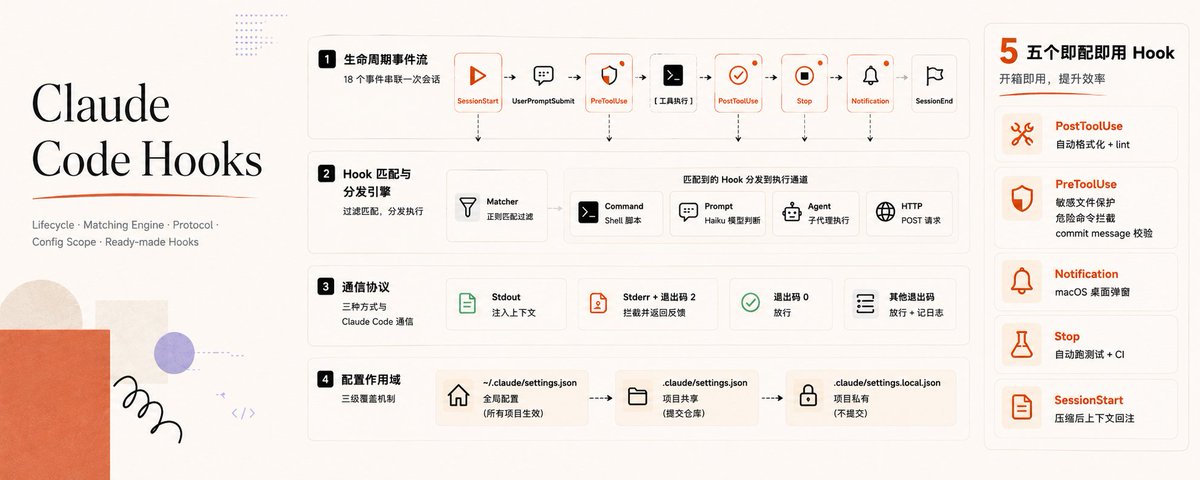
Claude Code has over 20 lifecycle events, but you really use these five: PostToolUse (triggered after Claude uses a tool—auto-format, lint, log changes); PreToolUse (triggered before tool use, can block—protect sensitive files, prevent dangerous commands); Notification (triggered when Claude needs your attention—desktop alerts so you don't stare at the terminal); Stop (triggered when Claude finishes a reply—run tests, CI, auto-commit); SessionStart (triggered on session start or resume—reload context after compaction, load environment reminders). Skip the rest for now; start with these five.
Claude Code 有 20多个生命周期事件,SessionStart 到 SessionEnd。不用全记。下面 5 个是实际工作中真会用的:
PostToolUse:Claude 用完工具后触发。自动格式化、跑 linter、记变更日志。
PreToolUse:Claude 调工具之前触发,可以拦截。保护敏感文件(.env、package-lock.json)、阻止危险命令、在 Claude 写任何东西之前卡一刀。
Notification:Claude 需要你关注时触发。弹桌面通知,你不用盯着终端,该干嘛干嘛。
Stop:Claude 回复结束时触发。跑测试、跑 CI、自动提交——Claude 说「搞完了」之后自动执行。
SessionStart:会话启动或恢复时触发。压缩(compaction)之后重新灌上下文,或者加载环境相关的提醒。
剩下事件(SubagentStart、WorktreeCreate、InstructionsLoaded 等)给更复杂的流程。先从上面 5 个上手。

Beyond the standard shell command hook ("type": "command"), there are three more: Prompt Hook (type: prompt) passes hook input to a Claude model (default Haiku) for yes/no judgment, useful when you need model understanding—e.g., checking if all tasks are complete before Claude stops:
{
  "hooks": {
    "Stop": [
      {
        "hooks": [
          {
            "type": "prompt",
            "prompt": "Check if all tasks are complete. If not, respond with {\"ok\": false, \"reason\": \"what remains to be done\"}."
          }
        ]
      }
    ]
  }
}
Better than regex. Agent Hook (type: agent) spawns a sub-agent that can read files, search code, run tools for up to 50 turns—useful when you need to cross-reference actual code state, e.g., verifying tests pass before stopping. HTTP Hook (type: http) POSTs event data to a URL, no shell required—good for team audit logs, shared notification services, webhook integrations. In most cases, "type": "command" is sufficient.
除了标准的 shell 命令 Hook("type": "command"),还有三种:
Prompt Hook("type": "prompt")把 Hook 的输入丢给 Claude 模型(默认用 Haiku)做判断,返回是/否。适合需要模型理解的场景,比如在 Claude 停止前检查是不是所有任务都完成了:
{
  "hooks": {
    "Stop": [
      {
        "hooks": [
          {
            "type": "prompt",
            "prompt": "Check if all tasks are complete. If not, respond with {\"ok\": false, \"reason\": \"what remains to be done\"}."
          }
        ]
      }
    ]
  }
}
比写正则强。
Agent Hook("type": "agent")起一个子代理,能读文件、搜代码、跑工具,最多 50 轮。适合需要对照实际代码状态做判断的情况——比如 Claude 停之前确认测试确实过了。
HTTP Hook("type": "http")把事件数据 POST 到 URL,不跑 shell。适合团队审计日志、共享通知服务、webhook 集成。
多数场景 "type": "command" 够用。
Hook configs go in one of three locations:
~/.claude/settings.json  all projects
.claude/settings.json  current project (committed, shared with team)
.claude/settings.local.json  current project, not committed
The structure is the same:
{
  "hooks": {
    "EventName": [
      {
        "matcher": "ToolName|OtherTool",
        "hooks": [
          {
            "type": "command",
            "command": "your shell command here"
          }
        ]
      }
    ]
  }
}
Matcher is a regex that filters triggers. In PostToolUse and PreToolUse, match tool names: "Edit|Write" triggers after file edits, "Bash" after shell commands, "mcp__github_.*" after any GitHub MCP tool call. The easiest way is the /hooks interactive menu—type /hooks in Claude Code, select event, set matcher, enter command, no hand-editing JSON. Takes effect immediately.
Hook 配置放在三个位置之一:
~/.claude/settings.json 所有项目
.claude/settings.json 当前项目(提交到仓库,团队共享)
.claude/settings.local.json 当前项目,不提交
结构都一样:
{
  "hooks": {
    "EventName": [
      {
        "matcher": "ToolName|OtherTool",
        "hooks": [
          {
            "type": "command",
            "command": "your shell command here"
          }
        ]
      }
    ]
  }
}
Matcher 是正则,过滤触发条件。在 PostToolUse 和 PreToolUse 里匹配工具名称:"Edit|Write" 在文件编辑后触发,"Bash" 在 shell 命令后触发,"mcp__github_.*" 在任意 GitHub MCP 工具调用后触发。
最简单的方式是用 /hooks 交互菜单。在 Claude Code 里敲 /hooks,选事件、设 matcher、填命令,不用手写 JSON。加了就生效。
- Notification when Claude needs you: Stop staring at the terminal. Every time Claude waits for you—permission confirmations, idle waits, any intervention—pop this up:
{
  "hooks": {
    "Notification": [
      {
        "matcher": "",
        "hooks": [
          {
            "type": "command",
            "command": "osascript -e 'display notification \"Claude needs your attention\" with title \"Claude Code\"'"
          }
        ]
      }
    ]
  }
}
Place in ~/.claude/settings.json for global effect.
- Auto-format files Claude touches: After every Edit or Write, run Prettier. Eliminate formatting inconsistencies from Claude's incremental edits once and for all:
{
  "hooks": {
    "PostToolUse": [
      {
        "matcher": "Edit|Write",
        "hooks": [
          {
            "type": "command",
            "command": "jq -r '.tool_input.file_path' | xargs npx prettier --write"
          }
        ]
      }
    ]
  }
}
Requires jq for JSON parsing (install via brew install jq on macOS). Put in project's .claude/settings.json and commit as a team standard.
- Prevent Claude from touching protected files: Block
.env,package-lock.json,.git/. Claude will get feedback explaining why:
#!/bin/bash
# .claude/hooks/protect-files.sh
INPUT=$(cat)
FILE_PATH=$(echo "$INPUT" | jq -r '.tool_input.file_path // empty')
PROTECTED_PATTERNS=(".env" "package-lock.json" ".git/")

for pattern in "${PROTECTED_PATTERNS[@]}"; do
  if [[ "$FILE_PATH" == *"$pattern"* ]]; then
    echo "Blocked: $FILE_PATH matches protected pattern '$pattern'" >&2
    exit 2
  fi
done

exit 0
Make executable with chmod +x .claude/hooks/protect-files.sh, then register:
{
  "hooks": {
    "PreToolUse": [
      {
        "matcher": "Edit|Write",
        "hooks": [
          {
            "type": "command",
            "command": "\"$CLAUDE_PROJECT_DIR\"/.claude/hooks/protect-files.sh"
          }
        ]
      }
    ]
  }
}
- Refill context after compaction: When the context window fills and Claude summarizes (compaction), important details can be lost. This hook triggers after each compaction to remind Claude of the essentials:
{
  "hooks": {
    "SessionStart": [
      {
        "matcher": "compact",
        "hooks": [
          {
            "type": "command",
            "command": "echo 'Reminder: use Bun, not npm. Run bun test before committing. Current sprint: auth refactor.'"
          }
        ]
      }
    ]
  }
}
You can replace echo with dynamic commands like git log --oneline -5 or cat .claude/sprint-context.md to load a dedicated context file.
- Enforce git commit message conventions: Claude sometimes writes commit messages with the wrong type prefix, sentence case, or a trailing period. This hook intercepts before the commit lands:
{
  "hooks": {
    "PreToolUse": [
      {
        "matcher": "Bash",
        "hooks": [
          {
            "type": "prompt",
            "prompt": "Look at tool_input.command. If it does NOT start with 'git commit', return {\"ok\": true}. If it is a git commit command, extract the commit message and check only the FIRST LINE (subject line) — ignore any body lines after the first newline. Check: (1) format is 'type: Capitalized description' where type is one of feat/fix/refactor/docs/chore/perf/revert, (2) description starts with a capital letter, (3) no trailing period, (4) no 'Co-Authored-By' trailer anywhere in the command. Return {\"ok\": false, \"reason\": \"[specific issue. Corrected subject line: type: Description]\"} if any check fails. Return {\"ok\": true} if all pass."
          }
        ]
      }
    ]
  }
}
This is a Prompt Hook—no shell script, no regex; let Haiku read the command, check against your rules, and return the result. Place in ~/.claude/settings.json for all projects.
- Claude 需要你时弹通知
别盯终端了。每次 Claude 等你输入——权限确认、空闲等待、任何需要你介入的时刻——自动弹:
{
  "hooks": {
    "Notification": [
      {
        "matcher": "",
        "hooks": [
          {
            "type": "command",
            "command": "osascript -e 'display notification \"Claude needs your attention\" with title \"Claude Code\"'"
          }
        ]
      }
    ]
  }
}
放 ~/.claude/settings.json。这个要全局生效。
- Claude 碰过的文件自动格式化
每次 Edit 或 Write 之后跑 Prettier。Claude 逐文件改代码导致的格式不一致,一劳永逸:
{
  "hooks": {
    "PostToolUse": [
      {
        "matcher": "Edit|Write",
        "hooks": [
          {
            "type": "command",
            "command": "jq -r '.tool_input.file_path' | xargs npx prettier --write"
          }
        ]
      }
    ]
  }
}
需要 jq 做 JSON 解析,macOS 上安装
brew install jq
放项目的 .claude/settings.json 并提交。这是团队规范。
- 不让 Claude 碰受保护文件
拦住 .env、package-lock.json、.git/。被拦后 Claude 会收到反馈说明原因:
#!/bin/bash
# .claude/hooks/protect-files.sh
INPUT=$(cat)
FILE_PATH=$(echo "$INPUT" | jq -r '.tool_input.file_path // empty')
PROTECTED_PATTERNS=(".env" "package-lock.json" ".git/")

for pattern in "${PROTECTED_PATTERNS[@]}"; do
  if [[ "$FILE_PATH" == *"$pattern"* ]]; then
    echo "Blocked: $FILE_PATH matches protected pattern '$pattern'" >&2
    exit 2
  fi
done

exit 0
chmod +x .claude/hooks/protect-files.sh,然后注册:
{
  "hooks": {
    "PreToolUse": [
      {
        "matcher": "Edit|Write",
        "hooks": [
          {
            "type": "command",
            "command": "\"$CLAUDE_PROJECT_DIR\"/.claude/hooks/protect-files.sh"
          }
        ]
      }
    ]
  }
}
- 压缩后把上下文填回去
上下文窗口满了,Claude 会压缩对话总结。有时候重要细节被丢掉了。这个 Hook 在每次压缩后触发,提醒 Claude 最核心的事:
{
  "hooks": {
    "SessionStart": [
      {
        "matcher": "compact",
        "hooks": [
          {
            "type": "command",
            "command": "echo 'Reminder: use Bun, not npm. Run bun test before committing. Current sprint: auth refactor.'"
          }
        ]
      }
    ]
  }
}
echo 换成动态命令也行:git log --oneline -5 看最近提交,或 cat .claude/sprint-context.md 加载独立上下文文件。
- Git 提交强制规范
Claude 有时候按自己喜好写 commit message——type 前缀不对、用了句子大小写、末尾拖个句号。这个 Hook 在提交落地前拦一道:
{
  "hooks": {
    "PreToolUse": [
      {
        "matcher": "Bash",
        "hooks": [
          {
            "type": "prompt",
            "prompt": "Look at tool_input.command. If it does NOT start with 'git commit', return {\"ok\": true}. If it is a git commit command, extract the commit message and check only the FIRST LINE (subject line) — ignore any body lines after the first newline. Check: (1) format is 'type: Capitalized description' where type is one of feat/fix/refactor/docs/chore/perf/revert, (2) description starts with a capital letter, (3) no trailing period, (4) no 'Co-Authored-By' trailer anywhere in the command. Return {\"ok\": false, \"reason\": \"[specific issue. Corrected subject line: type: Description]\"} if any check fails. Return {\"ok\": true} if all pass."
          }
        ]
      }
    ]
  }
}
这是 Prompt Hook——不写 shell 脚本,不写正则,让 Haiku 模型读命令、对照你的规范判断,直接返回结果。
放 ~/.claude/settings.json,所有项目生效。
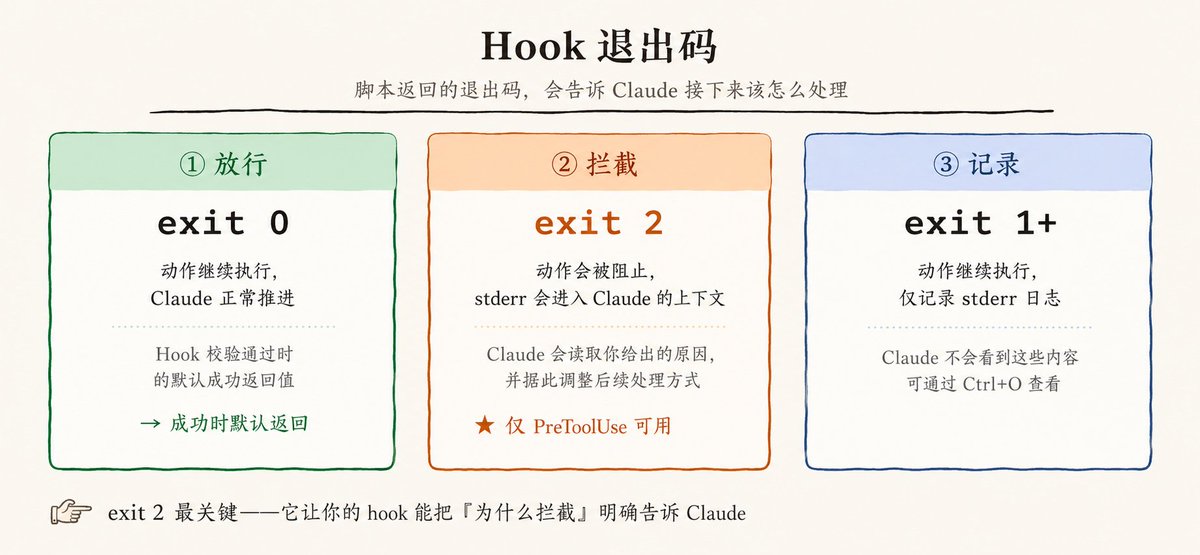
Hook scripts communicate with Claude Code through three channels:
Stdout: added to Claude's context
  Used for SessionStart, UserPromptSubmit, etc.

Stderr: displayed to Claude when exit code 2 is used

Exit code: determines what happens next:

0 → continue
2 → block the current action
     stderr message is fed back to Claude
other → continue
     stderr is logged (viewable via Ctrl+O)
The real power of PreToolUse hooks lies in this exit code system: your script reads the operation Claude is about to perform, checks it against rules, and either allows it or returns a specific reason.
Hook 脚本通过三个通道和 Claude Code 通信:
Stdout: 会被加入 Claude 的上下文中
适用于 SessionStart、UserPromptSubmit 这些 hooks

Stderr: 当你以退出码 2 退出时,会显示给 Claude

Exit code: 决定接下来发生什么:

0 → 继续执行

2 → 阻止当前动作
     stderr 中的消息会作为反馈传给 Claude

其他退出码 → 继续执行
           stderr 会被记录下来
           可以通过 Ctrl+O 查看
PreToolUse Hook 真正的威力就靠这个退出码体系:你的脚本读到 Claude 即将执行的操作,对照规则判断,要么放行,要么返回具体原因。
Step 1: Add a global notification hook. Open ~/.claude/settings.json and paste the macOS notification config above. Most practical, zero risk, purely additive—it doesn't block anything. Make Claude do something that triggers a permission confirmation to test the popup. Step 2: Add Prettier formatting to the current project. Open (or create) .claude/settings.json in your project root, add the PostToolUse formatting hook. Install jq if needed. Have Claude edit a file and confirm it's auto-formatted. Step 3: Open /hooks and explore. The interactive menu lists all events and descriptions. Think about what else in your workflow could be automated. The Stop event (run tests after Claude finishes) and PreToolUse (intercept specific patterns) are good next choices.
第一步:全局加通知 Hook
打开 ~/.claude/settings.json,贴上面 macOS 通知的配置。最实用、零风险,纯附加行为,不拦截任何东西。让 Claude 做一件会触发权限确认的事,看看弹没弹。
第二步:当前项目加 Prettier 格式化
在项目根目录打开 .claude/settings.json(没有就新建),加 PostToolUse 格式化 Hook。没装 jq 先装。让 Claude 改个文件,确认自动格式化了。
第三步:打开 /hooks 翻一翻
交互菜单列出全部 事件和说明。想想你的工作流里还有哪些可以自动化。Stop 事件(Claude 完成后跑测试)和 PreToolUse(拦截特定模式)是下一个选择。
Without hooks, you have to follow up and check: was formatting run? were tests run? was the code committed? With hooks, these questions are answered. Formatting always runs, tests always run, notifications always pop up. They no longer depend on whether Claude remembers, understands, or complies—they become the default behavior of the project environment. Don't hang critical workflows on prompt constraints. Enforce crucial actions through environmental mechanisms, ensuring they execute reliably every run.
没有 Hook 时,你可能需要结束后追问和检查:格式化做了吗?测试跑了吗?代码提交了吗?
配置 Hook 之后,这些问题解决。格式化一定会执行,测试一定会运行,通知一定会弹出。它们不再依赖 Claude 是否记得、是否理解、是否照做,而是变成项目环境本身的默认行为。
不要把关键流程寄托在 prompt 约束上。应通过环境机制强制执行关键动作,确保它们在每次运行中稳定执行。