How I set up Claude to actually get work done
Most people use Claude as a one-off Q&A, losing context each time. The author shares a systematic setup: personal instructions, projects, reference files, a context file, connected tools like email and calendar, templates, and repeatable workflows. 25 concrete steps transform Claude from a chat window into a reusable work environment. Suitable for technical workers frustrated with inconsistent AI responses.
How I set up Claude to actually get work done
By @0xwhrrari · 2026-05-28T15:18:16.000Z
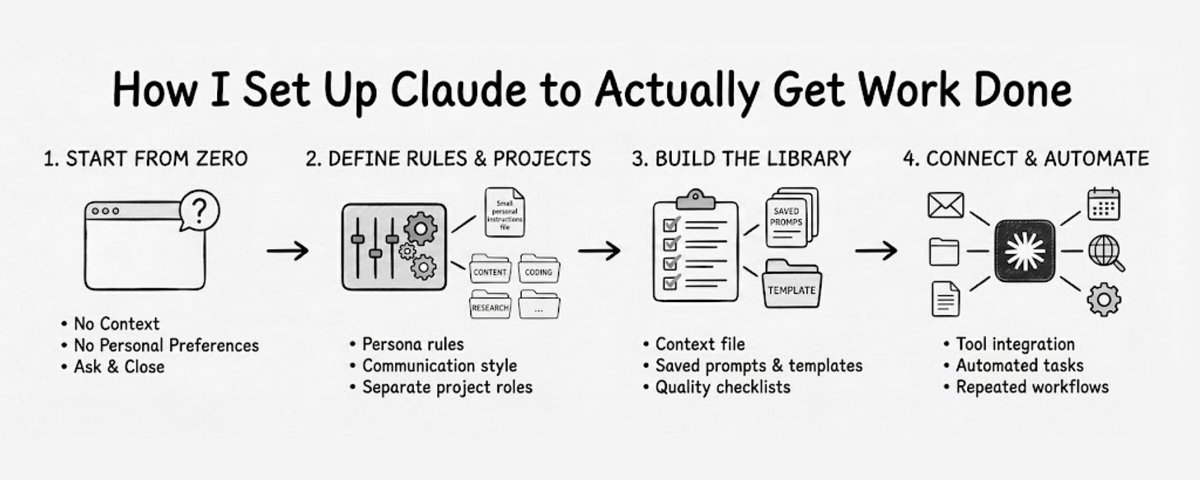
25 Ways to Turn It From a Chatbot Into a Work System
Most people use Claude in the weakest possible way.
- They open a new chat.
- Ask one question.
- Get one answer.
- Close the tab. Then next time, they start from zero again.
- No saved context.
- No personal preferences.
- No project memory.
- No files.
- No repeatable workflows.
- No connection to the tools they use every day. That is why the answers feel random.
Claude becomes much more useful when you stop treating it like a blank chat window and start treating it like a system you configure.
Here is the setup I would build.
我是如何设置 Claude 来真正完成工作的
By @0xwhrrari · 2026-05-28T15:18:16.000Z
25 种将其从聊天机器人转变为工作系统的方法
大多数人都以最低效的方式使用 Claude。
- 他们打开一个新的聊天。
- 提一个问题。
- 得到一个答案。
- 关闭标签页。 然后下一次,他们又从零开始。
- 没有保存上下文。
- 没有个人偏好。
- 没有项目记忆。
- 没有文件。
- 没有可重复的工作流程。
- 没有与他们每天使用的工具建立连接。 这就是为什么答案会显得很随意。
当你不再将 Claude 视作一个空白聊天窗口,而开始将其视作一个可以配置的系统时,它就会变得更有用。
以下是我会搭建的设置。
Part 1: Set the Default Behavior
1. Write your personal instructions
Tell Claude the basic facts it should always know:
- Who you are
- What you work on
- Who your audience or customers are
- What kind of answers you prefer
- What formats you use often
- What tone you want This removes a lot of repeated explanation.
2. Define how Claude should communicate
Be specific.
For example:
- Keep answers practical
- Use examples when possible
- Avoid vague advice
- Ask clarifying questions only when necessary
- Give the answer first, then explain
- Use clear formatting If you do not define this, Claude guesses.
Part 1: 设定默认行为
1. 编写你的个人说明指令
告诉 Claude 它应该始终知道的基本事实:
- 你是谁
- 你从事什么工作
- 你的受众或客户是谁
- 你喜欢什么样的回答
- 你经常使用什么格式
- 你想要什么语气 这会省去大量重复的解释。
2. 定义 Claude 应如何沟通
要具体。
例如:
- 保持回答实用
- 尽可能使用示例
- 避免模糊的建议
- 仅在必要时才提澄清问题
- 先给出答案,再解释
- 使用清晰的排版格式 如果你不定义这些,Claude 就会靠猜。
3. Separate your work into projects
Do not put everything in one chat.
Create separate projects for different areas:
- Content
- Coding
- Research
- Business planning
- Client work
- Personal productivity Each project should have its own context.
4. Give each project a clear role
Inside every project, explain what Claude is supposed to help with.
Example:
Claude helps me plan, draft, and edit content for my audience. The writing should be direct, specific, and useful. Avoid generic advice. Prefer strong structure, short paragraphs, and concrete examples.
Now that project has a job.
5. Upload the most important reference files
Start with the files Claude needs most:
- Writing samples
- Brand guidelines
- Customer profiles
- Product docs
- Strategy notes
- Examples of good previous work This makes the output much less generic.
3. 将工作拆分为不同的项目
不要把所有内容都塞进一个聊天。
为不同领域创建单独的项目:
- 内容
- 编程
- 调研
- 商业规划
- 客户工作
- 个人生产力 每个项目都应有自己的上下文。
4. 为每个项目设定明确的角色
在每个项目中,说明 Claude 应协助什么。
示例:
Claude 帮我为受众规划、起草和编辑内容。写作应直接、具体、有用。避免泛泛而谈。偏好强有力的结构、短段落和具体示例。
这样,该项目就有了明确的职责。
5. 上传最重要的参考文件
从 Claude 最需要的文件开始:
- 写作样本
- 品牌指南
- 客户画像
- 产品文档
- 战略笔记
- 过往优秀作品的示例 这会让输出变得不那么通用。
Part 2: Make the Output Consistent
6. Create a context file
Make one file called context.md.
Put the important current information there:
- Active projects
- Current goals
- Important decisions
- Tools you use
- People involved
- Deadlines
- Things Claude should not forget Update it when your situation changes.
7. Save your best prompts
When a prompt works well, save it.
Build a simple prompt library:
- Research brief prompt
- Article draft prompt
- Editing prompt
- Meeting summary prompt
- Competitor research prompt Good prompts should not disappear inside old chats.
Part 2: 让输出保持一致
6. 创建一个上下文文件
创建一个名为 context.md 的文件。
将重要的当前信息放进去:
- 正在进行的项目
- 当前目标
- 重要决策
- 你使用的工具
- 相关人员
- 截止日期
- Claude 不应忘记的事项 在你的情况发生变化时更新它。
7. 保存你的最佳提示词
当一个提示词效果好时,把它存下来。
建立一个简单的提示词库:
- 调研简报提示词
- 文章草稿提示词
- 编辑提示词
- 会议摘要提示词
- 竞争对手调研提示词 好的提示词不应该消失在旧聊天记录里。
8. Build templates for repeated work
If you create the same type of output more than twice, make a template.
Examples:
- Weekly report
- Content brief
- Project update
- Research memo
- Client summary
- Article outline Templates make Claude more predictable.
9. Create a quality checklist
Tell Claude what “good” means before it sends the final answer.
Example checklist:
- Is the answer specific?
- Is there any filler?
- Does it match my format?
- Are the examples useful?
- Is the structure easy to scan?
- Is anything missing? This improves the final output immediately.
10. Correct Claude when it misses
Do not just accept bad output.
Tell it exactly what to change:
- "This is too vague"
- "Use shorter paragraphs"
- "Give me examples"
- "Do not use corporate language"
- "Make the structure easier to scan" Claude improves when your feedback is precise.
8. 为重复性工作建立模板
如果你创建相同类型的输出超过两次,就做一个模板。
示例:
- 周报
- 内容简报
- 项目更新
- 调研备忘录
- 客户摘要
- 文章大纲 模板让 Claude 的输出更可预测。
9. 制作质量检查清单
在 Claude 发送最终答案之前,告诉它“好”的标准是什么。
示例清单:
- 答案是否具体?
- 有没有废话?
- 是否符合我的格式?
- 示例有用吗?
- 结构是否易于浏览?
- 还缺什么? 这能立即提升最终输出质量。
10. 当 Claude 出错时立刻纠正
不要接受糟糕的输出。
准确地告诉它需要改变什么:
- “这太模糊了”
- “用更短的段落”
- “给我一些例子”
- “别用那种企业风的语言”
- “让结构更容易浏览” 当你给出精准反馈时,Claude 才会改进。
Part 3: Connect It to Real Work
11. Connect your email
If your setup supports it, connect Gmail or your email tool.
Then Claude can help with:
- Summarizing important messages
- Drafting replies
- Finding urgent items
- Preparing a morning inbox brief
12. Connect your calendar
Calendar access makes planning much more useful.
You can ask:
- What should I prepare for today?
- Where are my free blocks?
- What meetings need follow-up?
- What does my week look like? This turns Claude into a planning assistant.
13. Connect your documents
If your work lives in Google Drive, Notion, Dropbox, or local folders, connect the right sources.
Claude should be able to use your actual material:
- Docs
- Spreadsheets
- Meeting notes
- Strategy files
- Briefs
- Drafts Less copy-pasting. More useful answers.
14. Connect team communication
If you use Slack or another team tool, connect the channels that matter.
Claude can help you:
- Catch up on missed messages
- Extract action items
- Summarize decisions
- Draft replies
- Prepare updates
15. Add web or research access
For anything current, Claude needs a way to check live information.
Use web search, MCP tools, or research connectors.
This matters for:
- Market research
- News
- Competitors
- Software docs
- Pricing
- Current events Old knowledge is not enough for current work.
Part 3: 将其连接到真实工作
11. 连接你的邮箱
如果你的设置支持,连接 Gmail 或你的邮件工具。
这样 Claude 就能帮助你:
- 总结重要信息
- 起草回复
- 查找紧急事项
- 准备早晨的收件箱简报
12. 连接你的日历
访问日历能让规划变得更有用。
你可以问:
- 今天我需要准备什么?
- 我有哪些空闲时间段?
- 哪些会议需要跟进?
- 我下周的安排是什么样的? 这让 Claude 变成了一个规划助手。
13. 连接你的文档
如果你的工作资料存放在 Google Drive、Notion、Dropbox 或本地文件夹中,连接正确的数据源。
Claude 应该能够使用你的实际资料:
- 文档
- 电子表格
- 会议记录
- 战略文件
- 简报
- 草稿 减少复制粘贴。得到更有用的回答。
14. 连接团队沟通渠道
如果你使用 Slack 或其他团队工具,连接重要的频道。
Claude 可以帮你:
- 补上错过的消息
- 提取待办事项
- 总结决策
- 起草回复
- 准备更新
15. 添加网页或研究访问能力
对于任何有时效性的信息,Claude 需要一种检查实时信息的方式。
使用网页搜索、MCP 工具或研究连接器。
这对以下方面很重要:
- 市场调研
- 新闻
- 竞争对手
- 软件文档
- 定价
- 时事 对于当前的工作,旧的知识是不够的。
Part 4: Move Beyond Chat
16. Install the desktop app
If you only use Claude in the browser, install the desktop version.
Desktop workflows are better when you want Claude to work with files, folders, and local tasks.
17. Give access only to the folders that matter
Do not give access to everything.
Start with a few useful folders:
- Documents
- Work projects
- Content drafts
- Research files
- Code repositories Keep it organized from the beginning.
18. Run one real file task
Start small.
Ask Claude to do something practical:
- Organize a folder
- Summarize several documents
- Rename files consistently
- Create a clean project structure
- Extract action items from notes This is where Claude stops being just a text generator.
Part 4: 超越聊天
16. 安装桌面应用
如果你只在浏览器中使用 Claude,安装桌面版。
当你希望 Claude 能处理文件、文件夹和本地任务时,桌面工作流会更好。
17. 只授予重要文件夹的访问权限
不要给所有内容的访问权限。
从几个有用的文件夹开始:
- 文档
- 工作项目
- 内容草稿
- 研究文件
- 代码仓库 从一开始就保持有序。
18. 执行一项真实的文件任务
从小处着手。
让 Claude 做一些实用的事:
- 整理一个文件夹
- 总结几份文档
- 按规则重命名文件
- 创建一个干净的项目结构
- 从笔记中提取待办事项 这时 Claude 就不再只是一个文本生成器了。
19. Create one scheduled workflow
Set up a recurring task.
Examples:
- Every Monday, create a weekly planning note
- Every morning, summarize today’s calendar
- Every Friday, prepare a weekly review
- Every day, collect important updates into one brief Start with one useful automation.
20. Install one tool that matches your work
Do not install random plugins.
Pick one that helps your main workflow:
- Writing
- Coding
- Research
- Sales
- Operations
- Support
- Planning One useful tool is better than ten unused ones.
19. 创建一个定时工作流
设置一个周期性任务。
示例:
- 每周一,创建一份周计划笔记
- 每天早上,总结今天的日历
- 每周五,准备一周回顾
- 每天,将重要更新汇总成一份简报 先从一个有用的自动化开始。
20. 安装一个与你的工作匹配的工具
不要随意安装插件。
选择一个有助于你主要工作流的:
- 写作
- 编程
- 研究
- 销售
- 运营
- 支持
- 规划 一个有用的工具胜过十个闲置的。
Part 5: Build Repeatable Systems
21. Turn one repeated task into a workflow
Choose something you do often.
For example:
- Writing a newsletter
- Preparing a meeting brief
- Reviewing code
- Researching a topic
- Creating a weekly report Then define the exact steps Claude should follow every time.
22. Build a morning briefing
A strong daily brief can include:
- Urgent emails
- Today's meetings
- Open tasks
- Project updates
- Things to prepare
- One recommended priority This saves time before the day even starts.
23. Build a content pipeline
If you create content, do not ask Claude for a full post immediately.
Use stages:
- Research the topic
- Find the strongest angle
- Create several outlines
- Choose the best one
- Write the draft
- Edit for clarity
- Format for publishing Step-by-step workflows produce better work.
Part 5: 构建可重复的系统
21. 将一个重复任务转化为工作流
选择一个你经常做的事情。
例如:
- 写一份 newsletter
- 准备会议简报
- 审查代码
- 研究一个主题
- 创建周报 然后定义每次 Claude 都应遵循的准确步骤。
22. 构建早晨简报
一份充实的每日简报可以包括:
- 紧急邮件
- 今天的会议
- 待办任务
- 项目更新
- 需要准备的内容
- 一项推荐的优先事项 这会在一天甚至还没开始前就节省时间。
23. 构建内容流水线
如果你创作内容,不要立刻让 Claude 输出一篇完整的文章。
分阶段进行:
- 研究主题
- 找到最佳角度
- 创建多份大纲
- 选择最好的那份
- 撰写草稿
- 为清晰度进行编辑
- 为发布排版格式 分步工作流能产生更好的作品。
24. Improve the system every week
Once a week, review what worked and what failed.
Ask:
- Which outputs were useful?
- Which answers were weak?
- What context was missing?
- Which prompt should be saved?
- Which template needs improvement?
- What should be automated next? Small weekly improvements compound.
25. Document your full setup
Create one master file that explains your whole Claude system.
Include:
- Personal instructions
- Projects
- Uploaded files
- Saved prompts
- Templates
- Tools
- Automations
- Workflows
- Quality rules This becomes your operating manual.
If you ever rebuild the setup or share it with someone else, everything is documented.
24. 每周改进系统
一周一次,回顾哪些有效、哪些无效。
问自己:
- 哪些输出有用?
- 哪些回答比较弱?
- 缺少了什么上下文?
- 应该保存哪个提示词?
- 哪个模板需要改进?
- 下一步该自动化什么? 每周的小改进会累积起来。
25. 完整记录你的设置
创建一个主文件,说明你的整个 Claude 系统。
包含:
- 个人指令
- 项目
- 上传的文件
- 保存的提示词
- 模板
- 工具
- 自动化
- 工作流
- 质量规则 这将成为你的操作手册。
如果你将来需要重建设置或与他人分享,一切都有记录。
The Real Difference
Most users do not need a better model.
They need a better setup.
Without setup, Claude is just a chat window.
With setup, Claude becomes a work environment:
- It understands your context
- Follows your preferences
- Uses your files
- Connects to your tools
- Repeats useful workflows
- Improves over time The model is the same.
The experience is completely different.
Most people will read this and still keep using Claude the old way.
The people who actually set up instructions, create projects, upload context, and build one repeatable workflow will get much better results almost immediately.
If you read this far:
- BOOKMARK THIS.
- Follow @0xwhrrari
- Follow my Private Telegram Channel
真正的差异
大多数用户并不需要一个更好的模型。
他们需要的是更好的设置。
没有设置,Claude 只是一个聊天窗口。
有了设置,Claude 就变成了一个工作环境:
- 它理解你的上下文
- 遵循你的偏好
- 使用你的文件
- 连接到你的工具
- 重复执行有用的工作流
- 随着时间不断改进 模型还是一样的。
但体验完全不同。
大多数人会读到这些,但仍会沿用旧方式使用 Claude。
而那些真正去设置指令、创建项目、上传上下文并构建一个可重复工作流的人,几乎立刻就能获得好得多的结果。
如果你读到了这里:
- 收藏这篇内容。
- 关注 @0xwhrrari
- 关注我的 Private Telegram Channel