How to Stop Hitting Claude Usage Limits: 23 Token-Saving Habits
A personal guide of 23 habits to reduce Claude token usage, based on author's experience and Anthropic docs. Includes converting files before upload, planning in Chat before building files, using edit instead of follow-ups, and voice-to-text for richer prompts. Helps paid users go from daily limits to hitting them once a month. For heavy Claude users.
How to stop hitting Claude usage limits.
By @rubenhassid · 2026-04-12T04:00:31.000Z

23 tricks to use Claude better and not spend too much money:
You’re paying for Claude. But you’re burning through your credits like someone who leaves the lights on in every room.
I know because I did the same. For weeks. I’d hit my usage limit by 2 pm, stare at the “you’ve reached your limit” screen, and wonder if the $20 plan was enough.
I did switch to the $100 plan… but I kept receiving the same private DM:

“Ruben, I have a problem with Claude limits… how can I save it?”
So I made a list for my team on how to save Claude credits.
This free guide is my list of 23 habits, ranked from the most unknown to obvious.
I now hit my limit maybe once a month, never more.
Two things before we start:
- Save this guide. Pick 3 habits this week. You’ll feel the difference by Friday.
- Send it to anyone on your team who keeps complaining about Claude limits.
如何不再碰到Claude使用限制
作者:@rubenhassid · 2026-04-12T04:00:31.000Z
23个节省技巧,让你用好Claude又不花冤枉钱:
你明明付了费,却在疯狂消耗额度,就像把所有房间的灯都开着一样浪费。
我也经历过。连续好几周,下午两点就碰到使用上限,盯着“已达到限制”的屏幕,怀疑20美元的套餐到底够不够用。
后来我换到了100美元的套餐……但依然收到同样的私信:
“Ruben,我的Claude额度总是不够……怎么省着点用?”
于是我给我的团队整理了这份省额度指南。
这份免费指南汇总了23个习惯,按从最不为人知到最显而易见的顺序排列。
现在,我一个月最多才碰到一次限制,甚至更少。
开始之前,有两件事:
- 收藏好这份指南,这周挑3个习惯试试,周五你就能感受到变化。
- 把它分享给团队里老抱怨Claude不够用的人。
Claude counts tokens.
Claude counts tokens. A token is roughly a word.

You send one message, and Claude re-reads your entire conversation from the top. Every previous message. Every previous answer. All of it.
So message 1 costs very little. But message 30? Claude is re-reading 29 previous exchanges before it even starts thinking about your new question.
That’s why your credits disappear. The conversation gets longer, and every message gets more expensive.
Every habit you will apply from this newsletter comes back to this one idea: how to avoid wasting tokens, so you can spend them on what matters.
Claude 按 token 计费。
Claude 按 token 计费。一个 token 大约等于一个词。
你每发一条消息,Claude 都会从头重新读取整个对话:之前的每一条消息、每一次回复,全部都要重新读。
所以第1条消息成本极低。但到了第30条呢?Claude 要重读之前29轮对话,然后才开始思考你的新问题。
这就是额度消耗这么快的原因——对话越拉越长,每条消息的成本也越来越高。
你将从这份指南中学会的所有习惯,都围绕同一个理念:如何避免浪费 token,从而把 token 花在真正重要的事情上。
These are the ones that changed how I spend tokens.
Most of them I discovered by accident. A few came from Anthropic’s own documentation that almost nobody reads (and I know you don’t, stop lying).
1. Convert files before uploading them.
A single PDF page costs 1,500 to 3,000 tokens. Screenshots are even worse (a full 1000x1000 image is roughly 1,300 tokens). DOCX and PPTX files carry metadata bloat you can’t even see.
- Before uploading, extract the text. Copy-paste the relevant sections into a plain text or markdown file.
- Crop screenshots tight to only the part that matters (a tight crop can drop from 1,300 tokens to under 100).
- If you upload the same 15-page PDF to 4 different chats, you just burned 180,000+ tokens on a document you could have converted to 2,000 tokens of clean text. My favorite workflow is the following:
- I open a google doc (little trick, type doc.new on the URL bar).
- I paste the text that I need to upload to Claude.
- I download the file as an md. file.

下面这些习惯改变了我的 token 使用方式。
大部分是我偶然发现的,少数来自 Anthropic 自己的文档——几乎没人会读(我知道你也不读,别装了)。
1. 上传前先转换文件
一页 PDF 成本为 1,500 到 3,000 token。截图更贵(一张 1000x1000 的图片大约 1300 token)。DOCX 和 PPTX 文件还携带你看不见的元数据臃肿。
- 上传前先提取文本:把相关部分复制粘贴到纯文本或 Markdown 文件中。
- 截图要裁切紧凑,只保留关键部分(紧凑裁切可以从 1300 token 降到 100 以下)。
- 如果把同一份 15 页 PDF 上传到 4 个不同对话,你会在同一个文档上烧掉 180,000+ token,而它本来可以转换成 2000 token 的干净文本。
我最喜欢的工作流程如下:
- 打开 Google 文档(小技巧:在地址栏输入 doc.new)。
- 粘贴需要上传到 Claude 的文本。
- 以 .md 文件格式下载。
2. Plan in Chat. Create the file at the end.
Anthropic confirmed that file creation (spreadsheets, docs, presentations) uses more of your limit than regular chat messages.
So don’t open Cowork and say “Create me a financial model.”
Instead: open Chat, plan the structure, agree on the sections, nail the assumptions. Then, once you know exactly what you want, move to Cowork and say “Build this exact file.”
→ You do the thinking in the cheap product.
→ You do the building in the expensive one.
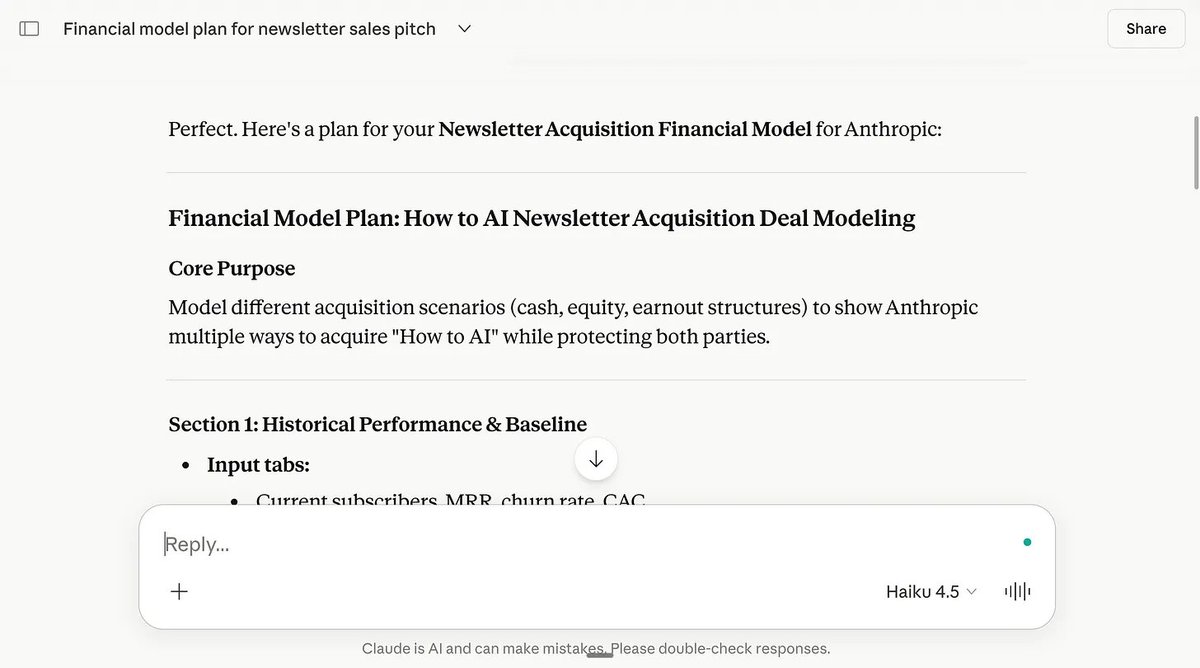

2. 在 Chat 里规划,最后再创建文件
Anthropic 已确认,文件创建(电子表格、文档、演示文稿)比普通聊天消息消耗更多额度。
所以不要一上来就用 Cowork 说“给我建个财务模型”。
相反,先在 Chat 里规划好结构,商量好各部分,确定假设条件。等你确切知道想要什么了,再转到 Cowork 说“生成这份文件”。
→ 在便宜的产品里思考。
→ 在昂贵的产品里构建。
3. Say “ask me questions” instead of writing a long prompt.
A 500-word prompt costs 500 tokens every time Claude re-reads the conversation. But if you write a 15-word prompt and let AskUserQuestion do the work, the clarifying questions are generated once and your answers are short clicks.
My go-to prompt is under 30 words: “I want to [task] to [success criteria]. Read my folder. Ask me questions using AskUserQuestion before you start.”

Clicking options costs almost nothing. Typing paragraphs of instructions costs a lot. Let Claude pull the context from you instead of you pushing walls of text at it.
3. 说“问我问题”而不是写长提示
一条 500 词的提示每次 Claude 重读对话都要花费 500 token。但如果你写一条 15 词的提示,并让 AskUserQuestion 发挥作用,澄清问题只会生成一次,你的回答也只是简单的点击。
我常用的提示不超过 30 个词:“我想[任务]以[成功标准]。读取我的文件夹。在开始之前用 AskUserQuestion 向我提问。”
点击选项几乎不花 token,而输入大段指令则很贵。让 Claude 主动从你这里获取上下文,而不是你把大段文字塞给它。
4. Use Wispr Flow to give richer answers (without token bloat).
Wispr Flow is a voice-to-text tool. I explain how I use it everyday here.
So wait, this sounds counterintuitive: speak your answers instead of typing them, and you’ll use fewer tokens?
Here’s why it works. When you type, you write lazy prompts. “Make it better.” “Change the tone.” Vague. Claude guesses wrong. And you keep sending more and more and more messages (so Claude has to re-re-read everything).
When you speak, you naturally give more context in one-shot. “The tone is too stiff. I want it to sound like I’m texting a friend who runs a 200-person company. Keep the data but make it casual. Only redo section 2.”
Fewer messages = fewer context reloads = saving tokens.
4. 用 Wispr Flow 提供更丰富的回答(不增加 token 负担)
Wispr Flow 是一个语音转文字工具。我在这里解释了我每天的用法。
等等,这听起来有点反直觉:用说的代替打字,反而能省 token?
原因是这样的。当你打字时,你会写出懒散的提示:“改好一点”、“改改语气”,很模糊。Claude 猜错了,于是你不停地发更多消息(Claude 不得不反复重读一切)。
但当你说话时,你会自然一次性给出更多上下文:“语气太生硬了,我希望听起来像在给一个管理 200 人公司的朋友发短信。保留数据,但更随意些。只重做第 2 部分。”
消息少了 = 上下文重载少了 = 节省 token。
5. Stop asking Claude to redo the whole thing.
When section 3 of a report is wrong, don’t say “redo the report.”
Say “only redo section 3. Keep everything else to save tokens.”
Every full redo means Claude re-generates the entire output. If your report is 2,000 tokens, that’s 2,000 output tokens burned again. Point to the specific section. Tell Claude what’s wrong with it.
While you’re at it, add “No commentary. No explanations. Just the output.” to your prompts when you know exactly what you want. Claude defaults to being helpful and verbose.
Every sentence of “Happy to help! Here’s what I did...” is tokens you’re paying for.
5. 别让 Claude 重做全部
当报告的第 3 部分出错时,不要说“重做报告”。
要说“只重做第 3 部分,其余保留以节省 token”。
每次全部重做都意味着 Claude 重新生成整个输出。如果你的报告是 2000 token,那就又烧掉了 2000 输出 token。请明确指出具体部分,告诉 Claude 哪里有问题。
同时,当你确切知道想要什么时,在提示里加上“不要评论,不要解释,只要结果”。Claude 默认会乐于助人、废话连篇。
每一句“乐意帮忙!以下是我做的……”都是你付了费的 token。
6. Batch your tasks into one message.
Three separate prompts = three full context reloads.
One prompt with three tasks = one reload.
Instead of sending “Summarize this article” then “List the main points” then “Suggest a headline,” write: “Summarize this article, list the main points, and suggest a headline.”
Side bonus: the answer usually turn out better too.
Claude needs to see the full picture at once… just like a normal human.
6. 把任务集中到一条消息里
三个单独的提示 = 三次完整的上下文重载。
一条包含三个任务的提示 = 一次重载。
不要先发“总结这篇文章”,再发“列出要点”,再发“建议一个标题”。而是直接写:“总结这篇文章,列出要点,并建议一个标题。”
额外好处:答案通常也会更好。
Claude 需要一次看到全貌——就像普通人一样。
7. Use the same prompt structure every time.
Anthropic confirmed that similar prompts you use frequently get partially cached. They don’t publish the exact mechanism, but the practical takeaway is clear: keep a stable prompt library and swap only the variable part.
Access my prompt library by subscribing for free at my newsletter.
I use the same 30-word structure for 80% of my Cowork sessions:
“I want to [task] to [success criteria]. Read my folder. Ask me questions using AskUserQuestion before you start.”
7. 每次都使用相同的提示结构
Anthropic 已确认,你频繁使用的类似提示会被部分缓存。他们没有公布具体机制,但实际结论很清楚:维护一个稳定的提示库,只替换可变部分。
免费订阅我的 Newsletter 获取我的提示库。
我 80% 的 Cowork 会话都使用相同的 30 词结构:
“我想[任务]以[成功标准]。读取我的文件夹。在开始之前用 AskUserQuestion 向我提问。”
8. Edit your message instead of sending a follow-up.
This is by far my favorite hack. I use it all of the time.
In Chat (unlike Cowork), you can click Edit on your original message, fix it, and regenerate. The old exchange gets replaced. Not stacked.


Every time you send “No, I meant...” or “Actually, change X to Y,” you’re adding to the conversation history. The edit button avoids this entirely.
Bonus: it’s also awesome when Claude missed the spot, you can just “go back”.
8. 编辑消息而不是发送后续
这是我最喜欢的技巧,我经常使用。
在 Chat 中(与 Cowork 不同),你可以点击原始消息的“编辑”,修改后重新生成。旧的交流会被替换,而不是堆叠。
每次你发“不,我的意思是……”或“实际上,把 X 改成 Y”,都在增加对话历史。编辑按钮完全避免了这个问题。
额外好处:当 Claude 答偏时,你还可以“返回”。
9. Pick the right product for the task.
- Quick question? Chat with Haiku.
- Writing a report based on your files? Cowork with Opus.
- Building a chart from data? Code with Sonnet. Every product has different token costs per interaction. Chat is the lightest. Cowork is the heaviest. Matching the tool to the task means you stop paying Cowork prices for Chat-level work.
Same goes to a feature no one uses (somehow), the Research feature of Chat:

9. 为任务选择合适的模型
- 快速提问?用 Chat 的 Haiku。
- 基于文件写报告?用 Cowork 的 Opus。
- 用数据构建图表?用 Code 的 Sonnet。 每种产品的每次交互 token 成本不同。Chat 最轻,Cowork 最重。为任务匹配工具意味着你不会为 Chat 级别的工作付 Cowork 的价格。
同样适用于一个几乎没人用的功能——Chat 的 Research 功能:
The basics that still matter.
You probably know some of these.
10. Keep your ABOUT ME files under 2,000 words each.
I explained everything on my last Claude Cowork guide.
But you’ve read it, right? Right?
Cowork reads your folder before every single task. If your about-me file is 22,000 words (mine used to be), that’s thousands of tokens burned before any real work starts. Every session. Every task.
I trimmed it to under 2,000 words.
Pro tip: at the end of a Cowork session, prompt “Write a session-notes.md with the key decisions and next steps.” Next session, start with “Read session-notes.md first.”

You carry the context forward without re-explaining everything from scratch.
基础但仍然重要的东西
你可能已经知道其中一些。
10. 保持 ABOUT ME 文件在 2000 词以内
我在上一份 Claude Cowork 指南里解释过一切。
你看过了吧?嗯?
Cowork 在每次任务前都会读取你的文件夹。如果你的 about-me 文件有 22,000 词(我以前就是),那么在真正工作开始之前就已经烧掉了几千 token。每次会话、每个任务都是如此。
我把它缩减到了 2,000 词以内。
专业提示:在 Cowork 会话结束时,提示“写一份 session-notes.md,记录关键决策和下一步”。下一会话以“先阅读 session-notes.md”开始。
这样你可以向前传递上下文,而不必从头重新解释一切。
11. Restart the conversation instead of sending follow-ups.
When Cowork gets something wrong, your instinct is to type “No, I meant...” and send another message. Every follow-up stacks on top of the full conversation history. Claude re-reads all of it. Again.
A 20-message session burns roughly 105,000 tokens.
A 30-message session burns 232,000. That’s insane, right?
Since you can’t edit prompts inside Cowork (to go back), you can still “Restart the conversation from here” on an earlier message. The higher up you restart, the more tokens you save.

If the whole session went sideways, start a fresh one. Paste a one-line summary of what you need. Clean slate.
11. 重新开始对话而不是发送后续
当 Cowork 出问题时,你的本能是输入“不,我的意思是……”并发送另一条消息。每一条后续都会叠加在完整对话历史之上。Claude 再次重读全部内容。
20 条消息的会话大约消耗 105,000 token。
30 条消息的会话消耗 232,000 token。很疯狂,对吧?
既然你不能在 Cowork 中编辑提示(以返回),你仍然可以点击较早消息的“从此处重新开始对话”。你重新开始的位置越靠前,节省的 token 就越多。
如果整个会话走偏了,干脆重新开始一个新的。粘贴一行你需要的总结,从头开始。
12. Summarize and start fresh every 15-20 messages.
Long conversations are token furnaces.
One developer tracked his usage and found 98.5% of tokens were spent re-reading history. Only 1.5% went toward the actual output.
When a Cowork session gets long: ask Claude to summarize everything important, copy that summary, open a new session, paste it as your first message.
12. 每 15-20 条消息就总结并重置
长对话是 token 熔炉。
一位开发者跟踪了自己的使用情况,发现 98.5% 的 token 花在了重读历史上,只有 1.5% 用于实际输出。
当 Cowork 会话变长时:让 Claude 总结所有重要内容,复制总结,打开一个新会话,把它作为第一条消息粘贴进去。
13. Use Sonnet or Haiku for simple tasks. Save Opus for deep work.
Grammar checks, brainstorming, reformatting, short answers. Sonnet handles all of this at a fraction of the cost.
Opus + Extended thinking is your heavy machinery. Don’t use heavy machinery to move a chair.
My rule: if the task takes Claude less than 30 seconds to answer, it probably doesn’t need Opus. Switch models before you start the session. It takes 2 clicks.

13. 简单任务用 Sonnet 或 Haiku,深度工作留给 Opus
语法检查、头脑风暴、重新格式化、简短回答——Sonnet 都能以较低成本处理。
Opus + Extended thinking 是重型机械。不要用重型机械来搬一把椅子。
我的原则:如果任务让 Claude 回答的时间不超过 30 秒,那很可能不需要 Opus。在开始会话前切换模型,只需要点两下。
14. Don’t dump your entire folder into Cowork.
I’ve seen people drop 50 files into their Cowork folder “just in case.”
Every file Cowork reads is tokens spent. And if your files are too big, Cowork starts summarizing them loosely instead of reading them carefully.
If Claude doesn’t need it for this task, it shouldn’t be reading it.
And for Cowork tasks that don’t need your files at all (like a quick email draft using a connector), select zero folders when you start the session.
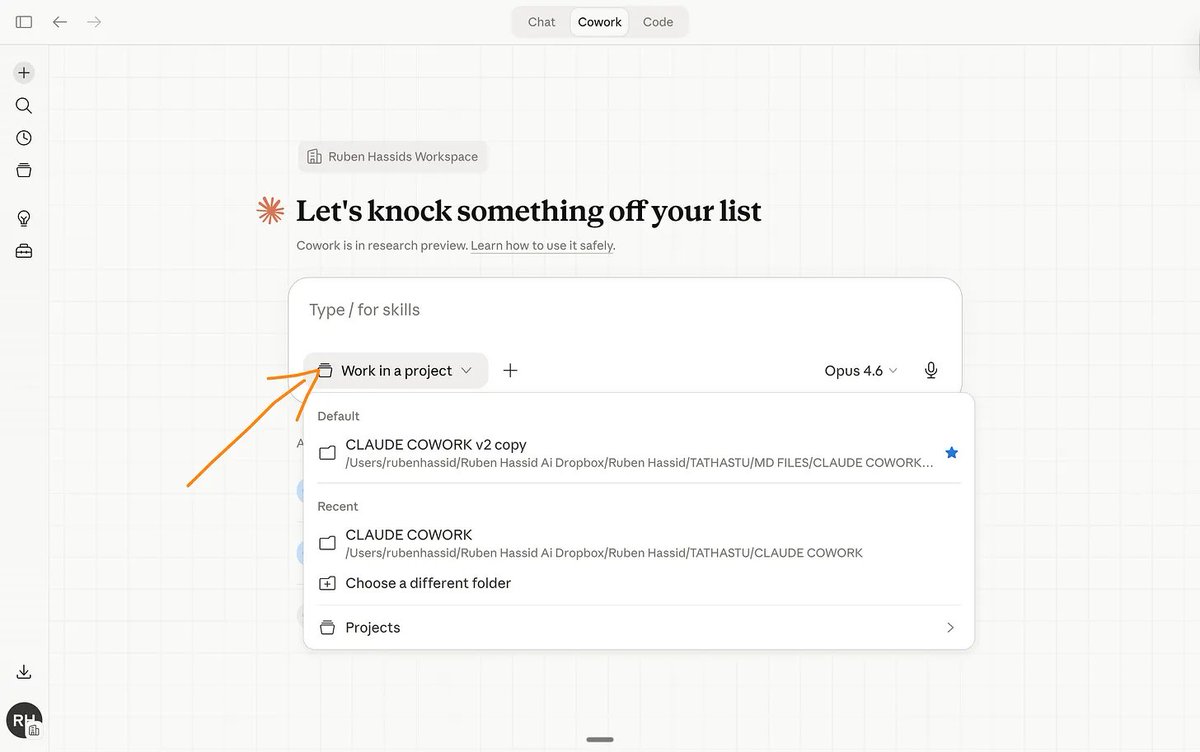
Zero folders = zero local file context = tokens saved before you even type.
14. 不要把整个文件夹丢进 Cowork
我见过有人往 Cowork 文件夹里丢 50 个文件,“以防万一”。
Cowork 读取的每个文件都是花出去的 token。而且如果文件太大,Cowork 会粗略地总结而不是认真阅读。
如果 Claude 本次任务不需要它,就不该让 Claude 读它。
对于完全不需要文件的 Cowork 任务(比如用连接器快速起草邮件),刚开始会话时选择零个文件夹。
零文件夹 = 零本地文件上下文 = 在你打字之前就已经节省了 token。
15. Start a new chat when the topic changes.
You asked Claude to help with a LinkedIn post. Then you asked about a client proposal. Then a recipe. Inside the same chat. Well… don’t.
Claude is still re-reading the LinkedIn post conversation and the client proposal every time it thinks about your dinner. Those old messages are dead weight. Tokens burned on context that does nothing for the current question.
New topic = new chat. Always.
15. 话题变化时开始新对话
你让 Claude 帮忙写 LinkedIn 帖子,接着又问客户提案,然后又问食谱——都在同一个对话里。千万别这样。
Claude 在思考你的晚餐时,还在重读 LinkedIn 帖子对话和客户提案。那些旧消息是死重,token 花在了与当前问题无关的上下文中。
新话题 = 新对话。永远。
16. Turn off features you’re not using.
Web search, connectors, and “Explore” mode all add tokens to every response. Even when you don’t need them.
Writing your own content? Turn off Search and Tools. Doing a simple grammar check? Turn off Extended Thinking. These features are powerful, but they cost tokens. Only turn them on when you actually need them.
My default: everything off. I turn features on per task, not per account.
I do use Extended thinking almost all of the time, but I pay for the $100 plan.
And when you do use connectors (Slack, Google Drive, Notion), be specific about what you need. “Search Slack from the last 7 days for messages about the Q2 launch” is way cheaper than “Search Slack for anything about launches.”

Filtered retrieval = fewer results loaded = fewer tokens burned.
16. 关掉不用的功能
网络搜索、连接器和“探索”模式都会给每次响应增加 token 消耗,即使你并不需要它们。
自己写内容?关掉搜索和工具。做简单的语法检查?关掉 Extended Thinking。这些功能很强大,但也要消耗 token。只在确实需要时才打开。
我的默认设置:全部关掉。我按任务开启功能,而不是按账户。
我几乎一直使用 Extended thinking,但我付的是 100 美元的套餐。
当你确实使用连接器(Slack、Google Drive、Notion)时,要具体说明需求。“搜索 Slack 过去 7 天内关于 Q2 发布的 messages”比“搜索 Slack 中关于发布的任何内容”便宜得多。
过滤检索 = 加载更少结果 = 烧掉更少 token。
17. Use Projects for recurring work.
If you upload the same PDF to five different chats, Claude re-tokenizes that document every single time. Five chats, five full reads.
Use Projects instead. Upload the file once. It gets cached (= saved).

Every new conversation inside that project references it without burning tokens again. Anthropic confirmed that reused project content does not count the same way as fresh uploads.
On paid plans, Projects also use RAG, which means Claude retrieves only the relevant chunks instead of loading your entire document into the context window.
If you work with contracts, brand guides, research papers, or any document you reference often, this alone could cut your token spend significantly.
17. 对重复性工作使用 Projects
如果你把同一份 PDF 上传到五个不同的对话,Claude 每次都会重新 token 化该文档。五次对话,五次完整读取。
改用 Projects。上传一次文件,它会被缓存(保存)。
该项目内的每个新对话都会引用它,而不会再次消耗 token。Anthropic 已确认,重复使用的项目内容不计入像新上传那样的费用。
在付费计划中,Projects 还使用 RAG,这意味着 Claude 只检索相关片段,而不是将整个文档加载到上下文窗口中。
如果你经常处理合同、品牌指南、研究论文或任何文档,仅这一点就能大幅减少 token 消耗。
18. Turn off Memory and add User Preferences.
Every new chat without saved context wastes 3-5 messages on setup.
“I’m a marketer, I write casually, I prefer short paragraphs...”
So do this:


Also set up Styles (you’ll find it in the model selector).

Pick “Concise” or create a custom style. It persists across chats without eating your context. One setup, permanent savings.
18. 关闭记忆并添加用户偏好
每个没有保存上下文的新聊天都会浪费 3-5 条消息进行设置。
“我是市场人员,我写作随意,喜欢短段落……”
那么这样做:
另外设置 Styles(你可以在模型选择器里找到它)。
选择“简洁”或创建自定义风格。它会跨聊天持久化,且不消耗你的上下文。一次性设置,永久节省。
19. Use scheduled tasks for recurring work.
If you run the same report, digest, or research task every week, don’t do it manually in a growing Cowork session.
Use the /schedule plugin.


19. 对重复性任务使用 Scheduled Tasks
如果你每周都要跑同样的报告、摘要或研究任务,不要在一个不断增长的 Cowork 会话中手动操作。
使用 /schedule 插件。
20. Give Claude Code a clear scope before it starts.
You might think Claude Code is only for developers. I use it to create briefs for my tech team and build quick data visualizations. I explained how:
Claude Code.

But Code sessions can burn tokens faster than anything else if you’re not careful.
Code tends to go wide. It explores files, reads directories, runs checks. If you don’t tell it exactly what you need, it will investigate everything in sight.
Tokens everywhere, wasted.
Be specific. “Create a bar chart from this CSV showing monthly revenue for 2025. Save it as chart.png.” Don’t leave room for Claude to explore.
20. 给 Claude Code 明确的范围
你可能以为 Claude Code 只适合开发者。我用它给技术团队写任务简报,以及快速构建数据可视化。我解释过具体用法:
Claude Code。
但如果不够小心,Code 会话消耗 token 的速度比什么都快。
Code 倾向于广泛探索。它会检查文件、读取目录、运行校验。如果你不准确告诉它需要什么,它会调查所有能看到的东西。
token 四处乱烧,白白浪费。
要具体。“从这个 CSV 创建一张条形图,展示 2025 年每月收入,保存为 chart.png。”不要给 Claude 留下探索的空间。
21. Use the CLAUDE.md file to set permanent context.
Code reads a CLAUDE.md file (if it exists) before every task.
Put your recurring instructions there: what folder to work in, what language to use, what your naming conventions are.
Same logic as Cowork’s Global Instructions. Write it once, never repeat it, save tokens every session.
Anthropic also warns that bloated CLAUDE.md files make Claude ignore your actual instructions. Keep it short. If you have workflows you only use sometimes (like a specific reporting format), move those into Skills instead.
Skills load on demand. CLAUDE.md loads every single time.
More about skills here.
21. 使用 CLAUDE.md 文件设置永久上下文
Code 会在每个任务前读取 CLAUDE.md 文件(如果存在)。
把你重复使用的指令放进去:在哪个文件夹工作、用什么语言、命名规范是什么。
逻辑和 Cowork 的 Global Instructions 一样:写一次,不用重复,每次会话都节省 token。
Anthropic 也警告说,臃肿的 CLAUDE.md 文件会使 Claude 忽略你的实际指令。保持简短。如果你有一些不常用的工作流(比如特定的报告格式),把它们移到 Skills 中。
Skills 按需加载,而 CLAUDE.md 每次都加载。
更多关于 skills 的内容请点击这里。
22. Spread your work across the day.
Claude uses a rolling 5-hour window for usage limits. If you burn your entire limit in one morning session, most of your daily capacity goes unused.
Split into 2-3 sessions: morning, afternoon, evening. By the time you come back, your previous usage has rolled off.
I know. Easier said than done. I pay for the $100/month plan specifically so I don’t have to worry about this. But if you’re on the $20 plan, it matters.
22. 把工作分散到一天中进行
Claude 使用滚动的 5 小时窗口来计算使用限制。如果你在早间一次用完所有额度,那么大部分日容量就浪费了。
分成 2-3 次会话:早上、下午、晚上。等你再次使用时,之前的用量已经滚动失效。
我知道,说起来容易做起来难。我专门选了 100 美元/月的套餐,这样就不用担心这个。但如果你用的是 20 美元的套餐,这很重要。
23. Stop using Claude for things Claude is bad at.
Claude can’t generate images. If you’re spending 5 messages trying to describe a visual and getting text-based workarounds, switch to Gemini.
That’s 5 messages of tokens wasted on a task Claude was never going to solve.
Claude isn’t the best at real-time search either. Grok is faster and more accurate for that. Use Grok.
Recently, ChatGPT has been pretty good at both images and search. A comeback?
23. 不要在 Claude 不擅长的任务上浪费 token
Claude 不能生成图像。如果你花了 5 条消息描述一个视觉效果,只得到基于文本的变通方案,那就切换到 Gemini。
5 条消息的 token 浪费在 Claude 永远无法解决的任务上。
Claude 也不擅长实时搜索。在这方面 Grok 更快更准确,用 Grok。
最近,ChatGPT 在图像和搜索方面都做得不错,难道要回归了?
Where to start.
You won’t do all 23 at once. Don’t try.
Pick three:
If you use Cowork daily, start with habits 1, 2, and 5. Convert your files before uploading, plan in Chat before building, and stop asking for full redos.
If you mostly use Chat, start with 8, 15, and 17. Edit instead of correcting, new chat per topic, and use Projects for recurring files.
If you’re on the $20 plan and keep hitting limits, start with 6, 13, and 22. Batch your prompts, use cheaper models, and spread your sessions across the day.
A message from the author, Ruben.
This article exists because 65,000+ people decided AI is too important to leave aside. Not only that, but they shared it around them. They understand they are the sum of the 5 people around them. So better have them using AI.
If this helped you — or if it’ll help someone you know — forward it to them. That’s how this grew. Just readers like you sending it to people like them.
And if you're new here, follow me on X →@rubenhassid (also free!)
从哪里开始
你不会一次性做完 23 个习惯,别试。
挑三个:
- 如果你每天用 Cowork,从习惯 1、2、5 开始:上传前转换文件、在 Chat 规划再构建、不要要求全部重做。
- 如果你主要用 Chat,从习惯 8、15、17 开始:编辑而不是纠正、每话题新对话、使用 Projects 处理重复文件。
- 如果你用 20 美元套餐且经常超限,从习惯 6、13、22 开始:批量提示、用便宜模型、分散会话到全天。
作者 Ruben 的话
这篇文章之所以存在,是因为超过 65,000 人认为 AI 太重要,不能弃之不用。不仅如此,他们还把文章分享给周围的人。他们明白自己身边 5 个人的总和决定了自身,所以最好让周围人也用上 AI。
如果这篇文章帮到了你,或者能帮到你认识的人,请转发给他们。这篇文章就是这样成长起来的——正是像你一样的读者把它分享给像他们一样的人。
如果你是新朋友,在 X 上关注我 → @rubenhassid(也是免费的!)