Steering Claude Code: CLAUDE.md, skills, hooks, rules, subagents and more
This official guide from Claude Code maps out seven mechanisms for injecting instructions: CLAUDE.md, rules (with optional path scoping to save tokens), skills (dynamically loaded on invocation), subagents (fully isolated context, ideal for side tasks), hooks (deterministic triggers with low context cost), output styles (highest instruction weight, but replace defaults), and append-system-prompt (additive but has diminishing returns). It details when each loads, its context cost, and typical use cases. Key advice: use hooks for deterministic behavior over CLAUDE.md, skills for multi-step procedures, path-scoped rules for API-specific constraints, and managed settings for non-overridable guardrails. Aimed at engineers customizing Claude Code for production workflows.
Rules are markdown files in .claude/rules/ that give Claude specific constraints or conventions. Unscoped rules behave like CLAUDE.md in that they are always loaded at session start and get re-injected on compaction. This can waste tokens by loading context even when it's not relevant for the task at hand. Path-scoped rules allow you to load rule instructions only when they are relevant by adding a paths field that controls when they load. For example: a rule scoped to src/api/** stays out of context during a docs-only session. It would only be loaded whenever Claude reads files within that src/api/ directory. Here’s what that looks like: --- paths: - "src/api/" - "/*.handler.ts" --- All API handlers must validate input with Zod before processing.
规则文件是位于 .claude/rules/ 下的 markdown 文件,用于向 Claude 传递特定约束或约定。无作用域的规则与 CLAUDE.md 行为一致:始终在会话启动时加载,并在压缩时重新注入。这可能导致当前任务无关的上下文浪费令牌。路径作用域规则允许你通过添加 paths 字段,仅在相关时加载规则指令。例如:作用域限定在 src/api/** 的规则,在纯文档会话中不会进入上下文,仅当 Claude 读取 src/api/ 目录下的文件时才会加载。具体格式如下:
paths:
- "src/api/**"
- "**/*.handler.ts"
所有 API 处理器在处理前必须使用 Zod 验证输入。
Tip: A file-specific constraint, like "migrations are append-only," fits best as a rule placed in your paths: frontmatter. Reach for a path scoped rule over a nested CLAUDE.md file when the instruction regards a cross-cutting concern or file that appears in multiple (but not all) corners of the codebase.
建议:文件级别的约束(如“迁移文件仅可追加”)最适合作为带有 paths: 前置元数据的规则。当指令涉及跨多个目录但又非全局的关切点或文件时,应优先使用路径作用域规则,而非嵌套的 CLAUDE.md 文件。
Skills live in .claude/skills/ as folders of instructions, scripts, and resources that Claude loads dynamically. Each skill has a SKILL.md file with a name, description, and body. Only the name and description load at session start; the full body loads when Claude invokes the skill, either through a slash command (/code-review) or by auto-matching the task. 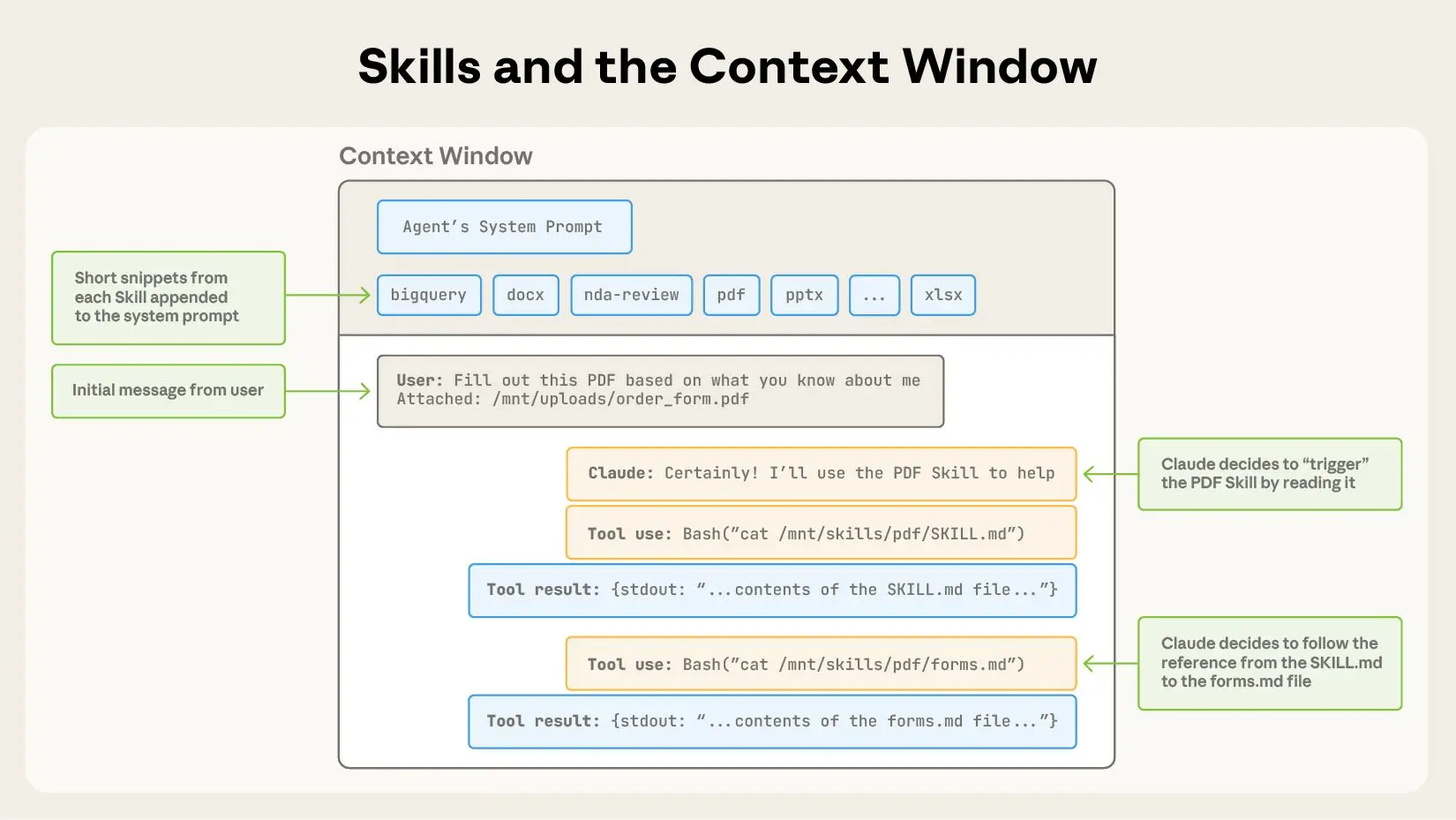 Skills are triggered via your system prompt. For example, /code-review is a built-in skill that reviews your current diff and reports its findings without editing files. The skill defines the playbook so Claude follows the same structured approach every time you invoke it. On compaction, Claude Code re-injects invoked skills up to a total budget across all invoked skills. If you’ve invoked many skills during a session, the oldest ones drop first.
技能存放在 .claude/skills/ 目录下,每个技能是一个包含指令、脚本和资源的文件夹,由 Claude 动态加载。每个技能包含一个 SKILL.md 文件,内含名称、描述和正文。会话启动时仅加载名称和描述;当 Claude 通过斜杠命令(如 /code-review)或自动匹配任务来调用技能时,完整正文才会加载。技能通过系统提示触发。例如,/code-review 是内置技能之一,它审查当前差异并报告结果,但不编辑文件。技能定义了操作手册,确保每次调用 Claude 都遵循相同的结构化方法。在压缩时,Claude Code 会在所有已调用技能的总预算内重新注入这些技能。如果会话中调用过多技能,最早的那些会被丢弃。
Tip: Instructions that are procedural, like deploy workflows, release checklists, or review processes, belong in a skill rather than in CLAUDE.md. Claude Code ships with skills, but you can also write your own custom skills. Our complete guide to building skills for Claude shows you how.
建议:过程性指令(如部署工作流、发布检查清单或审查流程)应放在技能中,而非 CLAUDE.md。Claude Code 自带了一些技能,你也可以编写自定义技能。我们的《Claude 技能构建完整指南》介绍了具体方法。
Subagents are markdown files in .claude/agents/ that define isolated assistants for specific side tasks. Each file uses YAML frontmatter (name, description, plus optional fields for model and tool access) followed by a body that becomes that subagent's system prompt. Subagents are similar to skills in that the name, description, and tool list load at session start, but the larger context within the body of the agent doesn’t auto-invoke. Claude calls them via the Agent tool, passing in a prompt string. 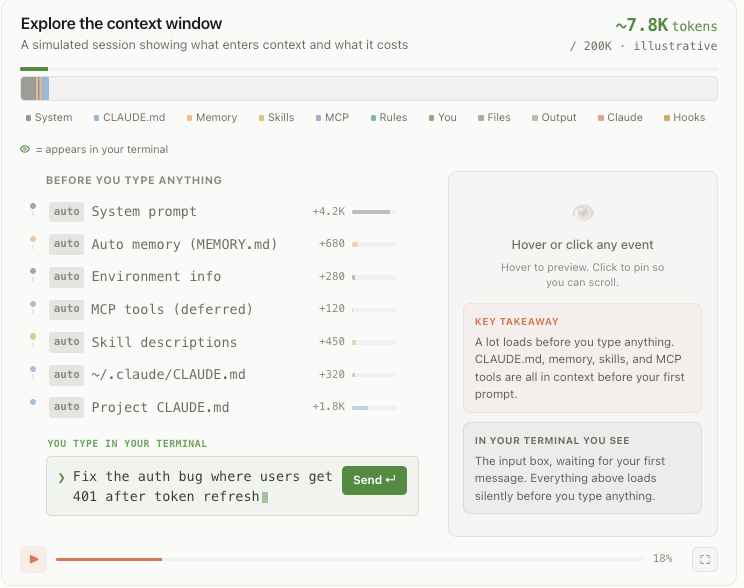 Claude Code’s context window holds everything Claude knows about your session. The interactive timeline here walks through what loads and when. Not only does the larger instructional context within the body of the subagent not auto-invoke, it never enters the parent conversation at all. The subagent then runs in its own fresh context window, and the only thing that returns to your main session is the subagent’s final message (often the aggregated result of many subtasks) plus metadata.
子代理是位于 .claude/agents/ 下的 markdown 文件,用于定义针对特定子任务的隔离助手。每个文件包含 YAML 前置元数据(名称、描述,以及可选的模型和工具访问权限字段),后接的正文作为该子代理的系统提示。子代理与技能类似:会话启动时仅加载名称、描述和工具列表,代理正文中的更大上下文不会自动调用。Claude 通过 Agent 工具调用子代理,并传入一个提示字符串。Claude Code 的上下文窗口包含会话的全部信息。此处的时间线交互图展示了各部分内容加载的时机。子代理正文中的大型指令上下文不仅不会自动调用,而且根本不会进入父会话。子代理会在自己的全新上下文窗口中运行,返回给主会话的只有子代理的最终消息(通常是多个子任务聚合后的结果)及元数据。
This pattern scales: subagents can nest up to five levels deep, and dynamic workflows orchestrate tens to hundreds of background agents without requiring you to specify each detail of the subagent architecture. The orchestration plan and intermediate results live in script variables rather than in Claude’s context window, which enables scale without losing instructional fidelity. Tip: That isolation is one of the main reasons to reach for a subagent instead of a skill. Use a subagent when a side task like deep search, a log analysis pass, or a dependency audit would clutter your main conversation with intermediate results you won't reference again. Use a skill when you want the procedure to play out inside the main thread so you can see and steer each step.
这种模式具有可扩展性:子代理可嵌套最多五层,动态工作流能编排数十到数百个后台代理,而无需你指定子代理架构的每个细节。编排计划和中间结果存储在脚本变量中,而非 Claude 的上下文窗口,从而在不损失指令保真度的前提下实现规模化扩展。建议:隔离性是选择子代理而非技能的主要原因之一。当需要深度搜索、日志分析或依赖审计等子任务时,使用子代理可以避免中间结果污染主会话。当你希望过程在主线程中执行,以便观察和引导每一步时,使用技能。
Hooks are user-defined commands, HTTP endpoints, or LLM prompts that provide more deterministic control over Claude’s behavior by firing on specific events in Claude’s lifecycle like file edits, tool calls, or session start. 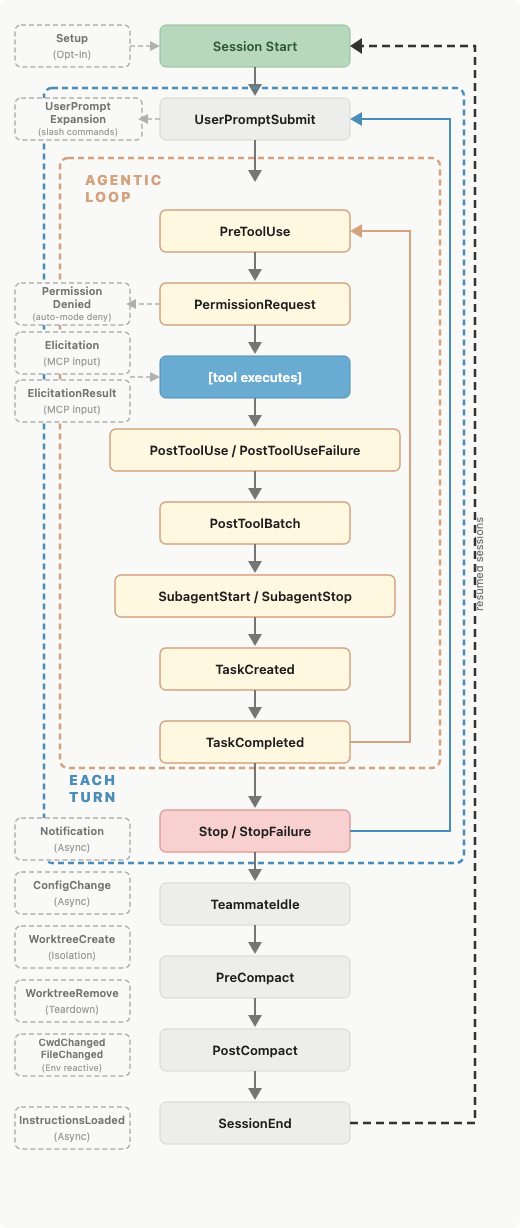 A map of events in a Claude Code session when a hook can fire. You register hooks in settings.json, managed policy settings, or skill/agent frontmatter. There are several types of hooks: command, HTTP, mcp_tool, prompt, and agent. All hooks are deterministically triggered. The first three execute deterministically while the latter two, prompt and agent, use Claude’s judgment rather than a set of rules to determine the output.
钩子是用户定义的命令、HTTP 端点或 LLM 提示,通过监听 Claude 生命周期中的特定事件(如文件编辑、工具调用或会话启动)来提供更确定性的行为控制。图中展示了 Claude Code 会话中可触发钩子的事件映射。你可以在 settings.json、托管策略设置或技能/代理的前置元数据中注册钩子。钩子有多种类型:command、HTTP、mcp_tool、prompt 和 agent。所有钩子都是确定性触发的。前三类以确定性方式执行,而后两类(prompt 和 agent)则依赖 Claude 的判断而非规则集来决定输出。
Hooks have low context costs because the configuration or instruction lives outside the main context window. The harness runs the handler (command, http, mcp_tool) or makes model calls with separate windows (prompt, agent) depending on the hook type. Some hooks may have the output saved to the main context window. For example, a blocking hook's standard error is saved within context so Claude knows why the call was denied. But most hooks won’t have the output saved to the main window unless the configuration explicitly returns it. If you backed up your chat history into another file for later reference before compaction using the PreCompact event, Claude wouldn’t know which file had the chat history saved. This makes these hook types fundamentally different from CLAUDE.md, rules, and skills. You can learn more in our post how to configure hooks. Tip: Use hooks for anything that should happen deterministically: running linters after edits, posting to Slack on completion, or blocking specific commands before they execute. A PreToolUse hook can inspect any tool call and exit code 2 to deny it. They have low context cost because they are code that the harness runs rather than instructions to Claude that get loaded into context.
钩子的上下文成本很低,因为配置或指令位于主上下文窗口之外。运行器根据钩子类型执行处理程序(command、http、mcp_tool),或使用独立窗口进行模型调用(prompt、agent)。某些钩子的输出可能会保存到主上下文窗口。例如,阻塞类钩子的标准错误会保存在上下文中,以便 Claude 了解调用被拒绝的原因。但大多数钩子的输出不会保存到主窗口,除非配置明确要求返回。如果使用 PreCompact 事件在压缩前将聊天历史备份到另一个文件,Claude 不会知道哪个文件保存了聊天历史。这使这些钩子类型与 CLAUDE.md、规则和技能有本质区别。更多信息请参阅《如何配置钩子》一文。建议:钩子适用于任何需要确定性执行的操作,例如编辑后运行 linter、完成后发布到 Slack,或在命令执行前进行拦截。PreToolUse 钩子可以检查任何工具调用,并通过退出码 2 拒绝它。钩子上下文成本低,因为它们是由运行器执行的代码,而非加载到上下文中的指令。
Output styles are files in .claude/output-styles/ that inject instructions into the system prompt. They never get compacted, load at the start of every session, and are cached after the first request within a session, meaning they have a moderate context cost. Because they sit in the system prompt, output styles carry the highest instruction-following weight of any method that we've covered so far and should be used judiciously. Changes to the output style will replace the default output style (unless you set keep-coding-instructions: true in the style's frontmatter). In Claude Code, this would remove instructions that tell Claude it is helping users with software engineering tasks and contains other critical default instructions such as: How to scope changes; When to add or omit code comments; What to do about security concerns; and Verification habits like running tests before declaring work complete. By default, a custom output style drops all of this and Claude Code becomes more of a general assistant than a software engineer assistant.
输出样式是位于 .claude/output-styles/ 下的文件,用于向系统提示注入指令。它们永远不会被压缩,在每次会话启动时加载,并在会话内首次请求后被缓存,因此具有中等上下文成本。由于位于系统提示中,输出样式在我们目前介绍的所有方法中拥有最高的指令遵循权重,应谨慎使用。修改输出样式会替换默认输出样式(除非在样式的前置元数据中设置 keep-coding-instructions: true)。在 Claude Code 中,这将移除用于告知 Claude 它正在帮助用户完成软件工程任务的指令,以及其他关键默认指令,例如:如何界定变更范围;何时添加或省略代码注释;如何处理安全问题;以及在宣布工作完成前运行测试等验证习惯。默认情况下,自定义输出样式会丢弃所有这些内容,Claude Code 将更像是通用助手而非软件工程助手。
Tip: Before writing a custom output style, check the built-in styles. Proactive, Explanatory, and Learning cover the most common needs (autonomy, teaching mode, collaborative coding) without you having to maintain a style file.
建议:在编写自定义输出样式之前,请先查看内置样式。Proactive、Explanatory 和 Learning 涵盖了最常见需求(自主性、教学模式、协作编码),无需你自行维护样式文件。
An alternative to modifying output styles is the append-system-prompt flag. Whereas modifying output style files can have large, unintended changes to Claude’s behavior, the append flag is only additive to the original system prompt. It doesn’t modify Claude’s role; it just adds instructions to its default role. It is also passed at invocation time, and only applies to that invocation, rather than persisted as a file across sessions. Appending the system prompt can have a higher context cost compared to other methods of passing instructions. It increases input tokens, though prompt caching reduces this cost after the first request in a session. Instructing Claude to use a more verbose or longer style also increases output tokens. Tip: Appending the system prompt is best for adding specific coding standards, output formatting, or domain-specific knowledge. Keep in mind that appending the system prompt has diminishing returns for adherence. Generally, the more instructions you provide using this method, the less strictly Claude will follow them, particularly if any contradict.
修改输出样式的替代方案是 append-system-prompt 标志。修改输出样式文件可能对 Claude 的行为产生重大且非预期的改变,而追加标志仅向原始系统提示添加内容,不会修改 Claude 的角色,只是在其默认角色基础上增加指令。它还在调用时传递,仅适用于该次调用,不会跨会话持久化存储为文件。与其他传递指令的方法相比,追加系统提示的上下文成本更高。它会增加输入令牌数,不过提示缓存会在会话内首次请求后降低这一成本。指示 Claude 使用更冗长或更长的风格也会增加输出令牌数。建议:追加系统提示最适合添加特定编码标准、输出格式或领域特定知识。请注意,使用此方法时,指令遵循度会递减。通常,提供的指令越多,Claude 遵循得越不严格,尤其是在存在矛盾指令时。
If you find yourself doing one of the following, you may want to consider an alternative location for your instructions: "Every time X, always do Y" in CLAUDE.md. If the behavior should happen reliably, like running prettier after every edit or posting to Slack on completion, use a hook in settings.json instead. The model choosing to run a formatter is different from the formatter running automatically. “Never do this” in CLAUDE.md. When there's something that absolutely must not happen, an instruction is the wrong tool. Claude will follow the instruction most of the time, but when under pressure, in a long session or an ambiguous situation, or due to a prompt injection in a file accessed as part of the task, the model can fail to follow a prompted rule. A real guardrail needs to be deterministic, and the enforcement methods are hooks and permissions. A PreToolUse hook can inspect a call and exit with code 2 to block it. Managed settings go further: they are admin-deployed, cannot be overridden by a user's local config, and are the only way to enforce a deterministic, organization-wide guardrail.
如果你发现自己正在做以下事情,可能需要考虑将指令放在其他位置:在 CLAUDE.md 中写“每次 X,总是做 Y”。如果行为需要可靠执行(如每次编辑后运行 prettier,或完成时发布到 Slack),应改用 settings.json 中的钩子。模型自行选择运行格式化程序,与格式化程序自动运行是两回事。在 CLAUDE.md 中写“永远不要这样”。当某件事绝对不允许发生时,指令不是正确的工具。Claude 大多数情况下会遵循指令,但在压力之下、长时间会话或模糊场景中,或因任务中访问的文件遭受提示注入,模型可能无法遵守提示中的规则。真正的护栏必须是确定性的,对应的强制手段是钩子和权限。PreToolUse 钩子可以检查调用并以退出码 2 阻止它。托管设置则更进一步:由管理员部署,用户本地配置无法覆盖,是实现确定性、组织级强制护栏的唯一方式。
A 30-line procedure in CLAUDE.md. Procedures belong in skills. CLAUDE.md is for facts Claude should hold all the time: build commands, monorepo layout, team conventions. A deployment runbook or a security review checklist should live in .claude/skills/, where the body loads only when invoked. An API-specific rule without paths. If a rule only applies to src/api/**, scoping it with paths: keeps it out of context during unrelated work. An unscoped rule is mechanically identical to putting the content in CLAUDE.md: always loaded, always costing tokens. Writing personal preferences to a project-level CLAUDE.md file. All file-based methods have a user-level counterpart loaded for every Claude Code session regardless of which repo you’re in. Use local files for personal preferences (always use semantic commit messages). Keep project-level files for preferences that are team-wide but specific to a given codebase.
在 CLAUDE.md 中写 30 行过程代码。过程性指令应放在技能中。CLAUDE.md 用于存放 Claude 应始终掌握的事实:构建命令、单仓库布局、团队约定。部署操作手册或安全审查检查清单应放在 .claude/skills/ 中,其正文仅在调用时加载。API 特定规则未指定路径。如果规则仅适用于 src/api/**,使用 paths: 限定作用域可使其在执行无关工作时远离上下文。无作用域的规则在机制上等同于将内容放入 CLAUDE.md:始终加载,始终消耗令牌。将个人偏好写入项目级 CLAUDE.md 文件。所有基于文件的方法都有对应的用户级文件,无论你处于哪个仓库,都会为每个 Claude Code 会话加载这些文件。个人偏好(如始终使用语义化提交消息)应使用本地文件。团队级但特定于某代码库的偏好应保留在项目级文件中。
You can find more tips and patterns for getting the most out of Claude Code, from configuring your environment to scaling across parallel sessions, in our best practices for Claude Code documentation. Once you have a few of these working, you can bundle many of them (skills, subagents, hooks, output styles) as a plugin to share a coherent setup across teammates or projects.
从环境配置到跨并行会话扩展,你可以从《Claude Code 最佳实践》文档中找到更多关于充分利用 Claude Code 的技巧和模式。当几种定制方式均已生效后,你可以将它们(技能、子代理、钩子、输出样式)打包为插件,以便在团队成员或项目之间共享一致的配置。