拆解 Claude Code:六层架构、治理与工程实践
作者基于半年深度使用 Claude Code 的实际踩坑,将 Claude Code 的功能拆解为六层(长期上下文、工具/MCP、Skills、Hooks、Subagents、Verifiers),并分别给出设计原则、反模式与配置示例。文章重点讨论了上下文工程(上下文成本构成、分层加载策略、压缩机制陷阱)、工具设计(如何让 Claude 少选错)、Hooks 的强制拦截场景、Subagents 的上下文隔离价值,以及 Prompt 缓存和验证闭环。最后给出项目级 CLAUDE.md 模板、混合语言项目 Hooks 实践与配置健康检查工具。适合希望将 Claude Code 从“ChatBot”升级为“可控工程 Agent”的一线工程师。
The author presents a six‑layer model for understanding and taming Claude Code:
| Layer | Responsibility |
|---|---|
| CLAUDE.md/rules/memory | Long‑term context, telling Claude “what is” |
| Tools/MCP | Action capabilities, telling Claude “what it can do” |
| Skills | On‑demand loaded methodologies, telling Claude “how to do it” |
| Hooks | Enforce specific behaviors, not relying on Claude’s own judgment |
| Subagents | Isolated‑context workers, responsible for controlled autonomy |
| Verifiers | Verification loop, making output verifiable, rollback‑able, auditable |
Optimising any single layer in isolation often creates issues elsewhere: CLAUDE.md too long pollutes context; too many tools cause confusion; too many subagents breed state drift; skipping verification leaves you with bugs you can’t trace.
作者将 Claude Code 拆解为六层来理解:
| 层 | 职责 |
|---|---|
| CLAUDE.md/rules/memory | 长期上下文,告诉 Claude “是什么” |
| Tools/MCP | 动作能力,告诉 Claude “能做什么” |
| Skills | 按需加载的方法论,告诉 Claude “怎么做” |
| Hooks | 强制执行某些行为,不依赖 Claude 自己判断 |
| Subagents | 隔离上下文的工作者,负责受控自治 |
| Verifiers | 验证闭环,让输出可验、可回滚、可审计 |
单独优化任何一层都会在其他地方出岔子:CLAUDE.md 写太长,上下文先污染自己了;工具堆太多了,选择就搞不清楚了; subagents 开得到处都是,状态就漂移了;验证这步跳过了,出了问题根本不知道是哪里挂的。
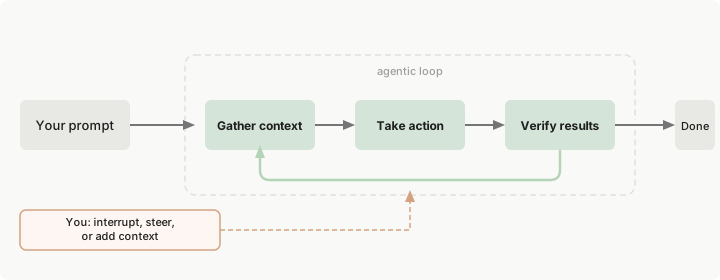
Claude Code runs in a repeated agent loop:
Gather context → Take action → Verify result → [Done or return to gather] ↑ ↓ CLAUDE.md Hooks/Permissions/Sandbox Skills Tools/MCP Memory
The author notes that the bottleneck is rarely model intelligence; more often it’s feeding it the wrong context, or writing code without a way to verify or roll back.
Claude Code 跑的是一个反复循环的代理过程:
收集上下文 → 采取行动 → 验证结果 → [完成 or 回到收集] ↑ ↓ CLAUDE.md Hooks / 权限 / 沙箱 Skills Tools / MCP Memory
用了一段时间才意识到,卡住的地方几乎从来不是模型不够聪明,更多时候是给了它错误的上下文,或者写出来了但根本没法判断对不对,也没法撤回。
The author maps common problems to five surfaces:
| Surface | Core Problem | Main Carriers |
|---|---|---|
| Context surface | Which info is resident vs. loaded on demand | CLAUDE.md, rules, memory, skills |
| Action surface | What actions Claude can take | built‑in tools, MCP, plugins |
| Control surface | Which actions must be constrained, blocked, or audited | permissions, sandbox, hooks |
| Isolation surface | Which tasks need isolated context and permissions | subagents, worktrees, forked sessions |
| Verification surface | How to judge completion and trustworthiness | tests, lint, screenshots, logs, CI |
These surfaces help troubleshoot: unstable results → check context loading order; runaway automation → look at control surface; quality drop in long sessions → intermediate outputs polluted context.
作者将常见问题对应到五个诊断层面:
| 层面 | 核心问题 | 主要载体 |
|---|---|---|
| Context surface | 哪些信息常驻,哪些按需加载 | CLAUDE.md、rules、memory、skills |
| Action surface | Claude 当前具备哪些动作能力 | built‑in tools、MCP、plugins |
| Control surface | 哪些动作必须被约束、阻断或审计 | permissions、sandbox、hooks |
| Isolation surface | 哪些任务需要隔离上下文和权限 | subagents、worktrees、forked sessions |
| Verification surface | 如何判断任务完成且结果可信 | tests、lint、screenshots、logs、CI |
对着这几个层看,很多问题好排查多了:结果不稳定,先查上下文加载顺序;自动化失控,看控制层有没有设计;长会话质量下降,多半是中间产物把上下文污染了。
A clear table distinguishes the six key concepts, avoiding misuse:
| Concept | Runtime Role | Solves | Typical Misuse |
|---|---|---|---|
| CLAUDE.md | Project‑level persistent contract | Commands, boundaries, prohibitions that must hold every session | Turning it into a team knowledge base |
| .claude/rules/* | Path‑ or language‑scoped rules | Local norms for directories, file types, languages | Dumping all rules into root CLAUDE.md |
| Built‑in Tools | Native capabilities | Read/write files, run commands, search | Shoving all integrations into shell |
| MCP | External capability access protocol | Letting Claude access GitHub, Sentry, databases | Connecting too many servers, flooding context with tool definitions |
| Plugin | Packaging and distribution layer | Distributing Skills/Hooks/MCP together | Treating plug‑in as a runtime primitive |
| Skill | On‑demand loaded knowledge/workflow | Giving Claude a methodology package | Making a skill that is both an encyclopedia and a deploy script |
| Hook | Enforcement interception layer | Running rules at lifecycle events before/after | Replacing all model judgment with hooks |
| Subagent | Isolated‑context work unit | Parallel research, limiting tools and permissions | Unbounded fan‑out with governance loss |
Mnemonic: new actions → Tool/MCP; new methodology → Skill; isolated execution → Subagent; mandatory constraints/audit → Hook; cross‑project distribution → Plugin.
作者用一张表格区分六个核心概念,避免混用:
| 概念 | 运行时角色 | 解决什么 | 典型误用 |
|---|---|---|---|
| CLAUDE.md | 项目级持久契约 | 每次会话都必须成立的命令、边界、禁止项 | 写成团队知识库 |
| .claude/rules/* | 路径或语言相关规则 | 目录、文件类型或语言级局部规范 | 所有规则都堆到根 CLAUDE.md |
| Built‑in Tools | 内置能力 | 读文件、改文件、跑命令、搜索 | 把所有集成都塞进 shell |
| MCP | 外部能力接入协议 | 让 Claude 访问 GitHub、Sentry、数据库 | 接太多 server,工具定义挤爆上下文 |
| Plugin | 打包分发层 | 把 Skills/Hooks/MCP 一起分发 | 把 plugin 当成运行时 primitive |
| Skill | 按需加载的知识/工作流 | 给 Claude 一个方法包 | skill 既像百科全书又像部署脚本 |
| Hook | 强制执行规则的拦截层 | 在生命周期事件前后执行规则 | 用 hook 替代所有模型判断 |
| Subagent | 隔离上下文的工作单元 | 并行研究、限制工具与权限 | 无边界 fan‑out,治理失控 |
简单记:给 Claude 新动作能力用 Tool/MCP,给它一套工作方法用 Skill,需要隔离执行环境用 Subagent,要强制约束和审计用 Hook,跨项目分发用 Plugin。
The author emphasizes that context isn’t about length but signal‑to‑noise ratio. The real hidden cost of 200K context:
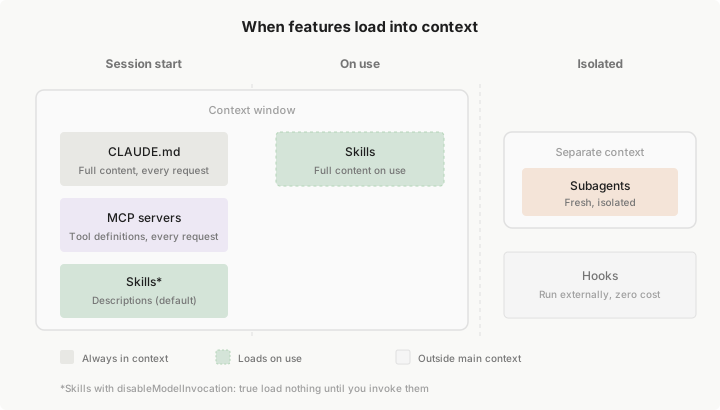
- Fixed overhead (~15‑20K): system prompt ~2K, skill descriptors ~1‑5K, MCP tool definitions ~10‑20K (the biggest stealth killer), LSP state ~2‑5K.
- Semi‑fixed (~5‑10K): CLAUDE.md ~2‑5K, Memory ~1‑2K.
- Dynamic available (~160‑180K): conversation history, file contents, tool call results.
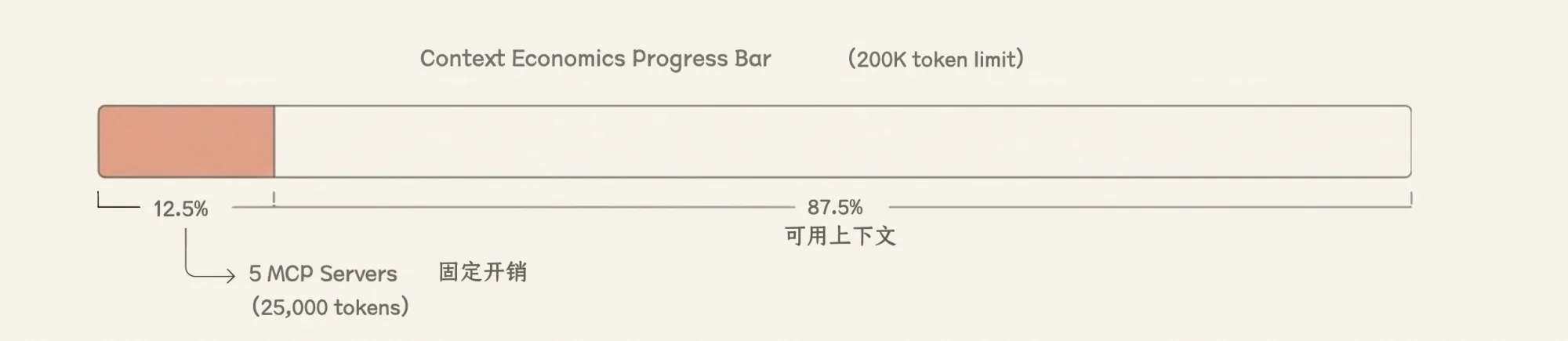
A typical MCP server like GitHub includes 20‑30 tool definitions (~200 tokens each), totaling 4‑6K tokens. With 5 servers, the fixed cost reaches 25K tokens (12.5%). In code‑reading sessions this is significant.
The recommended layering:
- Always resident → CLAUDE.md: contract, build commands, prohibitions
- Path‑loaded → rules: language/directory norms
- On‑demand → Skills: workflows/domain knowledge
- Isolated → Subagents: heavy exploration/parallel research
- Never in context → Hooks: deterministic scripts, audit, blocking
作者强调上下文不是长度问题,而是信噪比太低。200K 上下文的隐形成本构成如下:
- 固定开销 (~15‑20K):系统指令 ~2K、所有启用的 Skill 描述符 ~1‑5K、MCP Server 工具定义 ~10‑20K(最大隐形杀手)、LSP 状态 ~2‑5K。
- 半固定 (~5‑10K):CLAUDE.md ~2‑5K、Memory ~1‑2K。
- 动态可用 (~160‑180K):对话历史、文件内容、工具调用结果。
一个典型 MCP Server(如 GitHub)包含 20‑30 个工具定义,每个约 200 tokens,合计 4,000‑6,000 tokens。接 5 个 Server,固定开销就到 25,000 tokens(12.5%)。在要读大量代码的场景,这 12.5% 真的很关键。
推荐的上下文分层:
- 始终常驻 → CLAUDE.md:项目契约 / 构建命令 / 禁止事项
- 按路径加载 → rules:语言 / 目录 / 文件类型特定规则
- 按需加载 → Skills:工作流 / 领域知识
- 隔离加载 → Subagents:大量探索 / 并行研究
- 不进上下文 → Hooks:确定性脚本 / 审计 / 阻断
- Keep CLAUDE.md short, hard, executable: commands, constraints, architecture boundaries. Anthropic’s own CLAUDE.md is ~2.5K tokens.
- Offload large reference docs to Skills’ supporting files, not into SKILL.md body.
- Use .claude/rules/ for path/language rules; don’t let root CLAUDE.md bear all differences.
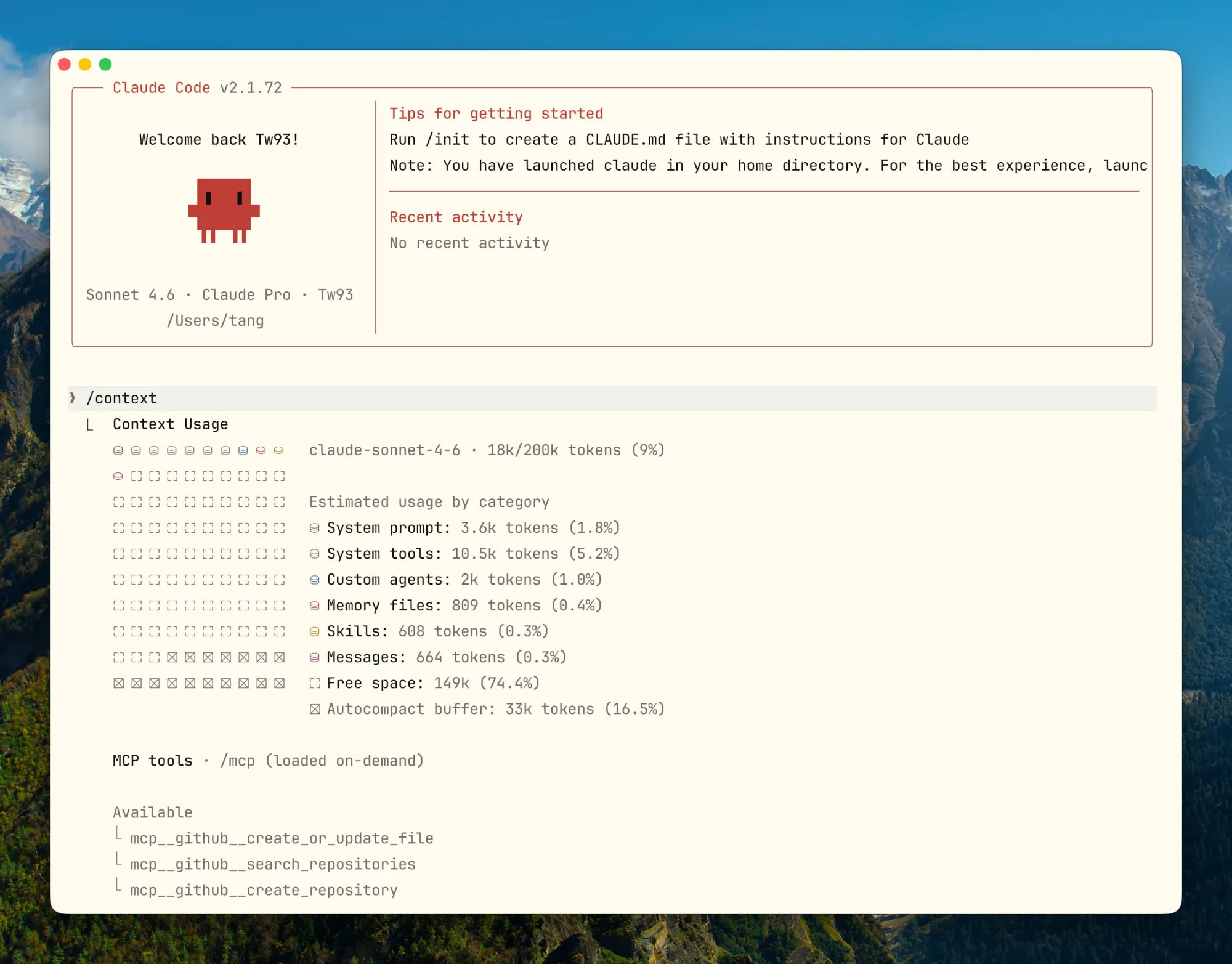
- Actively monitor token usage with /context; don’t wait for automatic compaction.
- On task switch, prefer /clear; within a task phase, use /compact.
- Write Compact Instructions into CLAUDE.md so you control what gets preserved after compaction, not the algorithm.
- 保持 CLAUDE.md 短、硬、可执行,优先写命令、约束、架构边界。Anthropic 官方自己的 CLAUDE.md 大约只有 2.5K tokens,可以参考。
- 把大型参考文档拆到 Skills 的 supporting files,不要塞进 SKILL.md 正文。
- 使用 .claude/rules/ 做路径/语言规则,不让根 CLAUDE.md 承担所有差异。
- 长会话主动用 /context 观察消耗,不要等系统自动压缩后再补救。
- 任务切换优先 /clear,同一任务进入新阶段用 /compact。
- 把 Compact Instructions 写进 CLAUDE.md,压缩后必须保留什么由你控制,不由算法猜。
Tool output is another hidden context killer. Full cargo test output can be thousands of lines; git log, find, grep can flood the screen. Claude doesn’t need all of it.
The author mentions the open‑source project RTK (Rust Token Killer), which filters command output before it reaches Claude:
Claude sees:
running 262 tests test auth::test_login ... ok ... (thousands of lines)
After RTK filtering:
✓ cargo test: 262 passed (1 suite, 0.08s)
Claude only needs to know pass/fail and where failures occurred. RTK does this transparently via Hooks, without modifying the commands. It is available on GitHub.
Tool Output 是另一个隐形上下文杀手。cargo test 一次完整输出动辄几千行,git log、find、grep 在稍大的仓库里也能轻松塞满屏幕。这些输出 Claude 并不需要全看,但只要它出现在上下文里,就是实实在在的 token 消耗。
作者介绍了开源项目 RTK(Rust Token Killer),它在命令输出到 Claude 之前自动过滤,只留决策需要的核心信息:
Claude 看到的原始输出
running 262 tests test auth::test_login ... ok ...(几千行)
走 RTK 之后
✓ cargo test: 262 passed (1 suite, 0.08s)
Claude 真正需要知道的就是「过了还是挂了,挂在哪里」,其他都是噪声。RTK 通过 Hook 透明重写命令,对 Claude Code 完全无感,项目开源在 GitHub。
Default compaction assumes earlier tool outputs and file contents can be discarded and later re‑read, but it often throws away architecture decisions and rationale, leading to mysterious bugs. The solution is to write explicit Compact Instructions in CLAUDE.md:
Compact Instructions
When compressing, preserve in priority order:
- Architecture decisions (NEVER summarize)
- Modified files and their key changes
- Current verification status (pass/fail)
- Open TODOs and rollback notes
- Tool outputs (can delete, keep pass/fail only)
Additionally, before starting a new session, have Claude write a HANDOFF.md summarizing current progress, attempts, dead ends, and next steps. The next instance can continue by reading only that file.
默认压缩算法按“可重新读取”判断,早期的 Tool Output 和文件内容会被优先删掉,顺带把架构决策和约束理由也一起扔了,导致莫名其妙的 Bug。解决方案是在 CLAUDE.md 里写明 Compact Instructions:
Compact Instructions
When compressing, preserve in priority order:
- Architecture decisions (NEVER summarize)
- Modified files and their key changes
- Current verification status (pass/fail)
- Open TODOs and rollback notes
- Tool outputs (can delete, keep pass/fail only)
除了写 Compact Instructions,还有一种更主动的方案:在开新会话前,先让 Claude 写一份 HANDOFF.md,把当前进度、尝试过什么、哪些走通了、哪些是死路、下一步该做什么写清楚。下一个 Claude 实例只读这个文件就能接着做,不依赖压缩算法的摘要质量。
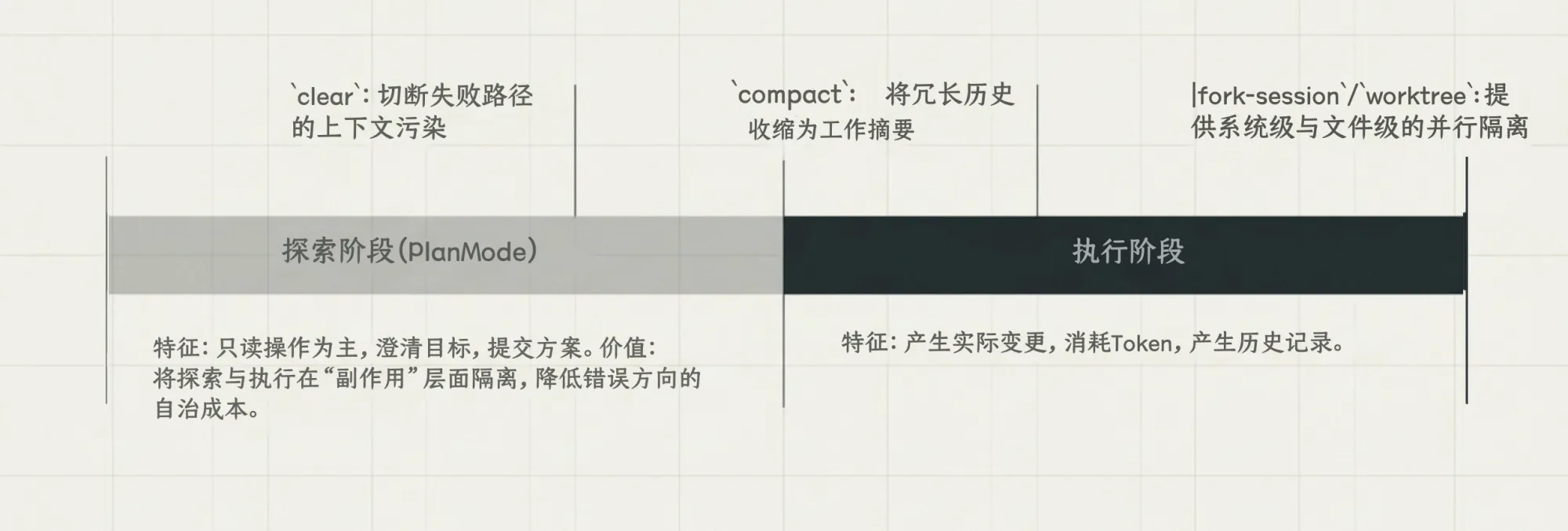
Plan Mode separates exploration from execution: exploration is read‑only, goals and boundaries are clarified first, and the concrete plan is agreed before any changes. This reduces chasing wrong assumptions on complex refactors or migrations. Enter Plan Mode with double‑press Shift+Tab. An advanced pattern: one Claude writes the plan, another Claude (Codex) reviews it as a “senior engineer” — AI reviewing AI.
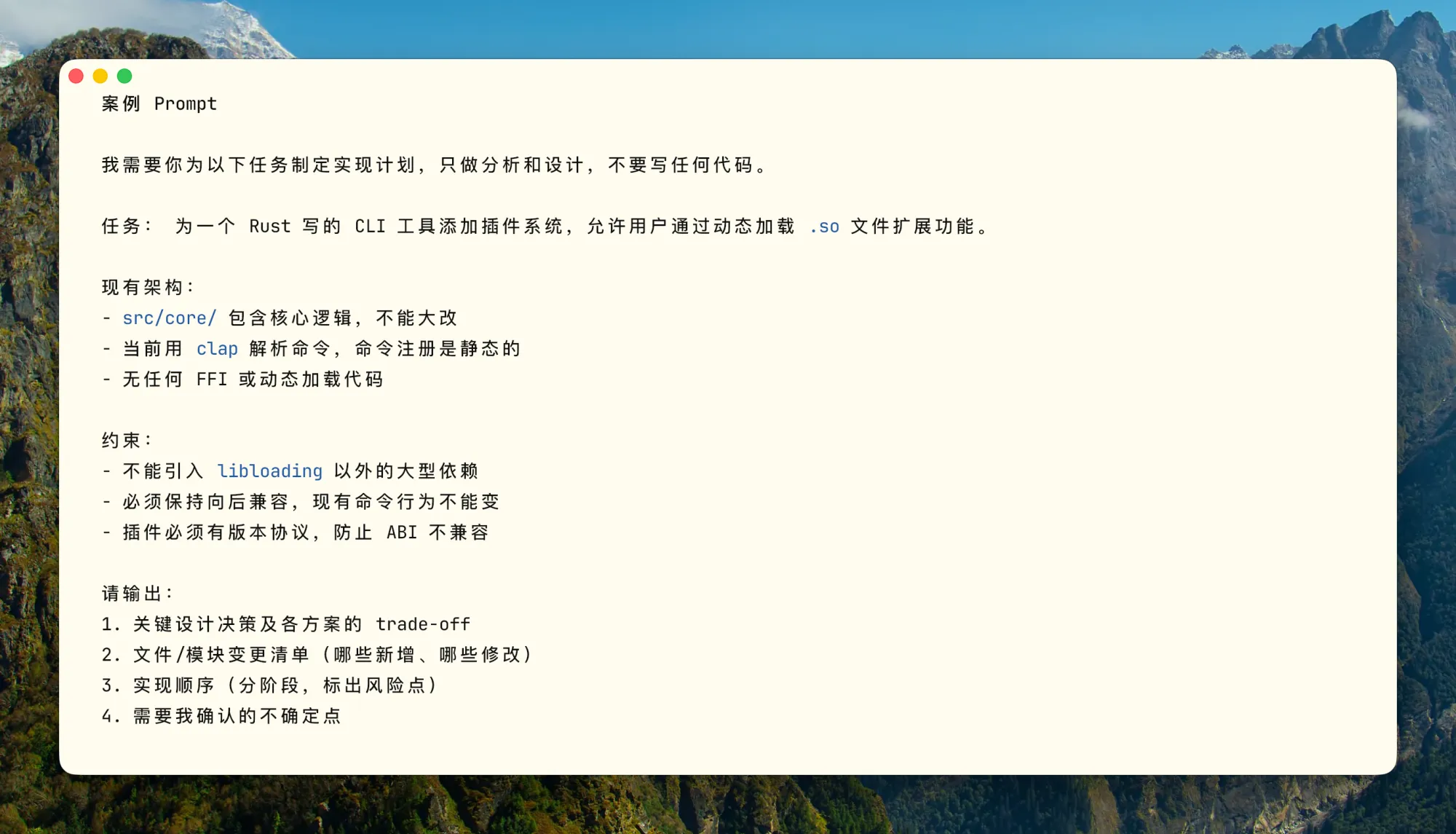
Plan Mode 的核心是把探索和执行拆开,探索阶段不动文件,确认方案后再执行。对于复杂重构、迁移、跨模块改动,这样做比“急着出代码”有用多了,在错误假设上越跑越偏的情况会少很多。按两下 Shift+Tab 进入 Plan Mode,进阶玩法是开一个 Claude 写计划,再开一个 Codex 以“高级工程师”身份审这个计划,让 AI 审 AI,效果很好。
A good Skill tells the model “when to use me”, has complete steps/inputs/outputs/stop conditions, keeps only navigation and core constraints in SKILL.md body (details in supporting files), and sets disable-model‑invocation: true for side‑effect‑heavy skills.
The internal design philosophy is “progressive disclosure”: SKILL.md defines task semantics and skeleton; supporting files provide domain detail; scripts collect deterministic context.
A stable structure:
.claude/skills/ └── incident-triage/ ├── SKILL.md ├── runbook.md ├── examples.md └── scripts/ └── collect-context.sh
Three archetypes from the author’s open‑source terminal project Kaku:
- Checklist (quality gate): release‑check skill.
- Workflow (standardised operation): config‑migration with rollback.
- Domain Expert (decision framework): runtime‑diagnosis with evidence collection and decision matrix.
Descriptor optimization matters: each enabled skill descriptor consumes context. A good descriptor is concise and tells when to trigger (≤9 tokens), not a verbose description.
官方描述 Skill 是“按需加载的知识与工作流”。一个好 Skill 应满足:描述让模型知道“何时该用我”,而非“我是干什么的”;有完整步骤、输入、输出和停止条件;正文只放导航和核心约束,大资料拆到 supporting files;有副作用的 Skill 要显式设置 disable‑model‑invocation: true。
设计理念是“progressive disclosure”:SKILL.md 负责定义任务语义、边界和执行骨架;supporting files 负责提供领域细节;脚本负责确定性收集上下文或证据。
一个较稳定的结构:
.claude/skills/ └── incident-triage/ ├── SKILL.md ├── runbook.md ├── examples.md └── scripts/ └── collect-context.sh
来自作者开源终端项目 Kaku 的三种典型 Skill:
- 检查清单型:发布前 checklist(release‑check)。
- 工作流型:配置迁移,内置回滚(config‑migration)。
- 领域专家型:运行时诊断,证据收集 + 决策矩阵(runtime‑diagnosis)。
描述符优化:每个启用的 Skill 描述符都偷你的上下文空间,好的描述应简洁且有触发条件。
Tools for agents are different from human APIs. The author contrasts good vs. bad tools:
| Dimension | Good Tool | Bad Tool |
|---|---|---|
| Name | jira_issue_get, sentry_errors_search | query, fetch, do_action |
| Parameters | issue_key, project_id, response_format | id, name, target |
| Return | Directly relevant for next decision | UIDs, internal fields, raw noise |
| Scale | Single goal, clear boundary | Multiple mixed actions, opaque side effects |
| Cost | Default output controlled, truncatable | Default returns too large context |
| Error info | Includes correction suggestions | Opaque error code only |
Design principles: namespaced names (github_pr_), response_format for concise/detailed, error messages that teach the model how to fix, prefer high‑level compound tools over many low‑level fragments (avoid list_all_ forcing the model to sift).
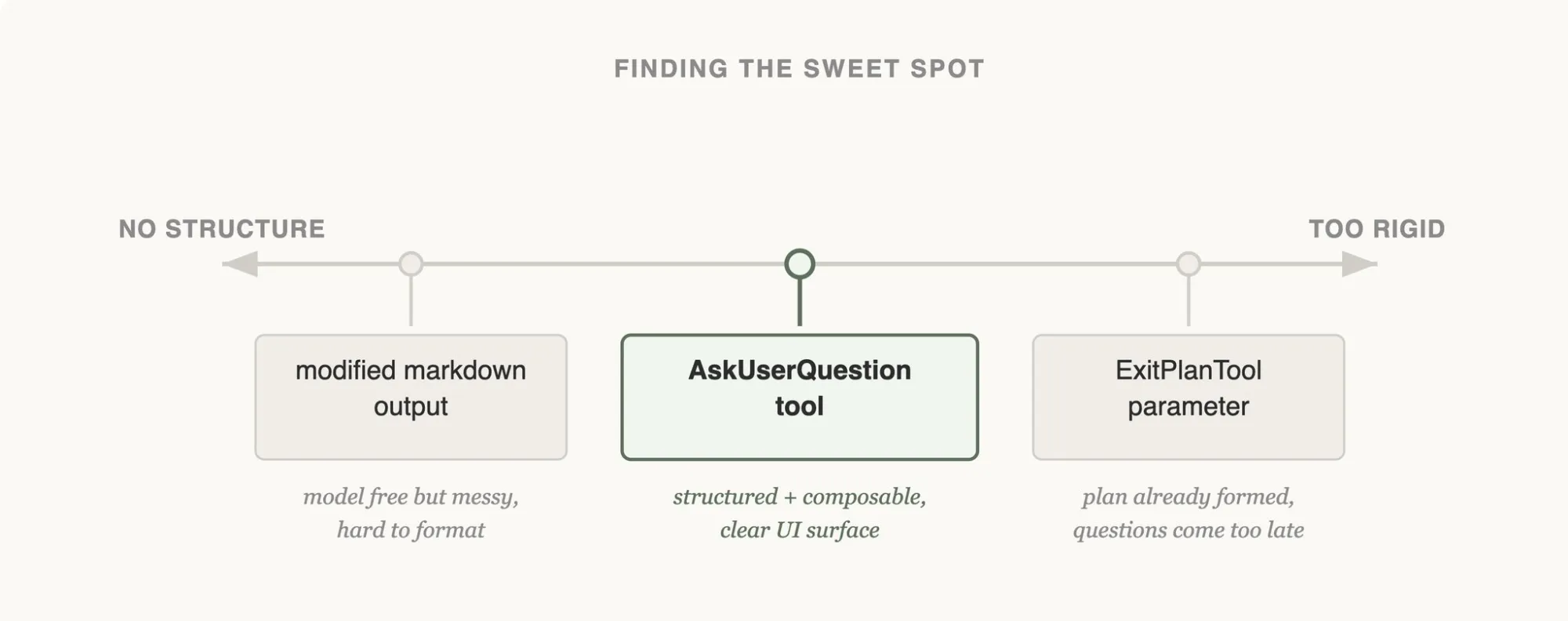
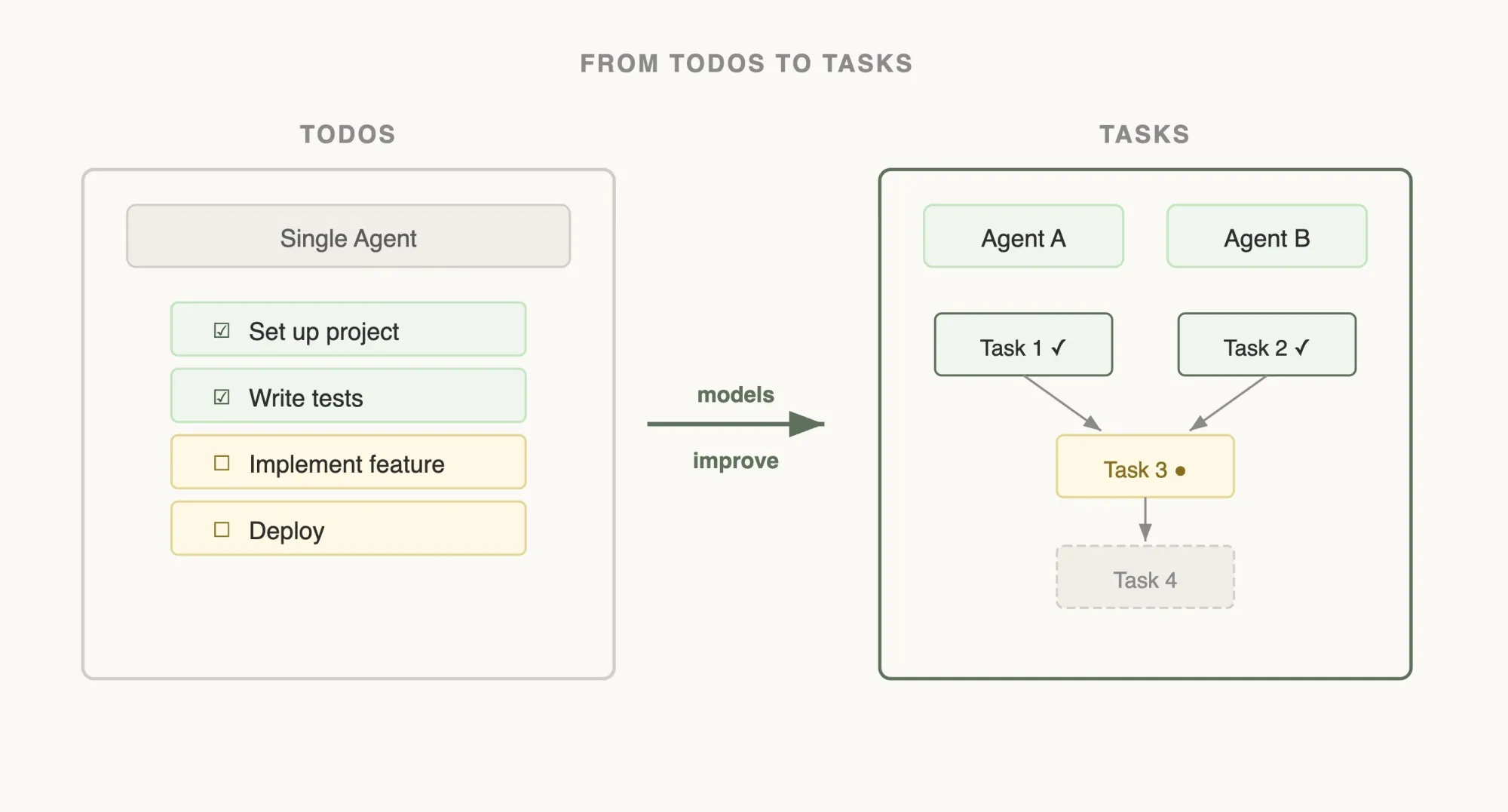
The evolution of Claude Code’s internal tools is instructive. For “pause and ask the user”, they tried: (1) adding a question parameter to Bash → ignored; (2) markdown‑based pause → unreliable formatting; (3) dedicated AskUserQuestion tool → explicitly call to pause, most robust. For Todo tools, early TodoWrite + reminders became a straitjacket as models improved; now tools are lighter. For search, they moved from RAG (fragile) to a Grep tool that the model actively uses, enabling “progressive disclosure” as Claude reads skill files that reference other files.
When should you NOT add a tool? When local shell can do it, when static knowledge suffices, when a Skill workflow is more appropriate, or when the tool schema/returns haven’t been validated as stably used by the model.
给 Agent 的工具和给人写的 API 不是一回事,目标是让它用对。好工具 vs 坏工具的对比:
| 维度 | 好工具 | 坏工具 |
|---|---|---|
| 名称 | jira_issue_get, sentry_errors_search | query, fetch, do_action |
| 参数 | issue_key, project_id, response_format | id, name, target |
| 返回 | 与下一步决策直接相关的信息 | 一堆 UUID、内部字段、原始噪声 |
| 规模 | 单一目标,边界清楚 | 多个动作混杂,副作用不透明 |
| 成本 | 默认输出受控、可截断 | 默认返回过大上下文 |
| 错误信息 | 包含修正建议 | 仅返回 opaque error code |
设计原则:名称按系统分层(如 github_pr_*),支持 response_format,错误响应要教模型如何修正,能合并成高层任务工具时不要暴露过多碎片工具。
Claude Code 内部工具演进:暂停提问工具从加参数(被忽略)、到 markdown 暂停(不可靠),再到独立 AskUserQuestion 工具(最稳);Todo 工具早期用 TodoWrite + 提醒,后来模型变强反而成了限制,说明应定期回顾限制是否过时;搜索从 RAG 转向 Grep 工具,模型主动使用并支持“渐进式披露”。
什么时候不该再加 Tool?本地 shell 可以可靠完成、只需静态知识、需求更适合 Skill 工作流约束、或工具描述/返回格式未被模型稳定使用。
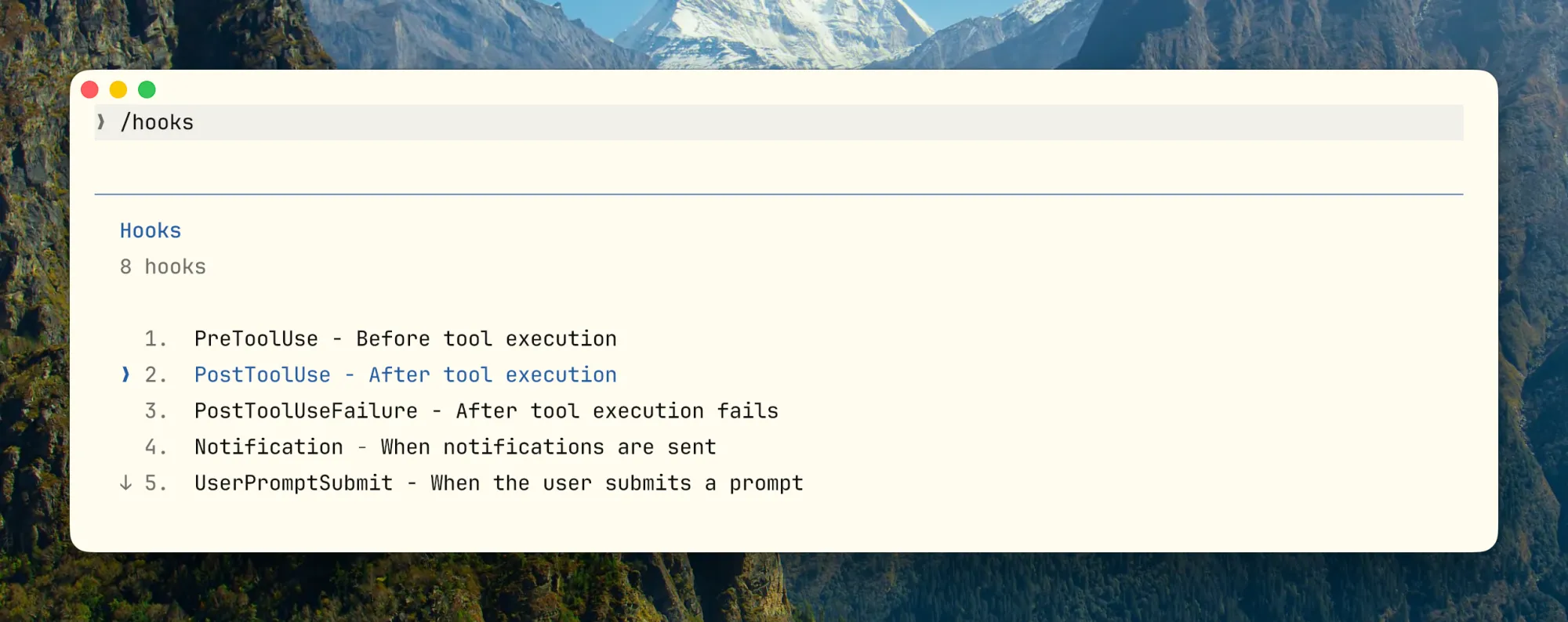
Hooks enforce logic before or after Claude’s actions, reclaiming what shouldn’t be left to improvisation. Supported hook points: before/after tool use, session start, etc.
Suitable: blocking edits to protected files, auto‑formatting/lint after edits, injecting dynamic context at SessionStart, pushing notifications.
Unsuitable: complex semantic judgments requiring large context, long‑running business processes, multi‑step reasoning — these belong in Skills or Subagents.
Example configuration:
{
  "hooks": {
    "PostToolUse": [
      {
        "matcher": "Edit",
        "pattern": "*.rs",
        "hooks": [{
          "type": "command",
          "command": "cargo check 2>&1 | head -30",
          "statusMessage": "Running cargo check..."
        }]
      }
    ],
    "Notification": [{
      "type": "command",
      "command": "osascript -e 'display notification \"Task completed\" with title \"Claude Code\"'"
    }]
  }
}
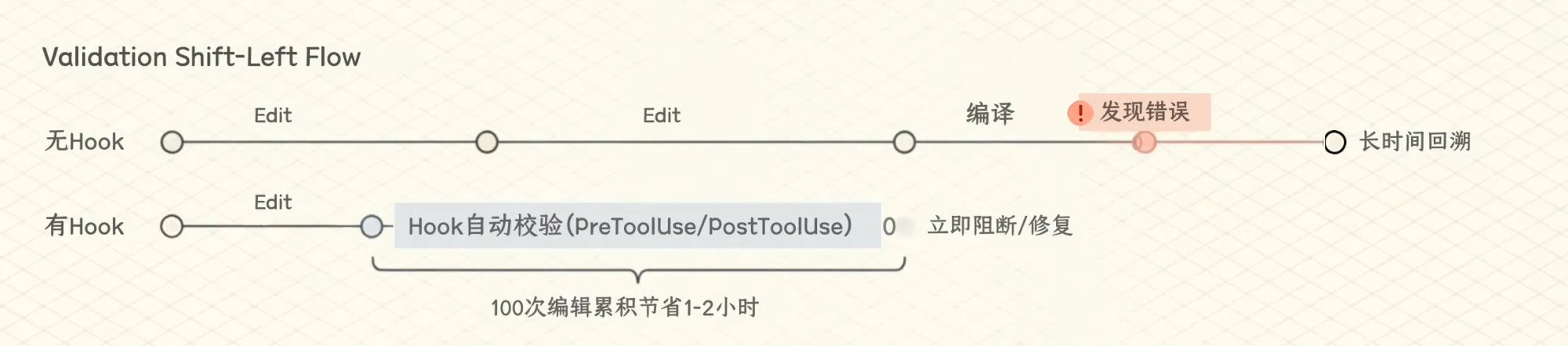
In a 100‑edit session, saving 30‑60s per edit accumulates to 1‑2 hours. Always limit hook output (e.g., | head -30) to avoid polluting context. For systematic output truncation, see RTK in §3.
Hooks + Skills + CLAUDE.md layering: CLAUDE.md states “must pass tests and lint before commit”; Skill tells the sequence and how to interpret failures; Hook enforces hard checks on critical paths and blocks if necessary.
Hooks 在 Claude 执行操作前后,强制插入你自己的逻辑,把不能交给 Claude 临场发挥的事情收回到确定性流程里。当前支持的 Hook 点:工具使用前后、会话开始等。
适合放 Hooks 的:阻断修改受保护文件、Edit 后自动格式化/lint、SessionStart 后注入动态上下文(Git 分支、环境变量)、任务完成后推送通知。不适合:需要读大量上下文的复杂语义判断、长时间运行的业务流程、多步推理的决策(这些该在 Skill 或 Subagent 里)。
示例配置:
{
  "hooks": {
    "PostToolUse": [
      {
        "matcher": "Edit",
        "pattern": "*.rs",
        "hooks": [{
          "type": "command",
          "command": "cargo check 2>&1 | head -30",
          "statusMessage": "Running cargo check..."
        }]
      }
    ],
    "Notification": [{
      "type": "command",
      "command": "osascript -e 'display notification \"Task completed\" with title \"Claude Code\"'"
    }]
  }
}
在 100 次编辑的会话中,每次节省 30‑60 秒,累积节省 1‑2 小时。注意限制输出长度(| head -30),避免 Hook 输出污染上下文。如果不想手动截断,可参考第 3 节的 RTK。
Hooks + Skills + CLAUDE.md 三层叠加:CLAUDE.md 声明“提交前必须通过测试和 lint”;Skill 告诉 Claude 在什么顺序下运行测试、如何看失败、如何修复;Hook 对关键路径执行硬性校验,必要时阻断。
Subagents are separate Claude instances with their own context, limited tools, and they report back. The key value is isolation: heavy output tasks (codebase scanning, testing, reviewing) stay out of the main thread’s context. Built‑in subagents: Explore (read‑only, Haiku), Plan, General‑purpose; custom subagents can be defined.
Critical configurations:
- tools/disallowedTools: limit what the subagent can use.
- model: Haiku for exploration, Sonnet/Opus for deeper work.
- maxTurns: prevent runaway.
- isolation: worktree for filesystem isolation when modifying files.
Note: long‑running bash commands can be backgrounded with Ctrl+B; subagents can be told to run in the background, and results retrieved via BashOutput.
Anti‑patterns: subagent permissions as wide as main thread, unstructured output, strong inter‑task dependencies (use sequential steps instead).
Subagent 是从主对话派出去的一个独立 Claude 实例,有自己的上下文窗口,只用你指定的工具,干完汇报结果。最大的价值不是“并行”,而是隔离——扫代码库、跑测试、做审查这类会产生大量输出的事,塞进主线程很快就把有效上下文挤没了,交给 Subagent 做,主线程只拿一个摘要,干净很多。
Claude Code 内置三个:Explore(只读扫库,默认跑 Haiku 省成本)、Plan(规划调研)、General‑purpose(通用),也可自定义。
关键配置:
- tools/disallowedTools:限定能用的工具。
- model:探索用 Haiku/Sonnet,重要审查用 Opus。
- maxTurns:防止跑飞。
- isolation: worktree:需要动文件时隔离文件系统。
实用细节:长时间运行的 bash 命令可以按 Ctrl+B 移到后台;subagent 同理,告诉它“在后台跑”就行。
常见反模式:子代理权限和主线程一样宽(隔离无意义)、输出格式不固定、子任务之间强依赖(不适合 Subagent)。
Claude Code’s architecture is built around prompt caching. High cache hit rates not only save cost but also relax rate limits. The prompt layout is designed for caching: 1) System Prompt (static), 2) Tool Definitions (static), 3) Chat History (dynamic), 4) Current User Input (last). Caching is prefix‑based.
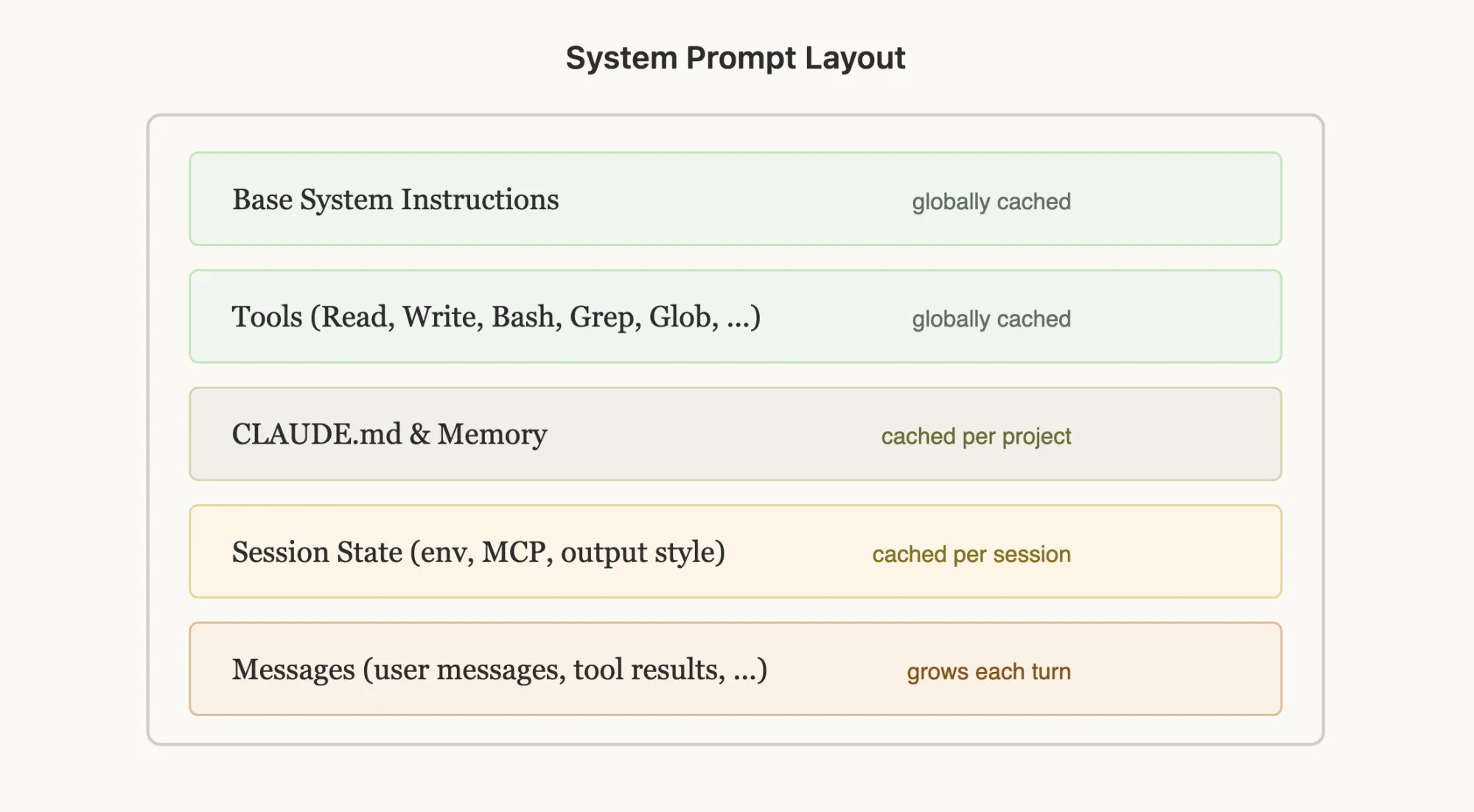
Cache‑breaking mistakes: putting timestamps in the static system prompt, non‑deterministically shuffling tool definitions, adding/removing tools mid‑session. Dynamic content like current time should be placed in the user message as a <system‑reminder> tag.
Don’t switch models mid‑session: cache is model‑unique. Switching to a cheaper model after 100K tokens actually costs more due to cache rebuild. If necessary, use a Subagent handoff.
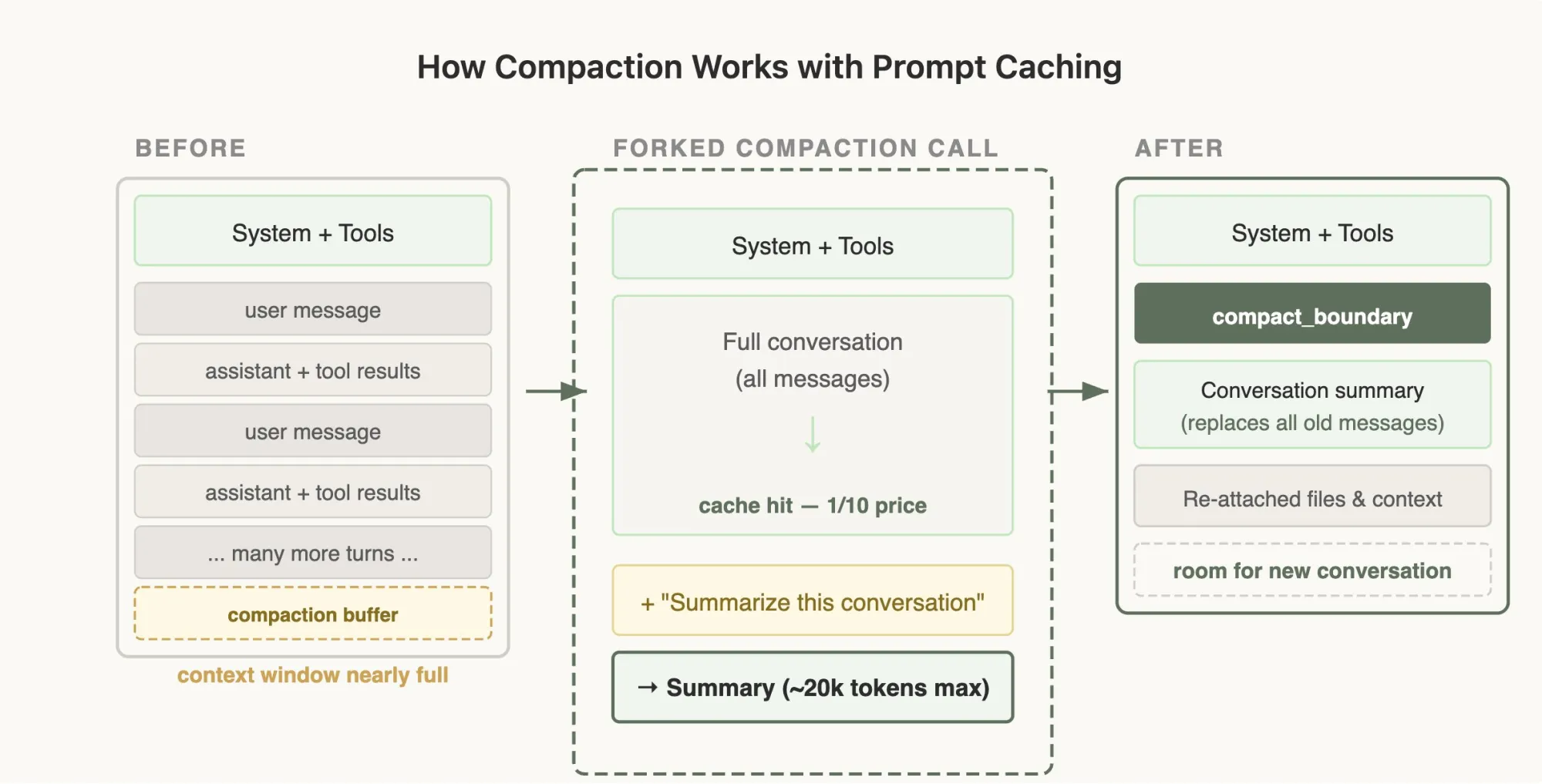
Compaction implementation: when context nears full, fork a call with full history + “Summarize this conversation”, hitting cache for 1/10 the price; the result replaces dozens of turns with a ~20K‑token summary, preserving System + Tools plus file references.
Plan Mode doesn’t switch toolsets (would break cache); instead, EnterPlanMode is a tool the model can call when it detects complexity. defer_loading: lightweight tool stubs with name only (defer_loading: true) keep the cache prefix stable; full schemas load only when selected via ToolSearch.
Claude Code 的整个架构都是围绕 Prompt 缓存构建的,高命中率不光省钱,速率限制也会松很多。提示词的布局顺序为缓存设计:1. System Prompt(静态),2. Tool Definitions(静态),3. Chat History(动态),4. 当前用户输入(最后)。缓存基于前缀匹配。
破坏缓存的常见陷阱:在静态系统 Prompt 中放入带时间戳的内容;非确定性地打乱工具定义顺序;会话中途增删工具。动态信息如当前时间应放在用户消息的 <system‑reminder> 标签里。
会话中途不要切换模型:缓存是模型唯一的。切换到更便宜的模型可能更贵,因为要重建整个缓存。确实需要切换时,用 Subagent 交接。
压缩(Compaction)的实现:上下文快满时,fork 一个调用,把完整历史喂给模型并加一句“Summarize this conversation”,这一步命中缓存所以只需 1/10 的价格;压缩后,几十轮对话被替换成一段 ~20K tokens 的摘要,System + Tools 还在,再挂上文件引用。
Plan Mode 不切换工具集(会破坏缓存),而是 EnterPlanMode 作为模型可调用的工具。defer_loading:只发送工具名 stub(标记 defer_loading: true),完整 schema 只有在模型通过 ToolSearch 选中后才加载,保持缓存前缀稳定。
“Claude says it’s done” is useless. You need a hierarchy of verifiers:
- Lowest: exit codes, lint, typecheck, unit tests
- Middle: integration tests, screenshot diffing, contract tests, smoke tests
- Higher: production log validation, monitoring metrics, human review checklists
Define verification explicitly in prompts, Skills, and CLAUDE.md:
## Verification
For backend changes:
- Run `make test` and `make lint`
- For API changes, update contract tests under `tests/contracts/`
For UI changes:
- Capture before/after screenshots if visual
Definition of done:
- All tests pass
- Lint passes
- No TODO left behind unless explicitly tracked
Embed acceptance criteria early: which commands to run, what to check on failure, what screenshots/logs to see as passing.
「Claude 说完成了」其实没啥用,你得能知道它做没做对、出了问题能退回来、过程还能查,这才算数。验证层级:
- 最低层:命令退出码、lint、typecheck、unit test
- 中间层:集成测试、截图对比、contract test、smoke test
- 更高层:生产日志验证、监控指标、人工审查清单
在 Prompt、Skill 和 CLAUDE.md 中显式定义验证:
## Verification
For backend changes:
- Run `make test` and `make lint`
- For API changes, update contract tests under `tests/contracts/`
For UI changes:
- Capture before/after screenshots if visual
Definition of done:
- All tests pass
- Lint passes
- No TODO left behind unless explicitly tracked
写任务 Prompt 或 Skill 的时候,最好把验收标准提前说清楚。哪些命令跑完算完成,失败了先查什么,截图和日志看到什么才算过,这些越早讲明白,后面越省事。
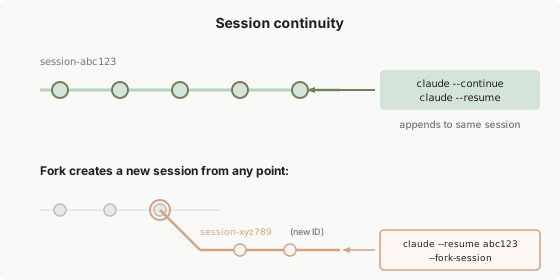
The author groups useful commands into context management ( /context, /clear, /compact, /memory ), capability & governance ( /mcp, /hooks, /permissions, /sandbox, /model ), session continuity & parallelism ( claude --continue, --resume, --fork, --worktree, -p, --output-format json ), and several lesser‑known but valuable ones:
- /simplify: reviews recently changed code for reuse, quality, efficiency.
- /rewind: returns to a session checkpoint and re‑summarizes, useful when Claude has gone too far down a wrong path.
- /btw: ask a quick side question without disturbing the main task.
- /insight: Claude analyzes the session and suggests what to persist into CLAUDE.md.
- Double‑press ESC: go back to edit previous input, faster than restarting.
- Session history stored in ~/.claude/projects/ as .jsonl files; grep or ask Claude to search.
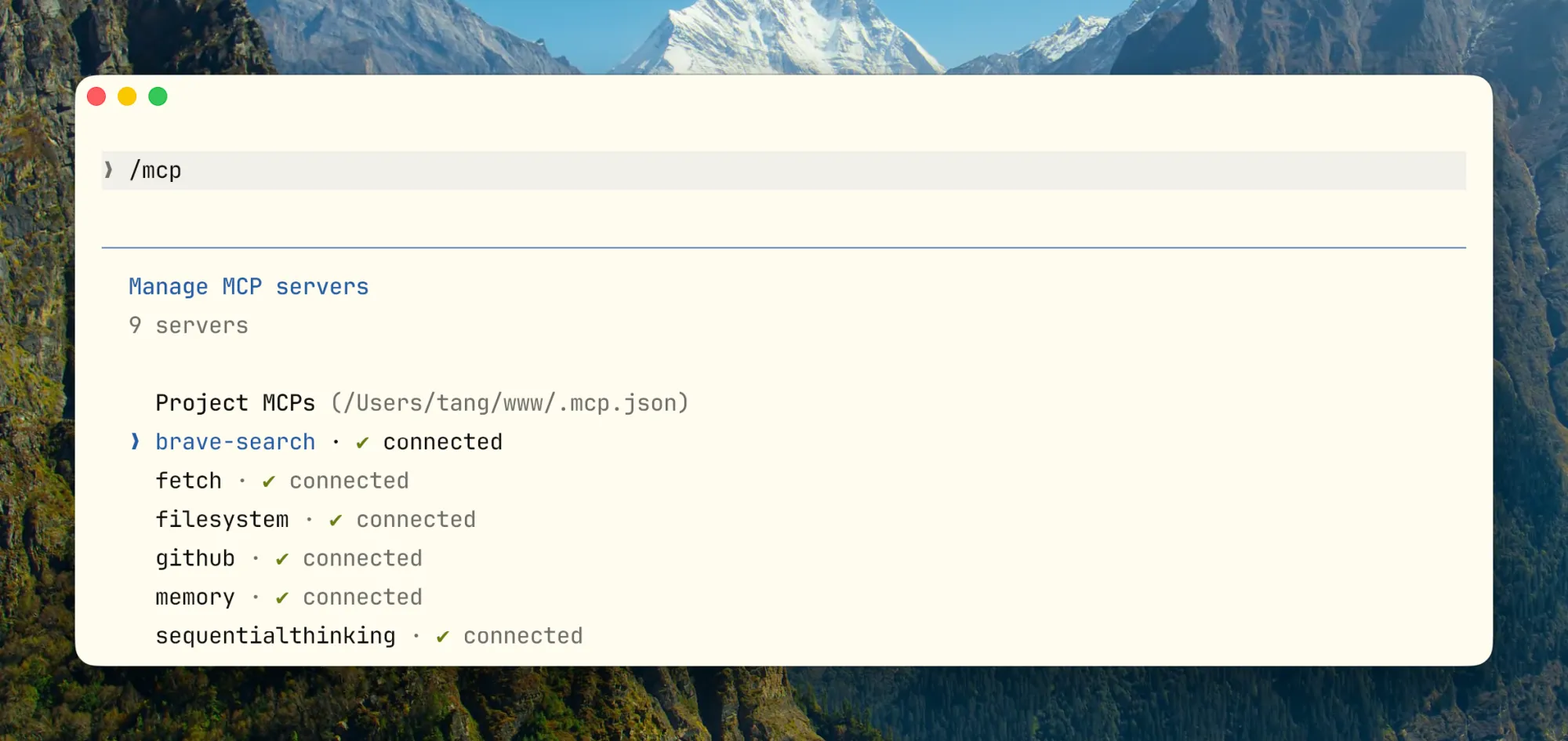
作者将高频命令分为上下文管理(/context、/clear、/compact、/memory)、能力与治理(/mcp、/hooks、/permissions、/sandbox、/model)、会话连续性与并行(claude --continue、--resume、--fork、--worktree、-p、--output-format json),以及几个不常见但很好用的:
- /simplify:对刚改完的代码做三维检查(复用、质量、效率)。
- /rewind:回到会话 checkpoint 重新总结,适合 Claude 已在错误路径探索太深。
- /btw:不打断主任务快速问一个侧问题。
- /insight:让 Claude 分析当前会话,指出可沉淀到 CLAUDE.md 的内容。
- 双击 ESC:回溯上一条输入重新编辑。
- 所有会话记录存放在 ~/.claude/projects/ 下,可 grep 或让 Claude 搜索。
CLAUDE.md is a collaboration contract, not a knowledge base. Start empty, add only things you find yourself repeating. Use # to append or simply tell Claude “add this to the project’s CLAUDE.md.”
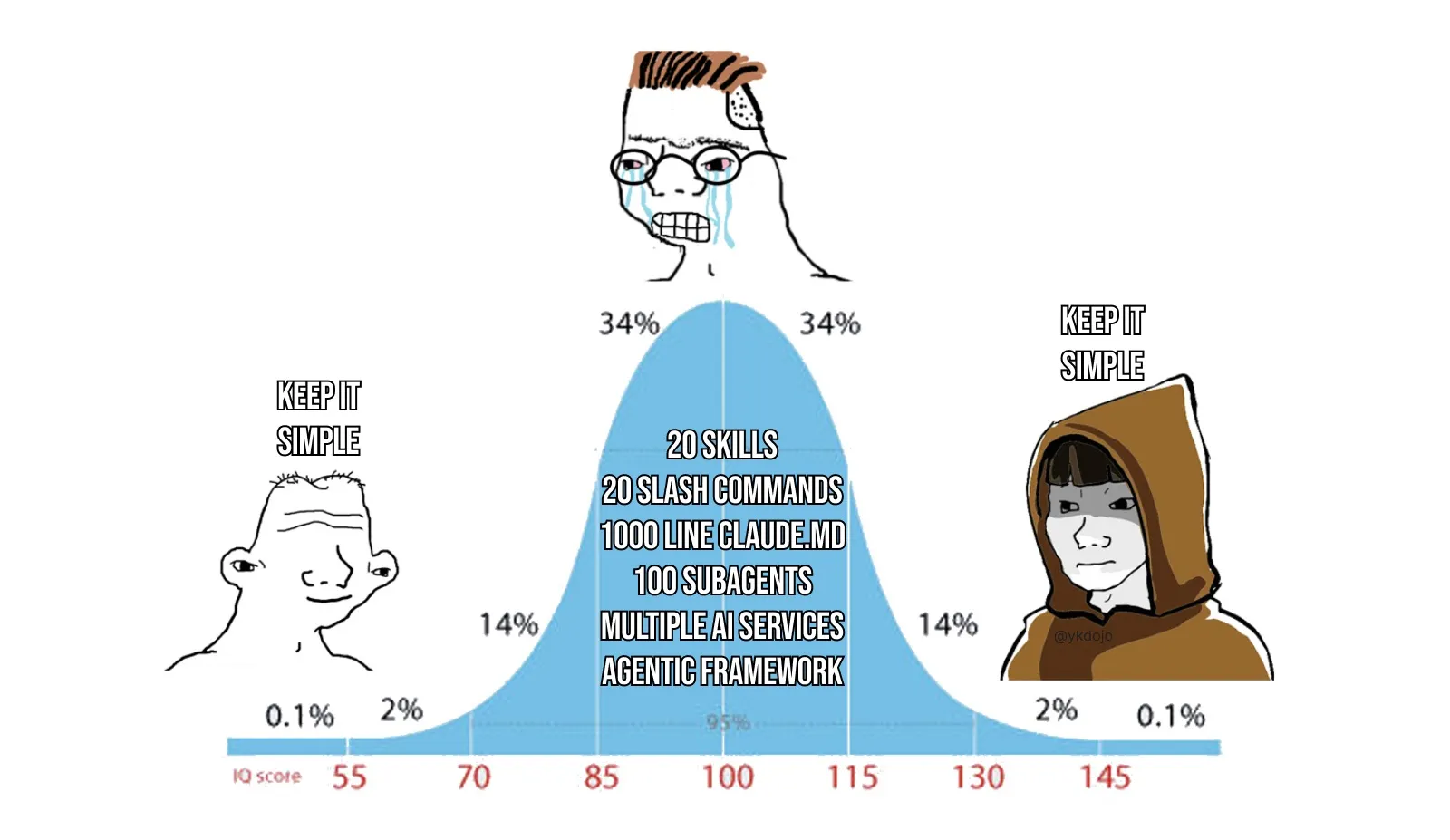
What to put: how to build, test, run; key directory structure & module boundaries; coding style & naming constraints; non‑obvious environment pitfalls; NEVER lists; Compact Instructions.
What NOT to put: large background intros, full API docs, vague principles (“write high‑quality code”), obvious information inferable from the repo, large references (offload to Skills).
A high‑quality template:
# Project Contract
## Build And Test
- Install: `pnpm install`
- Dev: `pnpm dev`
- Test: `pnpm test`
- Typecheck: `pnpm typecheck`
- Lint: `pnpm lint`
## Architecture Boundaries
- HTTP handlers in `src/http/handlers/`
- Domain logic in `src/domain/`
- No persistence logic in handlers
- Shared types in `src/contracts/`
## Coding Conventions
- Pure functions in domain layer
- No new global state without justification
- Reuse existing error types
## Safety Rails
### NEVER
- Modify `.env`, lockfiles, or CI secrets without approval
- Remove feature flags without searching all call sites
- Commit without running tests
### ALWAYS
- Show diff before committing
- Update CHANGELOG for user‑facing changes
## Verification
- Backend: `make test` + `make lint`
- API: update contract tests
- UI: before/after screenshots
## Compact Instructions
Preserve: 1. Architecture decisions 2. Modified files and changes 3. Verification status 4. Open risks, TODOs, rollback notes
A favorite trick: after correcting a mistake, tell Claude “Update your CLAUDE.md so you don’t make that mistake again.”
CLAUDE.md 更像你和 Claude 之间的协作契约,不是团队文档也不是知识库,里面只放那些每次会话都得成立的事。作者建议一开始甚至可以什么都不写,先反复遇到同一件事再补进去。输入 # 可以把对话内容追加进 CLAUDE.md,或者直接告诉 Claude“把这条加到项目的 CLAUDE.md 里”。
应该放什么:怎么 build、test、跑;关键目录结构与模块边界;代码风格和命名约束;不明显的环境坑;绝对不能干的事(NEVER 列表);Compact Instructions。
不该放什么:大段背景介绍、完整 API 文档、空泛原则如“写高质量代码”、Claude 读仓库即可推断的显然信息、大量背景资料和低频任务知识(这些放 Skills)。
一个高质量模板提供了构建、架构边界、编码约定、安全护栏、验证和紧凑指令的完整示例。
作者最喜欢的技巧:每次纠正 Claude 的错误后,让它自己更新 CLAUDE.md:“Update your CLAUDE.md so you don’t make that mistake again.” 用久了确实越来越少犯同样的错,但需要定期 review。
The author built an open‑source terminal project (Kaku, Rust + Lua) using Claude Code and shares practical insights:
Environment transparency: Claude Code calls real shell, git, package managers. Opaque environment layers force guessing. A doctor command that reports environment state, dependencies, and configuration before work starts reduces errors. CLI commands with clear semantics (init, config, reset) give Claude stable entry points.
Hooks for multi‑language projects: Post‑edit hooks trigger language‑specific checks (cargo check for .rs, luajit syntax for .lua), catching errors immediately.
Recommended project layout for engineering with Claude Code:
Project/
├── CLAUDE.md
├── .claude/
│   ├── rules/
│   │   ├── core.md
│   │   ├── config.md
│   │   └── release.md
│   ├── skills/
│   │   ├── runtime-diagnosis/
│   │   ├── config-migration/
│   │   ├── release-check/
│   │   └── incident-triage/
│   ├── agents/
│   │   ├── reviewer.md
│   │   └── explorer.md
│   └── settings.json
└── docs/
    └── ai/
        ├── architecture.md
        └── release-runbook.md
Common anti‑patterns: CLAUDE.md as wiki, skill mish‑mash, tool bloat, no verification loop, excessive autonomy, no context segmentation, over‑autonomy without governance, stale dangerous approved commands.
Configuration health check: The author released an open‑source Skill tw93/waza that audits your Claude Code configuration against the six‑layer framework, producing a prioritized report.
作者用 Claude Code 做了一个开源 terminal 项目 Kaku(Rust + Lua),分享了几个新经验:
环境透明:Claude Code 调用的都是真实 shell、git、package manager,只要有一层不透明,它就只能猜。建议在 terminal 里加一个 doctor 命令统一收集环境状态、依赖和配置,Claude 做事前先跑一次,能省很多“环境没搞清楚就开干”的问题。CLI 有语义清晰的 init、config、reset 等子命令也会更稳。
混合语言项目的 Hooks 实践:按文件类型分别触发 cargo check 和 luajit 语法检查,每次编辑完立刻知道有没有编译错误。
完整的工程化布局参考:
Project/
├── CLAUDE.md
├── .claude/
│   ├── rules/
│   │   ├── core.md
│   │   ├── config.md
│   │   └── release.md
│   ├── skills/
│   │   ├── runtime-diagnosis/
│   │   ├── config-migration/
│   │   ├── release-check/
│   │   └── incident-triage/
│   ├── agents/
│   │   ├── reviewer.md
│   │   └── explorer.md
│   └── settings.json
└── docs/
    └── ai/
        ├── architecture.md
        └── release-runbook.md
常见反模式:CLAUDE.md 当 wiki、Skill 大杂烩、工具太多描述模糊、没有验证闭环、过度自治、上下文不做切分、自治范围过宽但治理不足、已批准危险命令堆积不清理。
配置健康检查:作者基于六层框架开发了开源 Skill tw93/waza,一键检查 Claude Code 配置状态,输出优先级报告。
The author concludes with a three‑stage maturity model:
- Tool User – “How does this feature work?” Helpful but limited.
- Process Optimizer – “How do I smooth collaboration?” Writing CLAUDE.md and Skills; efficiency noticeably improves.
- System Designer – “How do I make the agent operate autonomously within constraints?” Qualitative leap.
A key question: if you can’t clearly define “done” for a task, it probably isn’t suitable for autonomous Claude.
作者总结了使用 Claude Code 的三个阶段:
- 工具使用者 – “这个功能怎么用”,有帮助但有限。
- 流程优化者 – “如何让协作更顺”,开始写 CLAUDE.md 和 Skills,效率明显提升。
- 系统设计者 – “如何让 Agent 在约束下自主运作”,产生质变。
一个值得想的问题:假如一个任务你说不清楚 “什么叫做完”,那大概率也不适合直接扔给 Claude 自主完成。