额度十分钟跑光不是计量 bug:被遗忘的 agent 一天开了 1,555 个会话
作者发现 20x Claude Max 的 5 小时配额在十分钟内耗尽,一度怀疑 Anthropic 计量有 bug。翻遍本地日志后定位到真正原因:一个被遗忘的 YC 后台 coding agent 以并发 swarm 方式每天启动 1,555 个 Claude Code 会话,其中 91% 的消耗来自机器而非人工。文章同时澄清两个机制:/usage 展示的是滚动时间窗而非“当日额度”,以及每个新会话都要重建 prompt cache,成本约为命中缓存重读的 12 倍。作者随后把排查过程固化为开源 skill tare,纯本地解析日志并按 request id 去重——不去重会让 token 统计虚高约 86%——能回答“额度去哪了”并生成可脱敏导出的 HTML 报告。适合 Claude Code 深度用户,以及关心后台 agent 开销的工程团队。
It wasn't a metering bug. A robot I forgot about was running 1,555 Claude Code sessions a day on my laptop. Here's how to check yours.
For the last two weeks, my Claude Max account had been acting weird. I’m on the 20x plan, and the weekly limits, both the all-models one and the Fable one, typically last me 5 to 6 days. I almost never hit the 5-hour window. Then usage started running out way faster than it should. I hit the weekly limit in 2 days with a similar amount of work, and started hitting the 5-hour window within an hour. This Monday, I hit it in 10 minutes.
这不是计量 bug。是我忘掉的一个机器人,每天在我的笔记本上跑 1,555 个 Claude Code 会话。下面说说怎么检查你自己的机器。
过去两周,我的 Claude Max 账户一直不对劲。我用的是 20x 套餐,每周限额(全体模型的额度和 Fable 模型的额度)通常能用 5 到 6 天,5 小时窗口几乎从没撞过。后来用量开始以远超正常的速度消耗:同样多的工作量,我两天就用完了每周限额,5 小时窗口也在一小时内见底。这周一,10 分钟就撞上了。
That surprised me, so I did some quick research. Turns out there are a lot of threads about exactly this: people hitting Claude Code usage limits way faster than expected, everyone convinced the meter is wrong, nobody able to prove it either way. So I assumed it was a bug on Anthropic’s side, and I was about to switch to Codex.
But one thing bugged me. Hundreds of people with the same complaint, and not one of them could actually answer the question “where did my tokens go?” Neither could I. The only built-in way to check your Claude usage limit, the /usage screen, shows you a percentage bar and nothing else. Not which project, not which session, not what the tokens were spent on. So before switching, I decided to find out properly.
这个现象让我很意外,于是快速查了一下。结果发现这类帖子非常多:不少人遇到 Claude Code 用量比预期快得多地耗尽,每个人都认定是计量 bug,却没有人能证明。于是我也以为是 Anthropic 那边出了 bug,正准备换到 Codex。
但有一件事让我放不下。几百个人有同样抱怨,却没有一个人能真正回答“我的 token 去哪了?”我也不能。Claude 内置查用量限额的唯一入口 /usage 页面只显示一个百分比条,别的什么都没有:不显示哪个项目、哪个会话,也不显示 token 花在什么上。所以在切换之前,我决定先好好查清楚。
Something most people don’t know: Claude Code keeps a log of every request it makes, locally. Every message, every token count, every model, with timestamps. It all sits in a folder in your home directory.
So the answer to “where did my usage go” was already on my laptop. I just had to read it.
I asked Claude itself to help me dig through its own logs. One warning if you ever try this by hand, or if you’re comparing numbers from ccusage or other token counters: the log format repeats each API response several times, so naive counting overstates your token usage by around 86%. You have to deduplicate by request id, and not every tool does.
We wrote a small script, parsed a month of logs, and started asking questions.
大多数人都不知道:Claude Code 会在本地保存它发出的每一个请求日志。每条消息、每次 token 计数、每个模型,都带时间戳。它们都放在你用户主目录里的一个文件夹里。
所以“我的用量去哪了”这个问题的答案早就躺在我笔记本上,只等我去读。
我让 Claude 自己帮我翻自己的日志。如果你想手动做同样的事,或者拿 ccusage 等 token 计数器比对数字,先提醒一句:日志格式会把每次 API 响应重复好几遍,所以直接去数会把 token 用量高估约 86%。你必须按 request id 去重,而并非每个工具都会这么做。
我们写了个小脚本,解析了一个月的日志,然后开始提问。
The first pass already smelled wrong. My week of Jul 29 to Aug 3 was about 190 million tokens. The week after was 1.22 billion. Six times more, and I hadn’t changed anything about how I work.
Then we zoomed into the day of the lockout, and Claude put it plainly:
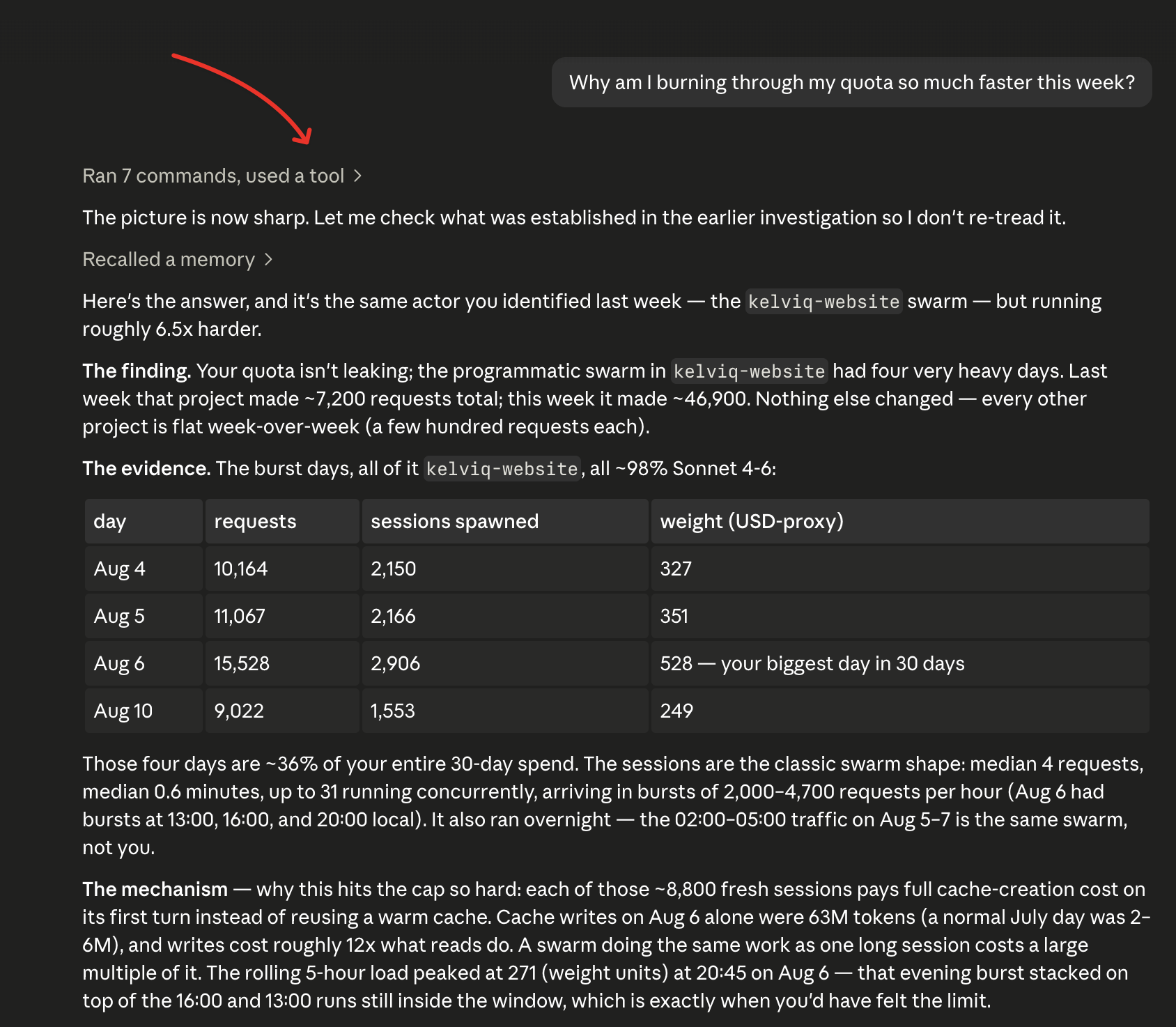
Found it. This isn’t a metering bug. Something is running Claude Code as a swarm.
The numbers were absurd. On that one day there were 1,555 seperate Claude Code sessions on my machine. The median session lasted 30 seconds and made 4 requests. At 19:54 there were 51 sessions running at the same time. At peak, my laptop was firing about 190 API requests per minute.
That is not a human. I type slower than that.
For contrast, there was exactly one session that day that looked like a person: 82 requests spread over five hours. That was me, actually coding. My real work was 9% of the day. The other 91% was a machine.
第一轮结果就不对劲。7 月 29 日到 8 月 3 日那一周,我用了约 1.9 亿 token;后一周是 12.2 亿,翻了六倍多,而我的工作方式没有任何变化。
接着我们把目光聚焦在封锁那天,Claude 说得很直白:
找到了。这不是计量 bug。有东西在以 swarm 形式跑 Claude Code。
数字非常离谱。那一天我的机器上出现了 1,555 个 Claude Code 会话,中位会话只持续 30 秒、发出 4 个请求。19:54 时有 51 个会话同时在跑;峰值时笔记本每分钟射出约 190 个 API 请求。
那不是人。我打字没这么快。
相比之下,那一天只有一个会话像人:82 个请求,分散在五个小时里。那才是真正写代码的我。我一天里 9% 是真实工作,其余 91% 都是机器。
So what was it? A coding agent that some friends of mine are building, from the current YC batch. I had set it up to do background work in one of our project repos and honestly forgot how it worked under the hood. It spawns fresh Claude Code sessions in parallel, in bursts. It ran twice that day, and thousands of times that week.
So, no bug and no broken meter. Just my own robot eating my plan.
So much for switching to Codex.
那到底是什么?是我几个朋友在做的编码 Agent,来自当前这期 YC 批次。我把它配好在一个项目仓库里跑后台任务,说实话忘了它内部是怎么运作的。它会分波并行生成全新的 Claude Code 会话。它那天跑了两次,那一周跑了上千次。
所以,没有 bug,计量表也没坏。只是我自己的机器人在吃我的套餐。
换 Codex 的事就算了。
Finding the culprit still didn’t explain how you hit a usage limit ten minutes after starting. Two things explain that.
The limit is a rolling window, not a daily bucket. The 5-hour limit counts everything from the last five hours, whether you were at the keyboard or not. The weekly limit works the same way over seven days. When I started that evening at 19:46, the robot’s afternoon run was still inside my window, so it was already 83% full before I typed a single word. I didn’t burn my quota in ten minutes. Most of it was already gone before I started.
Most of what a session costs is the container, not the contents. Every time Claude sends a message, it re-sends the whole conversation so far. The files it read, the history, all of it, every single turn. This is what prompt caching is for, and over my month, 87% of all tokens were exactly this, the same context shipped again and again. A swarm makes it brutally expensive in a different way: every fresh session has to build its cache from nothing, and building costs about 12 times more than re-reading. Fifteen hundred fresh sessions means fifteen hundred contexts built from scratch. That was 33 million tokens of pure setup in a single afternoon.
There’s a name for the weight of a container that you subtract to find what’s actually inside. It’s called tare. It’s the button on a kitchen scale that zeroes out the bowl so you only weigh the flour.
找到元凶仍然无法解释为什么开始后十分钟就撞上限。这由两件事造成。
限额是滚动窗口,不是按天重置的桶。5 小时限额统计的是过去五小时内的所有用量,无论你是否坐在键盘前;每周限额在七天里同理。我当晚 19:46 开始工作时,机器人下午那一轮还在我的窗口里,所以我一个字还没敲,窗口就已经用掉了 83%。我并不是在十分钟里烧光配额——大部分在我开始前就没了。
会话费用的大头是容器,而不是容器里的内容。Claude 每次发消息,都会把目前整段对话重新发一遍:读过的文件、历史,全部都要从头再传。这正是 prompt caching 的用途;而我这一个月里,87% 的 token 恰恰都属于这一类——同一份上下文被反复运送。换成 swarm 后,费用会以另一种方式变得极其昂贵:每个全新会话都得从零建缓存,而建缓存的成本大约是重新读取的 12 倍。一千五百个新会话,就是一千五百份从零搭建的上下文。仅一个下午就花掉 3300 万 token 的纯准备成本。
这种需要先扣掉才能知道里面实际重量的容器重量,有一个名字,叫 tare。它就是厨房秤上那个把碗归零、只称面粉的按键。
The investigation took two days of manual digging. That felt wrong, because everything we did was repeatable, and all those people on Reddit have the same logs sitting on their machines.
So we turned it into a tool, and named it tare.
It’s a skill for Claude Code. You install it once, and then you just ask, in plain English, in any session:
Why did I hit my usage limit yesterday?
Which of my projects is eating my quota?
Is something running Claude Code in the background?
Is it safe to start a big refactor right now, or is my window still full?
Make me a usage report I can open in my browser.
Export my usage to a spreadsheet.
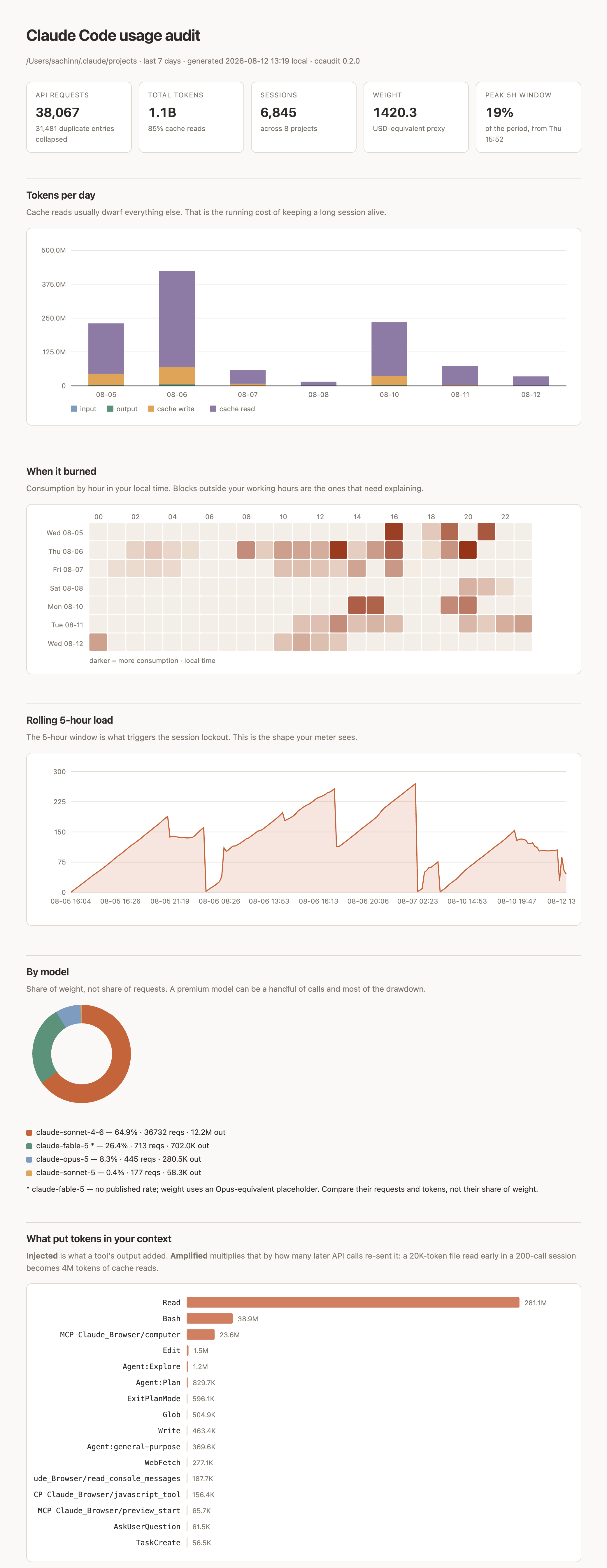
Claude reads its own logs and answers with a cause, not a spreadsheet. There’s also a little dashboard, a HTML usage report with charts, and a scrubbed summary file you can post publicly to ask “is this normal?” without leaking a single prompt or file name.
这次排查花了我整整两天手动翻日志。这感觉不对,因为我们做的每一步都可重复,而 Reddit 上那些人手里同样有这些日志。
于是我们把它做成了一个工具,取名 tare。
这是给 Claude Code 用的技能包。装一次之后,你可以在任意会话里直接用大白话提问:
为什么我昨天会撞上用量限额?
我的哪个项目在吃配额?
是不是有东西在后台运行 Claude Code?
现在开始大规模重构安全吗,还是窗口仍是满的?
给我生成一份能在浏览器打开的用量报告。
把我的用量导出成表格。
Claude 会读自己的日志,给你原因,而不是表格。另外还有一个小仪表盘:一份带图表的 HTML 用量报告,以及一份经脱敏的摘要文件,你可以公开贴出来问“这样正常吗?”,不会泄露任何 prompt 或文件名。
One design choice I care about: the tool is built to be able to say “nothing is wrong.” Most diagnostic tools only know how to find problems. This one will happily tell you your token usage is normal and boring. Mine is a good example. There was never a metering bug, just a rolling window nobody explains and a robot I forgot about.
我在意的一个设计点是:这个工具必须能说出“一切正常”。绝大多数诊断工具只会找问题;它却会高高兴兴告诉你,你的 token 用量正常且平平无奇。我自己就是好例子。从来就没有计量 bug,只有一个没人解释过的滚动窗口,和我一个忘掉的机器人。
Two things happened while testing that sold me on it.
First, it re-opened a case I thought was closed. For two days we’d been calling one 2,705-request session a runaway agent loop. The tool’s session deep-dive showed it was actually legitimate work spread over eight days, resumed 22 times, and that my habit of resuming old sessions instead of starting fresh had cost about 3.4 million tokens in rebuilt context. It turned “use /clear between tasks” from generic advice into a personal number.
Second, once the robot was gone, it correctly identified the new biggest spender on my machine: the session where we were building the tool itself. A usage tool that bills itself honestly. Fair enough.
测试过程中有两件事让我彻底信了它。
第一,它重开了一个我本以为已结案的判断。过去两天,我们一直把一个 2,705 次请求的会话称为失控 Agent 循环。工具的会话深度分析显示,那其实是横跨八天的合法工作,被恢复了 22 次;而我习惯恢复旧会话而不是新开,导致重建上下文多花了约 340 万 token。它把“任务之间用 /clear”从一句泛泛建议,变成了一个属于我自己的具体数字。
第二,机器人消失后,它正确指认了机器上新的最大消耗源:我们构建这个工具本身的那个会话。一个会如实给自己记账的用量工具,倒也公平。
One thing to be clear about, because a tool that reads your entire Claude history deserves suspicion. Everything runs locally. The scripts make zero network calls, and you don’t have to trust me on that: the repo has a SECURITY.md that shows the one grep command that proves it. The only file designed to be shared is scrubbed by construction. No prompts, no file paths, no session ids, nothing.
有一点必须说清楚,因为一个会读取你全部 Claude 历史的工具理应被怀疑。一切都在本机运行。脚本零网络调用;你不必只信我的话——仓库里有 SECURITY.md,用一条 grep 命令就能证明。唯一设计为可以分享的文件,在结构上就保证了脱敏:没有 prompt、没有文件路径、没有 session id,什么都没有。
The whole install is one line:
npx skills add kelviq/tare -g -y --copy --agent claude-code
Then open a new Claude Code session and ask:
Where did my tokens actually go this week?
It took me two days to answer that. It should take you about two minutes. And if enough people share their scrubbed summaries, we can eventually answer the question no single person can: what does normal usage even look like?
The code is open source at github.com/kelviq/tare. If it finds a robot in your logs, I’d genuinely love to hear about it.
安装只需要一行:
npx skills add kelviq/tare -g -y --copy --agent claude-code
然后新开一个 Claude Code 会话,问一句:
我这周的 token 到底花在哪了?
我花了两天才答出这个问题。你大概只需两分钟。而如果足够多人分享自己的脱敏摘要,我们最终就能回答单靠一个人无从回答的问题:正常用量到底是什么样?