把网站动作变成 Agent 可调用的接口:WebMCP 上手实测
WebMCP 是 W3C Web Machine Learning Community Group 正在孵化的浏览器标准草案(Chrome 与 Edge 联合提出):网页把“能做什么”注册成带 JSON Schema 的结构化工具,AI Agent 按声明直接调用,不再靠读 DOM、猜按钮。作者没有停在概念介绍——他部署了 Career Copilot,在页面上注册 13 个 WebMCP 工具,并让已支持 WebMCP 的 ChatGPT 跑完真实流程:聚合 GitLab/Stripe/Databricks 共 75 个职位,读取 24 份真实 JD 并打分,找出技能差距,短名单 4 个职位后停在人工闸门,最终只提交 3 份申请。文中包含最小可用的 registerTool() 代码、Chrome 149 Origin Trial 的启用方式、从发现到执行的调用链路,以及同源限制、readOnlyHint、敏感操作确认等信任模型。结论是它早期但方向可信,适合做 Agent 工程、浏览器 API 或站点自动化的团队评估。
Picture an AI agent trying to book you a table on a restaurant’s website. Today, it works like a very patient, slightly confused intern. It loads the page, reads the raw HTML, tries to figure out which of the forty <div> elements is the date picker, guesses that the green button probably means “confirm,” clicks it, waits, and re-reads the whole screen to see if anything happened. Move that button next week and the agent breaks. Rename a CSS class and it breaks. Add a cookie banner on top and it clicks the wrong thing entirely.
This is how almost all “agents using websites” works right now: screen-scraping and hoping. It’s the automation equivalent of operating a computer by describing screenshots over the phone.
设想一个 AI agent 替你在餐厅网站订位。今天的它就像一位极有耐心但有点糊涂的实习生:载入页面、读原始 HTML、试图从四十个 <div> 里找出日期选择器、猜测绿色按钮大概就是“确认”、点击、等待,然后重读整个屏幕看有没有变化。下星期按钮一挪位置,agent 就崩;CSS 类名一改,它也崩;顶部加个 cookie 横幅,它干脆点错东西。
当前几乎所有“用网站”的 agent 都是这么工作的:爬屏幕、碰运气。这在自动化上相当于隔着电话向对方描述截图来操作一台电脑。
WebMCP proposes something much saner. Instead of the agent guessing what your site can do by staring at it, your site declares what it can do, as a set of clean, structured tools the agent can call directly. “Here’s a book_table tool. It takes a date, a time, and a party size. Call it.” No pixel-reading. No guessing. And the best part: it already runs in Chrome behind a trial, and adding your first tool takes about ten minutes.
Let me show you the whole thing.
WebMCP 提出一种合理得多的做法:agent 不必盯着页面猜你的站点能做什么,而是由站点主动声明一套干净、结构化的工具,让 agent 直接调用。“这是一个 book_table 工具,接收日期、时间和人数参数。调用它即可。”不用读像素,不用猜。最棒的是它已经在 Chrome 的试验版里可用,添加第一个工具大约只需十分钟。
下面我把整个过程讲给你看。
The core shift: from scraping to declaring
The entire idea fits in one comparison. Same task, two worlds.
Today: the agent scrapes
- Read the entire DOM
- Guess which element is the date field
- Simulate typing and clicking
- Re-read the whole page to check
- Break when the layout changes
WebMCP: the site declares
- Page registers a book_table tool
- Agent reads the tool's schema
- Agent calls it with structured args
- Tool runs your real JS, returns a result
- Survives redesigns: the tool is the contract
The left column is brittle because the agent is reverse-engineering your UI every time. The right column is stable because you gave it a real interface. The layout can change freely underneath a tool whose name and schema stay the same.
核心转变:从爬取到声明
整个想法浓缩成一张对照表:同一个任务,两个世界。
如今:agent 爬取
- 读取整个 DOM
- 猜测哪个元素是日期输入框
- 模拟键入与点击
- 重读整页确认结果
- 页面布局一变就崩
WebMCP:站点声明
- 页面注册 book_table 工具
- agent 读取工具的 schema
- agent 用结构化参数调用
- 工具运行你真实的 JS 并返回结果
- 经受改版:工具本身就是契约
左侧之所以脆弱,是因为 agent 每次都在逆向你的界面;右侧之所以稳定,是因为你给了它一个真正的接口。只要工具名和 schema 不变,底下布局可以随时改。
If you’ve read my earlier post on MCP, the port that let AI touch the world, this will feel familiar, and it should. MCP gave AI a standard way to call tools on a server. WebMCP brings that same idea into the browser: the web page itself becomes a place that offers tools, running in the tab you already have open, with the session you’re already logged into.
如果你读过我之前那篇关于 MCP 的文章——那个让 AI 触达世界的“端口”——你会有似曾相识之感,这很正常。MCP 为 AI 提供了在服务端调用工具的标准方式;WebMCP 把这个想法搬进浏览器:网页本身就是提供工具的地方,运行在你已经打开的标签页里,带着你已登录的会话。
What it actually is
WebMCP is a proposed web standard, developed jointly by Google (Chrome) and Microsoft (Edge) in the W3C Web Machine Learning Community Group, that gives a web page a small JavaScript API to register tools that an AI agent can discover and call. Google describes it plainly in the Chrome docs: a way to “build and expose structured tools for AI agents,” where the site annotates its own features so agents “know exactly how to interact” with them. To be precise about maturity, it’s a Community Group draft, not a finished W3C standard and not yet on the standards track, which is exactly why now is the moment to learn it and shape it.
它到底是什么
WebMCP 是一个拟议中的 Web 标准,由 Google(Chrome)与 Microsoft(Edge)在 W3C Web 机器学习社区组联合推进,赋予网页一个轻量 JavaScript API,让网页可以注册供 AI agent 发现和调用的工具。Chrome 文档里说得很直白:这是一种“构建并暴露面向 AI agent 的结构化工具”的方式,站点标注自己的功能,agent 因此“确切知道如何与之交互”。准确地说,它目前只是社区组草案,不是定稿的 W3C 标准,也尚未进入标准轨道——这正是现在去学习并参与塑造它的理由。
Three things make it click into place:
- Discovery. A standard way for a page to say “I offer these tools,” like checkout or filter_results, so an agent can list them.
- Schemas. Each tool declares its inputs and outputs as JSON Schema, so the agent knows exactly what to pass and there’s far less room to hallucinate or misread.
- State. A shared understanding of what’s on the page right now, so the agent knows what it can actually act on.
三个机制让它真正运转起来:
- 发现(Discovery)。 页面用标准方式声明“我提供这些工具”,例如 checkout 或 filter_results,agent 可以把它们列出来。
- Schema(模式)。 每个工具用 JSON Schema 声明输入与输出,agent 确切知道该传什么,幻觉和误读的空间大大缩小。
- 状态(State)。 双方对页面当前状态有共同理解,agent 才知道当前到底能对什么采取行动。
WebMCP is real and runnable, but early. It's available as a Chrome origin trial from Chrome 149, and you can switch it on locally with the flag chrome://flags/#enable-webmcp-testing. The proposal lives at github.com/webmachinelearning/webmcp, Angular already has experimental support, and Chrome ships demo sites (a pizza maker, travel search, a restaurant booking). Google's own words: it's "under active discussion and subject to change." So this is a "try it and shape it" moment, not a "ship it to production" one, and that's exactly why it's worth learning now.
WebMCP 真实可运行,但还处于早期:Chrome 149 起提供 origin trial,你也可以用 chrome://flags/#enable-webmcp-testing 在本地打开。提案在 github.com/webmachinelearning/webmcp,Angular 已提供实验性支持,Chrome 还发布了演示站点(披萨制作、旅行搜索、餐厅订位)。Google 自己的说法是“正在积极讨论,可能变更”。所以这是一个“试它并塑造它”的时刻,而不是“上线到生产”的时刻——这正是现在值得学的原因。
Here’s the whole loop, page to agent and back. Nothing exotic happens: the page registers tools, the agent lists them, picks one, calls it with structured arguments, and your own JavaScript does the work in the page.
- page → Register tools. Your JS declares book_table, search, etc.
- agent → Discover. Lists the page's tools and their schemas.
- agent → Call with args. Structured JSON matching the schema.
- page → execute() runs. Your real JS, in the logged-in page.
- agent → Gets result. A structured answer, visibly, in the tab.
The tool's execute function runs inside your actual page, using your existing JavaScript, state, and the user's own logged-in session. It happens visibly in the tab, not in some invisible headless browser, so the user can watch it and trust it.
That “runs in the page you’re already logged into” detail is a big deal. The agent isn’t a separate bot logging in with stolen credentials somewhere. It’s calling a function in your open, authenticated tab, using the session you already have. The site keeps control of what it exposes, and the user can see it happen.
这是页面到 agent 再返回的完整回路,没有什么奇特之处:页面注册工具,agent 列出并挑选,用结构化参数调用,最后由你自己的 JavaScript 在页面里干活。
- 页面 → 注册工具。你的 JS 声明 book_table、search 等。
- agent → 发现。列出页面工具及其 schema。
- agent → 带参数调用。传入符合 schema 的结构化 JSON。
- 页面 → 执行 execute()。运行你真实的 JS,就发生在已登录的页面中。
- agent → 拿到结果。结构化回复,在标签页中可见。
工具的 execute 函数运行在实际页面里,使用你现有的 JavaScript、状态,以及用户自己的登录会话。整个过程在标签页内可见,而不是在某个看不见的无头浏览器里,所以用户可以看着它发生并信任它。
“运行在你已登录的页面中”这一点至关重要:agent 不是带着偷来的凭证在别处登录的独立 bot,而是在你打开且已认证的标签页里调用函数,使用你已有的会话。站点仍然掌控暴露什么,用户也能看到全过程。
Watch one call happen
Concretely, when you ask an in-browser agent to do something on a WebMCP-enabled site, it looks like this: your request, the agent picking the declared tool, the tool running, the result.
- you › book a table for 4 tonight at 8
- agent › found tool book_table on this page
- agent › calling book_table({ date: "today", time: "20:00", party: 4 })
- page › Booked. Table for 4 at 8:00 PM, confirmation #A17.
No DOM guessing anywhere in that exchange. The agent called a named function with typed arguments, and the page did the rest with its own code. This is the difference between an agent operating your site and an agent operating a photograph of your site.
看一次真实调用
具体来说,当你让浏览器内的 agent 在一个启用 WebMCP 的站点上做事时,过程大致如下:你的请求、agent 选中声明好的工具、工具执行、返回结果。
- 你 › 订一张今晚 8 点、4 人的餐桌
- agent › 在此页面找到工具 book_table
- agent › 调用 book_table({ date: "today", time: "20:00", party: 4 })
- 页面 › 已订。4 人桌,晚上 8:00,确认号 #A17。
整个过程没有任何 DOM 猜测:agent 调用了一个带类型参数的具名函数,剩下的事由页面用自己的代码完成。区别在于:agent 是在操作你的站点,还是在操作一张站点的照片。
The code is genuinely tiny
This is the part that makes people want to try it. Registering a tool is one call. Using the current imperative API from the Chrome docs, a to-do site adding an “add item” tool looks essentially like this:
// register a WebMCP tool (imperative API)
await document.modelContext.registerTool({
  name: 'add_todo',
  description: 'Add an item to the to-do list',
  inputSchema: {
    type: 'object',
    properties: { text: { type: 'string' } },
    required: ['text']
  },
  execute: async ({ text }) => {
    addTodoToPage(text); // your own existing function
    return `Added to-do: ${text}`;
  }
});
That's the whole thing. You give the tool a name, a description, an input schema, and an execute function that calls code you already wrote. The agent discovers it with getTools(), and you can pull a tool back with an AbortController if it stops being relevant. There's also a declarative flavor where you annotate an HTML form instead of writing JS.
Notice what execute does: it calls addTodoToPage, a function that already exists on your site. WebMCP isn’t asking you to rebuild anything. You’re wrapping the actions your site can already do in a thin, declared interface so an agent can reach them cleanly. That’s why the ten-minutes claim is real.
代码确实微小得惊人
这正是让人想立刻上手试的部分:注册一个工具就是一次调用。按 Chrome 文档当前的命令式 API,一个待办站点要添加“add item”工具,大致是这样:
// register a WebMCP tool (imperative API)
await document.modelContext.registerTool({
  name: 'add_todo',
  description: 'Add an item to the to-do list',
  inputSchema: {
    type: 'object',
    properties: { text: { type: 'string' } },
    required: ['text']
  },
  execute: async ({ text }) => {
    addTodoToPage(text); // your own existing function
    return `Added to-do: ${text}`;
  }
});
就这么多。给工具一个名字、一段描述、一份输入 schema,再加一个执行你已有代码的 execute 函数。agent 通过 getTools() 发现工具;如果工具不再适用,你还能用 AbortController 把它收回。此外还有一种声明式做法:不用写 JS,而是直接标注 HTML 表单。
注意 execute 做了什么:它调用 addTodoToPage,也就是你的站点本来就有的函数。WebMCP 并不是让你重建任何东西,而是在站点已能执行的动作外包一层薄薄的声明式接口,让 agent 能干净地触达它们。所以说“十分钟上手”是真的。
One accuracy note, because the API is young and moving: the current entry point is document.modelContext, while earlier drafts used navigator.modelContext, the move makes sense because tools really belong to a document, not the whole browser. If you follow an older tutorial showing navigator, that’s why. A one-line shim (const mc = document.modelContext || navigator.modelContext) bridges both while the change rolls out. Expect a few more edges like this to shift; it’s a draft.
一点准确性提醒:这个 API 还很年轻、仍在变动。当前入口是 document.modelContext,早期草案用的是 navigator.modelContext。这次迁移是有道理的——工具确实属于 document,而不是整个浏览器。如果你看的老教程写的是 navigator,原因就在这里。可用一行 shim 兼容两者:const mc = document.modelContext || navigator.modelContext,等变更慢慢铺开。之后可能还有类似边缘会变动,毕竟还是草案。
A real one, worked all the way through
The official WebMCP demos are all “call one tool and you’re done”, order a pizza, book a table. Useful, but they undersell the idea, because the interesting part of WebMCP isn’t one tool call. It’s an agent chaining tools to do real work, with a human gate on the part that matters. So instead of a toy, I built and deployed a real one to go with this post, and this section is the honest walk-through of it, because it teaches the whole model better than any abstract example.
Career Copilot is an experimental agentic career portal. You give it a resume; it reads real job descriptions from live company boards, scores your true fit, tells you your skill gaps, and prepares a batch of applications you approve in one click. Nothing is faked: the jobs are real, the matching is computed from real job-description text, and it applies nothing without your explicit OK.
Career Copilot, a live WebMCP career portal
Open it, tap “See it work instantly”, and watch an agent run a full job-search mission over live data: read a resume, pull real openings from GitLab, Stripe and Databricks, read each job description, score your fit, surface your skill gaps, and propose a batch of applications for you to approve. It registers 13 real WebMCP tools on the page.
Open the live demo →
一个真实案例,完整跑通
官方 WebMCP demo 都是“调用一个工具就结束”——订个披萨、订张桌。这有用,但低估了这个想法,因为 WebMCP 的趣味不在单次工具调用,而在 agent 串联工具做真实工作,并在关键处设一道人工闸门。因此我没有做玩具,而是为这篇文章构建并部署了一个真实示例。这一节是它老老实实的实战复盘,因为它比任何抽象示例都更能说明整套模型。
Career Copilot 是一个实验性的 agent 化求职门户:把简历交给它,它会读取真实公司职位面板上的职位描述,评估你的真实匹配度,指出技能差距,并准备一批可以一键批准的申请。没有任何伪造:职位是真实的、匹配度由真实职位描述文本计算而来,在你明确同意之前不会投出任何申请。
Career Copilot:一个在线 WebMCP 求职门户
打开它,点一下“See it work instantly”,就能看到 agent 在实时数据上跑完整个求职任务:读取简历、从 GitLab、Stripe、Databricks 拉取真实职位、逐条阅读职位描述、评估匹配度、给出技能差距,并整理出一批待你批准的申请。这个页面注册了 13 个真实的 WebMCP 工具。
打开实时演示 →
Deployed and validated. With chrome://flags/#enable-webmcp-testing on, the page reports “WebMCP live, 13 tools registered” and they show up in the DevTools WebMCP panel. No flag needed to try it: one button runs the whole mission anyway. It never really submits an application, it prepares them and stops for you.
And this isn’t a diagram of what should happen, here’s the actual browser proving it. Turn the flag on, open DevTools, and Chrome grows a WebMCP panel that lists every tool the page registered, each with the same name and description the agent sees. This is the whole pitch made visible: the website declares its tools, and the browser reads them straight off the page.
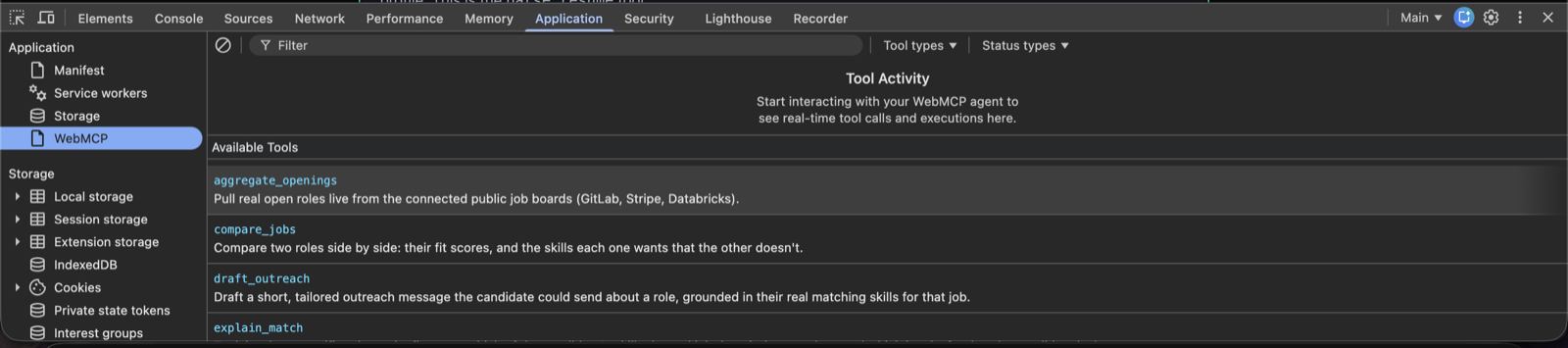
The tools, straight from the page. Chrome's DevTools → Application → WebMCP panel. Every tool the page registered is listed with its real name and description, aggregate_openings, compare_jobs, draft_outreach, explain_match, exactly what an agent would discover.
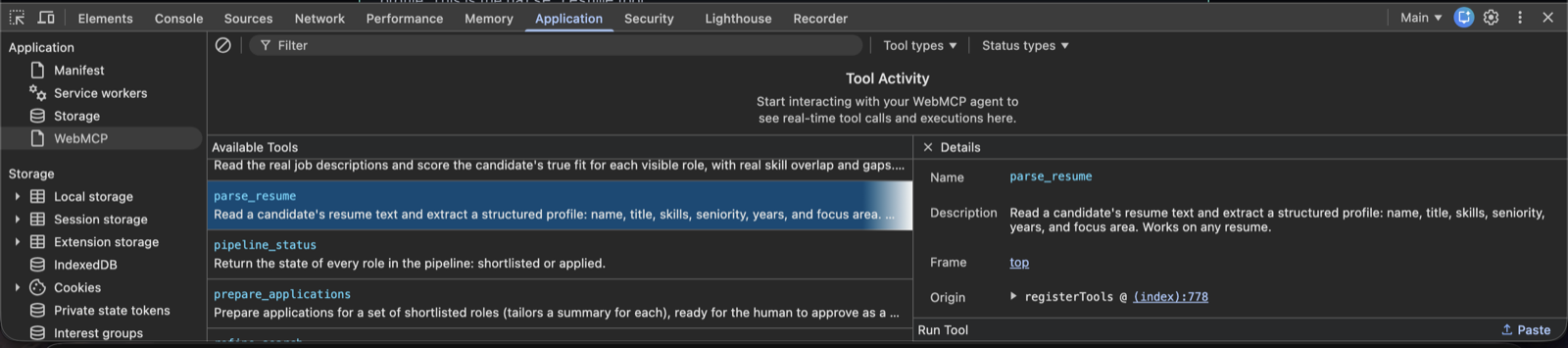
Click one, see its contract. Selecting parse_resume opens a Details pane: name, full description, the frame it lives in, and an Origin that points right back at registerTools in the page's own source. No scraping, no guessing, the tool is the interface.
Real screenshots from the deployed demo. The left of the panel is the tool list an agent sees; the right is one tool's full contract. This is what “the website talks to the agent” actually looks like in the browser today.
已部署并通过验证。打开 chrome://flags/#enable-webmcp-testing 后,页面会显示“WebMCP live, 13 tools registered”,这些工具也会出现在 DevTools 的 WebMCP 面板中。即使不开 flag 也能体验:有一个按钮可以直接跑完整个任务。它不会真的提交申请,而是把申请准备好,然后停下来等你。
这不是“未来会这样”的示意图,而是真实浏览器在证明。打开 flag、打开 DevTools,Chrome 会多出一个 WebMCP 面板,列出页面注册的每一个工具,名称与描述和 agent 所见完全一致。整个主张在这里变得可见:网站声明自己的工具,浏览器直接从页面读取它们。
工具直接来自页面。Chrome DevTools → Application → WebMCP 面板列出页面注册的每个工具及其真实名称与描述:aggregate_openings、compare_jobs、draft_outreach、explain_match,正是 agent 会发现的东西。
点开即可看到契约。选中 parse_resume 会打开 Details 窗格:名称、完整描述、所在 frame,以及一个直接指回页面源码中 registerTools 的 Origin。没有爬取,没有猜测,工具就是界面。
这些是已部署 demo 的真实截图。面板左侧是 agent 看到的工具列表,右侧是单个工具的完整契约。这就是“网站和 agent 对话”今天在浏览器里的真实样子。
And a real agent actually drove it
Listing tools in a panel is one thing. Getting a production AI agent to use them is the real test. ChatGPT supports WebMCP now, so I pointed it at the live demo and asked it, in plain English, to read the sample frontend resume, find the best job matches with skill gaps, and stop before applying to anything. It did the whole thing through the page’s declared tools.
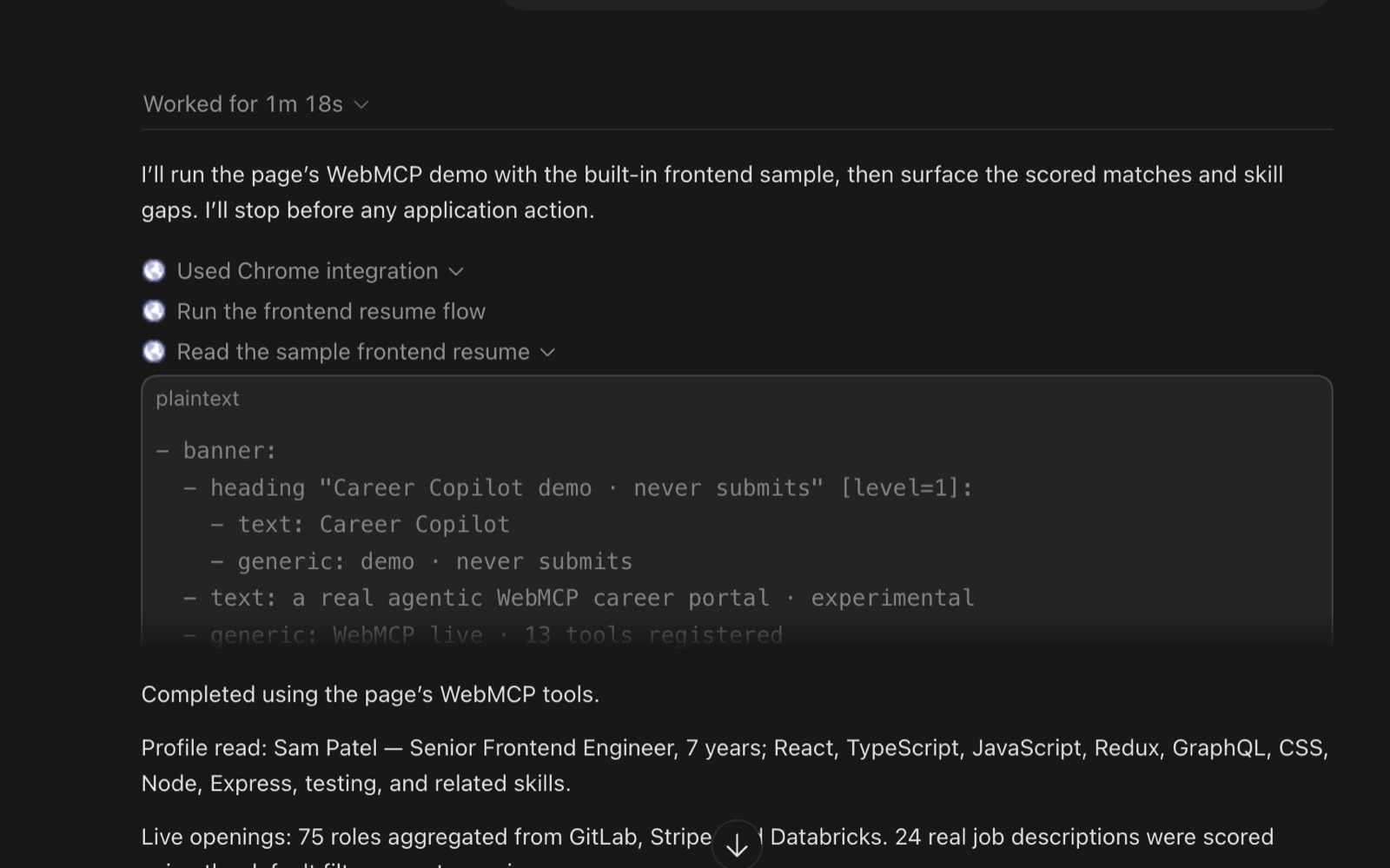
ChatGPT, using the tools. Its own trace reads the page as WebMCP live · 13 tools registered, names the parse_resume tool, and signs off with “Completed using the page's WebMCP tools.” No DOM scraping, it called the declared tools.
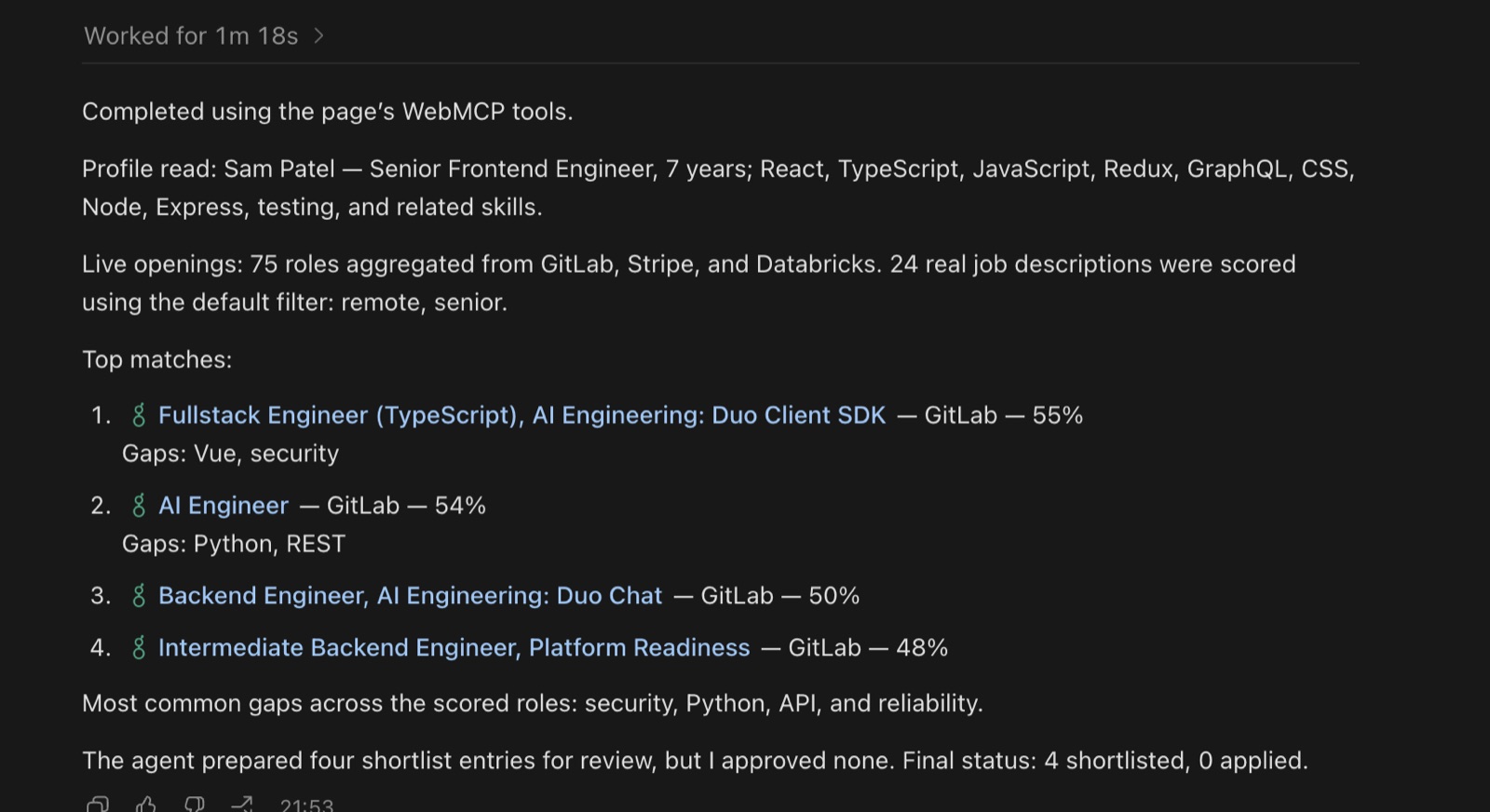
The result it produced. It read the profile, aggregated 75 live roles, scored 24 real job descriptions, ranked the matches with honest percentages and real gaps, and stopped: 4 shortlisted, 0 applied. The human gate held, exactly as designed.
A different vendor's agent, using the same declared tools the DevTools panel lists. The scores aren't scraped from the page, they're computed by the match_profile tool when the agent calls it. That's the whole promise of WebMCP working end to end: describe the task in words, and the agent operates the site through a clean interface instead of guessing at its buttons.
而且真的有一个生产级 agent 驱动了它
把工具列在面板里是一回事;让生产级 AI agent 实际去使用它们才是真正的考验。ChatGPT 现在已支持 WebMCP,所以我让它访问在线 demo,并用自然语言要求:读取示例前端工程师简历、找出带技能差距的最佳职位匹配,并在投递任何职位前停下。它通过页面声明的工具完成了全部动作。
ChatGPT 确实在使用这些工具。它自己的轨迹把页面读作 WebMCP live · 13 tools registered,点名 parse_resume 工具,并以“Completed using the page's WebMCP tools.”收尾。没有 DOM 爬取,它调用的是已声明工具。
这是它产出的结果:读取档案、聚合 75 个在招职位、对 24 份真实职位描述评分、按诚实百分比和真实差距排序,然后停下来——4 份进入候选,0 份投出。人工闸门按设计稳稳生效。
一个来自另一家厂商的 agent,用的是 DevTools 面板列出的同一批已声明工具。匹配分数不是从页面爬出来的,而是 agent 调用 match_profile 工具时算出来的。这正是 WebMCP 端到端的承诺:用自然语言描述任务,agent 通过干净接口操作站点,而不是去猜按钮。
Here’s the real mission, step by step. Each row is a WebMCP tool the page exposes; the agent chains them. Notice the shape: a run phase, then a consequential act phase that stops for a human.
- parse_resume — Reads any resume into a real profile: skills, seniority, focus area (read)
- aggregate_openings — Pulls live roles from three real company job boards (read)
- match_profile — Fetches each real job description and scores your true fit + gaps (read)
- find_gaps — Aggregates the gaps into a learning signal: “learn X to unlock more roles” (read)
- shortlist — Adds the strongest fits to your pipeline. Reversible (act)
- prepare_applications — Tailors a summary per role, ready to review (act)
- submit_batch — Opens a human approval panel: review the set, uncheck any, then apply (gate)
The real agent loop. The first four tools are read-only, the agent gathers and reasons freely. Then shortlist and prepare change reversible state. Only the last one, applying in your name, is consequential, and it cannot happen without you clicking approve. That split is the entire safety model of WebMCP, made concrete.
这是真实任务的逐步流程。每一行都是页面暴露的一个 WebMCP 工具,agent 会串联它们。注意整体形态:先有一段“读取/运行”,随后是会产生后果的动作,并在真人这里停下。
- parse_resume — 把任意简历读成结构化档案:技能、资历、专注方向(只读)
- aggregate_openings — 从三家真实公司的职位面板拉取在招职位(只读)
- match_profile — 抓取每份真实职位描述并计算你的匹配度与差距(只读)
- find_gaps — 把差距汇总成学习信号:“学 X 以解锁更多职位”(只读)
- shortlist — 把最强的匹配加入你的候选管道。可撤销(动作)
- prepare_applications — 按职位各写一份适配摘要,供审阅(动作)
- submit_batch — 打开人工审批面板:审阅整批、取消勾选任意项,然后提交(闸门)
这就是真实的 agent 循环:前四个工具只读,agent 可以自由收集与推理;接着 shortlist 与 prepare 修改的是可逆状态;只有最后一步——以你的名义投递——才会产生真实后果,而且不经过你点击 approve 就不会发生。这个切分正是 WebMCP 整套安全模型的具体化。
The tools, grouped by what they can do
This grouping is worth internalizing, because it’s how you should design any WebMCP surface: separate what merely reads from what acts, and put the human gate only where it’s truly needed.
13 tools, three tiers. WebMCP lets a tool flag itself with hints like readOnlyHint, so the agent (and the browser) know which calls are safe to make freely and which need a human. Getting this taxonomy right is most of what makes an agentic surface trustworthy.
工具按能力分层
这个分组值得内化,因为它就是设计任何 WebMCP 界面的准则:把“只读”与“会改动状态”的动作分开,只在真正必要的地方放人工闸门。
13 个工具,三个层级。WebMCP 允许工具用 readOnlyHint 这样的 hint 标记自己,agent(以及浏览器)因此知道哪些调用可以放心自由执行、哪些需要人类介入。把这种分类法做对,agent 化界面才谈得上可信。
A real run, not a mockup
Here’s the actual tool-activity log from a validated run with a frontend engineer’s resume. Watch it read real descriptions and score honestly, no fake 99%s:
tool activity · real run
→ tool parse_resume(…) ✓ result Sam Patel, Senior Frontend Engineer · 11 skills · frontend focus
→ tool aggregate_openings() ✓ result 75 live roles from GitLab, Stripe, Databricks
→ tool match_profile() ✓ result reading 24 real job descriptions… ✓ result Design Engineer, Presence @ GitLab: 80%, no gaps ✓ result Senior Software Engineer, Fullstack @ Stripe: 57%, gaps: python ✓ result AI Engineer @ GitLab: 54%, gaps: python, llm
→ tool find_gaps() ✓ result top gaps across matches: python, testing, api
→ tool shortlist([4 roles]) → tool prepare_applications([4]) ⏸ gate awaiting your approval for 4 applications… ✓ result applied to 3 (you unchecked 1) ✓
Mission complete.
A genuine run. The frontend resume's true best fit, a Design Engineer role at 80%, came from reading the real job description, not the title (the title never says “React”). The scores are honest and capped, the gaps are real, and the human approved 3 of 4 in the batch. Swap in a backend or data resume and the whole thing re-ranks to that person's real best matches. That's what a scraper fundamentally cannot do.
真实运行,不是 mockup
下面是使用一位前端工程师简历做验证时的真实工具活动日志。可以看到它读取真实职位描述并诚实评分,没有伪造的 99%:
工具活动 · 真实运行
→ tool parse_resume(…) ✓ 结果 Sam Patel,高级前端工程师 · 11 项技能 · 前端方向
→ tool aggregate_openings() ✓ 结果 GitLab、Stripe、Databricks 共 75 个在招职位
→ tool match_profile() ✓ 结果 正在读取 24 份真实职位描述… ✓ 结果 GitLab Design Engineer, Presence:80%,无差距 ✓ 结果 Stripe Senior Software Engineer, Fullstack:57%,差距:python ✓ 结果 GitLab AI Engineer:54%,差距:python, llm
→ tool find_gaps() ✓ 结果 各职位主要共同差距:python、testing、api
→ tool shortlist([4 roles]) → tool prepare_applications([4]) ⏸ 闸门 等待你审批 4 份申请… ✓ 结果 实际投出 3 份(你取消了 1 份)✓
任务完成。
这是一次真实运行。前端简历真正的最佳匹配是匹配度 80% 的 Design Engineer 职位——这来自阅读真实职位描述,而不是看职位名称(职位名称里从未出现 “React”)。评分诚实且封顶,差距真实,人工在整批 4 份里批准了 3 份。换成后端或数据类简历,整套排序会重新指向那个人真实的最佳匹配。这是爬虫根本做不到的事。
The one hard thing, and why the human gate is the right answer
Building this taught me the honest limit of “auto-apply”, and it’s worth stating plainly because it’s the real engineering lesson. Everything up to the apply button is easy to automate and genuinely useful: reading resumes, aggregating openings, matching, tailoring. The last mile, actually submitting into a company’s application system, is the hard part. Those systems (Workday, Greenhouse and friends) are deliberately not open APIs, they sit behind logins and bot-detection, and automating submission usually violates their terms.
This is exactly the gap WebMCP is meant to close. If a careers site exposed a submit_application tool the way this demo does, an agent could apply cleanly, in your own authenticated session, with your approval. Until sites do that, the correct design isn’t to fake the last mile, it’s to automate everything up to it and keep a human on the submit. That’s not a compromise. An agent that silently applies to jobs in your name is a liability; one that does all the work and asks before it acts as you is a superpower. WebMCP’s consent model is what makes that line enforceable.
The full source is a single self-contained HTML file, and I wrote up the deeper product thinking, the candidate and employer sides, the phased build, the honest limits, as a design note in the repo.
一个难点,以及为什么人工闸门是正确答案
构建这个 demo 让我看清“自动投递”的真实边界。这值得直接说透,因为它是真正的工程教训:从读简历、聚合职位、匹配到定制,apply 按钮之前的事情都容易自动化且确实有用。最后一公里——真正提交进公司招聘系统——才是难点。Workday、Greenhouse 这类系统故意不提供开放 API,它们藏在登录与反机器人检测后面,自动化提交通常还违反其条款。
这正是 WebMCP 要补上的缺口。如果招聘网站像这个 demo 一样暴露 submit_application 工具,agent 就能在你自己已认证的会话中,经你批准后干净地投递。在站点这么做之前,正确的设计不是去伪造最后一公里,而是把之前一切都自动化,把“提交”留给人类。这不是妥协:一个悄悄以你名义投递工作的 agent 是负债;一个做完所有工作、在替你行动前先征求同意的 agent 才是超能力。WebMCP 的同意模型让这条线可以执行。
完整源码是单个自包含 HTML 文件;更深入的产品思考——候选人端与雇主端、分阶段构建、诚实的局限——都写在仓库的设计说明里。
The trust model, because this is the scary part
The obvious worry: if a page can hand tools to an agent, can a malicious page trick the agent into doing something awful? The design takes this seriously, and it’s worth knowing the guards.
- It runs visibly, in the tab. No headless, background execution. A browsing context has to be open, so actions happen where the user can see them.
- Same-origin only. Tool registration is gated by a tools Permissions Policy that defaults to self, so a random cross-origin iframe can’t quietly register tools unless the top page explicitly allows it.
- Sensitive actions can demand a human. For things like making a purchase, a tool can require an explicit user confirmation dialog before it proceeds. Human-in-the-loop is built into the pattern, not bolted on.
- Untrusted content is flagged. Tools carry annotation hints like readOnlyHint and untrustedContentHint, so the agent can treat a tool that returns third-party content with appropriate suspicion, which matters given everything we know about prompt injection.
None of this makes it magically safe, the standard is young and the security model is still being worked out, but the shape is right: visible, same-origin, consent-gated, and honest about untrusted data.
信任模型:这是最让人担心的一块
一个显然的疑虑:如果页面能把工具交给 agent,恶意页面会不会诱骗 agent 做坏事?设计对此很认真,下面这些防线值得了解。
- 在标签页内可见地运行。 没有无头或后台执行;必须有一个打开的 browsing context,动作发生在用户看得到的地方。
- 仅限同源。 工具注册受 tools Permissions Policy 约束,默认作用域为 self,因此随机的跨域 iframe 无法在顶层页面未明确允许时偷偷注册工具。
- 敏感动作可要求真人介入。 例如购买这类操作,工具在执行前可以要求明确的用户确认对话框。人在回环中是内建机制,而不是事后硬加。
- 不可信内容会被标记。 工具带有 readOnlyHint、untrustedContentHint 等注解提示,agent 会对返回第三方内容的工具保持适度怀疑——鉴于我们已知的 prompt injection 风险,这很重要。
这些并不能让事情神奇地绝对安全——标准年轻,安全模型仍在完善——但大方向是对的:可见、同源、以同意为闸门,并且对不可信数据保持诚实。
Honest pros and cons
Why it's exciting
- Structured tool calls instead of brittle DOM scraping
- Runs in the user's real, logged-in session, no separate bot auth
- The site stays in control of what it exposes
- Survives redesigns: the tool contract outlives the layout
- Reuses code you already have, tiny to adopt
- A real standard direction, not one vendor's lock-in
Why it's early
- Experimental: origin trial only, subject to change
- Chrome-first today; broad browser support isn't here yet
- Needs site adoption to matter; agents can't call tools that don't exist
- Discoverability gap: a client must visit a site to learn its tools
- Security model still maturing (malicious tools, injection)
- Complex sites may need real refactoring to expose clean tools
The cons are almost all “it's early,” not “it's wrong.” That's the profile of a promising standard in its incubation window: the idea is sound, the ecosystem hasn't caught up yet.
诚实的优点与不足
为什么让人兴奋
- 结构化工具调用取代脆弱的 DOM 爬取
- 运行在用户真实、已登录的会话中,无需单独的 bot 认证
- 站点始终控制自己暴露什么
- 扛得住改版:工具契约比布局活得更久
- 直接复用已有代码,接入成本极小
- 有真正的标准方向,不是某一家厂商的锁定
为什么还为时过早
- 仍是实验性:只有 origin trial,可能变更
- 目前 Chrome 优先,广泛的浏览器支持还没到位
- 需要站点采用才有价值;agent 无法调用不存在的工具
- 可发现性缺口:客户端必须先访问站点才能知道它有哪些工具
- 安全模型仍在成熟中(恶意工具、注入)
- 复杂站点可能需要真正的重构才能暴露干净工具
这些不足几乎都是“还太早”,不是“方向错了”。这正是有潜力标准在孵化窗口期的样子:想法成立,生态还没跟上。
Where it fits: use cases
The pattern shines anywhere an agent needs to do something on a site, not just read it.
- E-commerce — Expose search_products, add_to_cart, checkout. An agent shops your store through real tools, not by clicking around.
- Booking & travel — Multi-city, multi-passenger trips or restaurant tables, where the form is complex and scraping is painful.
- SaaS dashboards — Let an agent run the actions your app already has: create a ticket, filter a report, update a record.
- Form filling — Declare the form's fields and a submit tool; the agent maps data in cleanly instead of guessing inputs.
- Accessibility — A declared, semantic tool surface is a gift for assistive agents, clearer intent than raw markup.
- Internal tools — Wrap your admin panel's actions as tools so an internal assistant can drive them safely and visibly.
The through-line: any site that has “things you can do,” not just “things you can read,” is a candidate. The richer your site's actions, the more WebMCP gives you.
它适合哪里:应用场景
只要 agent 需要在网站上“做点什么”、而不仅是读内容,这个模式就有价值。
- 电商 — 暴露 search_products、add_to_cart、checkout。agent 通过真实工具在你的商店购物,而不是到处点击。
- 预订与旅行 — 多城市、多乘客的行程,或餐厅订位:表单复杂,爬取很痛苦。
- SaaS 控制台 — 让 agent 执行你的应用已有的动作:建工单、筛报表、改记录。
- 表单填写 — 声明表单字段与提交工具;agent 干净地对齐数据,而不是猜输入。
- 无障碍 — 声明式、语义化的工具界面是对辅助型 agent 的一份礼物,比原始标记更容易传达意图。
- 内部工具 — 把后台面板的动作包装成工具,让内部助手安全、可见地驱动它们。
贯穿始终的规律:任何提供“你可以做的事”、而不只是“你可以读的内容”的站点都是候选。站点的可执行动作越丰富,WebMCP 给它的增益就越大。
Where this is headed
Now the fun part, because the ceiling here is high.
The obvious next step is standardization across browsers. Right now it’s a Chrome trial; the destination is a web standard every browser implements, the way fetch or the clipboard API are everywhere. When that lands, “does this site have an agent interface?” becomes as normal a question as “is this site mobile-friendly?”
That direction just got a real push: ChatGPT now supports WebMCP. Visit a WebMCP-enabled page and it can automatically use the tools the page declares to complete your task. That’s the interesting signal, it’s not just Google and Microsoft (who wrote the draft) anymore. When a second major AI vendor starts consuming page-declared tools, a proposal in its incubation window starts looking like a direction the ecosystem is actually moving in.
未来走向
接下来是最好玩的部分,因为天花板很高。
最明显的下一步是跨浏览器标准化。目前它是 Chrome 试验;终点应该是像 fetch 或 clipboard API 一样,每个浏览器都实现的 Web 标准。到那时候,“这个站点有 agent 界面吗”会像“这个站点对移动端友好吗”一样普通。
这个方向刚刚获得真正的推力:ChatGPT 已支持 WebMCP。访问启用 WebMCP 的页面,它可以自动使用页面声明的工具来完成你的任务。这是最值得注意的信号——推动者不再只有起草草案的 Google 与 Microsoft。当第二家主流 AI 厂商开始消费页面声明的工具,一个孵化期提案就开始显得像是生态真正在往那里走。
Then there’s the agentic web itself. Imagine sites shipping an agent interface alongside their visual one, on purpose, the way they ship a mobile layout today. Your site’s UI is for humans; its declared tools are for agents; both are first-class. A site that’s good at being operated by an agent gets used by more agents, which becomes a real reason to invest in the tool surface.
It gets more interesting when you combine WebMCP with remote MCP. WebMCP handles what lives in the browser (the page’s own actions, the user’s session), while remote MCP servers handle backend tools and data. An agent could fluidly use both: call a page’s add_to_cart tool via WebMCP, then hit a remote inventory MCP server for stock, stitching client and server tools into one task.
And further out: agent commerce. If a store exposes clean purchase tools and an agent can call them within the user’s authenticated, consenting session, you get a path to agents that actually complete transactions safely, with the human able to watch and confirm, rather than a scraper hammering a checkout flow. The same shape extends to booking, scheduling, support, anything transactional.
The big bet underneath all of it: the web was built for humans to read and click. The next version is built to also be operated by agents, cleanly and on the site’s own terms. WebMCP is one of the first serious attempts to make that a standard instead of a hack.
还有 agent 化 Web 本身。想象一个常见未来:站点刻意在可视化界面旁边发布 agent 界面,就像今天发布移动版布局一样。你的站点 UI 给人,声明的工具给 agent,两者都是一等公民。一个擅长被 agent 操作的站点会被更多 agent 使用,这会成为真正投入工具表面的理由。
把 WebMCP 与远程 MCP 结合会更有趣:WebMCP 处理浏览器内的事情(页面自身的动作、用户会话),远程 MCP server 处理后端工具与数据。agent 可以流畅地同时使用两者:通过 WebMCP 调用页面的 add_to_cart 工具,再访问远程库存 MCP server 查库存,把客户端与服务器端工具缝进同一个任务。
再往远看是 agent 商务。如果商店暴露干净的购买工具,agent 又能在用户已认证、已同意的会话中调用它们,我们就有了一条让 agent 真正安全完成交易的路径:人可以观看与确认,而不是爬虫反复冲击结账流程。同样的形态延伸到预订、日程、客服,以及一切交易性事务。
这一切底层的豪赌是:Web 当初为人类阅读与点击而建;下一个版本也要让它能被 agent 干净地、按站点自己的规则操作。WebMCP 正是把这件事做成标准而非 hack 的第一批严肃尝试之一。
Here’s the whole thing in a sentence: WebMCP lets your website hand an AI agent a clean set of tools instead of forcing it to reverse-engineer your buttons. That single shift, declare instead of scrape, makes agent interactions reliable, keeps the site in control, runs in the user’s real session, and survives your next redesign.
It’s early, it’s Chrome-first, and the standard will change. But the barrier to trying it is almost nothing: flip on chrome://flags/#enable-webmcp-testing, add a registerTool call wrapping a function your site already has, and watch an agent call it. Ten minutes, and you’ll understand the agentic web better than most people reading about it. Then go read the proposal, poke the demos, and file the rough edges you hit, because right now, while it’s still being shaped, your feedback actually moves it.
用一句话概括全文:WebMCP 让你的网站递给 AI agent 一套干净的工具,而不是逼它逆向你的按钮。这个转变——声明取代爬取——让 agent 交互可靠、让站点保持掌控、运行在用户真实会话中,并且能承受你的下一次改版。
它还很早,目前 Chrome 优先,标准也还会变。但尝试门槛几乎为零:打开 chrome://flags/#enable-webmcp-testing,加一个 registerTool 调用,包住你的站点已有函数,然后看 agent 调用它。十分钟后,你会比大多数读文章的人更懂 agent 化 Web。接着去读提案、玩玩 demo,把你撞到的粗糙边缘反馈出来——因为在这个标准仍在塑形的当下,你的反馈真的能推动它。
References
Written from scratch after reading the official documentation. These are the primary, verified sources. Nothing here is copied from them; the code shape follows the documented API.
- Chrome for Developers, WebMCP overview: https://developer.chrome.com/docs/ai/webmcp
- Chrome for Developers, WebMCP imperative API: https://developer.chrome.com/docs/ai/webmcp/imperative-api
- Chrome for Developers, WebMCP declarative API: https://developer.chrome.com/docs/ai/webmcp/declarative-api
- WebMCP specification (Draft Community Group Report): https://webmachinelearning.github.io/webmcp/
- WebMCP proposal, explainer, and source (W3C Web Machine Learning Community Group): https://github.com/webmachinelearning/webmcp
- Chrome Platform Status, WebMCP feature: https://chromestatus.com/feature/5117755740913664
- WebMCP demo sites (Google Chrome Labs): https://github.com/GoogleChromeLabs/webmcp-tools/tree/main/demos
- Patrick Brosset (Microsoft Edge), WebMCP updates and clarifications: https://patrickbrosset.com/articles/2026-02-23-webmcp-updates-clarifications-and-next-steps/
- OpenAI Developers, WebMCP support in the ChatGPT desktop browser (Aug 26, 2026): https://x.com/OpenAIDevs/status/2092344959248761263
- Model Context Protocol (MCP), for the underlying protocol: https://modelcontextprotocol.io
Background reading: MCP: The Port That Let AI Finally Touch the World for the protocol WebMCP builds on, and LLM security for why the trust model here matters.
参考资料
本文在通读官方文档后从零写起;以下是主要、可核验的来源。文中没有照抄任何内容,代码形态遵循文档所记载的 API。
- Chrome for Developers,WebMCP 概览:https://developer.chrome.com/docs/ai/webmcp
- Chrome for Developers,WebMCP 命令式 API:https://developer.chrome.com/docs/ai/webmcp/imperative-api
- Chrome for Developers,WebMCP 声明式 API:https://developer.chrome.com/docs/ai/webmcp/declarative-api
- WebMCP 规范(社区组报告草案):https://webmachinelearning.github.io/webmcp/
- WebMCP 提案、explainer 与源码(W3C Web Machine Learning Community Group):https://github.com/webmachinelearning/webmcp
- Chrome Platform Status,WebMCP 功能页:https://chromestatus.com/feature/5117755740913664
- WebMCP 演示站点(Google Chrome Labs):https://github.com/GoogleChromeLabs/webmcp-tools/tree/main/demos
- Patrick Brosset(Microsoft Edge),WebMCP 更新与澄清:https://patrickbrosset.com/articles/2026-02-23-webmcp-updates-clarifications-and-next-steps/
- OpenAI Developers,ChatGPT 桌面浏览器支持 WebMCP(2026 年 8 月 26 日):https://x.com/OpenAIDevs/status/2092344959248761263
- Model Context Protocol(MCP),底层协议:https://modelcontextprotocol.io
背景阅读:MCP: The Port That Let AI Finally Touch the World——WebMCP 所构建其上的协议;LLM security——说明这里的信任模型为何重要。